学习使用vue实现一个验证码(随机生成汉字,按顺序点击汉字以完成验证)
目录
写在前面:
主要实现以及主要功能:
实现效果展示:
具体实现:
html:
data:
methods:
watch:
两个钩子:
样式:
写在前面:
这种形式的验证码有的时候色彩过于丰富,也可能出现背景图片、文字背景等加载不好等状况,对某些使用者(对颜色辨别能力较差或缺少颜色辨别能力、年长人群等)可能不太友好。可能基于这些原因,我很少见到这种验证码(‾◡◝)o(* ̄▽ ̄*)ブ。
主要实现以及主要功能:
1、随机生成背景图片;
2、根据 utf-8(Unicode)中文编码的范围(u4e00 —— u9fa5)随机生成四个编码,再分别解码为汉字,覆盖在背景图片上方;
3、提示用户根据指定的汉字顺序依次点击层叠于背景图片上的汉字以完成验证;
4、根据用户对汉字的点击顺序,生成小于汉字大小的数字覆盖在点击位置以提示用户当前的点击顺序;
5、当用户再次点击已被点击的汉字,将取消当前汉字以及数字提示大于当前汉字的所有汉字的点击,使用户可以重新操作。(比如如用户根据主观判断依次点击了汉字 “一”、“二”、“三”,那么汉字 “一”、“二”、“三” 上方将分别出现数字提示图标①、②、③,当用户在未点击第四个汉字之前又点击了汉字“一”,其数字提示图标为①,那么大于等于数字1的图标将消失,大于等于数字图标1的操作将被撤销,所以用户的此次点击撤销了此前在本次验证中的所有点击,用户可以在本次验证中重新操作而不减少可验证次数)
6、当用户点击汉字个数达到四个,自动判断用户的验证是否通过。给予用户三次验证机会,每次验证失败弹出相应提示,显示一段时间后自动更新验证码;尝试三次都不成功则不可再操作;验证成功给予验证成功提示。在用户点击汉字验证阶段,用户可以更换(刷新)验证码。
实现效果展示:
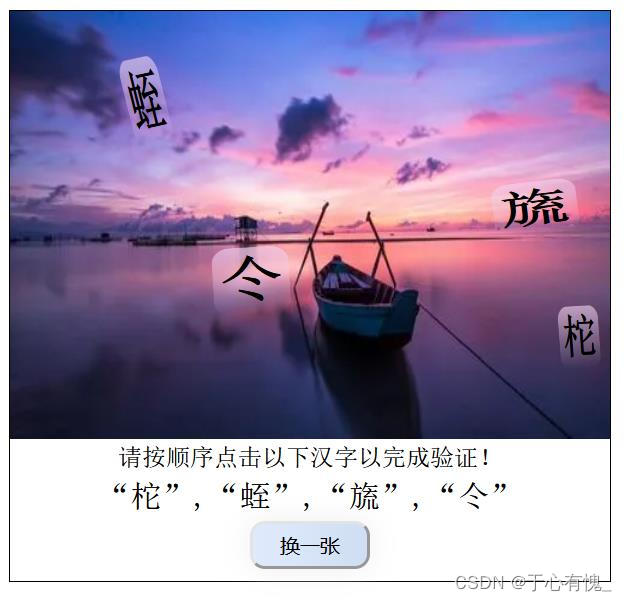
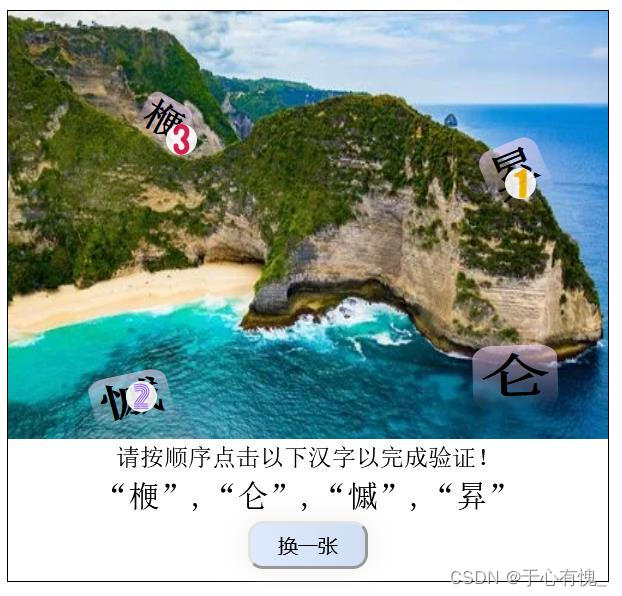
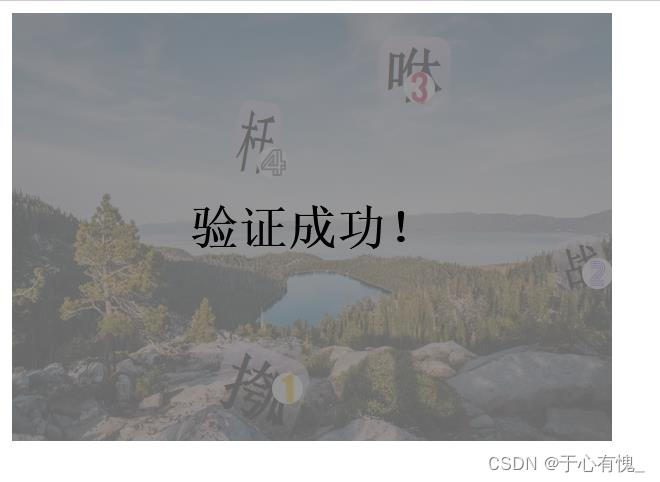
具体实现:
html:
四个数字提示图标来源于网络,下载到了项目中的图片文件夹里
来源:https://www.iconfont.cn/ (阿里巴巴矢量图标库)
![背景图片]() {{e.word}}
{{e.word}}


 验证成功!
验证成功!请按顺序点击以下汉字以完成验证!
“{{words[correctOrder[0]].word}}”,“{{words[correctOrder[1]].word}}”,“{{words[correctOrder[2]].word}}”,“{{words[correctOrder[3]].word}}”
剩余{{chance}}次机会验证失败!
data:
八张风景背景图来源于网络
data(){return{bgPictures:[{id:'0',src:'https://img2.baidu.com/it/u=1381481047,1529970259&fm=253&fmt=auto&app=138&f=JPEG?w=752&h=500'},{id:'1',src:'https://img2.baidu.com/it/u=4286724097,1475456570&fm=253&fmt=auto&app=120&f=JPEG?w=889&h=500'},{id:'2',src:'https://img1.baidu.com/it/u=2310170655,486191485&fm=253&fmt=auto&app=138&f=JPEG?w=500&h=281'},{id:'3',src:'https://img2.baidu.com/it/u=2526401426,2132302010&fm=253&fmt=auto&app=138&f=JPEG?w=500&h=281'},{id:'4',src:'https://img2.baidu.com/it/u=2279721922,3725358742&fm=253&fmt=auto&app=138&f=JPEG?w=889&h=500'},{id:'5',src:'https://img1.baidu.com/it/u=2605372625,2257936617&fm=253&fmt=auto&app=138&f=JPEG?w=500&h=313'},{id:'6',src:'https://img2.baidu.com/it/u=188805366,3528195373&fm=253&fmt=auto&app=120&f=JPEG?w=1200&h=675'},{id:'7',src:'https://img0.baidu.com/it/u=381886100,3541087750&fm=253&fmt=auto&app=138&f=JPEG?w=500&h=281'},{id:'8',src:'https://img2.baidu.com/it/u=769068768,1914010451&fm=253&fmt=auto&app=138&f=JPEG?w=889&h=500'}],background:"",codeCharacter:[0,1,2,3,4,5,6,7,8,9,'A','B','C','D','E','F'], //16进制数words:new Array(4), //储存四个汉字customStyle:[], //四个汉字的样式correctOrder:[], //正确的顺序choseOrder:[], //用户选择的顺序numtip:[], //数字的样式 用于提示用户点击了那个汉字的次序chance:3, //用户还可以尝试的次数falseTip:false, //用户验证失败,但是仍有次数,自动刷新时的提示isSucceed:false, //用户验证成功}},methods:
unescape() 可以解码,被声明弃用了,但是还能用;
decodeURI()解码不了形如 %u4e00 的编码;汉字一般占三个字符,encodeURI()将汉字编码成三个“ %xxx ”连接的形式, 如汉字中使用encodeURI()被编码为:%E4%B8%AD,此种形式才能被 decodeURI() 解码。
范围:%u 4e00 - %u 9fa5 ,(有规律可循,因此可以随机生成汉字);
每一个文字都用类似于 %u4e00 这样规则的字符串进行编码,前两个字符 %u 是固定前缀;
第三个字符范围4-9;
当第三个字符取4,第四个字符范围e-f,其他情况范围0-f,往后位置在范围内任意取;
当第三个字符取9,第四个字符取f,第五个字符范围0-a,其他情况范围0-f;
当地三个字符取9,第四个字符取f,第五个字符取a,第六个字符范围0-5;
参考:https://wenku.baidu.com/view/3630b3f2c2c708a1284ac850ad02de80d4d8062d.html
methods:{//随机选择四个文字,加入到 words 数组chooseFourWords(){let arr=new Array();for(let i=0;i<4;i++){let tempStr='%u';// 随机选择第三位字符let temp_3=4+Math.round(Math.random()*5);tempStr+=this.codeCharacter[temp_3];//随机选择第四位字符let temp_4;if(temp_3===4){temp_4=14+Math.round(Math.random());}else{temp_4=Math.round(Math.random()*15);}tempStr+=this.codeCharacter[temp_4];//随机选择第五位字符let temp_5;if(temp_4===15 && temp_3===9){temp_5=Math.round(Math.random()*10);}else{temp_5=Math.round(Math.random()*15);}tempStr+=this.codeCharacter[temp_5];//随机选择第六个字符let temp_6;if(temp_3===9 && temp_4===15 && temp_5===10){temp_6=Math.round(Math.random()*5);}else{temp_6=Math.round(Math.random()*15);}tempStr+=this.codeCharacter[temp_6]; arr.push({index:i,word:unescape(tempStr)});}this.words=arr;},//将平面图分成四个区域,左上,左下,右上,右下;参数可以是 0,1,2,3其一 分别设置左上,右上,左下,右下 区域//返回一个内联样式对象changeWordsStyle(area){if(Math.round(area)<0 || Math.round(area)>4 ){return undefined;}let halfWidth=this.$refs.content.offsetWidth / 2;let halfHeight=this.$refs.content.offsetHeight / 2;let right;let left;let top;let bottom;if(area===0 || area===2){right=halfWidth+(halfWidth-30)*Math.random()+'px';}else{left=halfWidth+(halfWidth-30)*Math.random()+'px';}if(area===2 || area===3){top=(halfHeight-5)*Math.random()+'px';}else{bottom=(halfHeight-5)*Math.random()+'px';}let rotate='rotate('+(30+Math.random()*(-60))+'deg)';let rotateX='rotateX('+(15+Math.random()*(-30))+'deg)';let rotateY='rotateY('+(15+Math.random()*(-30))+'deg)';let scale='scale('+(0.6+Math.random())+','+(0.6+Math.random())+')';return {left,top,right,bottom,transform:rotate+" "+rotateX+" "+rotateY+" "+scale,maxWidth:'70px',maxHeight:'80px'};},//更换背景图片chooseBGP(){return this.bgPictures[Math.round(Math.random()*8)].src;},//换一张 重新部署changeAll(){this.chooseFourWords();this.customStyle=[];for(let i=0;i<4;i++){this.customStyle.unshift(this.changeWordsStyle(3-i));}this.setCorrectOrder();this.background=this.chooseBGP();this.numtip=[];this.choseOrder=[];},//随机确定正确的点击顺序setCorrectOrder(){let s=new Set(); //用集合来判断有没有重复while(s.size<4){s.add(Math.round(Math.random()*3));}this.correctOrder=[...s];},// 用户点击汉字标签 添加或撤回 第一个参数为点击汉字在words中的index标识choose(index,e){let temp=this.choseOrder.indexOf(index);if(temp===-1){ //在choseOrder中找不到即是添加this.choseOrder.push(index);this.numtip.push({left:e.clientX+'px',top:e.clientY+'px'});}else{ //找得到即撤回自身以及上级所选(大于等于前数字标签的撤回,可重选)this.choseOrder.splice(temp);this.numtip.splice(temp);}},// 点击到提示数字 撤回withdrawChoose(index){this.choseOrder.splice(index);this.numtip.splice(index);}},watch:
监视 choseOrder 数组,其按顺序储存用户点击的数据,当其长度等于 correctOrder 数组的长度,即四个汉字的长度4,则表示用户完成当前的验证操作,立即开始检查验证是否通过。
watch:{choseOrder:{deep:true,handler(newval){//当用choseOrder的长度等于correctOrder的长度时,用户选择完毕,自动判断是否通过if(newval.length===this.correctOrder.length){let succeed=true;for(let i=0;i0){ //重新部署setTimeout(()=>{this.changeAll();this.falseTip=false;},1500)}}}}}}, 两个钩子:
beforeMount(){this.chooseFourWords();this.setCorrectOrder();},mounted(){for(let i=0;i<4;i++){this.customStyle.unshift(this.changeWordsStyle(3-i));}this.background=this.chooseBGP();}样式:
在这里主要是用绝对定位加 z-index 属性来实现层叠和覆盖的,也可以使用 float 和 index 来做
/* 最外侧轮廓 */.outside{width:400px;height:380px;border:1px solid black;position: absolute;}/**上方图片展示区域 */.display-area{width:100%;height: 75%;position: absolute;overflow: hidden;}.bg-picture{width: 100%;height: 100%;z-index: 2;}/**汉字span */.word-img{display: inline-block;box-sizing: border-box;padding:0.1em; font-size: 2rem;font-weight: 700;border-radius: 0.3em;background:-webkit-gradient(linear, 0 0, 0 bottom, from(rgba(241, 210, 240, 0.644)), to(rgba(0, 0, 255, 0)));position: absolute;z-index: 4;}/**底部提示用户操作区 换一张按钮放置区 */.msg{position: absolute;bottom: 8px;width:100%;z-index: 8;}p{margin-top: 0px;margin-bottom: 0px;}.action-target{font-size: 1.3em;line-height: 1.6;}button{background-image: linear-gradient(to right, #E0EAFC 0%, #CFDEF3 51%, #E0EAFC 100%);text-align: center;width: 5rem;height: 2rem;text-transform: uppercase;background-size: 200% auto;box-shadow: 0 0 20px #eee;border-radius: 10px;display: block;}/**数字顺序提示 */.number-tip{width:1.3rem;height: 1.3rem;background-color: #fff;border-radius: 90px;opacity: 0.9;z-index:8;position: fixed;}.word-img,button,.number-tip:hover{cursor: pointer;}/**判断用户验证结果的提示 */.tip{position: absolute;left: 0px;top: 0px;width: 100%;height: 100%;background-color: rgba(128, 127, 127,0.8);font-size: large;z-index: 10;}.tip-content{position: absolute;left: 50%;top:50%;transform: translate(-50%,-50%);font-size: 2rem;font-weight: bolder;z-index:15;}本文来自互联网用户投稿,文章观点仅代表作者本人,不代表本站立场,不承担相关法律责任。如若转载,请注明出处。 如若内容造成侵权/违法违规/事实不符,请点击【内容举报】进行投诉反馈!