unity之操控陀螺仪
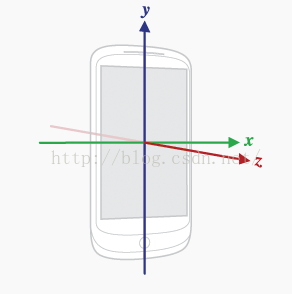
using UnityEngine;public class GyroDemo : MonoBehaviour {// Use this for initializationbool isGyro;Gyroscope gyro;//陀螺仪void Start () {//获取设备是否支持陀螺仪,是返回trueisGyro = SystemInfo.supportsGyroscope;//访问陀螺仪gyro = Input.gyro;//启用陀螺仪gyro.enabled = true;}// Update is called once per framevoid Update () {if (isGyro && gyro.enabled) {//陀螺仪的旋转值直接应用到摄像机身上//this.transform.rotation = gyro.attitude;Vector3 angle = gyro.attitude.eulerAngles;this.transform.eulerAngles = new Vector3(-angle.x, -angle.y, angle.z);// *Time.deltaTime;this.transform.Rotate(Vector3.right * 90, Space.World);}}
}
Input.acceleration获取陀螺仪的重力感应
using System.Collections;
using System.Collections.Generic;
using UnityEngine;public class InputAdeMO : MonoBehaviour {Vector3 speed;// Use this for initializationvoid Start () {}/*手机面朝上平方(0,0,-1)手机面朝下平放(0,0,1)手机面朝自己,home键在下(0,-1,0)手机面朝前面,(0,1,0)手机面朝左边(-1,0,0)手机面朝右边(1,0,0)加速度:-1~1*/// Update is called once per framevoid Update () {speed = Input.acceleration;transform.Translate(new Vector3(speed.x,0,speed.y)*3*Time.deltaTime);}private void OnGUI(){GUIStyle g = new GUIStyle();g.fontSize = 50;GUI.Label(new Rect(0, 0, 300, 300), speed.ToString(), g);}
}
本文来自互联网用户投稿,文章观点仅代表作者本人,不代表本站立场,不承担相关法律责任。如若转载,请注明出处。 如若内容造成侵权/违法违规/事实不符,请点击【内容举报】进行投诉反馈!