微信小程序两点之间的距离计算
最近一直在上课,整理了一些零星的碎知识,水了几篇文章(虽然一直都挺水,哈哈哈),那么,既然如此,今天就继续水,come on
| 雷霆嘎巴 |
js页面
//当前定位位置latitude: null,longitude: null,// 目的地坐标latitude2: 5145,longitude2: 234,
一个是当前位置的纬度坐标,设置成null会自动获取,第二个是目的地的经纬度。
还是js页面
onLoad: function (options) {//获取当前位置wx.getLocation({type:'gcj02',success:(res) => {console.log("当前位置:",res)const distance_new = this.getDistance(res.latitude,res.longitude,this.data.latitude2,this.data.longitude2);console.log(distance_new);let distances = this.data.productAll.map((item)=>{for(let i = 0;i<item.length;i++){console.log(i);item[i].distance = distance_new;console.log(item[i].distance);}return item;})this.setData({productAll: distances})}})},// 计算距离函数Rad(d) { //根据经纬度判断距离return d * Math.PI / 180.0;},getDistance(lat1, lng1, lat2, lng2) {// lat1用户的纬度// lng1用户的经度// lat2商家的纬度// lng2商家的经度var radLat1 = this.Rad(lat1);var radLat2 = this.Rad(lat2);var a = radLat1 - radLat2;var b = this.Rad(lng1) - this.Rad(lng2);var s = 2 * Math.asin(Math.sqrt(Math.pow(Math.sin(a / 2), 2) + Math.cos(radLat1) * Math.cos(radLat2) * Math.pow(Math.sin(b / 2), 2)));s = s * 6378.137;s = Math.round(s * 10000) / 10000;s = s.toFixed(1) + 'km' //保留两位小数console.log('经纬度计算的距离:' + s)return s},
计算两点之间的代码,到时候直接拿来用。
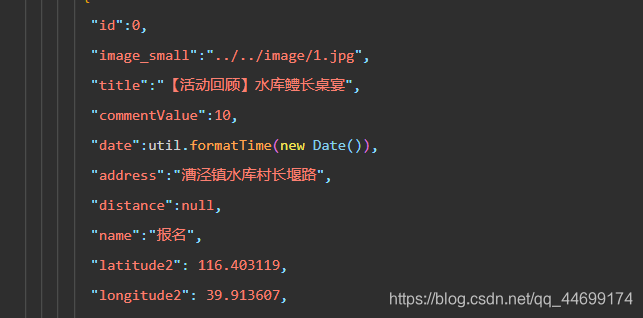
data中设置"distance":null,
app.json中
"permission":{"scope.userLocation":{"desc":"你的位置将用于计算您到商户的距离"}
},
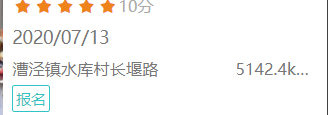
就这些,放一张效果图
本文来自互联网用户投稿,文章观点仅代表作者本人,不代表本站立场,不承担相关法律责任。如若转载,请注明出处。 如若内容造成侵权/违法违规/事实不符,请点击【内容举报】进行投诉反馈!