web上传图片,图片放大效果(viewer)
1.web上传图片
HTML界面
html这一部分的完整代码都贴出来了。这里是利用form表单提交。
页面定义允许上传格式定义为: .png,.gif,.jpg,.bmp
这里按钮样式的修改如下:
原有的文件选择按钮样式难看,且不能满足修改时隐藏文件按钮,所以,这里隐藏了原有的选择文件的按钮,转而使用label来做按钮展示。
JS关键脚本
$(document).ready(function(event){
//添加对自定义的按钮的监听document.getElementById("upfile").addEventListener("change",function () {fileFormubmit();});
});
//在点击自定义按钮时的触发事件
function fileFormubmit(){var file=$('#upfile').val();if(file==''){$.messager.alert('提示信息', '请选择要上传的文件!', 'warning');return false;}var recordID=$('#patListID').val();$('#recordID').val(recordID);$('#fileForm').submit();   //选择了图片之后直接将图片上传
}
图片工具类:
import com.sun.image.codec.jpeg.JPEGCodec;
import com.sun.image.codec.jpeg.JPEGEncodeParam;
import com.sun.image.codec.jpeg.JPEGImageEncoder;import java.awt.*;
import java.awt.image.BufferedImage;
import java.io.*;import javax.imageio.ImageIO;/*** 图片工具类*/
public class ImgTools {/*** 按照宽度还是高度进行压缩* @param w int 最大宽度* @param h int 最大高度*/public static void resizeFix(int w, int h, int width, int height,Image img,String newPath) throws IOException {if (width / height > w / h) {resizeByWidth(w,width,height,img,newPath);} else {resizeByHeight(h,width,height,img,newPath);}}/*** 以宽度为基准,等比例放缩图片* @param w int 新宽度*/public static void resizeByWidth(int w ,int width, int height,Image img,String newPath) throws IOException {int h = (int) (height * w / width);resize(w, h,img,newPath);}/*** 以高度为基准,等比例缩放图片* @param h int 新高度*/public static void resizeByHeight(int h, int width, int height,Image img,String newPath) throws IOException {int w = (int) (width * h / height);resize(w, h,img,newPath);}/*** 强制压缩/放大图片到固定的大小* @param w int 新宽度* @param h int 新高度*/public static void resize(int w, int h,Image img,String newPath) throws IOException {// SCALE_SMOOTH 的缩略算法 生成缩略图片的平滑度的 优先级比速度高 生成的图片质量比较好 但速度慢BufferedImage image = new BufferedImage(w, h, BufferedImage.TYPE_INT_RGB);image.getGraphics().drawImage(img, 0, 0, w, h, null); // 绘制缩小后的图File destFile = new File(newPath);FileOutputStream out = new FileOutputStream(destFile); // 输出到文件流
// 可以正常实现bmp、png、gif转jpgJPEGImageEncoder encoder = JPEGCodec.createJPEGEncoder(out);encoder.encode(image); // JPEG编码out.close();}
}
后台处理图片:上传、压缩到1M:
/**** 上传图片到服务器 并压缩** @param myFile 文件* @return*/@ResponseBody@RequestMapping(value="/uploadFile4High", method = RequestMethod.POST)public String uploadFile4High(@RequestParam(value="upfile") MultipartFile myFile,@RequestParam(value="recordID") String recordID,Model model){Boolean sta = false;InputStream is = null;FileOutputStream fs = null;int width=1366; int height=768;//这里是要控制图片大小为1MInteger maxSize=1;String allowType=".png,.gif,.jpg,.bmp";ResultEntity resultEntity = new ResultEntity();NtAttachment attachment = new NtAttachment();try {attachment.setRecordID(recordID);attachment.setRecordType(0);String realFileName = myFile.getOriginalFilename();String suffix = realFileName.substring(realFileName.lastIndexOf(".")).toLowerCase();String fileName = System.currentTimeMillis() + suffix;/** 临时文件夹*/String imgPath=attachment.getRecordType()+"temp";String tempPath = uploadFolder + imgPath;System.out.println("old-path-...." + tempPath);File oldFile = new File(tempPath);if (!oldFile.exists()) {oldFile.mkdirs();}/** 处理后文件夹*/String newImaPath=attachment.getRecordType()+"img";String newPath = uploadFolder + newImaPath;System.out.println("new-path-...." + newPath);File newFile = new File(newPath);if (!newFile.exists()) {newFile.mkdirs();}/** 先存取源文件*/is = myFile.getInputStream();fs = new FileOutputStream(tempPath +"/"+ fileName);//...Boolean ys = false;String copyPath=newPath+"/"+fileName;System.out.println("myFile.getSize() --->"+myFile.getSize() );int size = (int) myFile.getSize();if(myFile.getSize() > 0) {byte[] buffer = new byte[size];//超过了实际1M则需要处理if (myFile.getSize() > 1024 * 1024 * maxSize) {buffer = new byte[1024 * 1024];}int bytesum = 0;int byteread = 0;while ((byteread = is.read(buffer)) != -1) {bytesum += byteread;fs.write(buffer, 0, byteread);fs.flush();}fs.close();is.close();/** 处理源文件 ,进行压缩再放置到新的文件夹*/String oldPath=tempPath+"/"+fileName;File oldFile1 = new File(oldPath);Image srcFile = ImageIO.read(oldFile1);int w = srcFile.getWidth(null); // 得到源图宽int h = srcFile.getHeight(null); // 得到源图长System.out.println(w+"->"+h);File newFile2 = new File(copyPath);// Image srcFile2 = ImageIO.read(newFile2);ImgTools.resizeFix(width,height,w,h,srcFile,copyPath);Image srcFile2 = ImageIO.read(newFile2);if(srcFile2!=null) {ys = true;//删除源文件oldFile1.delete();//源文件在后续没有用到,避免占用内存,删掉}}//压缩成功if (ys) {CasUser user = SessionUtil.getCasUser();CasOffice office = user.getOffice();attachment.setCreateTime(new Date());attachment.setFileName(fileName);attachment.setFilePath(copyPath);attachment.setWorkID(user.getId());attachment.setWorkName(user.getName());attachment.setUnitCode(office.getId());attachment.setUnitName(office.getName());attachmentService.insert(attachment);resultEntity.setCode("1");resultEntity.setResult(attachment);} else {//压缩失败resultEntity.setCode(JumperExceptionEnums.SYSTEM_ERROR.getErrorCode());resultEntity.setMsg(JumperExceptionEnums.SYSTEM_ERROR.getErrorMessage());}}catch (JumperException jumperException) {resultEntity.setCode(jumperException.getErrorCode());resultEntity.setMsg(jumperException.getErrorMessage());log.error(jumperException.getErrorMessage(),jumperException);} catch (Exception exception) {resultEntity.setCode(JumperExceptionEnums.SYSTEM_ERROR.getErrorCode());resultEntity.setMsg(JumperExceptionEnums.SYSTEM_ERROR.getErrorMessage());log.error(exception.getMessage(), exception);}log.info("==========NtAttachmentController uploadFile4High end"+attachment.getFileName());return "";//回调js函数}回调函数:
//后台的回调函数function callBack4High(code,msg,allPath,attId,fileName) {if(code=='1'){ var filePath= ctp+ '/attachment/0img/'+fileName;$('#reviewImg').attr("src",filePath);//上传成功之后,将上传后的图片地址赋值到界面上,达到预览的效果$('#reviewImg').attr("data-original",filePath);//必须给data-original也赋值为图片地址,后面能用到$('#reviewImg').attr('style',"display:block");$('#subMemo').val(attId);$('#upfile').val('');}else{$.messager.alert('提示信息', msg, 'error');}ajaxLoadEnd();}在预览的时候,为了提高用户体验,利用viewer提供图片的放大缩小等功能:
viewer.min.css
viewer-jquery.min.js
界面也需要做样式和脚本的处理
特别说明一下,这里放大缩小实际上市对data-original做展示,所以在回调函数的时候必须给data-original也赋值。
效果图
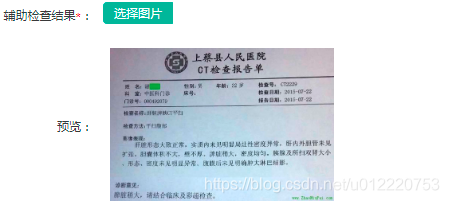
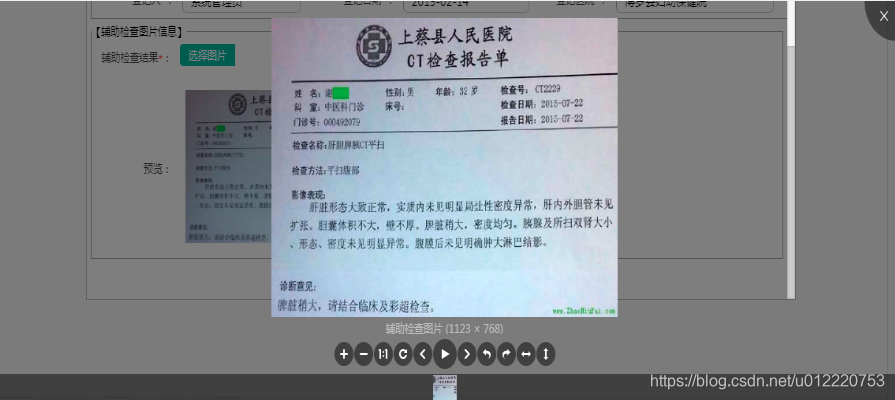
本文来自互联网用户投稿,文章观点仅代表作者本人,不代表本站立场,不承担相关法律责任。如若转载,请注明出处。 如若内容造成侵权/违法违规/事实不符,请点击【内容举报】进行投诉反馈!