table中的td自动换行
总有那么几个时候会觉得,table的td不能自适应换行真坑,凭什么只能用tr来换行,经常数据都是连在一起的呀,你叫我怎么把它拆分放到tr里......
那能不能用ul和li来替换?可以是可以,不过有时遇到“牛逼”的领导你能怎么办,就要用table怎么办!就问你怎么办!!!
那就把tr当ul,td当li用咯!
1.效果图:
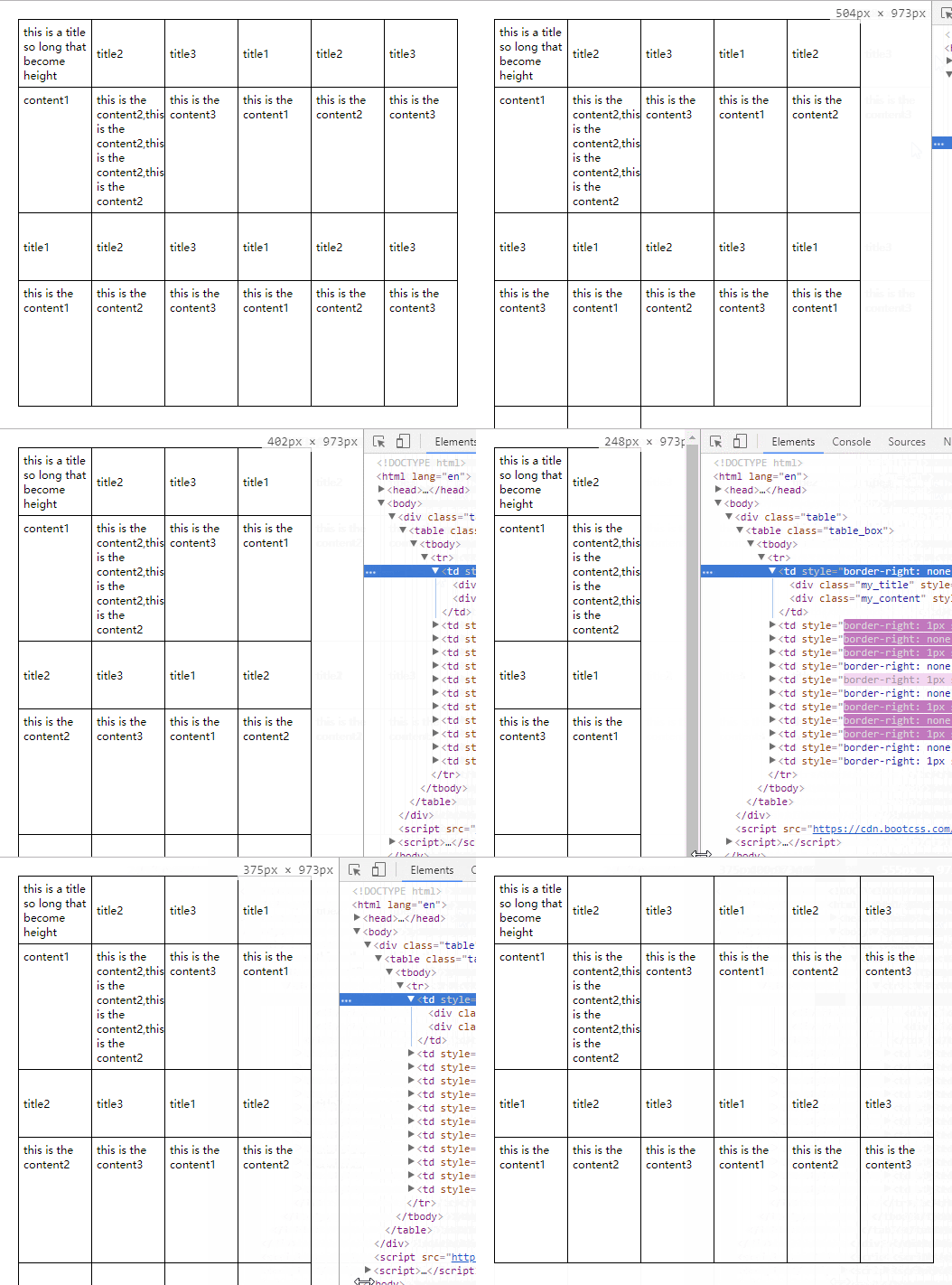
2.这是重置样式normalize.css代码:


/*** Correct `block` display not defined in IE 8/9.** 修正IE 8/9 中未定义的块级元素。*/article,
aside,
details,
figcaption,
figure,
footer,
header,
hgroup,
main,
nav,
section,
summary {display: block;
}/*** Correct `inline-block` display not defined in IE 8/9.** 修正在 IE 8/9 中未定义的 'inline-block' 元素。*/audio,
canvas,
video {display: inline-block;
}/*** Prevent modern browsers from displaying `audio` without controls.* Remove excess height in iOS 5 devices.** 阻止现在浏览器显示未定义 control 播放控件的 'audio' 声音元素。* 删除 IOS 5 设备中显示的多余的高度。*/audio:not([controls]) {display: none;height: 0;
}/*** Address styling not present in IE 8/9.** 处理 IE 8/9 中不存在的样式。*/[hidden] {display: none;
}/* ==========================================================================Base基本设置========================================================================== *//*** 1. Set default font family to sans-serif.* 2. Prevent iOS text size adjust after orientation change, without disabling*    user zoom.** 1. 设置默认字体类型为 sans-serif.* 2. 当用户放大或缩小页面时不改变字体大小。*/html {font-family: sans-serif; /* 1 */-ms-text-size-adjust: 100%; /* 2 */-webkit-text-size-adjust: 100%; /* 2 */
}/*** Remove default margin.** 删除默认边距。*/body {margin: 0;
}/* ==========================================================================Links链接========================================================================== *//*** Address `outline` inconsistency between Chrome and other browsers.** 处理 Chrome 与其它浏览器中关于 'outline' 的不一致性。*/a:focus {outline: thin dotted;
}/*** Improve readability when focused and also mouse hovered in all browsers.** 为所有浏览器改善当激活或悬停在元素上时元素内容的可读性。*/a:active,
a:hover {outline: 0;
}/* ==========================================================================Typography排版========================================================================== *//*** Address variable `h1` font-size and margin within `section` and `article`* contexts in Firefox 4 , Safari 5, and Chrome.** 处理多变的 'h1' 字体大小及其在 Firefox 4 , Safari 5, 及 Chrome时浏览器中的 * 'section' 与 'article' 元素中的边距。*/h1 {font-size: 2em;margin: 0.67em 0;
}/*** Address styling not present in IE 8/9, Safari 5, and Chrome.** 处理在 IE 8/9, Safari 5, 及 Chrome 没有的样式。*/abbr[title] {border-bottom: 1px dotted;
}/*** Address style set to `bolder` in Firefox 4 , Safari 5, and Chrome.** 处理 Firefox 4 , Safari 5, 及 Chrome 中默认的 'bolder' 样式为 'bold'.*/b,
strong {font-weight: bold;
}/*** Address styling not present in Safari 5 and Chrome.** 处理在 Safari 5 和 Chrome 没有的样式。*/dfn {font-style: italic;
}/*** Address differences between Firefox and other browsers.** 处理 Firefox 与其它浏览器的差异。*/hr {-moz-box-sizing: content-box;box-sizing: content-box;height: 0;
}/*** Address styling not present in IE 8/9.** 处理在 IE 8/9 中没有的样式。*/mark {background: #ff0;color: #000;
}/*** Correct font family set oddly in Safari 5 and Chrome.** 修正确 Safari 5 和 Chrome 中古怪的默认字体。*/code,
kbd,
pre,
samp {font-family: monospace, serif;font-size: 1em;
}/*** Improve readability of pre-formatted text in all browsers.** 为所有浏览器改善预格式化文本的可读性。*/pre {white-space: pre-wrap;
}/*** Set consistent quote types.** 设置一致的引用格式。*/q {quotes: "\201C" "\201D" "\2018" "\2019";
}/*** Address inconsistent and variable font size in all browsers.** 处理所有浏览器中字体大小的不一致性[译者注:原文直译为:处理所有* 浏览器中的不一致和多变的字体大小]。*/small {font-size: 80%;
}/*** Prevent `sub` and `sup` affecting `line-height` in all browsers.** 阻止所有浏览器中 'sub' 和 'sup' 元素影响 'line-height'. * [译者注:就是不让上标与下标影响行高。]*/sub,
sup {font-size: 75%;line-height: 0;position: relative;vertical-align: baseline;
}sup {top: -0.5em;
}sub {bottom: -0.25em;
}/* ==========================================================================Embedded content嵌入的内容========================================================================== *//*** Remove border when inside `a` element in IE 8/9.** 删除 IE 8/9 中当内容位于 'a' 中出现的边框。*/img {border: 0;
}/*** Correct overflow displayed oddly in IE 9.** 修正 IE 9 中显示古怪的溢出内容。*/svg:not(:root) {overflow: hidden;
}/* ==========================================================================FiguresFigure 图像/图表/代码等========================================================================== *//*** Address margin not present in IE 8/9 and Safari 5.** 处理在 IE 8/9 和 Safari 5 没有的边距。*/figure {margin: 0;
}/* ==========================================================================Forms========================================================================== *//*** Define consistent border, margin, and padding.** 定义一致的边框、外边距及内边距。*/fieldset {border: 1px solid #c0c0c0;margin: 0 2px;padding: 0.35em 0.625em 0.75em;
}/*** 1. Correct `color` not being inherited in IE 8/9.* 2. Remove padding so people aren't caught out if they zero out fieldsets.* 1. 修正在 IE 8/9 中没有继承的 'color'. **    [译者注:说是修正颜色嘛,可下面没有关于颜色的呀,这也行?求大神解释!]* 2. 去掉内边距,避免当用户清空表单组时认为出错了。*/legend {border: 0; /* 1 */padding: 0; /* 2 */
}/*** 1. Correct font family not being inherited in all browsers.* 2. Correct font size not being inherited in all browsers.* 3. Address margins set differently in Firefox 4 , Safari 5, and Chrome.** 1. 修正所有浏览器中未被继承的字体类型。* 2. 修正所有浏览器中未被继承的字体大小。* 3. 处理 Firefox 4 , Safari 5, 及 Chrome 中默认设置不同的外边距。*/button,
input,
select,
textarea {font-family: inherit; /* 1 */font-size: 100%; /* 2 */margin: 0; /* 3 */
}/*** Address Firefox 4  setting `line-height` on `input` using `!important` in* the UA stylesheet.** 处理 Firefox 4  中的客户端样式表里使用 '!important' 设置的 'line-height'.*/button,
input {line-height: normal;
}/*** Address inconsistent `text-transform` inheritance for `button` and `select`.* All other form control elements do not inherit `text-transform` values.* Correct `button` style inheritance in Chrome, Safari 5 , and IE 8 .* Correct `select` style inheritance in Firefox 4  and Opera.* * 处理 'button' 和 'select' 的 'text-transform' 继承的不一致性。* 所有其它表单控件元素不继承 'text-transform' 的值。* 修正 Chrome, Safari 5 , 及 IE 8  中 'button' 的继承样式。* 修正 Firefox 4  和 Opera 中 'select' 的继承样式。*/button,
select {text-transform: none;
}/*** 1. Avoid the WebKit bug in Android 4.0.* where (2) destroys native `audio`*    and `video` controls.* 2. Correct inability to style clickable `input` types in iOS.* 3. Improve usability and consistency of cursor style between image-type*    `input` and others.** 1. 避免 Android 4.0.* 中 WebKit 的一个bug, 防止 'audio' 与 'video' 的播放控件失效。* 2. 修正 iOS 中不可点击的 'input' 样式。* 3. 改善图片类型的 'input' 等光标样式的可用性与一致性。*/button,
html input[type="button"], /* 1 */
input[type="reset"],
input[type="submit"] {-webkit-appearance: button; /* 2 */cursor: pointer; /* 3 */
}/*** Re-set default cursor for disabled elements.* * 重置不可用元素的默认光标样式。*/button[disabled],
html input[disabled] {cursor: default;
}/*** 1. Address box sizing set to `content-box` in IE 8/9.* 2. Remove excess padding in IE 8/9.** 1. 处理 IE 8/9 中设置为 'content-box' 的盒子模型。* 2. 删除 IE 8/9 中多余的内边距。*/input[type="checkbox"],
input[type="radio"] {box-sizing: border-box; /* 1 */padding: 0; /* 2 */
}/*** 1. Address `appearance` set to `searchfield` in Safari 5 and Chrome.* 2. Address `box-sizing` set to `border-box` in Safari 5 and Chrome*    (include `-moz` to future-proof).** 1. 处理 Safari 5 和 Chrome 中默认设置为 'appearance' 的 'searchfield'.* 2. 处理 Safari 5 和 Chrome 中默认设置为 'box-sizing' 的 'border-box'*    (包括不会过时的 '-moz').*/input[type="search"] {-webkit-appearance: textfield; /* 1 */-moz-box-sizing: content-box;-webkit-box-sizing: content-box; /* 2 */box-sizing: content-box;
}/*** Remove inner padding and search cancel button in Safari 5 and Chrome* on OS X.** 删除 Safari 5 和 OS X 上的 Chrome 中的输入框上的内边距和搜索取消按钮。*/input[type="search"]::-webkit-search-cancel-button,
input[type="search"]::-webkit-search-decoration {-webkit-appearance: none;
}/*** Remove inner padding and border in Firefox 4 .** 删除 Firefox 4  button 与 input 上的内边距。*/button::-moz-focus-inner,
input::-moz-focus-inner {border: 0;padding: 0;
}/*** 1. Remove default vertical scrollbar in IE 8/9.* 2. Improve readability and alignment in all browsers.** 1. 删除 IE8/9 中默认的垂直滚动条。* 2. 改善所有浏览器中的可读性并使文本垂直对齐。*/textarea {overflow: auto; /* 1 */vertical-align: top; /* 2 */
}/* ==========================================================================Tables表格========================================================================== *//*** Remove most spacing between table cells.** 删除表格里单元格间的间距。*/table {border-collapse: collapse;border-spacing: 0;
}3.html:
<div class="table"><table class="table_box"><tr><td><div class="my_title">this is a title so long that become heightdiv><div class="my_content">content1div>td><td><div class="my_title">title2div><div class="my_content">this is the content2,this is the content2,this is the content2,this is the content2div>td><td><div class="my_title">title3div><div class="my_content">this is the content3div>td>tr>table>
div>
4.css:
.table{margin: 20px;}
.table_box{width:100%;font-size:12px;}
.table_box td{border:1px solid #000;border-right:none;border-top:none;display:inline-block;padding:0;width: 80px;}
.table_box td:last-child{border-right:1px solid #000 !important;}
.my_title{border-bottom:1px solid #000;display:flex;align-items:center;line-height:16px;padding:5px;}
.my_content{padding: 5px;}
5.js:
function tabFun(){var tabW = $(".table").width(); // 表格的宽度var tdW = $(".table_box td").width(); // 一个内容的宽度var bor = parseInt(tabW/tdW); // 一行有多少个tdvar cha = tabW - tdW*bor; // 差值if (cha <= bor) { // 去掉一个边框的宽度bor--;}// 清空边框$(".table_box td").css({"border-right":"none","border-top":"none"});// 设置相应的边框$(".table_box td:nth-child(" bor "n)").css({"border-right":"1px solid #000"});$(".table_box td").slice(0,bor).css({"border-top":"1px solid #000"});// 所有.my_title的高度集合var titH = [];// 所有.my_content的高度集合var conH = [];$(".my_content").each(function(index, el) {// 把高度数据存放到conH数组里面conH.push($(this).height());});$(".my_title").each(function(index, el) {// 把高度数据存放到titH数组里面titH.push($(this).height());});// 获取最大高度并把其它my_content高度设为最大高度$(".my_content").height(Math.max.apply(null, conH));// 获取最大高度并把其它my_title高度设为最大高度$(".my_title").height(Math.max.apply(null, titH));
}
tabFun();$(window).resize(function(event) {tabFun();
});
6.最后:
DOCTYPE html>
<html lang="en">
<head><meta charset="UTF-8"><meta name="viewport" content="width=device-width,minimum-scale=1.0,maximum-scale=1.0,user-scalable=no"><meta http-equiv="X-UA-Compatible" content="ie=edge"><title>table的td自动换行title><link rel="stylesheet" href="normalize.css"><style type="text/css">.table{margin: 20px;}.table_box{width:100%;font-size:12px;}.table_box td{border:1px solid #000;border-right:none;border-top:none;display:inline-block;padding:0;width: 80px;}.table_box td:last-child{border-right:1px solid #000 !important;}.my_title{border-bottom:1px solid #000;display:flex;align-items:center;line-height:16px;padding:5px;}.my_content{padding: 5px;}style>
head>
<body><div class="table"><table class="table_box"><tr><td><div class="my_title">this is a title so long that become heightdiv><div class="my_content">content1div>td><td><div class="my_title">title2div><div class="my_content">this is the content2,this is the content2,this is the content2,this is the content2div>td><td><div class="my_title">title3div><div class="my_content">this is the content3div>td><td><div class="my_title">title1div><div class="my_content">this is the content1div>td><td><div class="my_title">title2div><div class="my_content">this is the content2div>td><td><div class="my_title">title3div><div class="my_content">this is the content3div>td><td><div class="my_title">title1div><div class="my_content">this is the content1div>td><td><div class="my_title">title2div><div class="my_content">this is the content2div>td><td><div class="my_title">title3div><div class="my_content">this is the content3div>td><td><div class="my_title">title1div><div class="my_content">this is the content1div>td><td><div class="my_title">title2div><div class="my_content">this is the content2div>td><td><div class="my_title">title3div><div class="my_content">this is the content3div>td>tr>table>div><script src="https://cdn.bootcss.com/jquery/2.2.3/jquery.min.js">script><script>function tabFun(){var tabW = $(".table").width(); // 表格的宽度var tdW = $(".table_box td").width(); // 一个内容的宽度var bor = parseInt(tabW/tdW); // 一行有多少个tdvar cha = tabW - tdW*bor; // 差值if (cha <= bor) { // 去掉一个边框的宽度
                bor--;}// 清空边框
            $(".table_box td").css({"border-right":"none","border-top":"none"});// 设置相应的边框
            $(".table_box td:nth-child(" bor "n)").css({"border-right":"1px solid #000"});$(".table_box td").slice(0,bor).css({"border-top":"1px solid #000"});// 所有.my_title的高度集合var titH = [];// 所有.my_content的高度集合var conH = [];$(".my_content").each(function(index, el) {// 把高度数据存放到conH数组里面
                conH.push($(this).height());});$(".my_title").each(function(index, el) {// 把高度数据存放到conH数组里面
                titH.push($(this).height());});// 获取最大高度并把其它my_content高度设为最大高度
            $(".my_content").height(Math.max.apply(null, conH));// 获取最大高度并把其它my_title高度设为最大高度
            $(".my_title").height(Math.max.apply(null, titH));}tabFun();$(window).resize(function(event) {tabFun();});script>
body>
html>
本文来自互联网用户投稿,文章观点仅代表作者本人,不代表本站立场,不承担相关法律责任。如若转载,请注明出处。 如若内容造成侵权/违法违规/事实不符,请点击【内容举报】进行投诉反馈!