Vue [Day5]
自定义指令
全局注册 和 局部注册
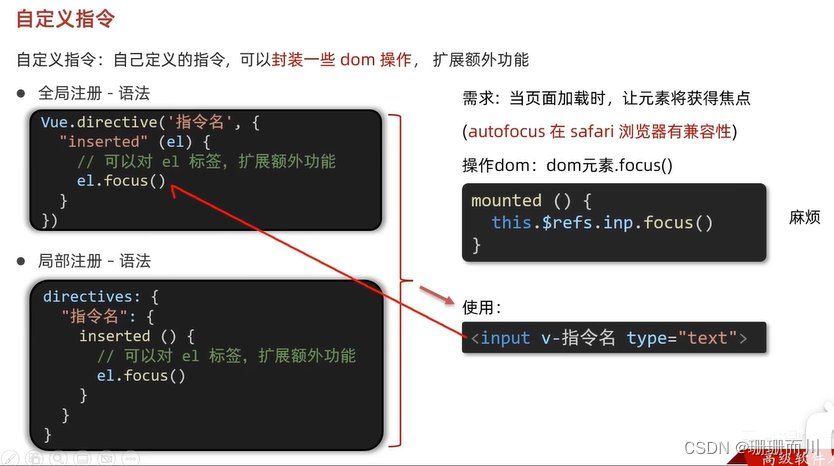
inserted在指令所在的元素 被插入到页面中时,触发
main.js
import Vue from 'vue'
import App from './App.vue'Vue.config.productionTip = false// 1.全局注册指令
Vue.directive('focus', {// inserted在指令所在的元素 被插入到页面中时,触发inserted(el) {// el就是指令所绑定的元素console.log(el);el.focus()}
})new Vue({render: h => h(App),
}).$mount('#app')
App.vue
<template><div class="app"><h1>自定义指令</h1><input v-focus ref="inp" type="text" /></div>
</template><script>
export default {// mounted() {//     this.$refs.inp.focus()// }// 2.局部注册指令directives: {focus: {inserted(el) {el.focus()}}}
}
</script><style>
</style>
### Day4 $nextTick改标题的光标异步问题
App.vue
<template><div class="app"><div v-if="isEdit"><input v-focus  ref="inp" v-model="editValue" type="text" /><button @click="over">ok</button><!-- 直接v-fous --></div><div v-else>{{ title }}<button @click="changeTitle">edit</button></div></div>
</template><script>
export default {data() {return {editValue: '',title: '我是title',isEdit: false}},methods: {changeTitle() { // 1.显示输入框(异步dom更新this.isEdit = true// 2.让输入框获取焦点// $nextTick等dom更新完,立刻执行函数体// this.$nextTick(() => {// this.$refs.inp.focus()// })},over() {this.title = this.editValuethis.isEdit = false}}
}
</script><style>
</style>
main.js
import Vue from 'vue'
import App from './App.vue'Vue.config.productionTip = falseVue.directive('focus',{inserted(el){console.log(el);   el.focus()}
})new Vue({render: h => h(App),
}).$mount('#app')
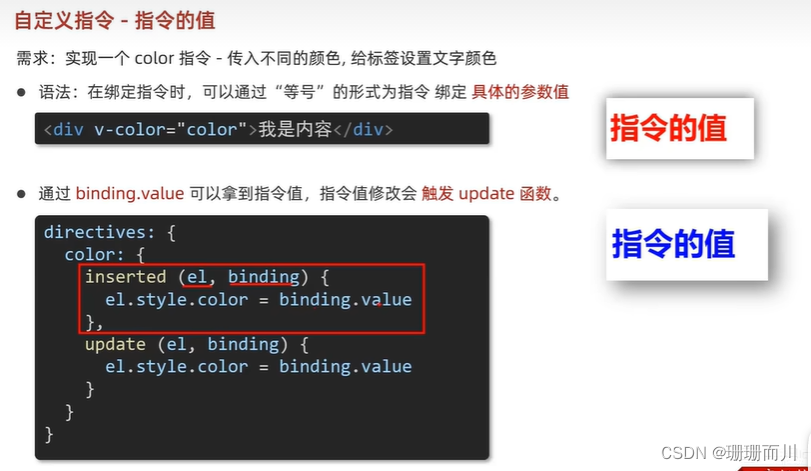
指令的值
App.vue
<template><div class="app"><h1 v-color="color1">11111</h1><h1 v-color="color2">22222</h1></div>
</template><script>
export default {data() {return {color1: 'red',color2: 'pink'}},directives: {color: {// 1.inserted提供的是元素被添加到页面中时的逻辑inserted(el, binding) {// binding.value就是指令的值el.style.color = binding.value},// 2.update 指令的值修改的时候触发,提供值变化后,dom更新的逻辑update(el, binding) {el.style.color = binding.value}}}
}
</script><style>
</style>
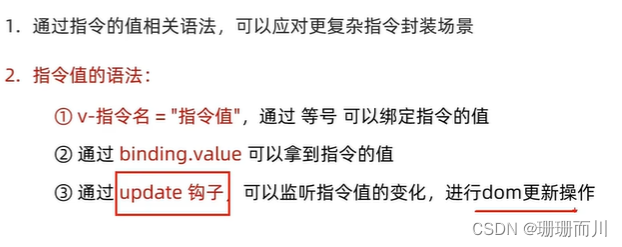
小结
binding.value,可以拿到指令的值
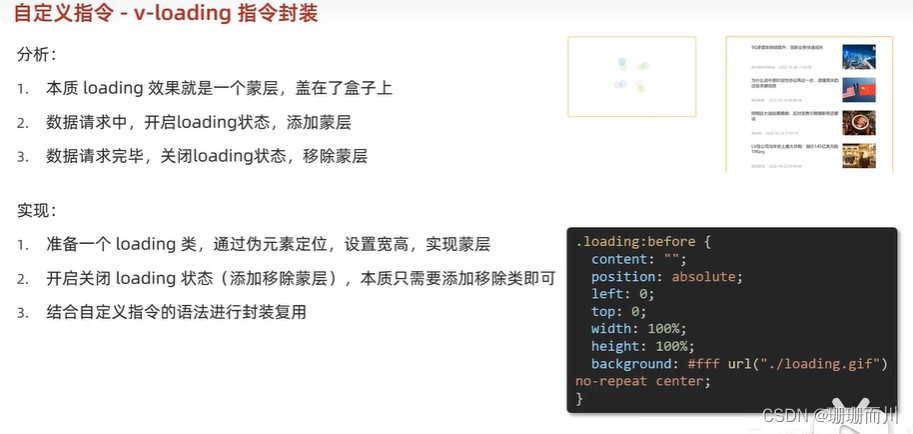
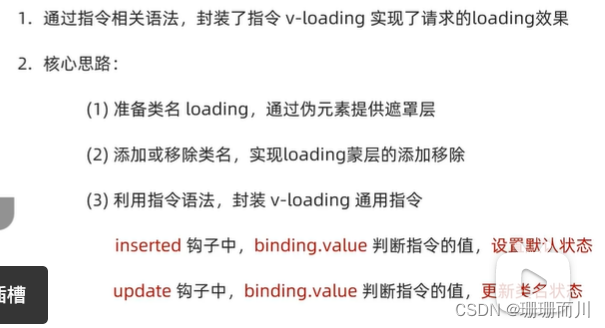
v-loading 指令封装
App.vue
<template><div class="main"><div class="box" v-loading="isLoading"><ul><li v-for="item in list" :key="item.id" class="news"><div class="left"><div class="title">{{ item.title }}</div><div class="info"><span>{{ item.source }}</span><span>{{ item.time }}</span></div></div><div class="right"><img :src="item.img" alt="" /></div></li></ul></div></div>
</template><script>
// 安装axios =>  yarn add axios
import axios from 'axios'// 接口地址:http://hmajax.itheima.net/api/news
// 请求方式:get
export default {data() {return {list: [],isLoading: true}},async created() {// 1. 发送请求获取数据const res = await axios.get('http://hmajax.itheima.net/api/news')setTimeout(() => {// 2. 更新到 list 中this.list = res.data.datathis.isLoading = falseconsole.log('111')}, 2000)console.log('22222')},directives: {loading: {inserted(el, binding) {// if (binding.value == true) {//     el.classList.add('loading')// } else {//     el.classList.remove('loading')// }// 用三元写binding.value? el.classList.add('loading'): el.classList.remove('loading')},update(el, binding) {binding.value? el.classList.add('loading'): el.classList.remove('loading')}}}
}
</script><style>
/* 伪类 - 蒙层效果 */
.loading:before {content: '';position: absolute;left: 0;top: 0;width: 100%;height: 100%;background: #fff url('../public/loading.gif') no-repeat center;
}/* .box2 {width: 400px;height: 400px;border: 2px solid #000;position: relative;} */.box {width: 800px;min-height: 500px;border: 3px solid orange;border-radius: 5px;position: relative;
}
.news {display: flex;height: 120px;width: 600px;margin: 0 auto;padding: 20px 0;cursor: pointer;
}
.news .left {flex: 1;display: flex;flex-direction: column;justify-content: space-between;padding-right: 10px;
}
.news .left .title {font-size: 20px;
}
.news .left .info {color: #999999;
}
.news .left .info span {margin-right: 20px;
}
.news .right {width: 160px;height: 120px;
}
.news .right img {width: 100%;height: 100%;object-fit: cover;
}
</style>
插槽
他本身就还是个组件,只不过是活的,可定制的
类别1:默认插槽
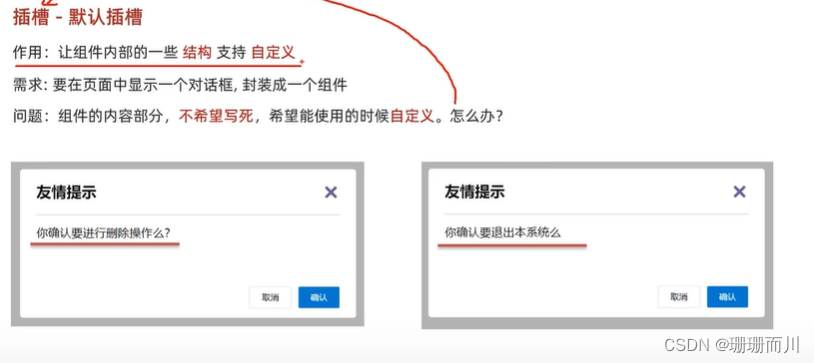
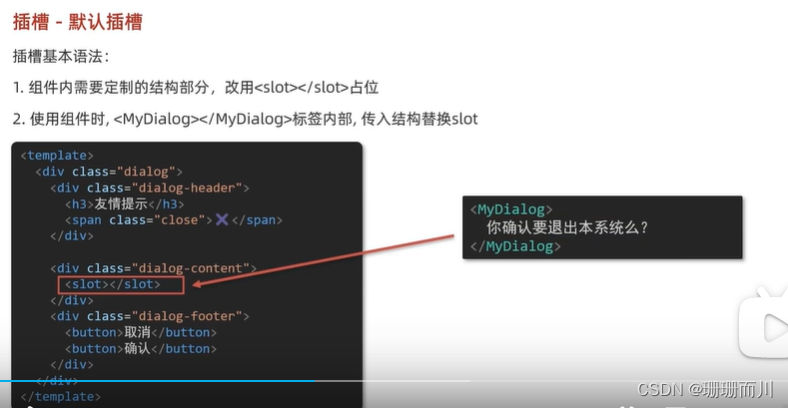
MyDialog2.vue 子组件是
<template><div class="MyDialog2"><div class="log-header"><h1>友情提示</h1><span>✖️</span></div><hr /><div class="log-body"><slot></slot></div><div class="log-footer"><button class="cancel">取消</button><button class="ok">确认</button></div></div>
</template><script>
export default {}
</script><style scoped>
* {margin: 0;padding: 0;box-sizing: border-box;
}
.MyDialog2 {width: 400px;margin: 20px auto;padding: 0 20px;border: 1px black solid;border-radius: 10px;background-color: #fff;
}
.log-header {height: 60px;display: flex;justify-content: space-between;line-height: 60px;
}.log-body {padding: 10px;height: 80px;
}.log-footer {display: flex;justify-content: flex-end;padding-bottom: 10px;
}button.cancel {width: 50px;height: 30px;background-color: #fff;margin-right: 20px;border: black 1px solid;border-radius: 5px;
}button.ok {width: 50px;height: 30px;background-color: #05defa;border: black 1px solid;border-radius: 5px;
}
</style>
App.vue
<template><div class="app"><!-- 直接写 不用{{}} --><MyDialog2>确认删除吗 </MyDialog2><MyDialog2>确认退出吗 </MyDialog2></div>
</template><script>
import MyDialog2 from './components/MyDialog2.vue'
export default {components: {MyDialog2}
}
</script><style>
body {background-color: #cac2c2;
}
</style>
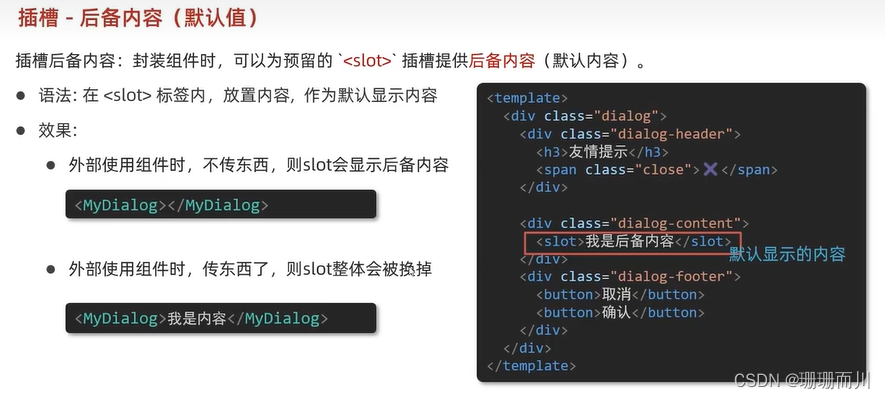
后备内容(有默认值的)
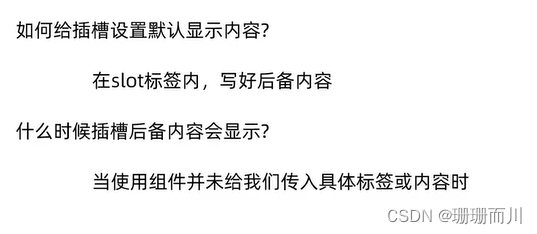
MyDialog.vue
<div class="log-body"><slot>有后备内容</slot></div>Vue.vue
<div class="app"><!-- 有数值,就照常显示 --><MyDialog2>确认删除吗 </MyDialog2><MyDialog2>确认退出吗 </MyDialog2><!-- 没数值,就显示默认 --><MyDialog2> </MyDialog2></div>
类别2:具名插槽
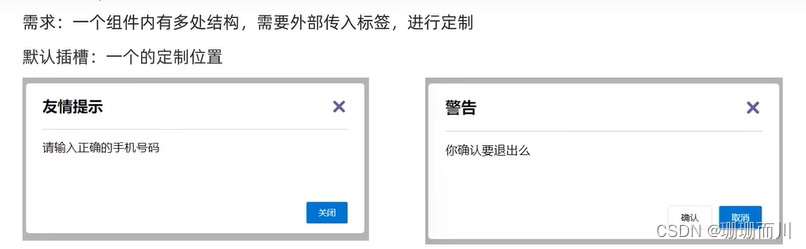
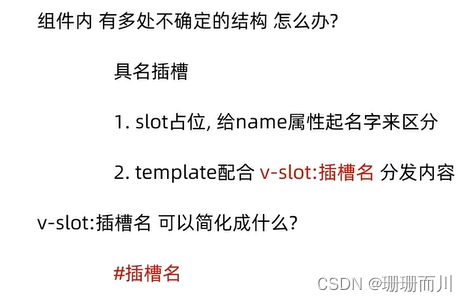
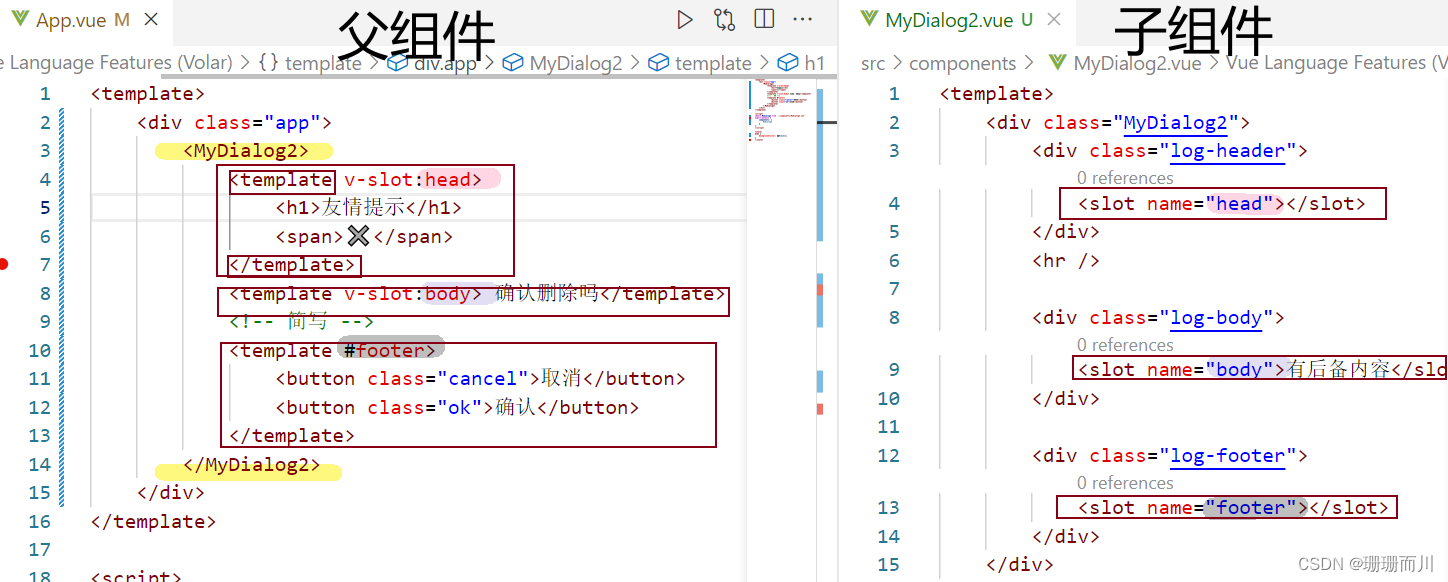
MyDialog2.vue 子组件
<div class="MyDialog2"><div class="log-header"><slot name="head"></slot></div><hr /><div class="log-body"><slot name="body">有后备内容</slot></div><div class="log-footer"><slot name="footer"></slot></div></div>
App.vue 父组件
class=“cancel” class="ok"等css样式,还是在MyDialog.vue里面没动,但是还是可以正常渲染,yyds
<div class="app"><MyDialog2><!-- head没有加“”,就直接写了哎 --><template v-slot:head><h1>友情提示</h1><span>✖️</span></template><template v-slot:body> 确认删除吗</template><template #footer><button class="cancel">取消</button><button class="ok">确认</button></template></MyDialog2></div>
插槽的传参语法:作用域插槽 (子传父
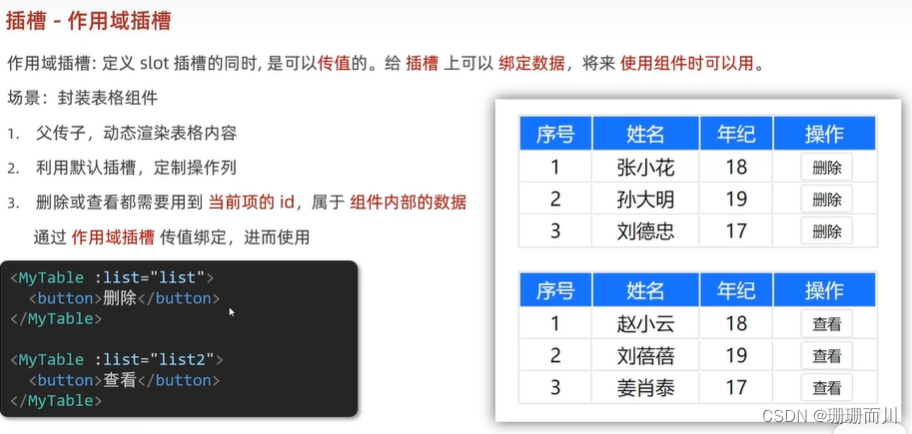


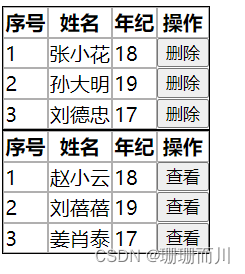
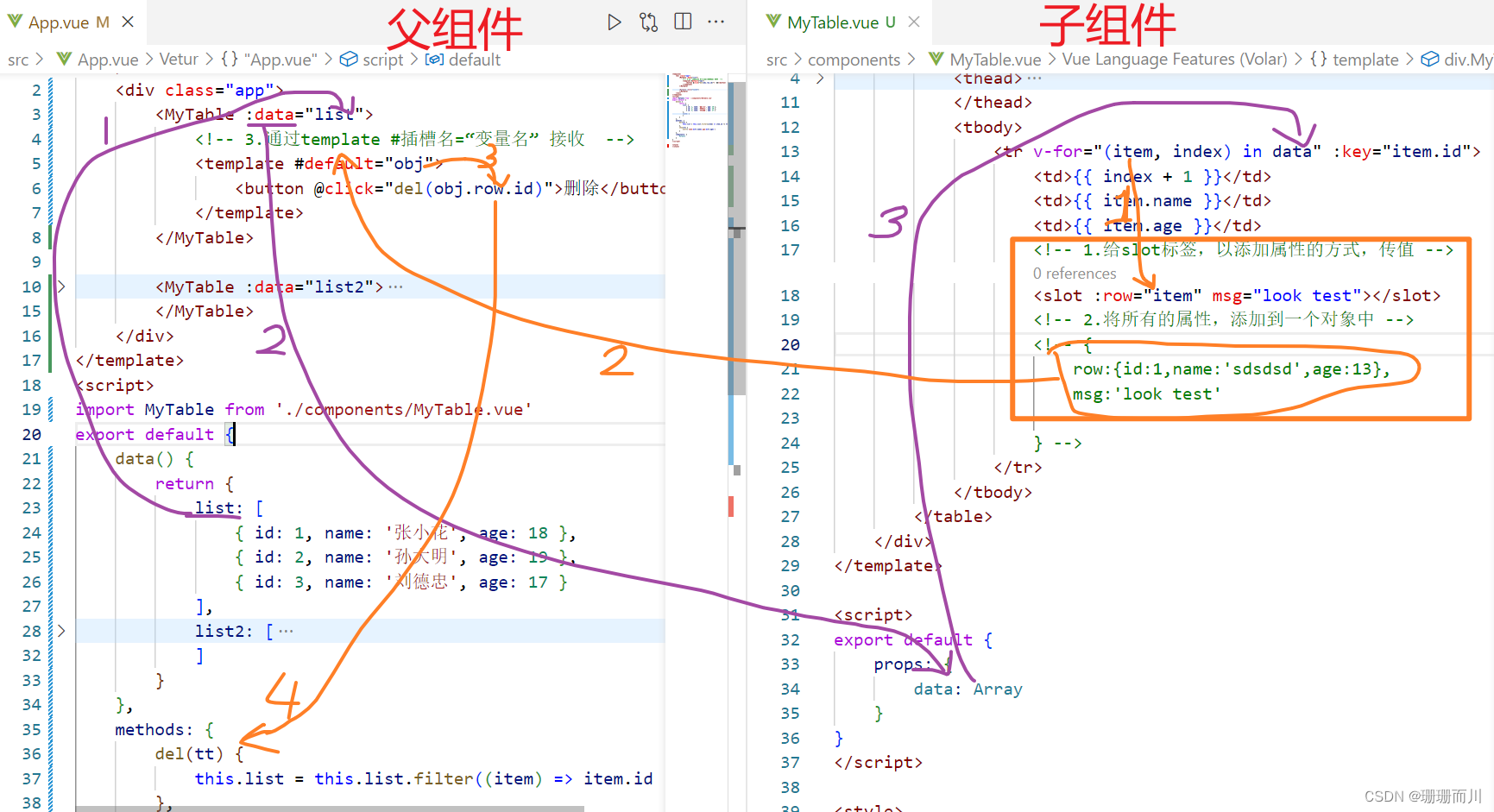
妙在 App.vue有两个数组,要求的两个表格也是显示不同的数据,但MyTable.vue里只用写一个table,如果写两个,反而会出现4个表单,而且两次的传数据必须同名,都是data
App.vue
<MyTable :data="list"><template #default="obj"><button @click="del(obj.row.id)">删除</button></template></MyTable><MyTable :data="list2"><template #default="{ row }"><!-- 还能直接解构 --><button @click="show(row.id)">查看</button></template></MyTable>
MyTable.vue
<template><div class="MyTable"><table><thead><tr><th>序号</th><th>姓名</th><th>年纪</th><th>操作</th></tr></thead><tbody><tr v-for="(item, index) in data" :key="item.id"><td>{{ index + 1 }}</td><td>{{ item.name }}</td><td>{{ item.age }}</td><!-- 1.给slot标签,以添加属性的方式,传值 --><slot :row="item" msg="look test"></slot><!-- 2.将所有的属性,添加到一个对象中 --><!-- {row:{id:1,name:'sdsdsd',age:13},msg:'look test'} --></tr></tbody></table></div>
</template><script>
export default {props: {data: Array}
}
</script><style>
table {border: 1px black solid;border-spacing: 0;
}
td,
th {border: 1px rgb(176, 175, 175) solid;
}
</style>
App.vue
<template><div class="app"><!-- 传数据是在 MyTable    父传子--><MyTable :data="list"><!-- 接收数据 是在template   子传父<template v-slot:head>制定插槽名字,也是在template--><!-- 3.通过template #插槽名=“变量名” 接收 --><template #default="obj"><button @click="del(obj.row.id)">删除</button></template></MyTable><MyTable :data="list2"><template #default="{ row }"><!-- 还能直接结构 --><button @click="show(row.id)">查看</button></template></MyTable></div>
</template><script>
import MyTable from './components/MyTable.vue'
export default {components: {MyTable},data() {return {list: [{ id: 1, name: '张小花', age: 18 },{ id: 2, name: '孙大明', age: 19 },{ id: 3, name: '刘德忠', age: 17 }],list2: [{ id: 1, name: '赵小云', age: 18 },{ id: 2, name: '刘蓓蓓', age: 19 },{ id: 3, name: '姜肖泰', age: 17 }]}},methods: {del(tt) {this.list = this.list.filter((item) => item.id != tt)},show(tt) {alert(`name:${tt.name},age:${tt.age}`)}}
}
</script><style>
</style>
【综合案例】—— 商品列表
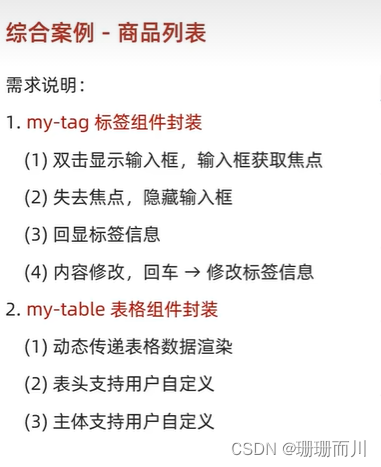
App.vue
<template><div class="table-case"><MyTable :mydata="goods"><template #head><th>编号</th><th>名称</th><th>图片</th><th width="100px">标签</th></template><!-- 对应名字,并接受数据 --><!-- <template #body="obj"> --><!-- 解构 --><template #body="{ item, index }"><td>{{ index + 1 }}</td><td>{{ item.name }}</td><td><img :src="item.picture" /></td><td><!-- 标签组件 --><MyTag v-model="item.tag"></MyTag></td></template></MyTable></div>
</template><script>
// my-tag 标签组件的封装
// 1. 创建组件 - 初始化
// 2. 实现功能
//    (1) 双击显示,并且自动聚焦
//        v-if v-else @dbclick 操作 isEdit
//        自动聚焦:
//        法1. $nextTick => $refs 获取到dom,进行focus获取焦点
//        法2. 封装v-focus指令//    (2) 失去焦点,隐藏输入框
//        @blur 操作 isEdit 即可//    (3) 回显标签信息
//        回显的标签信息是父组件传递过来的
//        v-model实现功能 (简化代码)  v-model => :value 和 @input
//        组件内部通过props接收, :value设置给输入框//    (4) 内容修改了,回车 => 修改标签信息
//        @keyup.enter, 触发事件 $emit('input', e.target.value)// ---------------------------------------------------------------------// my-table 表格组件的封装
// 1. 数据不能写死,动态传递表格渲染的数据  props
// 2. 结构不能写死 - 多处结构自定义 【具名插槽】
//    (1) 表头支持自定义
//    (2) 主体支持自定义
import MyTag from './components/MyTag.vue'
import MyTable from './components/MyTable.vue'
export default {name: 'TableCase',components: { MyTag, MyTable },data() {return {text: 'slx',goods: [{id: 101,picture:'https://yanxuan-item.nosdn.127.net/f8c37ffa41ab1eb84bff499e1f6acfc7.jpg',name: '梨皮朱泥三绝清代小品壶经典款紫砂壶',tag: '茶具'},{id: 102,picture:'https://yanxuan-item.nosdn.127.net/221317c85274a188174352474b859d7b.jpg',name: '全防水HABU旋钮牛皮户外徒步鞋山宁泰抗菌',tag: '男鞋'},{id: 103,picture:'https://yanxuan-item.nosdn.127.net/cd4b840751ef4f7505c85004f0bebcb5.png',name: '毛茸茸小熊出没,儿童羊羔绒背心73-90cm',tag: '儿童服饰'},{id: 104,picture:'https://yanxuan-item.nosdn.127.net/56eb25a38d7a630e76a608a9360eec6b.jpg',name: '基础百搭,儿童套头针织毛衣1-9岁',tag: '儿童服饰'}]}}
}
</script><style lang="less" scoped>
.table-case {width: 1000px;margin: 50px auto;img {width: 100px;height: 100px;object-fit: contain;vertical-align: middle;}
}
</style>
main.js
import Vue from 'vue'
import App from './App.vue'Vue.config.productionTip = false// 1.全局注册指令
Vue.directive('focus', {// inserted在指令所在的元素 被插入到页面中时,触发inserted(el) {// el就是指令所绑定的元素,binding用不到,所以没写console.log(el);el.focus()}
})new Vue({render: h => h(App),
}).$mount('#app')
MyTable.vue
<template><table class="my-table"><thead><tr><slot name="head"></slot></tr></thead><tbody><tr v-for="(item, index) in mydata" :key="item.id"><!-- 用作用域插槽,将数据绑在插槽 --><!-- 以添加属性的方式,传值 --><slot name="body" :item="item" :index="index"></slot></tr></tbody></table>
</template><script>
export default {props: {mydata: {type: Array,required: true}}
}
</script><style lang="less" scoped>
.my-table {width: 100%;border-spacing: 0;img {width: 100px;height: 100px;object-fit: contain;vertical-align: middle;}th {background: #f5f5f5;border-bottom: 2px solid #069;}td {border-bottom: 1px dashed #ccc;}td,th {text-align: center;padding: 10px;transition: all 0.5s;&.red {color: red;}}.none {height: 100px;line-height: 100px;color: #999;}
}
</style>
MyTag.vue
<template><div class="my-tag"><inputv-if="isEdit"v-focusref="inp"@blur="isEdit = false"@keyup.enter="handleEnter":value="value"class="input"type="text"placeholder="输入标签"/><div @dblclick="handleClick" v-else class="text">{{ value }}</div></div>
</template><script>
export default {props: {value: String},data() {return {isEdit: false}},methods: {handleClick() {// 切换显示状态this.isEdit = true// // 立刻获取焦点 异步// this.$nextTick(() => {//     this.$refs.inp.focus()// })// 先不用,要封装到全局指令main.js// 所以直接v-focus},handleEnter(e) {// 子传父,回车时,输入框内容提交给父组件更新// 由于父组件是v-model,触发事件,需要input事件,输入框的  v-model=>:value @input// e.target是触发事件的事件元if (e.target.value.trim() == '') {return alert('不能是空')}this.$emit('input', e.target.value)// 回车后,提交完成,要关闭输入框,而不是失去焦点才关上this.isEdit = false}}
}
</script><style lang="less" scoped>
.my-tag {cursor: pointer;.input {appearance: none;outline: none;border: 1px solid #ccc;width: 100px;height: 40px;box-sizing: border-box;padding: 10px;color: #666;&::placeholder {color: #666;}}
}
</style>
单页应用程序 SPA - Sinle Page Application
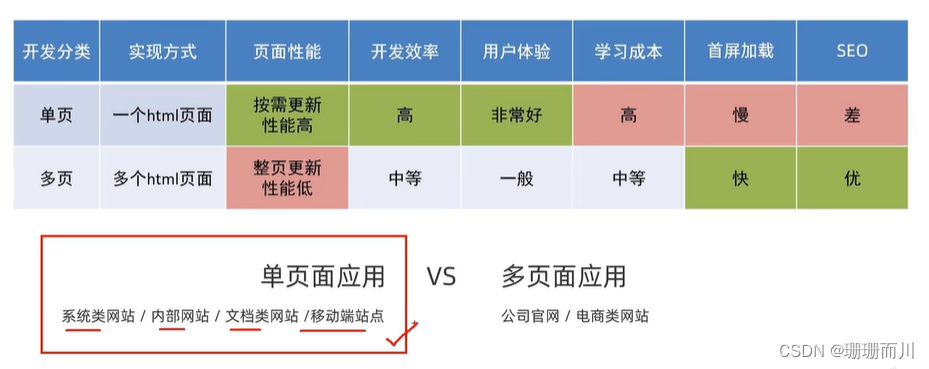
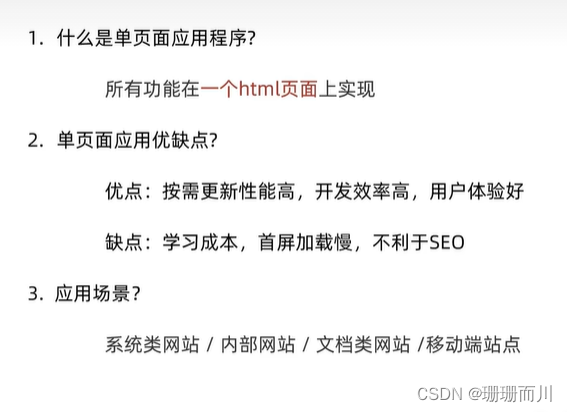
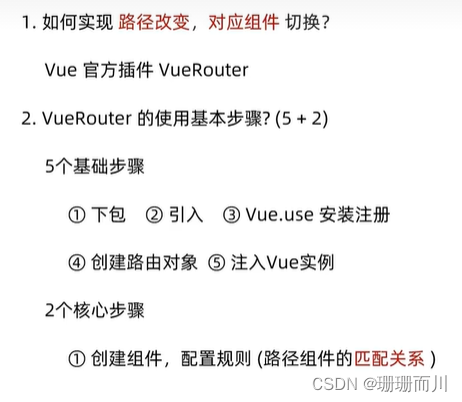
路由
路径 和 组件 的映射关系
VueRouter
作用:修改地址栏路径时,切换显示匹配的组件
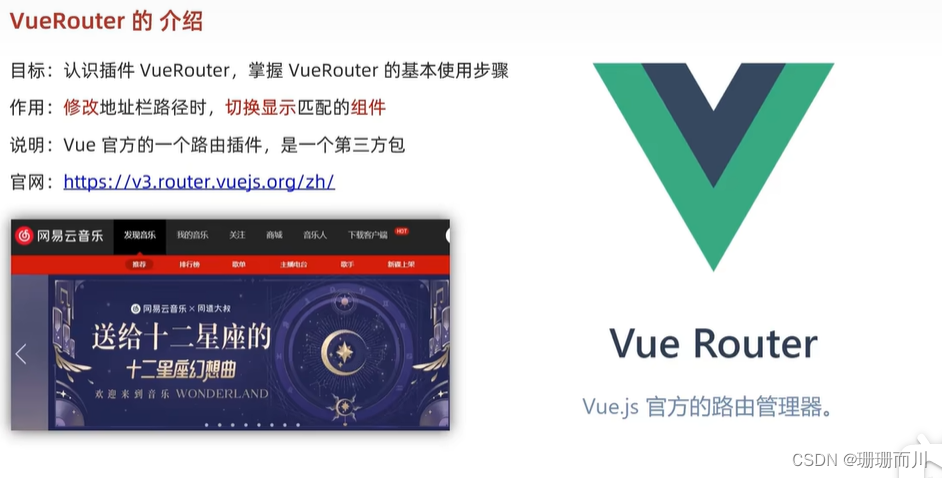
VueRouter 使用

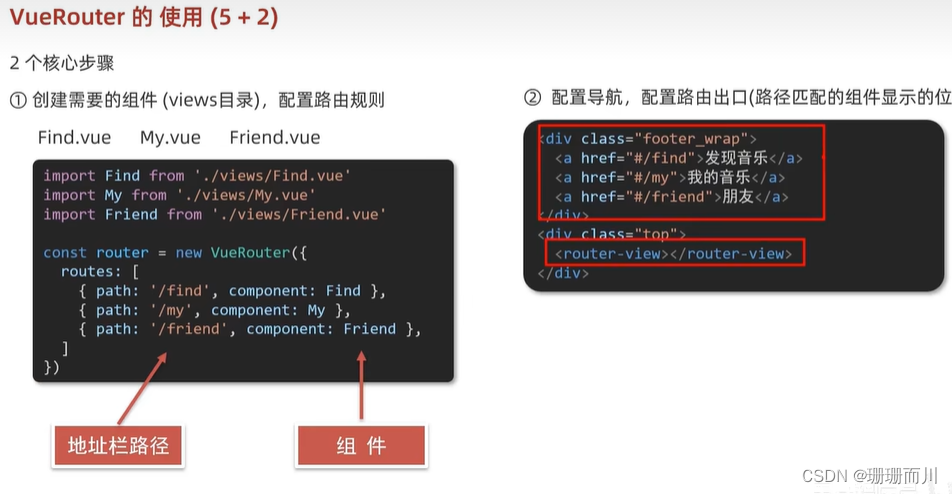
main.js
import Vue from 'vue'
import App from './App.vue'Vue.config.productionTip = false// 5个基础步骤
// 1.下载
// cnpm i vue-router@3.6.5
// 2.引入
import VueRouter from 'vue-router'
import Find from './views/Find'
import Friend from './views/Friend'
import My from './views/My'
// 3.安装注册 Vue.use
Vue.use(VueRouter)// 4.创建路由对象
const router = new VueRouter({// routes路由规则 {path:路径,components:组件}routes: [// 注意路径 没有./ 是绝对路径{ path: '/find', component: Find },{ path: '/friend', component: Friend },{ path: '/my', component: My},]
})// 5.注入到new Vue中,建立关联
new Vue({render: h => h(App),// router:router// 简写router
}).$mount('#app')// 2个核心步骤
// 1.建组件(src/views/xxxx),配规则
// 2.准备导航链接,配置路由出口(匹配组件所展示的位置
src/views/Find.vue
My.vue和Friend.vue同理
<template><div class="Find"><p>Find</p><p>Find</p><p>Find</p></div>
</template><script>
export default {name: 'MyFind'
}
</script><style>
</style>
App.vue
<template><div class="app"><div class="nav"><a href="#/find">发现</a><a href="#/friend">朋友</a><a href="#/my">我的</a></div><!-- 路由出口 匹配组件所展示的位置 --><router-view></router-view></div>
</template><script>
export default {}
</script><style>
.nav a {display: inline-block;width: 50px;height: 30px;text-decoration: none;background-color: #ca8b8b;border: 1px solid black;
}
</style>
我的 # 起到什么作用
发现朋友我的
在这里,#符号被用作一个锚点(anchor)。锚点是用来标识页面中的特定部分或位置的标记。当你点击带有#符号的链接时,浏览器会滚动到指定的锚点所在的位置,将页面的滚动位置调整到对应的元素上。
在给定的代码片段中,href属性值中的#后面是一个标识符,例如#/find、#/friend和#my。它们会被解释为页面中的锚点,并与页面中具有相应id或name属性的元素关联起来。当点击这些链接时,浏览器会将滚动位置调整到与相应锚点相关联的元素上。
例如,如果存在一个具有id="find"的元素,当你点击发现时,浏览器会滚动到具有id="find"的元素所在的位置。
注意:在这种情况下,#符号后面的字符串不会被发送到服务器,它只是本地页面内的导航标识符。
小结
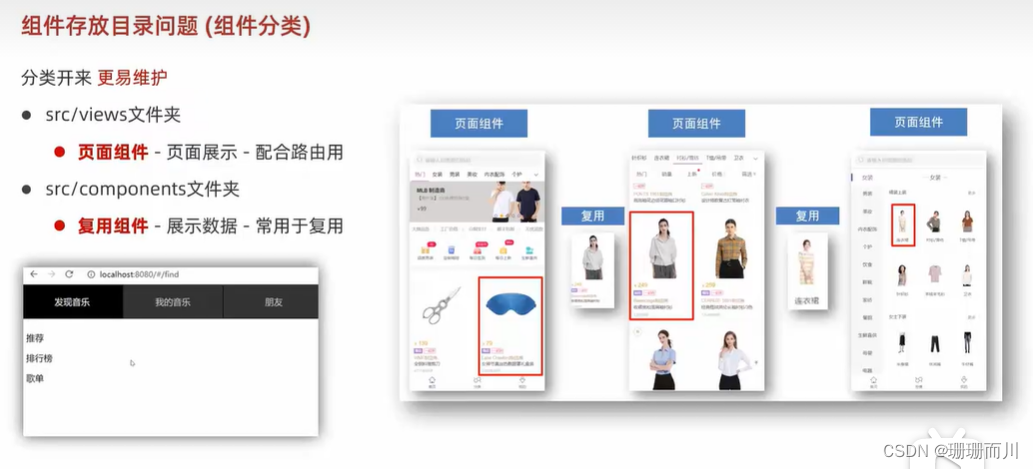
组件存放目录问题
页面组件放在 views
复用组件放在 components
本文来自互联网用户投稿,文章观点仅代表作者本人,不代表本站立场,不承担相关法律责任。如若转载,请注明出处。 如若内容造成侵权/违法违规/事实不符,请点击【内容举报】进行投诉反馈!