【springboot】mybatis-generator+tkmybatis通用mapper+swagge+redis缓存整合使用
- 介绍
- 💥mybatis-generator配置的代码:
- 💥tkmybatis:mybatis通用mapper配置
- 💥代码:整合redis+springcache+tkmybatis:
介绍
【mybatis-generator】:可作为一个插件使用
mybatis-generator-maven-plugin mybatis比较官方的代码生成器,生成dao,mapper,mapper.xml且生成大量mybatis动态sql.
官网
http://mybatis.org/generator/
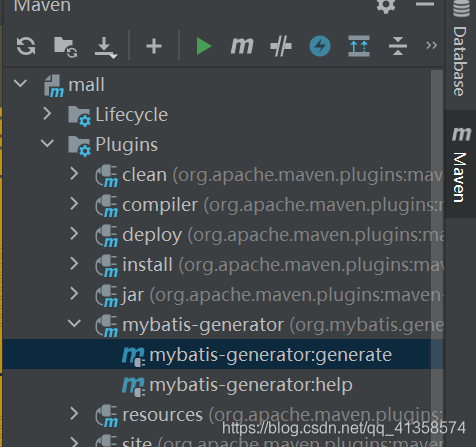
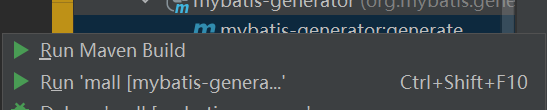
配置成功后点击run即可
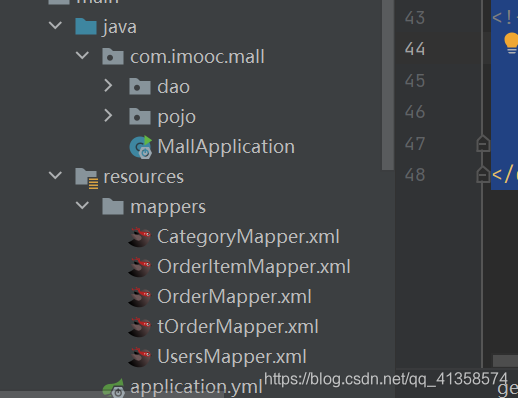
文件目录:
【tk-mybatis】:用通用mapper的方式减轻工作量
为最常见的语句提供了内置接口,不
需要写任何SQL语句。比如:
selectOne
select
selectAll
selectCount
selectByPrimrayKey
针对一些稍微高级一点的查询,可以使用Example机制
Example example = new Example(Person.class);
example.createCriteria().andGreaterThan("age", 18);List<Person> people = personMapper.selectByExample(example);
简单的SQL语句就直接使用通用mapper提供的接口
另外一些特别简单的SQL也可以通过Example扩展机制完成
更复杂的SQL语句,建议使用标准的MyBatis的实现方式
【spring cache】
缓存的框架太多了,各有各的优势,比如Redis、Memcached、Guava、Caffeine等等
Spring Cache就是一个这个框架。它利用了AOP,实现了基于注解的缓存功能,并且进行了合理的抽象,业务代码不用关心底层是使用了什么缓存框架,只需要简单地加一个注解,就能实现缓存功能了。而且Spring Cache也提供了很多默认的配置,用户可以3秒钟就使用上一个很不错的缓存功能。
需要依赖:
<dependency><groupId>org.springframework.bootgroupId><artifactId>spring-boot-starter-cacheartifactId>
dependency>
redis整合spring cache:如果我们引入了spring-data-redis,Spring就会自动使用spring-data-redis提供的RedisCacheManager,RedisCache。因此在这里我们需要重新定义好CacheManager个Bean。
记得redisconfig上面加上@EnableCaching
即:
@Configuration
@EnableCaching
public class RedisConfig {@Primary@Bean
//@ConditionalOnBean(RedisConnectionFactory.class)public CacheManager cacheManager(RedisConnectionFactory redisConnectionFactory){RedisCacheConfiguration redisCacheConfiguration = RedisCacheConfiguration.defaultCacheConfig();redisCacheConfiguration = redisCacheConfiguration//设置缓存的默认超时时间:30分钟.entryTtl(Duration.ofMinutes(30L))//如果是空值,不缓存.disableCachingNullValues()//设置key序列化器.serializeKeysWith(RedisSerializationContext.SerializationPair.fromSerializer(keySerializer()))//设置value序列化器.serializeValuesWith(RedisSerializationContext.SerializationPair.fromSerializer(valueSerializer()));return RedisCacheManager.builder(RedisCacheWriter.nonLockingRedisCacheWriter(redisConnectionFactory)).cacheDefaults(redisCacheConfiguration).build();}/*** key序列化器*/private RedisSerializer<String> keySerializer() {return new StringRedisSerializer();}/*** value序列化器*/private RedisSerializer<Object> valueSerializer() {return new GenericJackson2JsonRedisSerializer();}}
在要缓存的方法上面添加@Cacheable注解,即可缓存这个方法的返回值。
💥mybatis-generator配置的代码:
DOCTYPE generatorConfigurationPUBLIC "-//mybatis.org//DTD MyBatis Generator Configuration 1.0//EN""http://mybatis.org/dtd/mybatis-generator-config_1_0.dtd"><generatorConfiguration>
<classPathEntry location="C:\Users\14172\Desktop\spring\jar\mysql-connector-java-8.0.23.jar" /><context id="DB2Tables" targetRuntime="MyBatis3">


<plugin type="org.mybatis.generator.plugins.UnmergeableXmlMappersPlugin" /><commentGenerator><property name="suppressAllComments" value="true"/>commentGenerator><jdbcConnection driverClass="com.mysql.cj.jdbc.Driver"connectionURL="jdbc:mysql://127.0.0.1:3308/data1?characterEncoding=utf-8"userId="heziyi"password="123456">jdbcConnection><javaTypeResolver ><property name="forceBigDecimals" value="false" />javaTypeResolver><javaModelGenerator targetPackage="com.imooc.mall.pojo" targetProject="src/main/java"><property name="enableSubPackages" value="true" />
javaModelGenerator><sqlMapGenerator targetPackage="mappers"  targetProject="src/main/resources"><property name="enableSubPackages" value="true" />sqlMapGenerator><javaClientGenerator type="XMLMAPPER" targetPackage="com.imooc.mall.dao"  targetProject="src/main/java"><property name="enableSubPackages" value="true" />javaClientGenerator>
<table tableName="users" domainObjectName="Users" enableCountByExample="false" enableDeleteByExample="false" enableSelectByExample="false" enableUpdateByExample="false"/><table tableName="t_order" domainObjectName="tOrder" enableCountByExample="false" enableDeleteByExample="false" enableSelectByExample="false" enableUpdateByExample="false"/>context>
generatorConfiguration>
数据库相关配置:
spring:datasource:driver-class-name: com.mysql.cj.jdbc.Driverusername: rootpassword: 123456url: jdbc:mysql://127.0.0.1:3306/mall?characterEncoding=utf-8&useSSL=false
mybatis:configuration:map-underscore-to-camel-case: truemapper-locations: classpath:mappers/*.xml
logging:pattern:console: "[%thread] %-5level %logger{36} - %msg%n"
配置pom.xml
<plugin><groupId>org.mybatis.generatorgroupId><artifactId>mybatis-generator-maven-pluginartifactId><version>1.3.7version><configuration><overwrite>trueoverwrite>configuration>plugin>
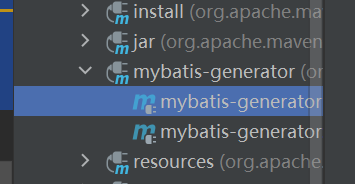
点击运行即可看到生成了相关xml mapper pojo文件。
💥tkmybatis:mybatis通用mapper配置
步骤:
-
引入TkMybatis的Maven依赖
-
实体类的相关配置,@Id,@Table
-
Mapper继承tkMabatis的Mapper接口
-
启动类Application或自定义Mybatis配置类上使用@MapperScan注解扫描Mapper接口
-
在application.properties配置文件中,配置mapper.xml文件指定的位置[可选]
-
使用TkMybatis提供的sql执行方法
-
如有需要,实现mapper.xml自定义sql语句
tkmybatis配置代码:
🔷🔷要点:
.启动类Application或自定义Mybatis配置类上使用
@MapperScan注解扫描Mapper接口
@MapperScan("xxx自己的mapper包路径")
public class MiddlewareApplication extends SpringBootServletInitializer {
}
application.properties配置mapper.xml配置文件的扫描路径
mybatis.mapperLocations=classpath*:cn/base/mapper/*.xml
💥代码:整合redis+springcache+tkmybatis:
目录
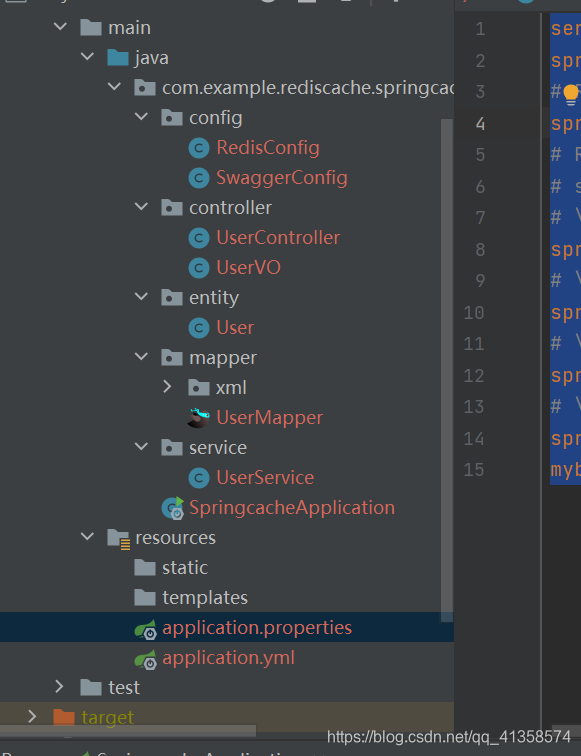
配置“:
spring:datasource:driver-class-name: com.mysql.cj.jdbc.Driverusername: heziyipassword: 123456url: jdbc:mysql://127.0.0.1:3308/data1?characterEncoding=utf-8&useSSL=falsepropertities:
server.port=9090
spring.redis.host=localhostspring.redis.port=6379  # spring.redis.password=123spring.redis.lettuce.pool.max-active=8spring.redis.lettuce.pool.max-wait=-1spring.redis.lettuce.pool.max-idle=8spring.redis.lettuce.pool.min-idle=0
mybatis.mapper-locations=classpath*:com/example/rediscache/springcache/mapper/xml/*.xml
pom.xml依赖:
<project xmlns="http://maven.apache.org/POM/4.0.0" xmlns:xsi="http://www.w3.org/2001/XMLSchema-instance"xsi:schemaLocation="http://maven.apache.org/POM/4.0.0 https://maven.apache.org/xsd/maven-4.0.0.xsd"><modelVersion>4.0.0modelVersion><parent><groupId>org.springframework.bootgroupId><artifactId>spring-boot-starter-parentartifactId><version>2.5.3version><relativePath/> parent><groupId>com.example.rediscachegroupId><artifactId>springcacheartifactId><version>0.0.1-SNAPSHOTversion><name>springcachename><description>Demo project for Spring Bootdescription><properties><java.version>1.8java.version>properties><dependencies><dependency><groupId>org.springframework.bootgroupId><artifactId>spring-boot-starter-cacheartifactId>dependency><dependency><groupId>org.springframework.bootgroupId><artifactId>spring-boot-starter-data-jdbcartifactId>dependency><dependency><groupId>org.springframework.bootgroupId><artifactId>spring-boot-starter-data-redisartifactId>dependency><dependency><groupId>org.springframework.bootgroupId><artifactId>spring-boot-starter-webartifactId>dependency><dependency><groupId>org.mybatis.spring.bootgroupId><artifactId>mybatis-spring-boot-starterartifactId><version>2.2.0version>dependency><dependency><groupId>org.apache.commonsgroupId><artifactId>commons-pool2artifactId><version>2.6.2version>dependency><dependency><groupId>org.springframework.bootgroupId><artifactId>spring-boot-devtoolsartifactId><scope>runtimescope><optional>trueoptional>dependency><dependency><groupId>mysqlgroupId><artifactId>mysql-connector-javaartifactId><scope>runtimescope>dependency><dependency><groupId>org.springframework.bootgroupId><artifactId>spring-boot-configuration-processorartifactId><optional>trueoptional>dependency><dependency><groupId>org.projectlombokgroupId><artifactId>lombokartifactId><optional>trueoptional>dependency><dependency><groupId>org.springframework.bootgroupId><artifactId>spring-boot-starter-testartifactId><scope>testscope>dependency><dependency><groupId>io.swaggergroupId><artifactId>swagger-annotationsartifactId><version>1.5.13version>dependency><dependency><groupId>javax.persistencegroupId><artifactId>persistence-apiartifactId><version>1.0version><scope>compilescope>dependency><dependency><groupId>io.springfoxgroupId><artifactId>springfox-swagger2artifactId><version>2.9.2version>dependency><dependency><groupId>tk.mybatisgroupId><artifactId>mapper-spring-boot-starterartifactId><version>2.1.5version>dependency><dependency><groupId>io.springfoxgroupId><artifactId>springfox-swagger2artifactId><version>2.9.2version>dependency><dependency><groupId>io.springfoxgroupId><artifactId>springfox-swagger-uiartifactId><version>2.9.2version>dependency>dependencies><build><plugins><plugin><groupId>org.springframework.bootgroupId><artifactId>spring-boot-maven-pluginartifactId><configuration><excludes><exclude><groupId>org.projectlombokgroupId><artifactId>lombokartifactId>exclude>excludes>configuration>plugin>plugins>build>project>redisconfig和swaggerconfig:
@Configuration
@EnableCaching
public class RedisConfig {@Primary@Bean
@ConditionalOnBean(RedisConnectionFactory.class)public CacheManager cacheManager(RedisConnectionFactory redisConnectionFactory){RedisCacheConfiguration redisCacheConfiguration = RedisCacheConfiguration.defaultCacheConfig();redisCacheConfiguration = redisCacheConfiguration//设置缓存的默认超时时间:30分钟.entryTtl(Duration.ofMinutes(30L))//如果是空值,不缓存.disableCachingNullValues()//设置key序列化器.serializeKeysWith(RedisSerializationContext.SerializationPair.fromSerializer(keySerializer()))//设置value序列化器.serializeValuesWith(RedisSerializationContext.SerializationPair.fromSerializer(valueSerializer()));return RedisCacheManager.builder(RedisCacheWriter.nonLockingRedisCacheWriter(redisConnectionFactory)).cacheDefaults(redisCacheConfiguration).build();}/*** key序列化器*/private RedisSerializer<String> keySerializer() {return new StringRedisSerializer();}/*** value序列化器*/private RedisSerializer<Object> valueSerializer() {return new GenericJackson2JsonRedisSerializer();}}
swagger配置时一定要记得包的路径要正确!!!
@Configuration
@EnableSwagger2
public class SwaggerConfig {@Value(value = "true")private Boolean swaggerEnabled;@Beanpublic Docket createRestApi() {return new Docket(DocumentationType.SWAGGER_2).apiInfo(apiInfo()).enable(swaggerEnabled).select().apis(RequestHandlerSelectors.basePackage("com.example.rediscache.springcache")).paths(PathSelectors.any()).build();}private ApiInfo apiInfo() {return new ApiInfoBuilder().title("接口文档").description("Spring Boot整合redis自动生成缓存").termsOfServiceUrl("https://study.163.com/provider/1016671292/index.htm").version("1.0").build();}
}
service:
@Service
@CacheConfig(cacheNames = { "user" })
public class UserService {private static final Logger LOGGER = LoggerFactory.getLogger(UserService.class);@Autowiredprivate UserMapper userMapper;@Cacheable(key="#id")public User findUserById(Integer id){return this.userMapper.selectByPrimaryKey(id);}@CachePut(key = "#obj.id")public User updateUser(User obj){this.userMapper.updateByPrimaryKeySelective(obj);return this.userMapper.selectByPrimaryKey(obj.getId());}@CacheEvict(key = "#id")public void deleteUser(Integer id){User user=new User();user.setId(id);user.setDeleted((byte)1);this.userMapper.updateByPrimaryKeySelective(user);}}
controller:
@Api(description = "用户接口")
@RestController
@RequestMapping("/user")
public class UserController {@Autowiredprivate UserService userService;@ApiOperation("单个用户查询,按userid查用户信息")@RequestMapping(value = "/findById/{id}", method = RequestMethod.GET)public UserVO findById(@PathVariable int id) {User user = this.userService.findUserById(id);//controller层调用了service的查询方法,service中配置了缓存UserVO userVO = new UserVO();BeanUtils.copyProperties(user, userVO);return userVO;}@ApiOperation("修改某条数据")@PostMapping(value = "/updateUser")public void updateUser(@RequestBody UserVO obj) {User user = new User();BeanUtils.copyProperties(obj, user);userService.updateUser(user);}@ApiOperation("按id删除用户")@RequestMapping(value = "/del/{id}", method = RequestMethod.GET)public void deleteUser(@PathVariable int id) {this.userService.deleteUser(id);}}
vo层:
package com.example.rediscache.springcache.controller;import io.swagger.annotations.ApiModel;
import io.swagger.annotations.ApiModelProperty;import java.util.Date;@ApiModel(value = "用户信息")
public class UserVO {@ApiModelProperty(value = "用户ID")private Integer id;@ApiModelProperty(value = "用户名")private String username;@ApiModelProperty(value = "密码")private String password;@ApiModelProperty(value = "性别 0=女 1=男 ")private Byte sex;@ApiModelProperty(value = "删除标志,默认0不删除,1删除")private Byte deleted;@ApiModelProperty(value = "更新时间")private Date updateTime;@ApiModelProperty(value = "创建时间")private Date createTime;/*** @return id*/public Integer getId() {return id;}/*** @param id*/public void setId(Integer id) {this.id = id;}/*** 获取用户名** @return username - 用户名*/public String getUsername() {return username;}/*** 设置用户名** @param username 用户名*/public void setUsername(String username) {this.username = username;}/*** 获取密码** @return password - 密码*/public String getPassword() {return password;}/*** 设置密码** @param password 密码*/public void setPassword(String password) {this.password = password;}/*** 获取性别 0=女 1=男 ** @return sex - 性别 0=女 1=男 */public Byte getSex() {return sex;}/*** 设置性别 0=女 1=男 ** @param sex 性别 0=女 1=男 */public void setSex(Byte sex) {this.sex = sex;}/*** 获取删除标志,默认0不删除,1删除** @return deleted - 删除标志,默认0不删除,1删除*/public Byte getDeleted() {return deleted;}/*** 设置删除标志,默认0不删除,1删除** @param deleted 删除标志,默认0不删除,1删除*/public void setDeleted(Byte deleted) {this.deleted = deleted;}/*** 获取更新时间** @return update_time - 更新时间*/public Date getUpdateTime() {return updateTime;}/*** 设置更新时间** @param updateTime 更新时间*/public void setUpdateTime(Date updateTime) {this.updateTime = updateTime;}/*** 获取创建时间** @return create_time - 创建时间*/public Date getCreateTime() {return createTime;}/*** 设置创建时间** @param createTime 创建时间*/public void setCreateTime(Date createTime) {this.createTime = createTime;}@Overridepublic String toString() {return "User{" +"id=" + id +", username='" + username + '\'' +", password='" + password + '\'' +", sex=" + sex +'}';}
}
查询时:
本文来自互联网用户投稿,文章观点仅代表作者本人,不代表本站立场,不承担相关法律责任。如若转载,请注明出处。 如若内容造成侵权/违法违规/事实不符,请点击【内容举报】进行投诉反馈!