【springboot中使用aop的具体步骤和示例】
1.依赖
<dependency><groupId>org.springframework.bootgroupId><artifactId>spring-boot-starter-aopartifactId>dependency>
Spring Boot 中使用AOP 非常简单,假如我们要在项目中打印一些log,在引入了上面的依赖之后,我们新建一个类LogAspectHandler,用来定义切面和处理方法。只要在
类上加个@Aspect 注解即可。@Aspect 注解用来描述一个切面类,定义切面类的时候需要打上这个注解。@Component 注解让该类交给Spring 来管理。
使用aop的实例:
@Aspect
@Component
public class LogAspectHandler {private final Logger logger = LoggerFactory.getLogger(this.getClass());/*** 定义一个切面,拦截com.xxx.controller包下的所有方法*/@Pointcut("execution(* com.xxx.controller..*.*(..))")public void pointCut() {}/*** 在上面定义的切面方法之前执行该方法* @param joinPoint jointPoint*/@Before("pointCut()")public void doBefore(JoinPoint joinPoint) {logger.info("====doBefore方法进入了====");// 获取签名Signature signature = joinPoint.getSignature();// 获取切入的包名String declaringTypeName = signature.getDeclaringTypeName();// 获取即将执行的方法名String funcName = signature.getName();logger.info("即将执行方法为: {},属于{}包", funcName, declaringTypeName);// 也可以用来记录一些信息,比如获取请求的url和ipServletRequestAttributes attributes = (ServletRequestAttributes) RequestContextHolder.getRequestAttributes();HttpServletRequest request = attributes.getRequest();// 获取请求urlString url = request.getRequestURL().toString();// 获取请求ipString ip = request.getRemoteAddr();logger.info("用户请求的url为:{},ip地址为:{}", url, ip);}/*** 在上面定义的切面方法之后执行该方法* @param joinPoint jointPoint*/@After("pointCut()")public void doAfter(JoinPoint joinPoint) {logger.info("====doAfter方法进入了====");Signature signature = joinPoint.getSignature();String method = signature.getName();logger.info("方法{}已经执行完", method);}/*** 在上面定义的切面方法返回后执行该方法,可以捕获返回对象或者对返回对象进行增强* @param joinPoint joinPoint* @param result result*/@AfterReturning(pointcut = "pointCut()", returning = "result")public void doAfterReturning(JoinPoint joinPoint, Object result) {Signature signature = joinPoint.getSignature();String classMethod = signature.getName();logger.info("方法{}执行完毕,返回参数为:{}", classMethod, result);// 实际项目中可以根据业务做具体的返回值增强logger.info("对返回参数进行业务上的增强:{}", result + "增强版");}/*** 在上面定义的切面方法执行抛异常时,执行该方法* @param joinPoint jointPoint* @param ex ex*/@AfterThrowing(pointcut = "pointCut()", throwing = "ex")public void afterThrowing(JoinPoint joinPoint, Throwable ex) {Signature signature = joinPoint.getSignature();String method = signature.getName();// 处理异常的逻辑logger.info("执行方法{}出错,异常为:{}", method, ex.getMessage());}}
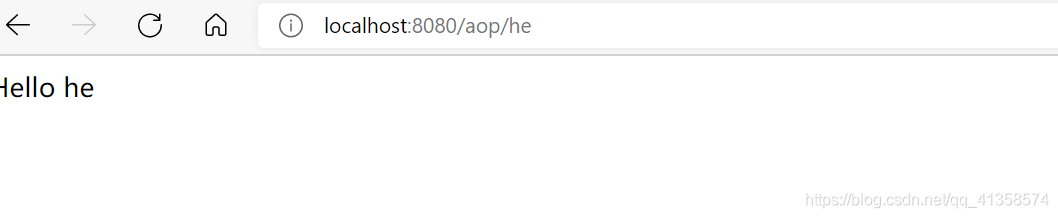
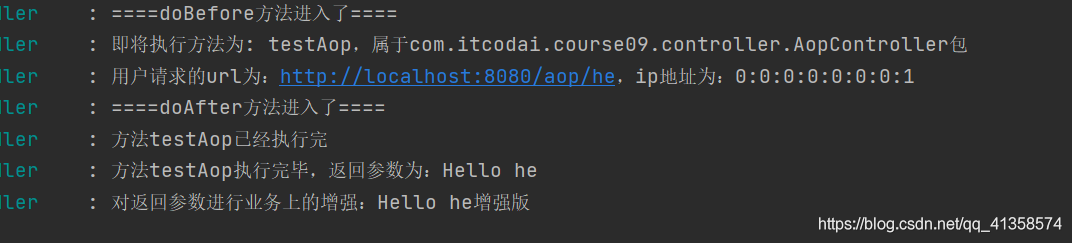
结果:
访问
查看打印的日志:
访问excetion

介绍几个常用的注解及使用
1.@Pointcut:定义一个切面,即上面所描述的关注的某件事
入口。
2.@Before:在做某件事之前做的事。
3.@After:在做某件事之后做的事。
4.@AfterReturning:在做某件事之后,对其返回值做增强处
理。
5.@AfterThrowing:在做某件事抛出异常时处理。
☞☞☞@Pointcut 注解指定一个切面,定义需要拦截的东西,这里介绍两个常用的表达式:
一个是使用execution(),另一个是使用annotation()。
以execution(* com.itcodai.course09.controller…*.*(…))) 表达式为例,
语法如下:
execution() 为表达式主体
第一个*号的位置:表示返回值类型,*表示所有类型
包名:表示需要拦截的包名,后面的两个句点表示当前包和当
前包的所有子包,com.xxx.controller 包、子包下所有类的方法
第二个*号的位置:表示类名,*表示所有类
*(…) :这个星号表示方法名,*表示所有的方法,后面括弧
里面表示方法的参数,两个句点表示任何参数
annotation() 方式是针对某个注解来定义切面,比如我们对具有@GetMapping 注解的方法做切面,可以如下定义切面
@Pointcut("@annotation(org.springframework.web.bind.annotation.GetMapping)")
public void annotationCut() {}
☞☞☞@Before 注解
@Before 注解指定的方法在切面切入目标方法之前执行,可以做一些log 处理,也可以做一些信息的统计,比如获取用户的请求url 以及用户的ip 地址等等,这个在做个人站点的时候都能用得到,都是常用的方法。例如上面的
@Before("pointCut()")public void doBefore(JoinPoint joinPoint) {logger.info("====doBefore方法进入了====");// 获取签名Signature signature = joinPoint.getSignature();// 获取切入的包名String declaringTypeName = signature.getDeclaringTypeName();// 获取即将执行的方法名String funcName = signature.getName();logger.info("即将执行方法为: {},属于{}包", funcName, declaringTypeName);// 也可以用来记录一些信息,比如获取请求的url和ipServletRequestAttributes attributes = (ServletRequestAttributes) RequestContextHolder.getRequestAttributes();HttpServletRequest request = attributes.getRequest();// 获取请求urlString url = request.getRequestURL().toString();// 获取请求ipString ip = request.getRemoteAddr();logger.info("用户请求的url为:{},ip地址为:{}", url, ip);}
@After 注解
@After 注解和@Before 注解相对应,指定的方法在切面切入目标方法之后执行,也可以做一些完成某方法之后的log 处理。
@AfterThrowing 注解
顾名思义,@AfterThrowing 注解是当被切方法执行时抛出异常时,会进入@AfterThrowing 注解的方法中执行,在该方法中可以做一些异常的处理逻辑。要注意的是throwing 属性的值必须要和参数一致,否则会报错。该方法中的第二个入参即为
抛出的异常。
本文来自互联网用户投稿,文章观点仅代表作者本人,不代表本站立场,不承担相关法律责任。如若转载,请注明出处。 如若内容造成侵权/违法违规/事实不符,请点击【内容举报】进行投诉反馈!