springboot+mybatis实现数据分页(三种方式)
项目准备
1.创建用户表
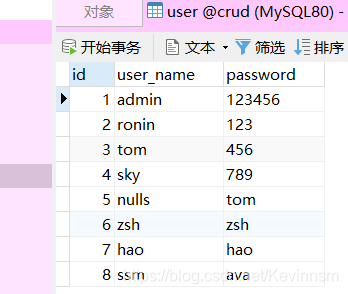
2.使用spring初始化向导快速创建项目,勾选mybatis,web,jdbc,driver
添加lombok插件
<?xml version="1.0" encoding="UTF-8"?>
<project xmlns="http://maven.apache.org/POM/4.0.0" xmlns:xsi="http://www.w3.org/2001/XMLSchema-instance"xsi:schemaLocation="http://maven.apache.org/POM/4.0.0 https://maven.apache.org/xsd/maven-4.0.0.xsd"><modelVersion>4.0.0</modelVersion><parent><groupId>org.springframework.boot</groupId><artifactId>spring-boot-starter-parent</artifactId><version>2.4.1</version><relativePath/> <!-- lookup parent from repository --></parent><groupId>com.hao</groupId><artifactId>spring-boot-crud-end</artifactId><version>0.0.1-SNAPSHOT</version><name>spring-boot-crud-end</name><description>Demo project for Spring Boot</description><properties><java.version>1.8</java.version></properties><dependencies><dependency><groupId>org.springframework.boot</groupId><artifactId>spring-boot-starter-jdbc</artifactId></dependency><dependency><groupId>org.springframework.boot</groupId><artifactId>spring-boot-starter-web</artifactId></dependency><dependency><groupId>org.mybatis.spring.boot</groupId><artifactId>mybatis-spring-boot-starter</artifactId><version>2.1.4</version></dependency><dependency><groupId>org.springframework.boot</groupId><artifactId>spring-boot-starter-test</artifactId><scope>test</scope></dependency><dependency><groupId>org.projectlombok</groupId><artifactId>lombok</artifactId></dependency><dependency><groupId>mysql</groupId><artifactId>mysql-connector-java</artifactId></dependency></dependencies><build><plugins><plugin><groupId>org.springframework.boot</groupId><artifactId>spring-boot-maven-plugin</artifactId></plugin></plugins></build></project>
一、使用原生Java实现分页
1.UserMapper接口
@Mapper
@Repository
public interface UserMapper {int selectCount();List<User> selectUserFindAll();
}
2.整合mybatis(application.yaml)
spring:datasource:driver-class-name: com.mysql.cj.jdbc.Driverurl: jdbc:mysql://localhost:3306/crud?serverTimezone=UTCusername: rootpassword: hao20001010mybatis:mapper-locations: classpath:mapper/*.xmltype-aliases-package: com.hao.springboot.entity
3.测试dao层(成功)
@SpringBootTest
class SpringBootCrudEndApplicationTests {@AutowiredUserMapper userMapper;@Testvoid contextLoads() {List<User> users = userMapper.selectUserFindAll();for(User user:users){System.out.println(user);}}@Testvoid contextLoads2(){}
}
4.编写service层
public interface UserService {int selectCount();List<User> selectUserByArray(int currentPage,int pageSize);
}
/*** @author:抱着鱼睡觉的喵喵* @date:2020/12/26* @description:*/
@Service
public class UserServiceImpl implements UserService {@AutowiredUserMapper userMapper;@Overridepublic int selectCount() {int count = userMapper.selectCount();return count;}/*** 原始分页逻辑实现* @param currentPage	当前页* @param pageSize		每页的数量* @return*/@Overridepublic List<User> selectUserByArray(int currentPage, int pageSize) {List<User> users = userMapper.selectUserFindAll();int count=selectCount();int startCurrentPage=(currentPage-1)*pageSize;        //开启的数据int endCurrentPage=currentPage*pageSize;        //结束的数据int totalPage=count/pageSize;                   //总页数if (currentPage>totalPage || currentPage<=0){return null;}else{return users.subList(startCurrentPage,endCurrentPage);}}
}
5.controller层
@RestController
public class UserController {@AutowiredUserService userService;@GetMapping("/user/{currentPage}/{pageSize}")public List<User> selectFindPart(@PathVariable("currentPage") int currentPage, @PathVariable("pageSize") int pageSize){List<User> list = userService.selectUserByArray(currentPage, pageSize);if (list==null){throw new UserNotExistException("访问出错!QWQ");}else{return list;}}
}
6.异常处理
public class UserNotExistException extends RuntimeException{private static final long serialVersionUID = 1L;private String msg;public UserNotExistException(String msg) {super("user not exist");this.msg=msg;}public String getMsg() {return msg;}public void setMsg(String msg) {this.msg = msg;}
}
7.controller异常处理类
/*** @author:抱着鱼睡觉的喵喵* @date:2020/12/26* @description:*/
@ControllerAdvice			//处理controller层出现的异常
public class ControllerExceptionHandler {@ExceptionHandler(UserNotExistException.class)@ResponseBody@ResponseStatus(value = HttpStatus.INTERNAL_SERVER_ERROR) //状态码public Map<String,Object> handlerUserNotExistException(UserNotExistException ex){Map<String,Object> result=new HashMap<>();result.put("msg", ex.getMsg());result.put("message", ex.getMessage());return result;}
}
8.访问http://localhost:8080/user/5/10出现如下
{“msg”:“访问出错!QWQ”,“message”:“user not exist”}
9.访问http://localhost:8080/user/2/3 出现如下
[{“id”:4,“userName”:“sky”,“password”:“789”},{“id”:5,“userName”:“nulls”,“password”:“tom”},{“id”:6,“userName”:“zsh”,“password”:“zsh”}]
总结:
缺点:数据库查询并返回所有的数据,而我们需要的只是极少数符合要求的数据。当数据量少时,还可以接受。当数据库数据量过大时,每次查询对数据库和程序的性能都会产生极大的影响。
二、通过sql语句进行分页操作
1.在UserMapper接口中新增一个方法
@Mapper
@Repository
public interface UserMapper {//原生分页int selectCount();List<User> selectUserFindAll();
//通过sql语句进行分页List<User> selectBySql(Map<String,Object> map);
}
2.UserService接口中新增方法,以及UserServiceImpl类中进行重写
public interface UserService {int selectCount();/*** 原生分页* @param currentPage* @param pageSize* @return*/List<User> selectUserByArray(int currentPage,int pageSize);/*** 通过sql分页* @param currentPage* @param pageSize* @return*/List<User> selectUserBySql(int currentPage,int pageSize);
}
@Service
public class UserServiceImpl implements UserService {@AutowiredUserMapper userMapper;@Overridepublic int selectCount() {int count = userMapper.selectCount();return count;}/*** 原始分页逻辑实现* @param currentPage* @param pageSize* @return*/@Overridepublic List<User> selectUserByArray(int currentPage, int pageSize) {List<User> users = userMapper.selectUserFindAll();int count=selectCount();int startCurrentPage=(currentPage-1)*pageSize;        //从第几个数据开始int endCurrentPage=currentPage*pageSize;        //结束的数据int totalPage=count/pageSize;                   //总页数if (currentPage>totalPage || currentPage<=0){return null;}else{return users.subList(startCurrentPage,endCurrentPage);}}
/**
*通过sql语句进行分页
*/@Overridepublic List<User> selectUserBySql(int currentPage, int pageSize) {Map<String,Object> map=new HashMap<>();int startCurrentPage=(currentPage-1)*pageSize;        //从第几个数据开始int count=selectCount();int totalPage=count/pageSize;                   //总页数if (currentPage>totalPage || currentPage<=0){return null;}else{map.put("currentPage",startCurrentPage);map.put("pageSize",pageSize);List<User> list = userMapper.selectBySql(map);return list;}}
}
3.controller层编写
@RestController
public class UserController {@AutowiredUserService userService;
//Java原生实现分页模块@GetMapping("/user/{currentPage}/{pageSize}")public List<User> selectFindByJava(@PathVariable("currentPage") int currentPage, @PathVariable("pageSize") int pageSize){List<User> list = userService.selectUserByArray(currentPage, pageSize);if (list==null){throw new UserNotExistException("访问出错!QWQ");}else{return list;}}
//sql分页方法模块@GetMapping("/user2/{currentPage}/{pageSize}")public List<User> selectFindBySql(@PathVariable("currentPage") int currentPage, @PathVariable("pageSize") int pageSize){List<User> list = userService.selectUserBySql(currentPage,pageSize);if (list==null){throw new UserNotExistException("访问出错!QWQ");}else{return list;}}
}
4.UserMapper.xml添加查询条件,使用limit进行分页
<?xml version="1.0" encoding="UTF-8"?>
<!DOCTYPE mapperPUBLIC "-//mybatis.org//DTD Mapper 3.0//EN""http://mybatis.org/dtd/mybatis-3-mapper.dtd"><mapper namespace="com.hao.springboot.mapper.UserMapper"><resultMap id="user" type="com.hao.springboot.entity.User"><result column="user_name" property="userName"/><result column="password" property="password"/></resultMap><select id="selectUserFindAll" resultMap="user">select * from user</select><select id="selectCount" resultType="integer">select count(*) from user</select><select id="selectBySql" parameterType="map" resultType="com.hao.springboot.entity.User">select * from user limit #{currentPage} , #{pageSize}</select>
</mapper>
5.启动访问http://localhost:8080/user2/5/10 出现如下
{“msg”:“访问出错!QWQ”,“message”:“user not exist”}
接着正确访问http://localhost:8080/user2/2/2
[{“id”:3,“userName”:“tom”,“password”:“456”},{“id”:4,“userName”:“sky”,“password”:“789”}]
总结:
缺点:虽然这里实现了按需查找,每次检索得到的是指定的数据。但是每次在分页的时候都需要去编写limit语句,很冗余。而且不方便统一管理,维护性较差。所以我们希望能够有一种更方便的分页实现。
三、拦截器实现分页
本文来自互联网用户投稿,文章观点仅代表作者本人,不代表本站立场,不承担相关法律责任。如若转载,请注明出处。 如若内容造成侵权/违法违规/事实不符,请点击【内容举报】进行投诉反馈!