shiro认证+授权(使用MD5+salt+散列加密)
通过上文自定义realm分析源码可得https://blog.csdn.net/Kevinnsm/article/details/11183124
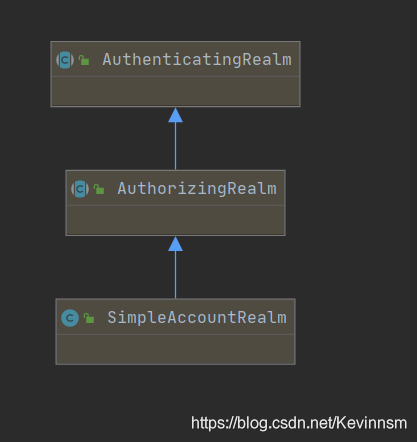
用户认证在doGetAuthenticationInfo()方法中进行操作,授权在doGetAuthorizationInfo()方法中进行,如果想要自定义则必须实现AuthorizingRealm类,该类中继承了AuthenticatingRealm;AuthenticatingRealm类中的doGetAuthenticationInfo()方法实现了用户认证,AuthorizingRealm中的doGetAuthorizationInfo()实现了授权
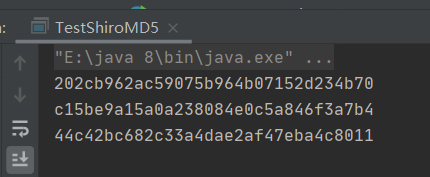
模拟处密码为123的加密后的数据
public class TestShiroMD5 {public static void main(String[] args) {//使用md5Md5Hash md5Hash=new Md5Hash("123");System.out.println(md5Hash.toHex());//使用md5 + saltMd5Hash md5Hash1 = new Md5Hash("123", "x0*7ps");System.out.println(md5Hash1.toHex());//使用md5 + slat + 散列Md5Hash md5Hash2 = new Md5Hash("123", "x0*7ps", 1024);System.out.println(md5Hash2.toHex());//44c42bc682c33a4dae2af47eba4c8011}
}
结果:
1.实现AuthorizingRealm类,重写其中的doGetAuthenticationInfo()和doGetAuthorizationInfo()方法,完成用户的认证和授权
public class CustomerMd5Realm extends AuthorizingRealm {//授权方法@Overrideprotected AuthorizationInfo doGetAuthorizationInfo(PrincipalCollection principalCollection) {System.out.println("授权操作中");String primaryPrincipal = (String) principalCollection.getPrimaryPrincipal();System.out.println("身份信息:"+primaryPrincipal);SimpleAuthorizationInfo simpleAuthorizationInfo = new SimpleAuthorizationInfo();//添加用户角色(例如:管理员,普通用户等)
//        simpleAuthorizationInfo.addRole("admin");
//        simpleAuthorizationInfo.addRole("user");
//        simpleAuthorizationInfo.addRole("supper");
//        simpleAuthorizationInfo.addRole("common");//一次添加多个用户角色	    //用户认证	    simpleAuthorizationInfo.addRoles(Arrays.asList("admin","user","supper","common","product"));//将数据库中的权限信息赋值个权限对象(角色标识符:操作:资源类型)simpleAuthorizationInfo.addStringPermission("user:*:*");simpleAuthorizationInfo.addStringPermission("product:*:*");return simpleAuthorizationInfo;}@Overrideprotected AuthenticationInfo doGetAuthenticationInfo(AuthenticationToken authenticationToken) throws AuthenticationException {System.out.println("身份认证中");//获取身份信息String principal = (String) authenticationToken.getPrincipal();//        //模拟根据用户名查询数据库if ("tom".equals(principal)) {//参数1,返回数据库中的正确的账户    //参数2 :(md5+salt+散列加密后)密码  //参数3:salt           //参数4.提供当前realm的名字return new SimpleAuthenticationInfo(principal,"44c42bc682c33a4dae2af47eba4c8011",ByteSource.Util.bytes("x0*7ps"),this.getName());}return null;}
}
模拟测试
/*** @author:抱着鱼睡觉的喵喵* @date:2020/12/28* @description:*/
public class TestCustomerMd5Realm {public static void main(String[] args) {//创建安全管理器DefaultSecurityManager securityManager = new DefaultSecurityManager();CustomerMd5Realm realm=new CustomerMd5Realm();//设置realm使用hash凭证匹配器HashedCredentialsMatcher credentialsMatcher = new HashedCredentialsMatcher();//使用算法md5credentialsMatcher.setHashAlgorithmName("md5");//散列次数credentialsMatcher.setHashIterations(1024);realm.setCredentialsMatcher(credentialsMatcher);//注入realm到安全管理器securityManager.setRealm(realm);//将安全管理器注入到安全工具类SecurityUtils.setSecurityManager(securityManager);//从安全工具类中获取SubjectSubject subject = SecurityUtils.getSubject();//封装登录信息到令牌UsernamePasswordToken token = new UsernamePasswordToken("tom", "123");
// ---------------------认证---------------------//try {subject.login(token);System.out.println("登陆成功");}catch (UnknownAccountException e){e.printStackTrace();System.out.println("用户名错误");}catch (IncorrectCredentialsException e){e.printStackTrace();System.out.println("密码错误");}//认证用户进行授权if (subject.isAuthenticated()){//1.基于角色权限控制System.out.println(subject.hasRole("admin"));//2.基于多角色的权限控制System.out.println(subject.hasAllRoles(Arrays.asList("common", "supper", "user")));//是否具有其中一个boolean[] booleans = subject.hasRoles(Arrays.asList("admin", "super", "user"));for (boolean roles:booleans){System.out.println(roles);}System.out.println("=======================");System.out.println(subject.hasRole("supper"));System.out.println("======================");//基于权限字符串的访问控制,资源标识符:操作:资源类型System.out.println("权限:"+subject.isPermitted("user:*:01"));System.out.println("权限:"+subject.isPermitted("user:create:023"));System.out.println("权限:"+subject.isPermitted("product:update:45"));}}
}
本文来自互联网用户投稿,文章观点仅代表作者本人,不代表本站立场,不承担相关法律责任。如若转载,请注明出处。 如若内容造成侵权/违法违规/事实不符,请点击【内容举报】进行投诉反馈!