springboot+springsecurity+mybatis plus之用户授权
文章目录
- 前言
- 一、导入坐标
- 二、Users实体类及其数据库表的创建
- 三、controller,service,mapper层的实现
- 四、核心--编写配置文件
- 五、无权限界面和登录界面的实现
前言
即访问控制,控制设能访问哪些资源。主体进行身份认证后需要分配权限方可访问系统的资源,对于某资源没有权限是无法访问的
一、导入坐标
<?xml version="1.0" encoding="UTF-8"?>
<project xmlns="http://maven.apache.org/POM/4.0.0" xmlns:xsi="http://www.w3.org/2001/XMLSchema-instance"xsi:schemaLocation="http://maven.apache.org/POM/4.0.0 https://maven.apache.org/xsd/maven-4.0.0.xsd"><modelVersion>4.0.0</modelVersion><parent><groupId>org.springframework.boot</groupId><artifactId>spring-boot-starter-parent</artifactId><version>2.4.3</version><relativePath/> <!-- lookup parent from repository --></parent><groupId>com.zsh</groupId><artifactId>springsecurity</artifactId><version>0.0.1-SNAPSHOT</version><name>springsecurity</name><description>Demo project for Spring Boot</description><properties><java.version>1.8</java.version></properties><dependencies><dependency><groupId>org.springframework.boot</groupId><artifactId>spring-boot-starter</artifactId></dependency><dependency><groupId>org.springframework.boot</groupId><artifactId>spring-boot-starter-test</artifactId><scope>test</scope></dependency><dependency><groupId>org.springframework.boot</groupId><artifactId>spring-boot-starter-web</artifactId><version>2.3.6.RELEASE</version></dependency><dependency><groupId>org.springframework.boot</groupId><artifactId>spring-boot-starter-security</artifactId><version>2.3.9.RELEASE</version></dependency><dependency><groupId>org.mybatis.spring.boot</groupId><artifactId>mybatis-spring-boot-starter</artifactId><version>2.1.4</version></dependency><dependency><groupId>org.projectlombok</groupId><artifactId>lombok</artifactId></dependency><dependency><groupId>mysql</groupId><artifactId>mysql-connector-java</artifactId></dependency><dependency><groupId>com.baomidou</groupId><artifactId>mybatis-plus-boot-starter</artifactId><version>3.4.1</version></dependency></dependencies><build><plugins><plugin><groupId>org.springframework.boot</groupId><artifactId>spring-boot-maven-plugin</artifactId></plugin></plugins></build></project>
二、Users实体类及其数据库表的创建
@Data
public class Users {private int id;private String username;private String password;
}
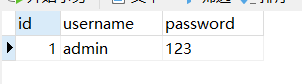
spring.datasource.driver-class-name=com.mysql.cj.jdbc.Driver
spring.datasource.url=jdbc:mysql://127.0.0.1:3306/springsecurity?serverTimezone=UTC
spring.datasource.username=root
spring.datasource.password=admin
三、controller,service,mapper层的实现
package com.zsh.security.controller;import org.springframework.web.bind.annotation.RequestMapping;
import org.springframework.web.bind.annotation.RestController;/*** @author:抱着鱼睡觉的喵喵* @date:2021/3/12* @description:*/
@RestController
@RequestMapping("/test")
public class SecurityController {@RequestMapping("/hello")public String hello() {return "hello! Spring Security!";}@RequestMapping("/index")public String index() {return "hello index!";}
}
package com.zsh.security.service;import com.baomidou.mybatisplus.core.conditions.query.QueryWrapper;
import com.zsh.security.mapper.UserMapper;
import com.zsh.security.pojo.Users;
import org.springframework.beans.factory.annotation.Autowired;
import org.springframework.security.core.GrantedAuthority;
import org.springframework.security.core.authority.AuthorityUtils;
import org.springframework.security.core.userdetails.User;
import org.springframework.security.core.userdetails.UserDetails;
import org.springframework.security.core.userdetails.UserDetailsService;
import org.springframework.security.core.userdetails.UsernameNotFoundException;
import org.springframework.security.crypto.bcrypt.BCryptPasswordEncoder;
import org.springframework.stereotype.Service;import java.util.List;/*** @author:抱着鱼睡觉的喵喵* @date:2021/3/12* @description:*/
@Service("userDetailsService")
public class UserDetailServiceImpl implements UserDetailsService {@Autowiredprivate UserMapper userMapper;@Overridepublic UserDetails loadUserByUsername(String s) throws UsernameNotFoundException {QueryWrapper<Users> wrapper = new QueryWrapper<>();wrapper.eq("username", s);Users users = userMapper.selectOne(wrapper);if (users == null) {//throw new UsernameNotFoundException("账号或密码错误!");} else {//表示有user角色权限List<GrantedAuthority> auths = AuthorityUtils.commaSeparatedStringToAuthorityList("ROLE_user");return new User(users.getUsername(), new BCryptPasswordEncoder().encode(users.getPassword()), auths);}}
}package com.zsh.security.mapper;import com.baomidou.mybatisplus.core.mapper.BaseMapper;
import com.zsh.security.pojo.Users;
import org.springframework.stereotype.Repository;/*** @author:抱着鱼睡觉的喵喵* @date:2021/3/12* @description:*/
@Repository
public interface UserMapper extends BaseMapper<Users> {}四、核心–编写配置文件
package com.zsh.security.config;import org.springframework.beans.factory.annotation.Autowired;
import org.springframework.context.annotation.Bean;
import org.springframework.context.annotation.Configuration;
import org.springframework.security.config.annotation.authentication.builders.AuthenticationManagerBuilder;
import org.springframework.security.config.annotation.web.builders.HttpSecurity;
import org.springframework.security.config.annotation.web.configuration.WebSecurityConfigurerAdapter;
import org.springframework.security.core.userdetails.UserDetailsService;
import org.springframework.security.crypto.bcrypt.BCryptPasswordEncoder;
import org.springframework.security.crypto.password.PasswordEncoder;/*** @author:抱着鱼睡觉的喵喵* @date:2021/3/12* @description:*/
@Configuration
public class SecurityConfig2 extends WebSecurityConfigurerAdapter {@Autowiredprivate UserDetailsService userDetailsService;@Overrideprotected void configure(AuthenticationManagerBuilder auth) throws Exception {auth.userDetailsService(userDetailsService).passwordEncoder(passwordEncoder());}@Overrideprotected void configure(HttpSecurity http) throws Exception {//没有权限时跳转到403界面(无权限界面)http.exceptionHandling().accessDeniedPage("/noauth.html");http.formLogin().loginPage("/login.html")   //设置登录界面.loginProcessingUrl("/user/login")  //登录界面url.defaultSuccessUrl("/test/index").permitAll()     //默认登录成功界面.and().authorizeRequests()      //哪些资源可以直接访问.antMatchers("/","/test/hello","/user/loin").permitAll()    //不做处理//.antMatchers("/test/index").hasAuthority("admin")
//                    .antMatchers("/test/index").hasAnyAuthority("admin","manager")//.antMatchers("/test/index").hasRole("admin").antMatchers("/test/index").hasAnyRole("admin","user").anyRequest().authenticated()   //所有请求都可以访问.and().csrf().disable();        //关闭CSRF}@BeanPasswordEncoder passwordEncoder() {return new BCryptPasswordEncoder();}}
分析核心的四个方法(其中给予某个角色权限在service层实现)
1、hasAuthority:是否有某个权限
2、hasAnyAuthority:是否拥有其中一个权限
3、hasRole:是否拥有某个角色
4、hasAnyRole:是否拥有其中一个角色
关于hasAuthority、hasAnyAuthority与hasRole、hasAnyRole的区别:
本质上没有什么区别,只不过是设计的维度不同(角色是权限的集合)
根据底层可以得出,如果要使用hasRole和hasAnyRole必须在service层加上ROLE_的前缀
五、无权限界面和登录界面的实现
<html lang="en">
<head><meta charset="UTF-8"><title>Titletitle>
head>
<body><form action="/user/login" method="post">username:<input type="text" name="username"> <br>password:<input type="password" name="password"><br><input type="submit" value="提交">form>
body>
html>
<html lang="en">
<head><meta charset="UTF-8"><title>Titletitle>
head>
<body><a style="background-color: red; margin-top: 100px; margin-left: 100px">no autha>
body>
html>
本文来自互联网用户投稿,文章观点仅代表作者本人,不代表本站立场,不承担相关法律责任。如若转载,请注明出处。 如若内容造成侵权/违法违规/事实不符,请点击【内容举报】进行投诉反馈!