vue项目npm总是出错
npm前端的Vue项目总是报错不成功。
报错信息如下:
error D:\xxx\xxx\node_modules\node-sass: Command failed.
Exit code: 1
Command: node scripts/build.js
Arguments:
Directory: D:\xxx\xxx\node_modules\node-sass
Output:
Binary found at D:\software\nodesass\win32-x64-72_binding.node
Testing binary
Binary has a problem: Error: The module '\\?\D:\software\nodesass\win32-x64-72_binding.node'
was compiled against a different Node.js version using
NODE_MODULE_VERSION 72. This version of Node.js requires
NODE_MODULE_VERSION 64. Please try re-compiling or re-installing
the module (for instance, using `npm rebuild` or `npm install`).at Object.Module._extensions..node (internal/modules/cjs/loader.js:717:18)at Module.load (internal/modules/cjs/loader.js:598:32)at tryModuleLoad (internal/modules/cjs/loader.js:537:12)at Function.Module._load (internal/modules/cjs/loader.js:529:3)at Module.require (internal/modules/cjs/loader.js:636:17)at require (internal/modules/cjs/helpers.js:20:18)at module.exports (D:\xxx\xxx\node_modules\node-sass\lib\binding.js:19:10)at Object.<anonymous> (D:\xxx\xxx\node_modules\node-sass\lib\index.js:14:35)at Module._compile (internal/modules/cjs/loader.js:688:30)at Object.Module._extensions..js (internal/modules/cjs/loader.js:699:10)
Building the binary locally
Building: C:\Program Files\nodejs\node.exe D:\xxx\xxx\node_modules\node-gyp\bin\node-gyp.js rebuild --verbose --libsass_ext= --libsass_cflags= --libsass_ldflags= --libsass_library=
gyp info it worked if it ends with ok
gyp verb cli [ 'C:\\Program Files\\nodejs\\node.exe',
gyp verb cli   'D:\\xxx\\xxx\\node_modules\\node-gyp\\bin\\node-gyp.js',
gyp verb cli   'rebuild',
gyp verb cli   '--verbose',
gyp verb cli   '--libsass_ext=',
gyp verb cli   '--libsass_cflags=',
gyp verb cli   '--libsass_ldflags=',
gyp verb cli   '--libsass_library=' ]
gyp info using node-gyp@3.8.0
gyp info using node@10.14.1 | win32 | x64
gyp verb command rebuild []
gyp verb command clean []
gyp verb clean removing "build" directory
gyp verb command configure []
gyp verb check python checking for Python executable "python2" in the PATH
gyp verb `which` failed Error: not found: python2
gyp verb `which` failed     at getNotFoundError (D:\xxx\xxx\node_modules\which\which.js:13:12)
gyp verb `which` failed     at F (D:\xxx\xxx\node_modules\which\which.js:68:19)
gyp verb `which` failed     at E (D:\xxx\xxx\node_modules\which\which.js:80:29)
gyp verb `which` failed     at D:\xxx\xxx\node_modules\which\which.js:89:16
gyp verb `which` failed     at D:\xxx\xxx\node_modules\isexe\index.js:42:5
gyp verb `which` failed     at D:\xxx\xxx\node_modules\isexe\windows.js:36:5
gyp verb `which` failed     at FSReqWrap.oncomplete (fs.js:154:21)
gyp verb `which` failed  python2 { Error: not found: python2
gyp verb `which` failed     at getNotFoundError (D:\xxx\xxx\node_modules\which\which.js:13:12)
gyp verb `which` failed     at F (D:\xxx\xxx\node_modules\which\which.js:68:19)
gyp verb `which` failed     at E (D:\xxx\xxx\node_modules\which\which.js:80:29)
gyp verb `which` failed     at D:\xxx\xxx\node_modules\which\which.js:89:16
gyp verb `which` failed     at D:\xxx\xxx\node_modules\isexe\index.js:42:5
gyp verb `which` failed     at D:\xxx\xxx\node_modules\isexe\windows.js:36:5
gyp verb `which` failed     at FSReqWrap.oncomplete (fs.js:154:21)
gyp verb `which` failed   stack:
gyp verb `which` failed    'Error: not found: python2\n    at getNotFoundError (D:\\xxx\\xxx\\node_modules\\which\\which.js:13:12)\n    at F (D:\\xxx\\xxx\\node_modules\\which\\which.js:68:19)\n    at E (D:\\xxx\\xxx\\node_modules\\which\\which.js:80:29)\n    at D:\\xxx\\xxx\\node_modules\\which\\which.js:89:16\n    at D:\\xxx\\xxx\\node_modules\\isexe\\index.js:42:5\n    at D:\\xxx\\xxx\\node_modules\\isexe\\windows.js:36:5\n    at FSReqWrap.oncomplete (fs.js:154:21)',
gyp verb `which` failed   code: 'ENOENT' }
gyp verb check python checking for Python executable "python" in the PATH
gyp verb `which` failed Error: not found: python
gyp verb `which` failed     at getNotFoundError (D:\xxx\xxx\node_modules\which\which.js:13:12)
gyp verb `which` failed     at F (D:\xxx\xxx\node_modules\which\which.js:68:19)
gyp verb `which` failed     at E (D:\xxx\xxx\node_modules\which\which.js:80:29)
gyp verb `which` failed     at D:\xxx\xxx\node_modules\which\which.js:89:16
gyp verb `which` failed     at D:\xxx\xxx\node_modules\isexe\index.js:42:5
gyp verb `which` failed     at D:\xxx\xxx\node_modules\isexe\windows.js:36:5
gyp verb `which` failed     at FSReqWrap.oncomplete (fs.js:154:21)
gyp verb `which` failed  python { Error: not found: python
gyp verb `which` failed     at getNotFoundError (D:\xxx\xxx\node_modules\which\which.js:13:12)
gyp verb `which` failed     at F (D:\xxx\xxx\node_modules\which\which.js:68:19)
gyp verb `which` failed     at E (D:\xxx\xxx\node_modules\which\which.js:80:29)
gyp verb `which` failed     at D:\xxx\xxx\node_modules\which\which.js:89:16
gyp verb `which` failed     at D:\xxx\xxx\node_modules\isexe\index.js:42:5
gyp verb `which` failed     at D:\xxx\xxx\node_modules\isexe\windows.js:36:5
gyp verb `which` failed     at FSReqWrap.oncomplete (fs.js:154:21)
gyp verb `which` failed   stack:
gyp verb `which` failed    'Error: not found: python\n    at getNotFoundError (D:\\xxx\\xxx\\node_modules\\which\\which.js:13:12)\n    at F (D:\\xxx\\xxx\\node_modules\\which\\which.js:68:19)\n    at E (D:\\xxx\\xxx\\node_modules\\which\\which.js:80:29)\n    at D:\\xxx\\xxx\\node_modules\\which\\which.js:89:16\n    at D:\\xxx\\xxx\\node_modules\\isexe\\index.js:42:5\n    at D:\\xxx\\xxx\\node_modules\\isexe\\windows.js:36:5\n    at FSReqWrap.oncomplete (fs.js:154:21)',
gyp verb `which` failed   code: 'ENOENT' }
gyp verb could not find "python". checking python launcher
gyp verb could not find "python". guessing location
gyp verb ensuring that file exists: C:\Python27\python.exe
gyp ERR! configure error
gyp ERR! stack Error: Can't find Python executable "python", you can set the PYTHON env variable.
gyp ERR! stack     at PythonFinder.failNoPython (D:\xxx\xxx\node_modules\node-gyp\lib\configure.js:484:19)
gyp ERR! stack     at PythonFinder.<anonymous> (D:\xxx\xxx\node_modules\node-gyp\lib\configure.js:509:16)
gyp ERR! stack     at D:\xxx\xxx\node_modules\graceful-fs\polyfills.js:284:29
gyp ERR! stack     at FSReqWrap.oncomplete (fs.js:154:21)
gyp ERR! System Windows_NT 10.0.19042
gyp ERR! command "C:\\Program Files\\nodejs\\node.exe" "D:\\xxx\\xxx\\node_modules\\node-gyp\\bin\\node-gyp.js" "rebuild" "--verbose" "--libsass_ext=" "--libsass_cflags=" "--libsass_ldflags=" "--libsass_library="
gyp ERR! cwd D:\xxx\xxx\node_modules\node-sass
gyp ERR! node -v v10.14.1
gyp ERR! node-gyp -v v3.8.0
gyp ERR! not ok
Build failed with error code: 1
info Visit https://yarnpkg.com/en/docs/cli/install for documentation about this command.
网上查询的结果是出现这种情况一般都是node-sass版本和node版本不对应。
node-sass安装不了,需要低版本的node,而我的是最新版本16版本的node,于是换成了14版本的node。
换成14版本之后继续npm,出现了下面的报错:
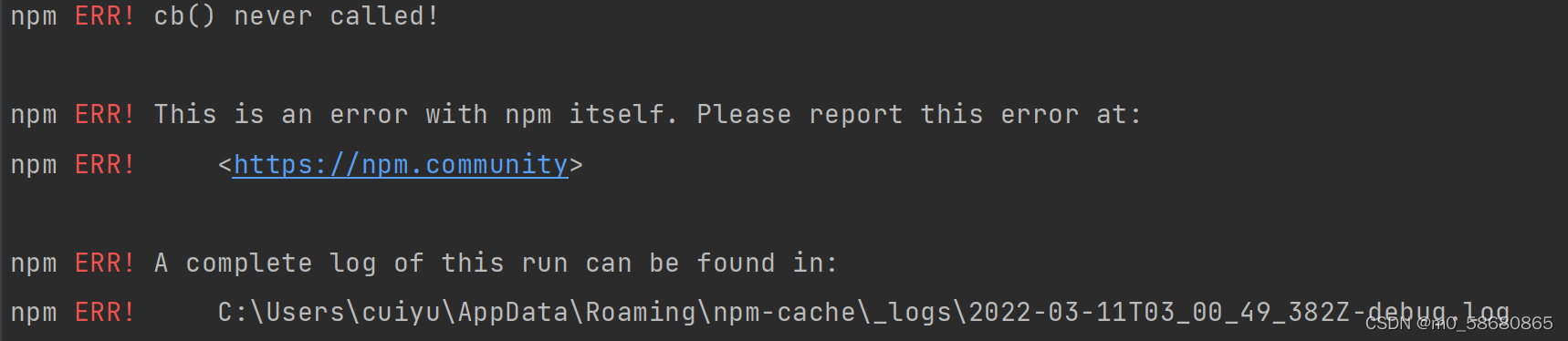
继续查询情况:
查询出来的原因是window 7无法安装@vue/cli 升级成为window10
应该是搭环境的前端兄弟电脑系统太老了,他的是win7,我的是win11
于是按照下面步骤继续操作:
一、首先要以管理员模式打开cmd清除你的npm缓存 : npm cache clean -f
二、清除完缓存后,安装最新版本的Node helper: npm install -g n
出现了错误:

然后执行以下 npm install -g n --force
成功出线下面:

最后再次npm install,虽然出现了下面一堆东西,但是感觉成功了。
> yorkie@2.0.0 install E:\北京车检项目\car-inspection-video-analysis-ui\node_modules\yorkie
> node bin/install.jssetting up Git hooks
done> node-sass@4.14.1 install E:\北京车检项目\car-inspection-video-analysis-ui\node_modules\node-sass
> node scripts/install.jsDownloading binary from https://github.com/sass/node-sass/releases/download/v4.14.1/win32-x64-83_binding.node
Download complete  ] - :
Binary saved to E:\北京车检项目\car-inspection-video-analysis-ui\node_modules\node-sass\vendor\win32-x64-83\binding.node
Caching binary to C:\Users\cuiyu\AppData\Roaming\npm-cache\node-sass\4.14.1\win32-x64-83_binding.node> core-js@2.6.12 postinstall E:\北京车检项目\car-inspection-video-analysis-ui\node_modules\babel-polyfill\node_modules\core-js
> node -e "try{require('./postinstall')}catch(e){}"Thank you for using core-js ( https://github.com/zloirock/core-js ) for polyfilling JavaScript standard library!The project needs your help! Please consider supporting of core-js on Open Collective or Patreon:
> https://opencollective.com/core-js
> https://www.patreon.com/zloirock Also, the author of core-js ( https://github.com/zloirock ) is looking for a good job -)> core-js@2.6.12 postinstall E:\北京车检项目\car-inspection-video-analysis-ui\node_modules\babel-runtime\node_modules\core-js
> node -e "try{require('./postinstall')}catch(e){}"> core-js@3.8.1 postinstall E:\北京车检项目\car-inspection-video-analysis-ui\node_modules\core-js
> node -e "try{require('./postinstall')}catch(e){}"> ejs@2.7.4 postinstall E:\北京车检项目\car-inspection-video-analysis-ui\node_modules\ejs
> node ./postinstall.jsThank you for installing EJS: built with the Jake JavaScript build tool (https://jakejs.com/)> highlight.js@9.18.5 postinstall E:\北京车检项目\car-inspection-video-analysis-ui\node_modules\highlight.js
> node deprecated.js-*-*-*-*-*-*-*-*-*-*-*-*-*-*-*-*-*-*-*-*-*-*-*-*-*-*-*-*-*-*-*-*-*-*Verion 9 of Highlight.js has reached EOL.  It will no longerbe supported or receive security updates in the future.Please upgrade to version 10 or encourage your indirectdependencies to do so.For more info:https://github.com/highlightjs/highlight.js/issues/2877https://github.com/highlightjs/highlight.js/blob/master/VERSION_10_UPGRADE.md-*-*-*-*-*-*-*-*-*-*-*-*-*-*-*-*-*-*-*-*-*-*-*-*-*-*-*-*-*-*-*-*-*-*> node-sass@4.14.1 postinstall E:\北京车检项目\car-inspection-video-analysis-ui\node_modules\node-sass
> node scripts/build.jsBinary found at E:\北京车检项目\car-inspection-video-analysis-ui\node_modules\node-sass\vendor\win32-x64-83\binding.node
Testing binary
Binary is fine
npm notice created a lockfile as package-lock.json. You should commit this file.
npm WARN notsup Unsupported engine for pkcs7@0.2.3: wanted: {"npm":"^1.4.6","node":"^0.10"} (current: {"node":"14.15.4","npm":"6.14.10"})
npm WARN notsup Not compatible with your version of node/npm: pkcs7@0.2.3
npm WARN optional SKIPPING OPTIONAL DEPENDENCY: fsevents@~2.3.2 (node_modules\chokidar\node_modules\fsevents):
npm WARN notsup SKIPPING OPTIONAL DEPENDENCY: Unsupported platform for fsevents@2.3.2: wanted {"os":"darwin","arch":"any"} (current: {"os":"
win32","arch":"x64"})
npm WARN optional SKIPPING OPTIONAL DEPENDENCY: fsevents@^1.2.7 (node_modules\watchpack-chokidar2\node_modules\chokidar\node_modules\fsevent
s):
npm WARN notsup SKIPPING OPTIONAL DEPENDENCY: Unsupported platform for fsevents@1.2.13: wanted {"os":"darwin","arch":"any"} (current: {"os":
"win32","arch":"x64"})
npm WARN optional SKIPPING OPTIONAL DEPENDENCY: fsevents@^1.2.7 (node_modules\webpack-dev-server\node_modules\chokidar\node_modules\fsevents
):
npm WARN notsup SKIPPING OPTIONAL DEPENDENCY: Unsupported platform for fsevents@1.2.13: wanted {"os":"darwin","arch":"any"} (current: {"os":
"win32","arch":"x64"})
npm WARN eslint-loader@2.2.1 requires a peer of eslint@>=1.6.0 <7.0.0 but none is installed. You must install peer dependencies yourself.
npm WARN jaya@1.0.0 No license field.added 1660 packages from 983 contributors in 250.103s110 packages are looking for fundingrun `npm fund` for details
于是最后:npm run dev 成功启动了
本文来自互联网用户投稿,文章观点仅代表作者本人,不代表本站立场,不承担相关法律责任。如若转载,请注明出处。 如若内容造成侵权/违法违规/事实不符,请点击【内容举报】进行投诉反馈!