node-sass安装失败问题分析及解决方案
项目场景:
一个使用node-sass的vue项目,从远程代码库拉到本地
问题描述
无法正常安装项目依赖
error D:\My prgram\demo-proj\node_modules\node-sass: Command failed.
Exit code: 1
Command: node scripts/build.js
Arguments:
Directory: D:\My prgram\demo-proj\node_modules\node-sass
Output:
Building: D:\Program Files\nodejs\node.exe D:\My prgram\demo-proj\node_modules\node-gyp\bin\node-gyp.js rebuild --verbose --libsass_ext= --libsass_cflags= --libsass_ldflags= --libsass_library=
gyp info it worked if it ends with ok
gyp verb cli [
gyp verb cli 'D:\\Program Files\\nodejs\\node.exe',
gyp verb cli 'D:\\My prgram\\demo-proj\\node_modules\\node-gyp\\bin\\node-gyp.js',
gyp verb cli 'rebuild',
gyp verb cli '--verbose',
gyp verb cli '--libsass_ext=',
gyp verb cli '--libsass_cflags=',
gyp verb cli '--libsass_ldflags=',
gyp verb cli '--libsass_library='
gyp verb cli ]
gyp info using node-gyp@3.8.0
gyp info using node@15.3.0 | win32 | x64
gyp verb command rebuild []
gyp verb command clean []
gyp verb clean removing "build" directory
gyp verb command configure []
gyp verb check python checking for Python executable "python2" in the PATH
gyp verb `which` failed Error: not found: python2
gyp verb `which` failed at getNotFoundError (D:\My prgram\demo-proj\node_modules\which\which.js:13:12)
gyp verb `which` failed at F (D:\My prgram\demo-proj\node_modules\which\which.js:68:19)
gyp verb `which` failed at E (D:\My prgram\demo-proj\node_modules\which\which.js:80:29)
gyp verb `which` failed at D:\My prgram\demo-proj\node_modules\which\which.js:89:16
gyp verb `which` failed at D:\My prgram\demo-proj\node_modules\isexe\index.js:42:5
gyp verb `which` failed at D:\My prgram\demo-proj\node_modules\isexe\windows.js:36:5
gyp verb `which` failed at FSReqCallback.oncomplete (node:fs:192:21)
gyp verb `which` failed python2 Error: not found: python2
gyp verb `which` failed at getNotFoundError (D:\My prgram\demo-proj\node_modules\which\which.js:13:12)
gyp verb `which` failed at F (D:\My prgram\demo-proj\node_modules\which\which.js:68:19)
gyp verb `which` failed at E (D:\My prgram\demo-proj\node_modules\which\which.js:80:29)
gyp verb `which` failed at D:\My prgram\demo-proj\node_modules\which\which.js:89:16
gyp verb `which` failed at D:\My prgram\demo-proj\node_modules\isexe\index.js:42:5
gyp verb `which` failed at D:\My prgram\demo-proj\node_modules\isexe\windows.js:36:5
gyp verb `which` failed at FSReqCallback.oncomplete (node:fs:192:21) {
gyp verb `which` failed code: 'ENOENT'
gyp verb `which` failed }
gyp verb `which` succeeded python D:\My prgram\Python\Python3.6.5\python.EXE
gyp ERR! configure error
gyp ERR! stack Error: Command failed: D:\My prgram\Python\Python3.6.5\python.EXE -c import sys; print "%s.%s.%s" % sys.version_info[:3];
gyp ERR! stack File "" , line 1
gyp ERR! stack import sys; print "%s.%s.%s" % sys.version_info[:3];
gyp ERR! stack ^
gyp ERR! stack SyntaxError: invalid syntax
gyp ERR! stack
gyp ERR! stack at ChildProcess.exithandler (node:child_process:309:12)
gyp ERR! stack at ChildProcess.emit (node:events:376:20)
gyp ERR! stack at maybeClose (node:internal/child_process:1055:16)
gyp ERR! stack at Process.ChildProcess._handle.onexit (node:internal/child_process:288:5)
gyp ERR! System Windows_NT 10.0.18363
gyp ERR! command "D:\\Program Files\\nodejs\\node.exe" "D:\\My prgram\\demo-proj\\node_modules\\node-gyp\\bin\\node-gyp.js" "rebuild" "--verbose" "--libsass_ext=" "--libsass_cflags=" "--libsass_ldflags=" "--libsass_library="
gyp ERR! cwd D:\My prgram\demo-proj\node_modules\node-sass
gyp ERR! node -v v15.3.0
相关链接
node-sass Git / Gitee
dart-sass
node-sass安装失败的解决方式
原因分析:
> 墙
首先猜测可能是某些包在墙外,这个很快被排除了
> npm/yarn缓存
此前自己也在其它设备上遇到过这个问题,采用这篇文章的方案,解决了问题,就没去细究
node-sass安装失败的解决方式
但实际上,这个并不是大部分情况下的原因
1、node版本的兼容
想起此前同事拉取代码后也碰到过这个问题,当时我的node版本是v14.16.0,他的是15+,重新安装node@14后,就可以安装项目依赖了
显然,这说明是node-sass不支持 node@15+
node-sass也在git仓库中说明了这一问题
“Warning: LibSass and Node Sass are deprecated. While they will continue to receive maintenance releases indefinitely, there are no plans to add additional features or compatibility with any new CSS or Sass features. Projects that still use it should move onto Dart Sass.”
可以看到,官方建议使用Dart Sass,不过,如果不想(敢)动node-sass,可以接着往下看
| NodeJS | Supported node-sass version | Node Module |
|---|---|---|
| Node 17 | 7.0+ | 102 |
| Node 16 | 6.0+ | 93 |
| Node 15 | 5.0+, <7.0 | 88 |
| Node 14 | 4.14+ | 83 |
| Node 13 | 4.13+, <5.0 | 79 |
| Node 12 | 4.12+ | 72 |
| Node 11 | 4.10+, <5.0 | 67 |
| Node 10 | 4.9+, <6.0 | 64 |
| Node 8 | 4.5.3+, <5.0 | 57 |
| Node <8 | <5.0 | <57 |
更详细的查看版本兼容性方法是查看node-sass的release列表
示例:
首先获取你的node版本适用的binding.node
C:\Users\YMZhao>node -p "[process.platform, process.arch, process.versions.modules].join('-')"
win32-x64-88
以下是node-sass@4.12.0的列表,没有win32-x64-88_binding.node,与你的node版本不兼容
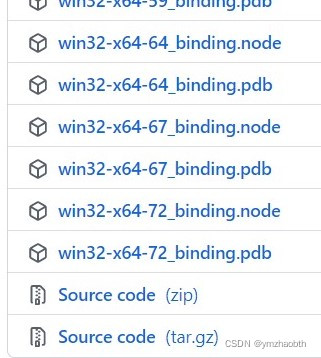
查询到node-sass@5.0.0兼容node@15
更新node-sass到v5.0.0后,又出现了新的问题:
ERROR Failed to compile with 1 error error in ./src/styles/index.scssSyntax Error: Error: Node Sass version 5.0.0 is incompatible with ^4.0.0.
原因是与"sass-loader": "^8.0.2"不兼容!!
错误:“node-sass”版本 5.0.0 与 ^4.0.0 不兼容
有网友试过,node-sass@5.0.0 兼容 sass-loader@10.1.1
2、使用dart-sass替换node-sass
上面已经提到,node-sass官方都建议更换成dart-sass
Migrate to dart-sass
“If you’re a user of Node Sass, migrating to Dart Sass is straightforward: just replace node-sass in your package.json file with sass. Both packages expose the same JavaScript API.”
使用npm/yarn卸载node-sass,安装sass
yarn remove node-sass
yarn add sass -D
解决方案:
按上一节分析,三种方案:
1、使用 dart-sass 替换 node-sass
2、安装node@14
3、node@15、node-sass@5.0.0、sass-loader@10.1.1
后两种需按上一节示例所示,确保node-sass兼容你的node版本
本文来自互联网用户投稿,文章观点仅代表作者本人,不代表本站立场,不承担相关法律责任。如若转载,请注明出处。 如若内容造成侵权/违法违规/事实不符,请点击【内容举报】进行投诉反馈!