iOS的tableview和xib结合实现QQ列表
之前做这个是因为老师布置的作业,其实写出来好长一段时间了,但是由于自己比较忙,没有时间进行整理,现在才拿出来整理。
不说话,首先上效果图:
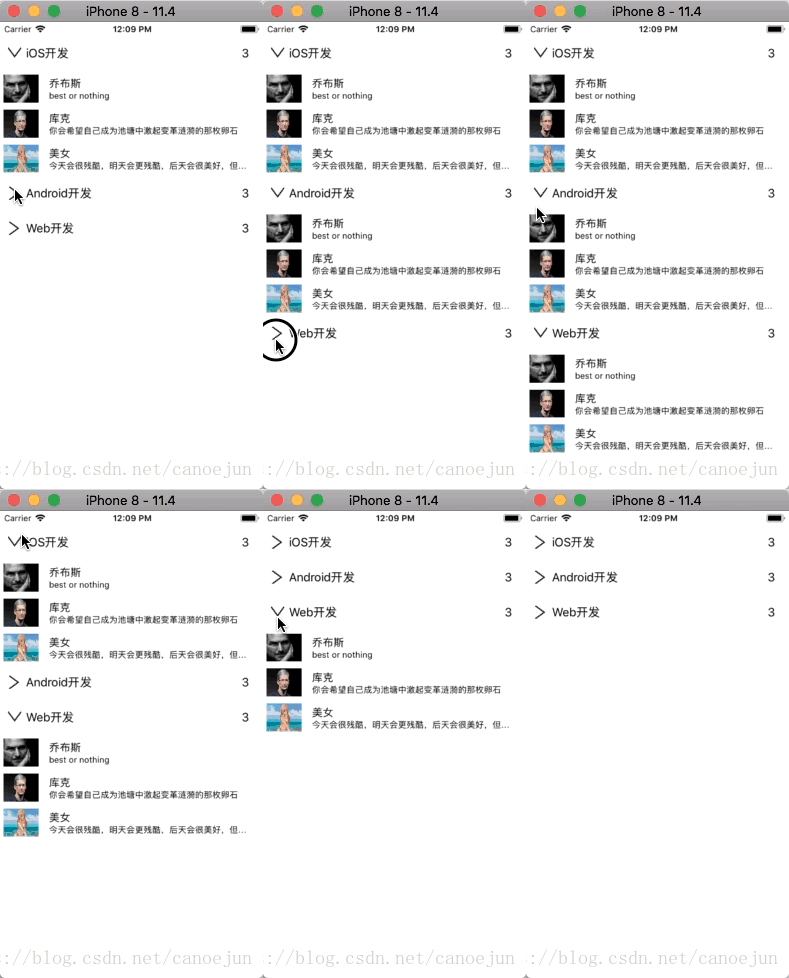
全部代码和相关的素材已经全部打包在GitHub上:https://github.com/canoejun/QQList
1.首先改变控制器
将控制器改为tableviewController,并在Main.storyboard中拖拽相应的tableviewcontroller,改变控制器所关联的类,设置DataSource和delegate。在所关联的类中修改继承的控制器。
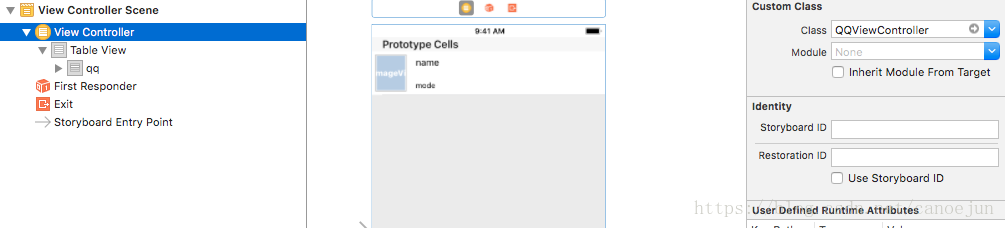
2.在控制器类中实现相应的代理方法和读取信息数据
在本例子中没有采用网络端的传输数据,而是采用了plist文件进行QQ列表用户信息数据的存储。
首先根据plist文件建立相关的模型,模型.m文件不需要书写任何的东西,因为本例子中采用了MJ框架进行数据的解析,因此不需要手动在.m文件中转换数据了
GroupModel.h
#import @interface GroupModel : NSObject/** 组名  */
@property (nonatomic, copy) NSString *groupname;/** 组员  */
@property (nonatomic, copy) NSArray *friends;/** 是否打开  */
@property (nonatomic, assign) BOOL  isOpen;@end
FriendModel.h
#import @interface FriendModel : NSObject/** QQ好友昵称  */
@property (nonatomic,copy) NSString *name;/** 状态  */
@property (nonatomic,copy) NSString *mode;/** 头像  */
@property (nonatomic,copy) NSString * icon;
@end
建立数组,采用懒加载进行字典转模型向是数组中存储数据(别忘记导入相应的MJ框架)
@interface QQViewController ()
/** 保存模型数据的数组  */
@property (nonatomic,copy) NSArray *QQDataArray;@end-(NSArray *)QQDataArray{if (!_QQDataArray) {
//        告诉group中array的成员是一个个的dictionary[GroupModel mj_setupObjectClassInArray:^NSDictionary *{return @{@"friends":[FriendModel class]};}];_QQDataArray = [GroupModel mj_objectArrayWithFilename:@"qq.plist"];}return _QQDataArray;
}
在主体部分就是进行cell和sectionHeader的宽度设定以及清除下方多余的cell
- (void)viewDidLoad {[super viewDidLoad];// 清除底部多余cell[self.tableView setTableFooterView:[[UIView alloc] initWithFrame:CGRectZero]];// 清除分割线self.tableView.separatorStyle = UITableViewCellSeparatorStyleNone;self.tableView.rowHeight = 50;self.tableView.sectionHeaderHeight = 50;
}
3.实现代理的DataSource方法
当然在一开始,并没有直接将相关的方法写的那么详细准确,但是也要把可能用到的方法先写出来放在那里,后面再定义了相关的cell和sectionHeadView以后再回过来进行修改
#pragma mark ------ UITableviewDataSource方法 -------(NSInteger)numberOfSectionsInTableView:(UITableView *)tableView{return self.QQDataArray.count;
}-(NSInteger)tableView:(UITableView *)tableView numberOfRowsInSection:(NSInteger)section{if ([self.QQDataArray[section] isOpen]) {return [[self.QQDataArray[section] friends] count];}else{return 0;}}
-(UITableViewCell*)tableView:(UITableView *)tableView cellForRowAtIndexPath:(NSIndexPath *)indexPath{static NSString * ID = @"qq";QQFriendTableViewCell * cell = [tableView dequeueReusableCellWithIdentifier:ID];//    设置数据GroupModel * group = self.QQDataArray[indexPath.section];FriendModel * friend = group.friends[indexPath.row];cell.friends = friend;return cell;
}
//设置分组的headView
-(UIView *)tableView:(UITableView *)tableView viewForHeaderInSection:(NSInteger)section{HeadView * view = [[[NSBundle mainBundle] loadNibNamed:NSStringFromClass([HeadView class]) owner:nil options:nil] firstObject];view.delegate = self;view.group = _QQDataArray[section];return view;
}
4.在tableview中自定义cell
在tableview里面进行xib的布局以后,然后将右边的class与新建的cell文件关联,将控件拖入到cell的.m文件中

QQFriendTableViewCell.h
#import
@class FriendModel;@interface QQFriendTableViewCell : UITableViewCell/** 模型  */
@property (nonatomic,copy) FriendModel * friends;@end
QQFriendTableViewCell.m
#import "QQFriendTableViewCell.h"
#import "FriendModel.h"@interface QQFriendTableViewCell ()
@property (weak, nonatomic) IBOutlet UIImageView *iconImageView;
@property (weak, nonatomic) IBOutlet UILabel *nameLabel;
@property (weak, nonatomic) IBOutlet UILabel *modeLabel;@end@implementation QQFriendTableViewCell//设置数据
- (void)setFriends:(FriendModel *)friends{_friends = friends;self.iconImageView.image = [UIImage imageNamed:friends.icon];self.nameLabel.text = friends.name;self.modeLabel.text = friends.mode;
}@end
4.自定义sectionHeaderView
考虑到系统默认提供的sectionHeadView并不能够满足自己的需求,这时候需要自己重新定义相关的视图。本例子还是采用了xib建立一个新的View类。
如图所示,自定义了一个View,并布局。别忘记将右边的class设置为相应建立的HeadView类。这时候记得别把将File‘s Owner设置为headview了,File’s Owner只是对View中的逻辑操作进行处理的,考虑到这个例子中section不需要这样子,所以这边可以不要设置。

HeadView.h
#import @class HeadView,GroupModel;@protocol SectionHeadViewDelegate
-(void)sectionHeadButtonDidClicked:(HeadView *)headView;
@end@interface HeadView : UIView
/** 代理  */
@property (nonatomic,strong) iddelegate;/** 模型  */
@property (nonatomic,strong) GroupModel * group;
@end
HeadView.m
在按钮点击事件中,因为需要控制相应组的展开或者是收缩,一开始没有想好。后来想到了将这个判断和模型绑定到一块,所以在模型中才定义了一个 isOpen的布尔属性,用于判断是否需要展开或者是关闭。
#import "HeadView.h"
#import "GroupModel.h"@interface HeadView ()
@property (weak, nonatomic) IBOutlet UIButton *pullButton;
@property (weak, nonatomic) IBOutlet UILabel *titleLabel;
@property (weak, nonatomic) IBOutlet UILabel *membersCountLabel;@end@implementation HeadView-(void)awakeFromNib{[super awakeFromNib];[self.pullButton addTarget:self action:@selector(pullButtonClicked:) forControlEvents:UIControlEventTouchUpInside];
}- (IBAction)pullButtonClicked:(UIButton *)sender {_group.isOpen = !_group.isOpen;if ([self.delegate respondsToSelector:@selector(sectionHeadButtonDidClicked:)]) {[self.delegate sectionHeadButtonDidClicked:self];}
}
/**   协议方法会刷新tableview,然后会刷新tableview的viewForHeaderInSection:方法 就会重新布局headView所以会走layoutSubviews方法*/
-(void)layoutSubviews{if (!_group.isOpen) {_pullButton.transform = CGAffineTransformMakeRotation(-M_PI_2);}else{_pullButton.transform = CGAffineTransformIdentity;}
}
//设置数据
-(void)setGroup:(GroupModel *)group{_group = group;_titleLabel.text = group.groupname;_membersCountLabel.text = [NSString stringWithFormat:@"%ld",group.friends.count];
}
@end
由于sectionHeadView的按钮点击事件,数据发生了改变,所以需要在主界面将数据刷新一下。本例子使用了协议完成。(有兴趣的可以使用block或者通知试一下)
在自己的主函数中完成协议的相关方法:
#pragma mark ------ 实现代理方法 ------
-(void)sectionHeadButtonDidClicked:(HeadView *)headView{[self.tableView reloadData];
}
由于是本人能力有限,刚刚开始学习IOS开发,如有问题还望大家一一指出
本文来自互联网用户投稿,文章观点仅代表作者本人,不代表本站立场,不承担相关法律责任。如若转载,请注明出处。 如若内容造成侵权/违法违规/事实不符,请点击【内容举报】进行投诉反馈!