IP代理池的搭建(案例---某马逊实战爬虫)
文章目录
- 前言
- 一. 免费IP的采集和使用
- 1. 免费ip网站
- 2. 采集ip数据和测试
- 二. 付费ip的使用
- 1.引入库
- 三. 实战案例
前言
提示:这里可以添加本文要记录的大概内容:
使用ip的作用和原因
- 首先代理ip可以保护用户信息的安全。在如今的大数据互联网时代,每个人上网总会留下一点信息,很有可能被别人利用,而使用代理ip可以完美解决这个问题。高匿名代理ip可以隐藏用户的真实ip地址,保护用户的个人数据和信息安全,提高用户上网的安全性。
- 其次可以提高访问速度,有时出现过访问网页时出现卡顿的问题,通过代理ip一定程度上可以解决这个问题。通过代理IP访问的一些网站等信息会存留在代理服务器的缓冲区内,假如别人访问过的信息你再访问,则会直接在缓冲区内拉取数据,进一步提高访问速度。遇到对ip检测比较严格的网址也需要进行替换。
- 代理区分:https://www.zhihu.com/question/442503446/answer/2516935440
一. 免费IP的采集和使用
1. 免费ip网站
可以从以下网址中采集到批量的ip地址
类似于快代理或者89代理等等网上有很多资源,大家可以进行自主查找
2. 采集ip数据和测试
我们在网站上采集的免费ip能使用率不足20%,所以我们采集的ip需要先进行测试,测试完之后存放到文本,或者数据库
import time
import requests
from lxml import etreeclass DaiLi(object):def __init__(self):self.base_URL = 'https://www.kuaidaili.com/free/inha/{}/'self.test_URL = 'http://httpbin.org/ip'self.headers = {'User-Agent': 'Mozilla/5.0 (Windows NT 10.0; Win64; x64) AppleWebKit/537.36 (KHTML, like Gecko) ''Chrome/107.0.0.0 Safari/537.36 Edg/107.0.1418.35'}self.base_xpath = '//div/div/table[@class="table table-bordered table-striped"]/tbody/tr'def get_response(self, url, proxies=None):try:response = requests.get(url=url, headers=self.headers, proxies=proxies)# time.sleep(0.5)return response.textexcept Exception as f:print('请求有误,错误为:%s' % f)def get_url(self, page):url = self.base_URL.format(page)return urldef xpath_html(self, html):html1 = etree.HTML(html)datas = html1.xpath(self.base_xpath)DiZhi = []for i in datas:dizhi = {'IP': i.xpath('./td/text()')[0], 'DuanKou': i.xpath('./td/text()')[1]}DiZhi.append(dizhi)return DiZhidef save_data(self, data):IPS = []for i in data:proxies = {'http': 'http://' + i['IP'] + ':' + i['DuanKou']}try:print(proxies)response = requests.get(url=self.test_URL, headers=self.headers, proxies=proxies, timeout=2)if response.status_code == 200:print(response.status_code)print(response.text)IPS.append(proxies)except Exception:print('超时链接')print(IPS)def run(self):for i in range(1, int(input('输入爬取页码')) + 1):url = self.get_url(i)html = self.get_response(url)data = self.xpath_html(html)self.save_data(data)if __name__ == '__main__':dl = DaiLi()dl.run()
注意:
免费ip采集存放到ip池之后,每次使用的时候也需要测试也会有过期的情况
二. 付费ip的使用
1.引入库
两者的优缺点:
-
- 免费:除了免费,没有优点
-
- 付费:除了付费,没有缺点
使用方法
-
快代理:https://www.kuaidaili.com/
-
找到自己喜欢的付费ip代理平台(案列:快代理,不同的代理平台都有对应文档和客服)
-
在平台注册一个账户
-
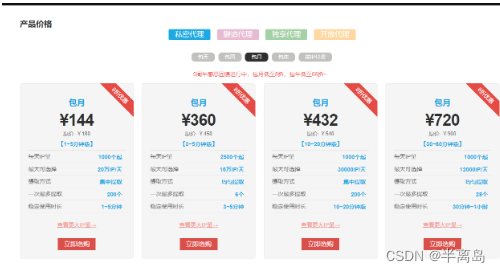
根据自己的项目选择购买的套餐
-
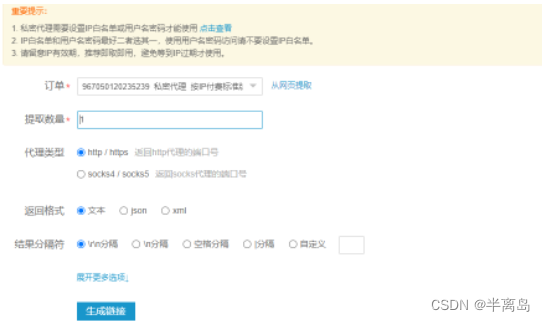
购买之后点击账户管理 – 》我的订单 --》点击更多 – 》点击提取ip --》点击生成api链接
-
根据项目需求修改你需要的提取数量,返回的格式和分割符
-
请求生成的接口就能获取到对应的ip数据
-
三. 实战案例
- 采集目标:亚马逊
- 项目思路分析:
-
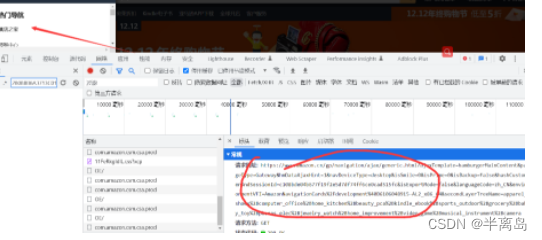
首先在页面找到所有的物品分类接口
-
在提取的页面里会包含广告请求,需要剔除掉
-
在获取到每个分类所对应的页数,获取到所有页数对应的网址
-
对页数发送请求,在提取出每个商品的详情页面地址
-
在页面里在提取出商品数据进行保存
-
import random
import time
from loguru import logger
import requests
from lxml import etree
from queue import Queue
import threading
from retrying import retry
from feapder.network.user_agent import get
import pymysqlclass Yamaxun():def __init__(self):self.db = pymysql.connect(host="localhost", user="root", password="root", db="spiders")self.cursor = self.db.cursor()self.index_url = 'https://www.amazon.cn/nav/ajax/hamburgerMainContent?ajaxTemplate=hamburgerMainContent&pageType=Gateway&hmDataAjaxHint=1&navDeviceType=desktop&isSmile=0&isPrime=0&isBackup=false&hashCustomerAndSessionId=c108bde04b677f19f2e5d7df74ff6ce0cad515fc&languageCode=zh_CN&environmentVFI=AmazonNavigationCards%2Fdevelopment%40B6122949553-AL2_x86_64&secondLayerTreeName=apparel_shoes%2Bcomputer_office%2Bhome_kitchen%2Bbeauty_pca%2Bkindle_ebook%2Bsports_outdoor%2Bgrocery%2Bbaby_toy%2Bphones_elec%2Bjewelry_watch%2Bhome_improvement%2Bvideo_game%2Bmusical_instrument%2Bcamera&customerCountryCode=null'self.headers = {"Referer": "https://www.amazon.cn/ref=nav_logo","User-Agent": "Mozilla/5.0 (Windows NT 10.0; Win64; x64) AppleWebKit/537.36 (KHTML, like Gecko) Chrome/107.0.0.0 Safari/537.36","X-Requested-With": "XMLHttpRequest","downlink": "10","ect": "4g","rtt": "200",}self.ip_url = 'https://dps.kdlapi.com/api/getdps/?secret_id=othy4dayz12khxp3vumh&num=1&signature=oha4jp4c8yqppcymxj4485db55&pt=1&sep=1'self.ip_queue = Queue()self.classify_url_queue = Queue()self.detail_url_queue = Queue()self.data_queue = Queue()def create_table(self):# 使用预处理语句创建表sql = '''CREATE TABLE IF NOT EXISTS yamaxun(id int primary key auto_increment not null,price VARCHAR(255) NOT NULL, title VARCHAR(255) NOT NULL,goods_url VARCHAR(255) NOT NULL,classify VARCHAR(255) NOT NULL)'''try:self.cursor.execute(sql)print("CREATE TABLE SUCCESS.")except Exception as ex:print(f"CREATE TABLE FAILED,CASE:{ex}")def get_ip(self):"""获取ip数据,将ip数据放进队列:return: ip地址"""while True:if self.ip_queue.empty():response = requests.get(self.ip_url)print(response.text)self.ip_queue.put(response.text)else:continue# 最大重试3次,3次全部报错,才会报错@retry(stop_max_attempt_number=5)def get_data(self, url):ip = self.ip_queue.get()proxies = {'http': 'http://' + ip,}# print(proxies)self.headers['User-Agent'] = get()response = requests.get(url=url, headers=self.headers, timeout=2, proxies=proxies)if response.status_code == 200:self.ip_queue.put(ip)else:assert '状态码错误'return responsedef get_info_url(self):response = self.get_data(self.index_url)html_object = etree.HTML(response.text)# 前两个没有请求地址li_list = html_object.xpath('//ul/li[position() > 2]')for li in li_list:item = {}if li.xpath('./a/text()'):# 全部分类的数据是分类页面if '全部' in li.xpath('./a/text()')[0]:continue# 带有https的为广告页面if 'http' in li.xpath('./a/@href')[0]:continueitem['title'] = li.xpath('./a/text()')[0]# item['href'] = li.xpath('./a/@href')[0]# print(li.xpath('./a/@href')[0])item['href'] = li.xpath('./a/@href')[0].split('=')[1].split('&')[0]self.classify_url_queue.put(item)def detail_url_get(self):while True:info_url = self.classify_url_queue.get()time.sleep(random.randint(500, 800)/1000)try:# 请求分类查看所有商品页面response = self.get_data("https://www.amazon.cn/s?rh=n%3A" + info_url['href'] + "&fs=true")except Exception as e:logger.error("https://www.amazon.cn/s?rh=n%3A" + info_url['href'] + "&fs=true")continuehtml_data = etree.HTML(response.text)if html_data.xpath('//span[@class="s-pagination-strip"]/span[last()]/text()'):# 获取到分类的总共页数max_page = html_data.xpath('//span[@class="s-pagination-strip"]/span[last()]/text()')[0]for page in range(1, int(max_page) + 1):# 每个分类单独页面拼接new_url = 'https://www.amazon.cn/s?rh=n%3A' + info_url['href'] + '&fs=true&page=' + str(page)# 请求每个分类的单独页面try:res = self.get_data(new_url)except Exception as e:logger.error(new_url)continuehtml = etree.HTML(res.text)detail_href_list = html.xpath('//div[@class="sg-col-inner"]/span/div[1]/div/div/div//h2/a/@href')# time.sleep(random.randint(200, 500) / 1000)# 获取到详情商品的详情地址和分类for detail_href in detail_href_list:item = {}item['detail_href'] = detail_hrefitem['classify_data'] = info_url['title']self.detail_url_queue.put(item)self.classify_url_queue.task_done()def paras_data(self):while True:goods_data = self.detail_url_queue.get()# 拼接详情页面goods_url = 'https://www.amazon.cn' + goods_data['detail_href']try:response = self.get_data(goods_url)except Exception as e:logger.error(goods_url)continueprint(response.text)html_data = etree.HTML(response.text)# 获取商品标题title = html_data.xpath('//div[@id="centerCol"]//h1/span/text()')[0] if html_data.xpath('//div[@id="centerCol"]//h1/span/text()') else html_data.xpath('//title/text()')[0]# 获取商品价格if html_data.xpath('//div[@id="centerCol"]//div[@id="apex_desktop"]//span[@class="a-price-whole"]/text()'):price = "¥" + html_data.xpath('//div[@id="centerCol"]//div[@id="apex_desktop"]//span[@class="a-price-whole"]/text()')[0]else:price = '-'.join(html_data.xpath('//td[@class="a-span12"]//span[@class="a-offscreen"]/text()'))print([goods_data['classify_data'], title.strip(), price, goods_url])self.data_queue.put((goods_data['classify_data'], title.strip(), price, goods_url))self.detail_url_queue.task_done()def save_data(self):while True:data_list = []for i in range(30):data = self.data_queue.get()data_list.append((0,) + data)self.data_queue.task_done()# SQL 插入语句sql = 'INSERT INTO yamaxun(id, price, title, classify, goods_url) values(%s, %s, %s, %s, %s)'# 执行 SQL 语句try:# print(sql, (0, data[0], data[1], data[2], data[3]))self.cursor.executemany(sql, data_list)# 提交到数据库执行self.db.commit()print('数据插入成功...')except Exception as e:print(f'数据插入失败: {e}')# 如果发生错误就回滚self.db.rollback()def main(self):self.create_table()t_list = []# 获取ip线程t_ip = threading.Thread(target=self.get_ip)t_list.append(t_ip)# 获取分类线程t_info = threading.Thread(target=self.get_info_url)t_list.append(t_info)# 获取详细商品线程for i in range(1):t_detail_url = threading.Thread(target=self.detail_url_get)t_list.append(t_detail_url)# 解析数据线程for i in range(1):t_paras = threading.Thread(target=self.paras_data)t_list.append(t_paras)# 保存数据线程t_save = threading.Thread(target=self.save_data)t_list.append(t_save)for t in t_list:t.setDaemon(True)t.start()time.sleep(3)for q in [self.classify_url_queue, self.detail_url_queue, self.detail_url_queue]:q.join()if __name__ == '__main__':# 文件过大于500M就会重新生成一个文件logger.add("runtime_{time}.log", rotation="500 MB")ymx = Yamaxun()ymx.main()
logger模块使用方法:
https://blog.csdn.net/Vertira/article/details/127430742
本文来自互联网用户投稿,文章观点仅代表作者本人,不代表本站立场,不承担相关法律责任。如若转载,请注明出处。 如若内容造成侵权/违法违规/事实不符,请点击【内容举报】进行投诉反馈!