Rk1126 实现 yolov5 6.2 推理
基于 RK1126 实现 yolov5 6.2 推理.
转换 ONNX
python export.py --weights ./weights/yolov5s.pt --img 640 --batch 1 --include onnx --simplify
安装 rk 环境
- 安装部分参考网上, 有很多. 参考: https://github.com/rockchip-linux/rknpu
转换 RK模型 并验证
-
yolov562_to_rknn_3_4.py
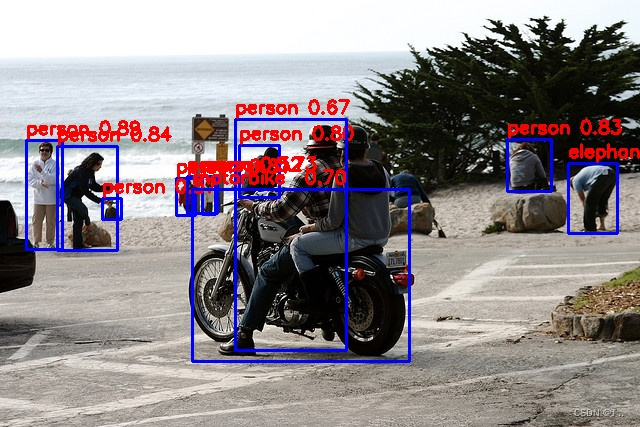
( s/m/l/x ..,输出节点不同,使用 netror 查看 )# -*- coding: utf-8 -*- """ Created on Wed Oct 12 18:24:38 2022@author: bobod """import os import numpy as np import cv2 from rknn.api import RKNNONNX_MODEL = './weights/yolov5s_v6.2.onnx' RKNN_MODEL = './weights/yolov5s_v6.2.rknn' IMG_PATH = './000000102411.jpg' DATASET = './dataset.txt'QUANTIZE_ON = TrueBOX_THRESH = 0.5 NMS_THRESH = 0.6 IMG_SIZE = (640, 640) # (width, height), such as (1280, 736)SHAPES =((0.0, 0.0), (0.0, 0.0)) #1 scale_coords SHAPE =(0,0)CLASSES = ("person", "bicycle", "car","motorbike ","aeroplane ","bus ","train","truck ","boat","traffic light","fire hydrant","stop sign ","parking meter","bench","bird","cat","dog ","horse ","sheep","cow","elephant","bear","zebra ","giraffe","backpack","umbrella","handbag","tie","suitcase","frisbee","skis","snowboard","sports ball","kite","baseball bat","baseball glove","skateboard","surfboard","tennis racket","bottle","wine glass","cup","fork","knife ","spoon","bowl","banana","apple","sandwich","orange","broccoli","carrot","hot dog","pizza ","donut","cake","chair","sofa","pottedplant","bed","diningtable","toilet ","tvmonitor","laptop ","mouse ","remote ","keyboard ","cell phone","microwave ","oven ","toaster","sink","refrigerator ","book","clock","vase","scissors ","teddy bear ","hair drier", "toothbrush ")def sigmoid(x):return 1 / (1 + np.exp(-x))def xywh2xyxy(x):# Convert [x, y, w, h] to [x1, y1, x2, y2]y = np.copy(x)y[:, 0] = x[:, 0] - x[:, 2] / 2 # top left xy[:, 1] = x[:, 1] - x[:, 3] / 2 # top left yy[:, 2] = x[:, 0] + x[:, 2] / 2 # bottom right xy[:, 3] = x[:, 1] + x[:, 3] / 2 # bottom right yreturn ydef process(input, mask, anchors):anchors = [anchors[i] for i in mask]grid_h, grid_w = map(int, input.shape[0:2])box_confidence = sigmoid(input[..., 4])box_confidence = np.expand_dims(box_confidence, axis=-1)box_class_probs = sigmoid(input[..., 5:])box_xy = sigmoid(input[..., :2])*2 - 0.5col = np.tile(np.arange(0, grid_w), grid_h).reshape(-1, grid_w)row = np.tile(np.arange(0, grid_h).reshape(-1, 1), grid_w)col = col.reshape(grid_h, grid_w, 1, 1).repeat(3, axis=-2)row = row.reshape(grid_h, grid_w, 1, 1).repeat(3, axis=-2)grid = np.concatenate((col, row), axis=-1)box_xy += gridbox_xy *= (int(IMG_SIZE[1]/grid_h), int(IMG_SIZE[0]/grid_w))box_wh = pow(sigmoid(input[..., 2:4])*2, 2)box_wh = box_wh * anchorsbox = np.concatenate((box_xy, box_wh), axis=-1)return box, box_confidence, box_class_probsdef filter_boxes(boxes, box_confidences, box_class_probs):"""Filter boxes with box threshold. It's a bit different with origin yolov5 post process!# Argumentsboxes: ndarray, boxes of objects.box_confidences: ndarray, confidences of objects.box_class_probs: ndarray, class_probs of objects.# Returnsboxes: ndarray, filtered boxes.classes: ndarray, classes for boxes.scores: ndarray, scores for boxes."""boxes = boxes.reshape(-1, 4)box_confidences = box_confidences.reshape(-1)box_class_probs = box_class_probs.reshape(-1, box_class_probs.shape[-1])_box_pos = np.where(box_confidences >= BOX_THRESH)boxes = boxes[_box_pos]box_confidences = box_confidences[_box_pos]box_class_probs = box_class_probs[_box_pos]class_max_score = np.max(box_class_probs, axis=-1)classes = np.argmax(box_class_probs, axis=-1)_class_pos = np.where(class_max_score* box_confidences >= BOX_THRESH)boxes = boxes[_class_pos]classes = classes[_class_pos]scores = (class_max_score* box_confidences)[_class_pos]return boxes, classes, scoresdef nms_boxes(boxes, scores):"""Suppress non-maximal boxes.# Argumentsboxes: ndarray, boxes of objects.scores: ndarray, scores of objects.# Returnskeep: ndarray, index of effective boxes."""x = boxes[:, 0]y = boxes[:, 1]w = boxes[:, 2] - boxes[:, 0]h = boxes[:, 3] - boxes[:, 1]areas = w * horder = scores.argsort()[::-1]keep = []while order.size > 0:i = order[0]keep.append(i)xx1 = np.maximum(x[i], x[order[1:]])yy1 = np.maximum(y[i], y[order[1:]])xx2 = np.minimum(x[i] + w[i], x[order[1:]] + w[order[1:]])yy2 = np.minimum(y[i] + h[i], y[order[1:]] + h[order[1:]])w1 = np.maximum(0.0, xx2 - xx1 + 0.00001)h1 = np.maximum(0.0, yy2 - yy1 + 0.00001)inter = w1 * h1ovr = inter / (areas[i] + areas[order[1:]] - inter)inds = np.where(ovr <= NMS_THRESH)[0]order = order[inds + 1]keep = np.array(keep)return keepdef yolov5_post_process(input_data):masks = [[0, 1, 2], [3, 4, 5], [6, 7, 8]]anchors = [[10, 13], [16, 30], [33, 23], [30, 61], [62, 45],[59, 119], [116, 90], [156, 198], [373, 326]]boxes, classes, scores = [], [], []for input,mask in zip(input_data, masks):b, c, s = process(input, mask, anchors)b, c, s = filter_boxes(b, c, s)boxes.append(b)classes.append(c)scores.append(s)boxes = np.concatenate(boxes)boxes = xywh2xyxy(boxes)classes = np.concatenate(classes)scores = np.concatenate(scores)nboxes, nclasses, nscores = [], [], []for c in set(classes):inds = np.where(classes == c)b = boxes[inds]c = classes[inds]s = scores[inds]keep = nms_boxes(b, s)nboxes.append(b[keep])nclasses.append(c[keep])nscores.append(s[keep])if not nclasses and not nscores:return None, None, Noneboxes = np.concatenate(nboxes)scale_coords(IMG_SIZE, boxes, SHAPE, SHAPES) #2classes = np.concatenate(nclasses)scores = np.concatenate(nscores)return boxes, classes, scoresdef draw(image, boxes, scores, classes):"""Draw the boxes on the image.# Argument:image: original image.boxes: ndarray, boxes of objects.classes: ndarray, classes of objects.scores: ndarray, scores of objects.all_classes: all classes name."""for box, score, cl in zip(boxes, scores, classes):left, top, right, bottom = boxprint('class: {}, score: {}'.format(CLASSES[cl], score))print('box coordinate left,top,right,bottom: [{}, {}, {}, {}]'.format(left, top, right, bottom))left = int(left)top = int(top)right = int(right)bottom = int(bottom)cv2.rectangle(image, (left, top), (right, bottom), (255, 0, 0), 2)cv2.putText(image, '{0} {1:.2f}'.format(CLASSES[cl], score),(left, top - 6),cv2.FONT_HERSHEY_SIMPLEX,0.6, (0, 0, 255), 2)def letterbox(im, new_shape=(640, 640), color=(0, 0, 0)):# Resize and pad image while meeting stride-multiple constraintsshape = im.shape[:2] # current shape [height, width]if isinstance(new_shape, int):new_shape = (new_shape, new_shape)# Scale ratio (new / old)r = min(new_shape[0] / shape[0], new_shape[1] / shape[1])# Compute paddingratio = r, r # width, height ratiosnew_unpad = int(round(shape[1] * r)), int(round(shape[0] * r))dw, dh = new_shape[1] - new_unpad[0], new_shape[0] - new_unpad[1] # wh paddingdw /= 2 # divide padding into 2 sidesdh /= 2if shape[::-1] != new_unpad: # resizeim = cv2.resize(im, new_unpad, interpolation=cv2.INTER_LINEAR)top, bottom = int(round(dh - 0.1)), int(round(dh + 0.1))left, right = int(round(dw - 0.1)), int(round(dw + 0.1))im = cv2.copyMakeBorder(im, top, bottom, left, right, cv2.BORDER_CONSTANT, value=color) # add borderreturn im, ratio, (dw, dh)#3 def scale_coords(img1_shape, coords, img0_shape, ratio_pad=None):# Rescale coords (xyxy) from img1_shape to img0_shapeif ratio_pad is None: # calculate from img0_shapegain = min(img1_shape[0] / img0_shape[0], img1_shape[1] / img0_shape[1]) # gain = old / newpad = (img1_shape[1] - img0_shape[1] * gain) / 2, (img1_shape[0] - img0_shape[0] * gain) / 2 # wh paddingelse:gain = ratio_pad[0][0]pad = ratio_pad[1]coords[:, [0, 2]] -= pad[0] # x paddingcoords[:, [1, 3]] -= pad[1] # y paddingcoords[:, :4] /= gainclip_coords(coords, img0_shape)return coordsdef clip_coords(boxes, shape):# Clip bounding xyxy bounding boxes to image shape (height, width)boxes[:, [0, 2]] = boxes[:, [0, 2]].clip(0, shape[1]) # x1, x2boxes[:, [1, 3]] = boxes[:, [1, 3]].clip(0, shape[0]) # y1, y2if __name__ == '__main__':# Create RKNN objectrknn = RKNN(verbose=False)if not os.path.exists(ONNX_MODEL):print('model not exist')exit(-1)_force_builtin_perm = False# pre-process configprint('--> Config model')rknn.config(reorder_channel='0 1 2',mean_values=[[0, 0, 0]],std_values=[[255, 255, 255]],optimization_level=3,#target_platform = 'rk1808',# target_platform='rv1109',target_platform = 'rv1126',quantize_input_node= QUANTIZE_ON,output_optimize=1,force_builtin_perm=_force_builtin_perm)print('done')# Load ONNX modelprint('--> Loading model')#ret = rknn.load_pytorch(model=PT_MODEL, input_size_list=[[3,IMG_SIZE[1], IMG_SIZE[0]]])ret = rknn.load_onnx(model=ONNX_MODEL, outputs=['output', '391', '402'])if ret != 0:print('Load yolov5 failed!')exit(ret)print('done')# Build modelprint('--> Building model')ret = rknn.build(do_quantization=QUANTIZE_ON, dataset=DATASET, pre_compile=False)if ret != 0:print('Build yolov5 failed!')exit(ret)print('done')# Export RKNN modelprint('--> Export RKNN model')ret = rknn.export_rknn(RKNN_MODEL)if ret != 0:print('Export yolov5rknn failed!')exit(ret)print('done')# init runtime environmentprint('--> Init runtime environment')ret = rknn.init_runtime() #ret = rknn.init_runtime('rv1126', device_id='bab4d7a824f04867')# ret = rknn.init_runtime('rv1109', device_id='1109')# ret = rknn.init_runtime('rk1808', device_id='1808')if ret != 0:print('Init runtime environment failed')exit(ret)print('done')# Set inputsoriginal_img = cv2.imread(IMG_PATH)#4img, ratio, pad = letterbox(original_img, new_shape=(IMG_SIZE[1], IMG_SIZE[0]))SHAPES=(ratio,pad)SHAPE=(original_img.shape[0],original_img.shape[1])img = cv2.cvtColor(img, cv2.COLOR_BGR2RGB)# Inferenceprint('--> Running model')outputs = rknn.inference(inputs=[img], inputs_pass_through=[0 if not _force_builtin_perm else 1])# post processinput0_data = outputs[0]input1_data = outputs[1]input2_data = outputs[2]input0_data = input0_data.reshape([3,-1]+list(input0_data.shape[-2:]))input1_data = input1_data.reshape([3,-1]+list(input1_data.shape[-2:]))input2_data = input2_data.reshape([3,-1]+list(input2_data.shape[-2:]))input_data = list()input_data.append(np.transpose(input0_data, (2, 3, 0, 1)))input_data.append(np.transpose(input1_data, (2, 3, 0, 1)))input_data.append(np.transpose(input2_data, (2, 3, 0, 1)))boxes, classes, scores = yolov5_post_process(input_data)if boxes is not None:draw(original_img, boxes, scores, classes)cv2.imwrite("result.jpg", original_img)
混合量化
- 首先做精度分析, 量化 build 之后, 调用精度分析函数。后来尝试在
hybrid_quantization_step2后调用,结果总是不成功 , 原因未知, 有知道的大佬望告知一下. - 精度分析:
entire_qnt( 完全量化结果 ) ,fp32( fp32结果 ) ,individual_qnt( 逐层量化结果,即输入为float, 排除累计误差 ),entire_qnt_error_analysis.txtindividual_qnt_error_analysis.txt( 完全量化和逐层量化分析结果 (欧式距离和余弦距离) ) - 这里需要注意,
DATASET只能有一行数据....# Build modelprint('--> Building model')ret = rknn.build(do_quantization=QUANTIZE_ON, dataset=DATASET, pre_compile=False)if ret != 0:print('Build yolov5 failed!')exit(ret)print('done')print('--> Accuracy analysis')ret = rknn.accuracy_analysis(inputs=DATASET1,output_dir="./output_dir")if ret != 0:print('accuracy_analysis failed!')exit(ret)print('done') - 生成混合量化配置文件, 调用
rknn.hybrid_quantization_step1会得到torchjitexport.data,torchjitexport.json,torchjitexport.quantization.cfg3个文件. - 根据精度分析结果,
torchjitexport.quantization.cfg将不想量化的层添加到自定义层中.# 1.冒号后面加个空格 2.一个模型最多同时只能存在两种量化方式 # add layer name and corresponding quantized_dtype to customized_quantize_layers, e.g conv2_3: float32 customized_quantize_layers: {"Conv_Conv_0_187": float32,"Sigmoid_Sigmoid_1_188_Mul_Mul_2_172": float32,"Conv_Conv_3_171": float32,... } ... - 调用
rknn.hybrid_quantization_step2导出rknn模型... ret = rknn.hybrid_quantization_step2(model_input='./torchjitexport.json',data_input='./torchjitexport.data', model_quantization_cfg='./torchjitexport.quantization.cfg',dataset=DATASET, pre_compile=False)if ret != 0:print("hybrid_quantization_step2 failed. ")exit(ret)# Export RKNN model print('--> Export RKNN model') ret = rknn.export_rknn(RKNN_MODEL) if ret != 0:print('Export yolov5rknn failed!')exit(ret) print('done') - 重复测试模型,找出一个平衡速度和准确率的模型。
- 验证没问题了,就可以连接板子尝试啦,可以将
pre_compile=True, 提高初始化速度. 不过不能在仿真环境中测试.
参考
- https://github.com/shaoshengsong/rockchip_rknn_yolov5
- https://github.com/rockchip-linux/rknpu
本文来自互联网用户投稿,文章观点仅代表作者本人,不代表本站立场,不承担相关法律责任。如若转载,请注明出处。 如若内容造成侵权/违法违规/事实不符,请点击【内容举报】进行投诉反馈!