如何利用safari获取手机的UDID
虽然从ios7开始,手机的udid就取不到了。但是苹果公司允许开发者通过IOS设备和Web服务器之间的某个操作,来获得IOS设备的UDID(包括其他的一些参数)。
也有人把这种工具做成应用放到appstore,并审核通过。

UDID Sender
步骤
- 1、在你的Web服务器上创建一个udid.mobileconfig的XML格式的描述文件;
<plist version="1.0"><dict><key>PayloadContentkey><dict><key>URLkey><string>http://192.168.0.215/web/uu.phpstring><key>DeviceAttributeskey><array><string>UDIDstring><string>IMEIstring><string>ICCIDstring><string>VERSIONstring><string>PRODUCTstring>array>dict><key>PayloadOrganizationkey><string>AppFree, Inc.string><key>PayloadDisplayNamekey><string>AppFreestring><key>PayloadVersionkey><integer>1integer><key>PayloadUUIDkey><string>9CF421B3-9853-4454-BC8A-982CBD3C907Cstring><key>PayloadIdentifierkey><string>com.gpon.profile-servicestring><key>PayloadDescriptionkey><string>This temporary profile will be used to find and display your current device's UDID.string><key>PayloadTypekey><string>Profile Servicestring>dict>
plist>
注意:mobileconfig下载时设置文件内容类型Content Type为:application/x-apple-aspen-config(遇到问题的都是因为这个)
或者像这里用一个简单页面做好下载mobileconfig文件。就无问题。
<html xmlns="http://www.w3.org/1999/xhtml">
<head>
<meta http-equiv="Content-Type" content="text/html; charset=utf-8" /><meta content="width=device-width, initial-scale=1.0, minimum-scale=1.0, maximum-scale=1.0,user-scalable=no" name="viewport" id="viewport" />
<title>获取您的UDIDtitle>
<body>
<div id="content">UUDI:<input style="" name="" value="" /> <a class="buttons" href="udid.mobileconfig">1.点击获取您的UDIDa>div>
body>
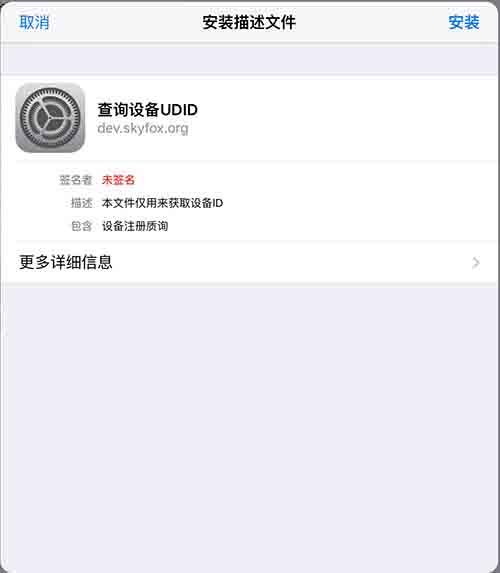
html>- 2、引导用户安装证书如下:
- 3、服务器接收数据的URL文件;
uu.PHP$data = file_get_contents('php://input');
//file_put_contents("data.txt", $data); header('HTTP/1.1 301 Moved Permanently');  //这里一定要301跳转,否则设备安装会提示"无效的描述文件"
header("Location: http://192.168.0.215/web/index.php?udid=".rawurlencode($data));
?>
再附一份解析这个data取出UDID值的php
$data = file_get_contents('php://input');$plistBegin   = ';
$plistEnd   = '';$pos1 = strpos($data, $plistBegin);
$pos2 = strpos($data, $plistEnd);$data2 = substr ($data,$pos1,$pos2-$pos1);$xml = xml_parser_create();xml_parse_into_struct($xml, $data2, $vs);
xml_parser_free($xml);$UDID = "";
$CHALLENGE = "";
$DEVICE_NAME = "";
$DEVICE_PRODUCT = "";
$DEVICE_VERSION = "";
$iterator = 0;$arrayCleaned = array();foreach($vs as $v){if($v['level'] == 3 && $v['type'] == 'complete'){$arrayCleaned[]= $v;}
$iterator++;
}$data = "";$iterator = 0;foreach($arrayCleaned as $elem){$data .= "\n==".$elem['tag']." -> ".$elem['value']."
";switch ($elem['value']) {case "CHALLENGE":$CHALLENGE = $arrayCleaned[$iterator+1]['value'];break;case "DEVICE_NAME":$DEVICE_NAME = $arrayCleaned[$iterator+1]['value'];break;case "PRODUCT":$DEVICE_PRODUCT = $arrayCleaned[$iterator+1]['value'];break;case "UDID":$UDID = $arrayCleaned[$iterator+1]['value'];break;case "VERSION":$DEVICE_VERSION = $arrayCleaned[$iterator+1]['value'];break;                       }$iterator++;
}$params = "UDID=".$UDID."&CHALLENGE=".$CHALLENGE."&DEVICE_NAME=".$DEVICE_NAME."&DEVICE_PRODUCT=".$DEVICE_PRODUCT."&DEVICE_VERSION=".$DEVICE_VERSION;// enrollment is a directory
header('Location: http://192.168.0.215/web?'.rawurlencode($params));
?>
值得注意的是重定向一定要使用301重定向,有些重定向默认是302重定向,这样就会导致安装失败,设备安装会提示”无效的描述文件
- 4、当用户设备完成数据的手机后,返回提示给客户端用户;下面是苹果传来的数据的例子
<plist version="1.0"><dict><key>IMEIkey><string>12 123456 123456 7string><key>PRODUCTkey><string>iPhone8,1string><key>UDIDkey><string>b59769e6c28b73b1195009d4b21cXXXXXXXXXXXXstring><key>VERSIONkey><string>15B206string>dict>plist>- 5,签名也像上面那样对它进行签名就行
openssl smime -sign -in udid.mobileconfig -out udidsigned.mobileconfig -signer 2_aaa.com.crt -inkey 1.key -certfile 1_root_bundle.pem -outform der -nodetach签名方法参考我上一篇
本文来自互联网用户投稿,文章观点仅代表作者本人,不代表本站立场,不承担相关法律责任。如若转载,请注明出处。 如若内容造成侵权/违法违规/事实不符,请点击【内容举报】进行投诉反馈!