iOS 全局悬浮按钮
现在有很多app都做这个全局按钮
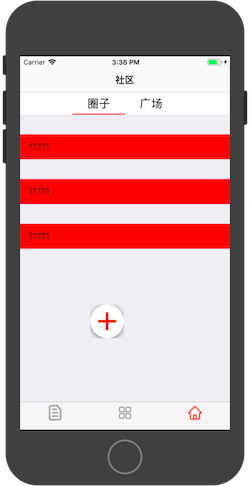

如上面两张图的效果,完成一个全局悬浮的按钮,而且不会划出屏幕外
既然是全局,那写在AppDelegate中
UIWindow是一种特殊的UIView,它相当于一块画框,而UIView相当于里面的画布。通常在一个app中只会有一个UIWindow。
AppDelegate.h
@interface AppDelegate : UIResponder @property (strong, nonatomic) UIWindow *window;
@property (strong, nonatomic) UIButton *button;@end
AppDelegate.m
先button懒加载
- (UIButton*)button {if (!_button) {_button = [UIButton buttonWithType:UIButtonTypeCustom];_button.frame = CGRectMake(258, 450, 60, 60);//初始在屏幕上的位置[_button setImage:[UIImage imageNamed:@"bcl_btn_whole"] forState:UIControlStateNormal];}return _button;
}
然后将其加在window上,设置手势
-(void)createButton{if (!_button) {_window = [[UIApplication sharedApplication] keyWindow];_window.backgroundColor = [UIColor whiteColor];[_window addSubview:self.button];UIPanGestureRecognizer *pan = [[UIPanGestureRecognizer alloc]initWithTarget:self action:@selector(locationChange:)];pan.delaysTouchesBegan = YES;[_button addGestureRecognizer:pan];}
}
这个呢是为了开机启动两秒后创建全局button
- (BOOL)application:(UIApplication *)application didFinishLaunchingWithOptions:(NSDictionary *)launchOptions {[self performSelector:@selector(createButton) withObject:nil afterDelay:2];
}
最关键的就是设置button不要划出屏幕外
以下四个else if分别为屏幕的上下左右
设置一个标记值isOVer
如果超出屏幕范围,纠正回来
-(void)locationChange:(UIPanGestureRecognizer*)p{CGFloat HEIGHT=_button.frame.size.height;CGFloat WIDTH=_button.frame.size.width;BOOL isOver = NO;CGPoint panPoint = [p locationInView:[UIApplication sharedApplication].windows[0]];CGRect frame = CGRectMake(panPoint.x, panPoint.y, HEIGHT, WIDTH);NSLog(@"%f--panPoint.x-%f-panPoint.y-", panPoint.x, panPoint.y);if(p.state == UIGestureRecognizerStateChanged){_button.center = CGPointMake(panPoint.x, panPoint.y);}else if(p.state == UIGestureRecognizerStateEnded){if (panPoint.x + WIDTH > KScreenWidth) {frame.origin.x = KScreenWidth - WIDTH;isOver = YES;} else if (panPoint.y + HEIGHT > KScreenHeight) {frame.origin.y = KScreenHeight - HEIGHT;isOver = YES;} else if(panPoint.x - WIDTH / 2< 0) {frame.origin.x = 0;isOver = YES;} else if(panPoint.y - HEIGHT / 2 < 0) {frame.origin.y = 0;isOver = YES;}if (isOver) {[UIView animateWithDuration:0.3 animations:^{self.button.frame = frame;}];}
本文来自互联网用户投稿,文章观点仅代表作者本人,不代表本站立场,不承担相关法律责任。如若转载,请注明出处。 如若内容造成侵权/违法违规/事实不符,请点击【内容举报】进行投诉反馈!