OBS源码分析二视频输出和画面显示流程
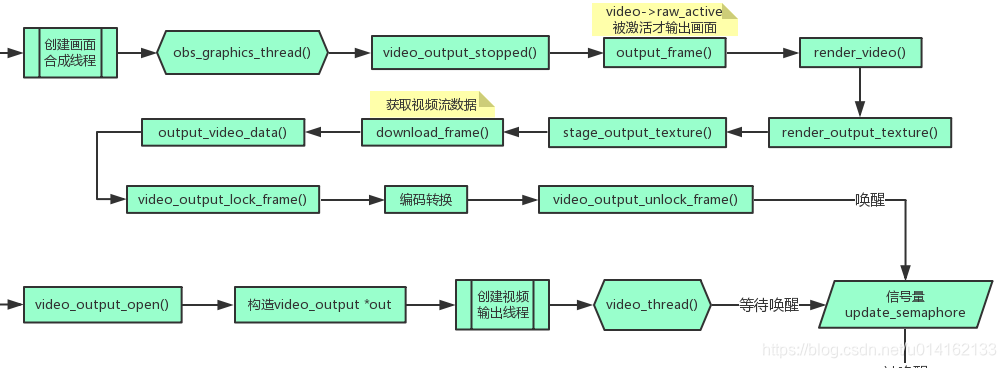
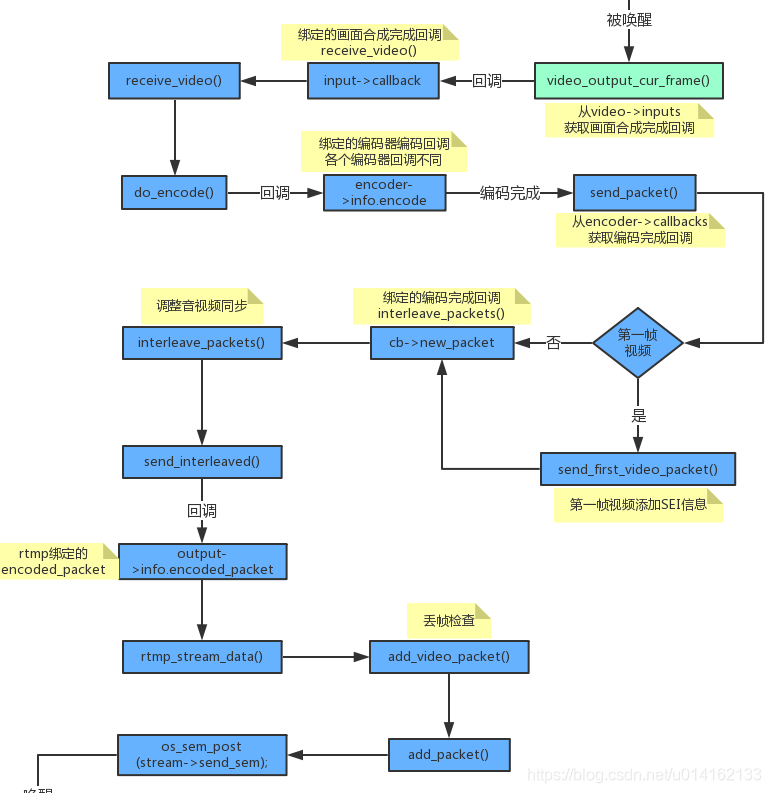
1.第一步先看视频显示和视频编码后输出流程图
2.第二步视频显示代码详细步骤说明
在初始化视频时,启动了一个线程函数obs_video_thread(),所有画面源的合成,画面显示以及视频输出都在这个函数里触发。
void *obs_video_thread(void *param)
{uint64_t last_time = 0;uint64_t interval = video_output_get_frame_time(obs->video.video);uint64_t frame_time_total_ns = 0;uint64_t fps_total_ns = 0;uint32_t fps_total_frames = 0;obs->video.video_time = os_gettime_ns();os_set_thread_name("obs-core: graphics thread");const char *video_thread_name =profile_store_name(obs_get_profiler_name_store(),"arcvideo_director_video_thread(%g"NBSP"ms)", interval / 1000000.);profile_register_root(video_thread_name, interval);while (!video_output_stopped(obs->video.video)) {uint64_t frame_start = os_gettime_ns();uint64_t frame_time_ns;profile_start(video_thread_name);profile_start(tick_sources_name);last_time = tick_sources(obs->video.video_time, last_time);profile_end(tick_sources_name);profile_start(render_displays_name);render_displays();profile_end(render_displays_name);profile_start(output_frame_name);output_frame(&obs->video.main_track, obs_get_video_context(), obs_get_video());for (int i = 0; i < MAX_AUX_TRACK_CHANNELS; i++) {output_frame(&obs->video.aux_track[i], obs_get_aux_video_context(), obs_get_aux_video(i));}profile_end(output_frame_name);frame_time_ns = os_gettime_ns() - frame_start;profile_end(video_thread_name);profile_reenable_thread();video_sleep(&obs->video, &obs->video.video_time, interval);frame_time_total_ns += frame_time_ns;fps_total_ns += (obs->video.video_time - last_time);fps_total_frames++;if (fps_total_ns >= 1000000000ULL) {obs->video.video_fps = (double)fps_total_frames /((double)fps_total_ns / 1000000000.0);obs->video.video_avg_frame_time_ns =frame_time_total_ns / (uint64_t)fps_total_frames;frame_time_total_ns = 0;fps_total_ns = 0;fps_total_frames = 0;}}UNUSED_PARAMETER(param);return NULL;
}
tick_sources()遍历每个sources;
static uint64_t tick_sources(uint64_t cur_time, uint64_t last_time)
{struct obs_core_data *data = &obs->data;struct obs_source    *source;uint64_t             delta_time;float                seconds;if (!last_time)last_time = cur_time -video_output_get_frame_time(obs->video.video);delta_time = cur_time - last_time;seconds = (float)((double)delta_time / 1000000000.0);pthread_mutex_lock(&data->sources_mutex);/* call the tick function of each source */source = data->first_source;while (source) {obs_source_video_tick(source, seconds);source = (struct obs_source*)source->context.next;}pthread_mutex_unlock(&data->sources_mutex);return cur_time;
}
调用render_displays()将当前视频画面显示在窗口中;
/* in obs-display.c */
extern void render_display(struct obs_display *display);static inline void render_displays(void)
{struct obs_display *display;if (!obs->data.valid)return;gs_enter_context(obs->video.graphics);/* render extra displays/swaps */pthread_mutex_lock(&obs->data.displays_mutex);display = obs->data.first_display;while (display) {render_display(display);display = display->next;}pthread_mutex_unlock(&obs->data.displays_mutex);gs_leave_context();
}
output_frame()输出当前视频帧;
static inline void output_frame(struct obs_video_track* track, struct video_c_t *context, struct video_d_t *data)
{struct obs_core_video *video = &obs->video;int cur_texture = track->cur_texture;int prev_texture = cur_texture == 0 ? NUM_TEXTURES-1 : cur_texture-1;struct video_data frame;bool frame_ready;memset(&frame, 0, sizeof(struct video_data));profile_start(output_frame_gs_context_name);gs_enter_context(video->graphics);profile_start(output_frame_render_video_name);render_video(video, track, cur_texture, prev_texture);profile_end(output_frame_render_video_name);//render_video_ex(video, cur_texture, prev_texture);profile_start(output_frame_download_frame_name);frame_ready = download_frame(video, track, prev_texture, &frame);profile_end(output_frame_download_frame_name);profile_start(output_frame_gs_flush_name);gs_flush();profile_end(output_frame_gs_flush_name);gs_leave_context();profile_end(output_frame_gs_context_name);if (frame_ready) {struct obs_vframe_info vframe_info;circlebuf_pop_front(&track->vframe_info_buffer, &vframe_info,sizeof(vframe_info));frame.timestamp = vframe_info.timestamp;profile_start(output_frame_output_video_data_name);output_video_data(video, context, data, &frame, vframe_info.count, track == &video->main_track || track->is_pgm);profile_end(output_frame_output_video_data_name);}if (++track->cur_texture == NUM_TEXTURES)track->cur_texture = 0;
}调用 render_video(),渲染视频数据,在开启推流和录像功能时,调用render_output_texture(),渲染输出帧,并保存在video->convert_textures和video->output_textures中;
调用stage_output_texture将画面保存到video->copy_surfaces;
再调用download_frme,从video->copy_surfaces中拷贝出当前视频帧数据到video_data *frame;
这样就拿到了需要输出的视频画面;
static inline void output_video_data(struct obs_core_video *video, struct video_c_t *video_context, struct video_d_t *video_data,struct video_data *input_frame, int count, bool enableFtb)
{const struct video_output_info *info;struct video_frame output_frame;bool locked;info = video_output_get_info(video_context);locked = video_output_lock_frame(video_data, &output_frame, count,input_frame->timestamp);if (locked) {/*modified by yshe end*/if (video->forceblack && enableFtb) {//fill the output_frame to black
//			memset(output_frame.data[0], 0,output_frame.linesize[0]*info->height*3/2);video_frame_setblack(&output_frame, info->format, info->height);}else{if (video->gpu_conversion) {set_gpu_converted_data(video, &output_frame,input_frame, info);}else if (format_is_yuv(info->format)) {convert_frame(&output_frame, input_frame, info);}else {copy_rgbx_frame(&output_frame, input_frame, info);}}video_output_unlock_frame(video_data);}
}
将frame传入output_video_data(),在该函数中,调用video_output_lock_frame()函数,拷贝input->cache[last_add]给output_frame,需要注意的是,这个拷贝是将cache[]中的指针地址拷贝过来了,通过格式转换函数例如copy_rgb_frame,将input_frame中的数据内容拷贝到output_frame,实际上也就是将视频内容拷贝到了input->cache[last_add]中,再调用video_output_unlock_frame()函数,唤醒信号量video->update_semaphore,通知线程video_thread视频输出数据已就绪,执行数据输出、编码、rtmp推流。
最后再调用render_displays()将当前视频画面显示在窗口中,sleep直到下一帧视频数据时间戳;
3.第二步视频编码后输出详细步骤说明
在初始化视频时,启动了一个线程函数video_thread(),这个函数一直等待视频帧数据准备就绪的信号唤醒;
static void *video_thread(void *param)
{struct video_output *video = param;os_set_thread_name("video-io: video thread");const char *video_thread_name =profile_store_name(obs_get_profiler_name_store(),"video_thread(%s)", video->context.info.name);while (os_sem_wait(video->data.update_semaphore) == 0) {if (video->context.stop)break;profile_start(video_thread_name);while (!video->context.stop && !video_output_cur_frame(&video->data)) {video->data.total_frames++;}video->data.total_frames++;profile_end(video_thread_name);profile_reenable_thread();}return NULL;
}
在输出的一帧视频画面合成后唤醒该信号,在video_output_unlock_frame()里触发该信号
void video_output_unlock_frame(video_d_t *video)
{if (!video) return;pthread_mutex_lock(&video->data_mutex);video->available_frames--;os_sem_post(video->update_semaphore);pthread_mutex_unlock(&video->data_mutex);
}
等到信号后执行video_output_cur_frame函数,获取视频缓存中第一帧,从video->inputs中获取输出类型调用编码器绑定的回调函数input->callback,receive_video(),进行视频数据编码,而video->update_semaphore 信号量是在所有画面合成完成后被唤醒;
video->inputs中保存的是输出类型,包括推流和录像,后面将会说到是如何添加的。
static inline bool video_output_cur_frame(struct video_output_data *video)
{struct cached_frame_info *frame_info;bool complete;bool skipped;/* -------------------------------- */pthread_mutex_lock(&video->data_mutex);frame_info = &video->cache[video->first_added];pthread_mutex_unlock(&video->data_mutex);/* -------------------------------- */pthread_mutex_lock(&video->input_mutex);for (size_t i = 0; i < video->inputs.num; i++) {struct video_input *input = video->inputs.array+i;struct video_data frame = frame_info->frame;if (scale_video_output(input, &frame))input->callback(input->param, &frame);}pthread_mutex_unlock(&video->input_mutex);/* -------------------------------- */pthread_mutex_lock(&video->data_mutex);frame_info->frame.timestamp += video->frame_time;complete = --frame_info->count == 0;skipped = frame_info->skipped > 0;if (complete) {if (++video->first_added == video->cache_size)video->first_added = 0;if (++video->available_frames == video->cache_size)video->last_added = video->first_added;} else if (skipped) {--frame_info->skipped;++video->skipped_frames;}pthread_mutex_unlock(&video->data_mutex);/* -------------------------------- */return complete;
}
在receive_video中调用do_encode()进行编码;
static const char *receive_video_name = "receive_video";
static void receive_video(void *param, struct video_data *frame)
{profile_start(receive_video_name);struct obs_encoder    *encoder  = param;struct obs_encoder    *pair     = encoder->paired_encoder;struct encoder_frame  enc_frame;if (!encoder->first_received && pair) {if (!pair->first_received ||pair->first_raw_ts > frame->timestamp) {goto wait_for_audio;}}//memset(&enc_frame, 0, sizeof(struct encoder_frame));for (size_t i = 0; i < MAX_AV_PLANES; i++) {enc_frame.data[i]     = frame->data[i];enc_frame.linesize[i] = frame->linesize[i];}if (!encoder->start_ts)encoder->start_ts = frame->timestamp;enc_frame.frames = 1;enc_frame.pts    = encoder->cur_pts;do_encode(encoder, &enc_frame);encoder->cur_pts += encoder->timebase_num;wait_for_audio:profile_end(receive_video_name);
}
在do_encode中根据不同的编码器名称进行编码回调,各个编码器模块在程序开始加载的时候会进行注册,编码完成后调用绑定的编码完成回调。
static const char *do_encode_name = "do_encode";
static inline void do_encode(struct obs_encoder *encoder,struct encoder_frame *frame)
{profile_start(do_encode_name);if (!encoder->profile_encoder_encode_name)encoder->profile_encoder_encode_name =profile_store_name(obs_get_profiler_name_store(),"encode(%s)", encoder->context.name);struct encoder_packet pkt = {0};bool received = false;bool success;pkt.timebase_num = encoder->timebase_num;pkt.timebase_den = encoder->timebase_den;pkt.encoder = encoder;profile_start(encoder->profile_encoder_encode_name);success = encoder->info.encode(encoder->context.data, frame, &pkt,&received);profile_end(encoder->profile_encoder_encode_name);if (!success) {pkt.error_code = 1;pthread_mutex_lock(&encoder->callbacks_mutex);for (size_t i = encoder->callbacks.num; i > 0; i--) {struct encoder_callback *cb;cb = encoder->callbacks.array + (i - 1);send_packet(encoder, cb, &pkt);}pthread_mutex_unlock(&encoder->callbacks_mutex);//full_stop(encoder);blog(LOG_INFO, "Error encoding with encoder '%s'",encoder->context.name);goto error;}if (received) {if (!encoder->first_received) {encoder->offset_usec = packet_dts_usec(&pkt);encoder->first_received = true;}/* we use system time here to ensure sync with other encoders,* you do not want to use relative timestamps here */pkt.dts_usec = encoder->start_ts / 1000 +packet_dts_usec(&pkt) - encoder->offset_usec;pkt.sys_dts_usec = pkt.dts_usec;pthread_mutex_lock(&encoder->callbacks_mutex);for (size_t i = encoder->callbacks.num; i > 0; i--) {struct encoder_callback *cb;cb = encoder->callbacks.array+(i-1);send_packet(encoder, cb, &pkt);}pthread_mutex_unlock(&encoder->callbacks_mutex);}error:profile_end(do_encode_name);
}
通过回调得到编码后的数据,然后rtmp对数据封装推流输出,下一篇介绍详细的推流步骤。
本文来自互联网用户投稿,文章观点仅代表作者本人,不代表本站立场,不承担相关法律责任。如若转载,请注明出处。 如若内容造成侵权/违法违规/事实不符,请点击【内容举报】进行投诉反馈!