008B-tracert,tracertroute,icmp 重定向
ICMP报文:
ICMP重定向:在同一个局域网中,网关和数据的下一跳在同一个网段中,从该接口收到的数据要从该接再发送回下去
008A-ICMP
| 类型Type | 代码Code | 描述 |
|---|---|---|
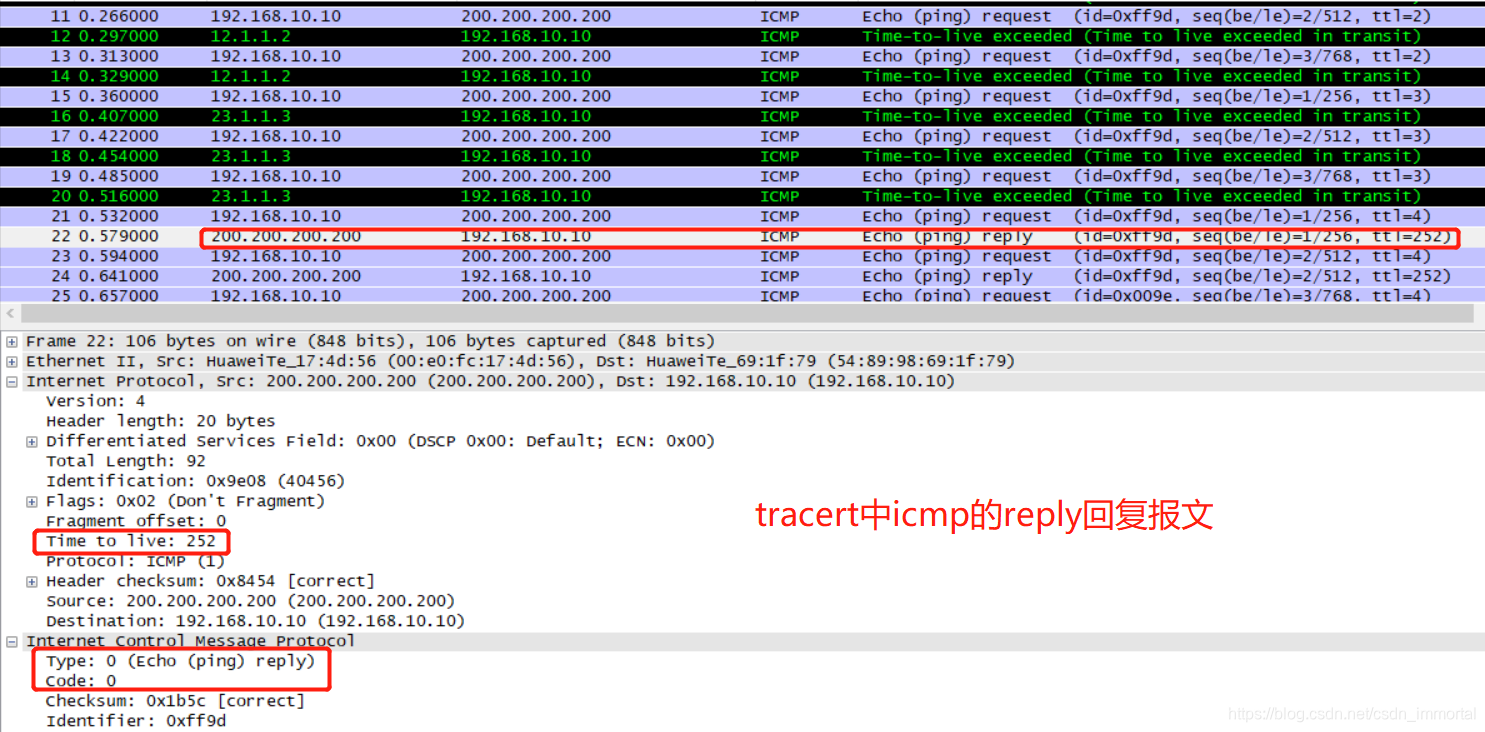
| 0 | 0 | 回显应答(ping应答) |
| 3 | 0 | 网络不可达 |
| 3 | 1 | 主机不可达 |
| 3 | 2 | 协议不可达 |
| 3 | 3 | 端口不可达 |
| 3 | 4 | 需要进行分片但设置不分片比特 |
| 3 | 5 | 源站选路失败 |
| 3 | 6 | 目的网络不认识 |
| 3 | 7 | 目的主机不认识 |
| 3 | 8 | 源主机被隔离(作废不用) |
| 3 | 9 | 目的网络被强制禁止 |
| 3 | 10 | 目的主机被强制禁止 |
| 3 | 11 | 由于TOS,网络不可达 |
| 3 | 12 | 由于TOS,主机不可达 |
| 3 | 13 | 由于过滤,通信被强制禁止 |
| 3 | 14 | 主机越权 |
| 3 | 15 | 优先权中止生效 |
| 4 | 0 | 源端被关闭 |
| 5 | 0 | 对网络重定向 |
| 5 | 1 | 对主机重定向 |
| 5 | 2 | 对服务类型和网络重定向 |
| 5 | 3 | 对服务类型和主机重定向 |
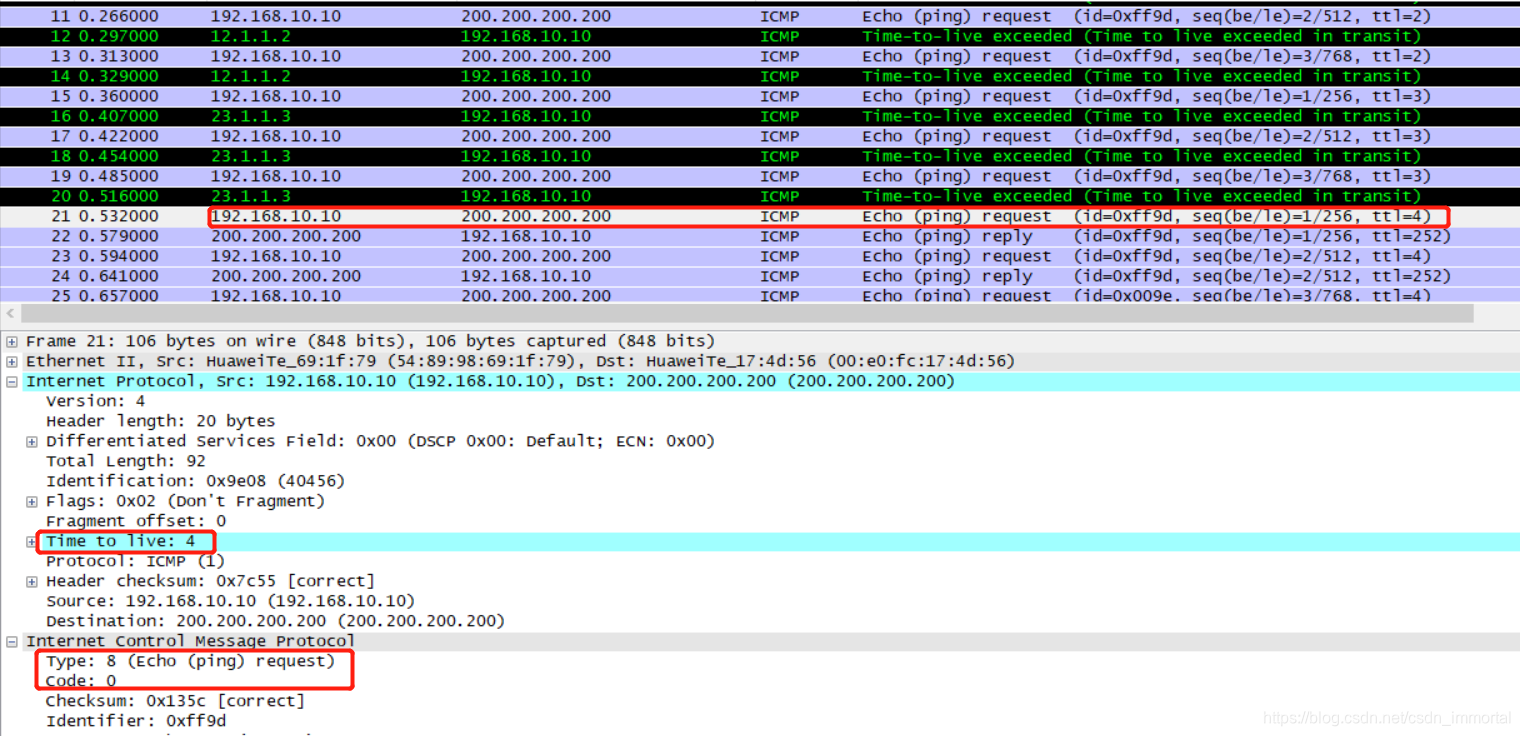
| 8 | 0 | 请求回显(ping请求) |
| 9 | 0 | 路由器通告 |
| 10 | 0 | 路由器请求告 |
| 11 | 0 | 传输期间生存时间为0 |
| 11 | 1 | 在数据报组装期间生存时间为0 |
| 12 | 0 | 坏的IP首部 |
| 12 | 1 | 缺少必须的选项 |
| 13 | 0 | 时间戳请求(作废不用) |
| 14 | 0 | 时间戳应答(作废不用) |
| 15 | 0 | 信息请求(作废不用) |
| 16 | 0 | 信息应答(作废不用) |
| 17 | 0 | 地址掩码请求 |
| 18 | 0 | 地址掩码应答 |
tracert和traceroute
traceroute是Linux场景
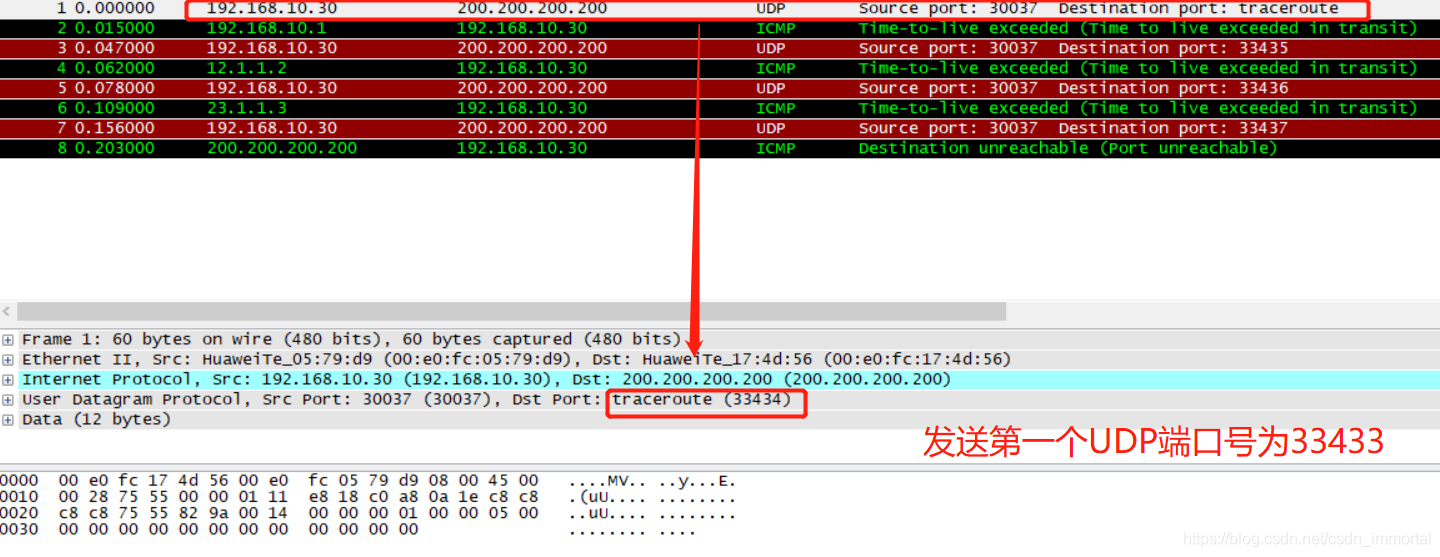
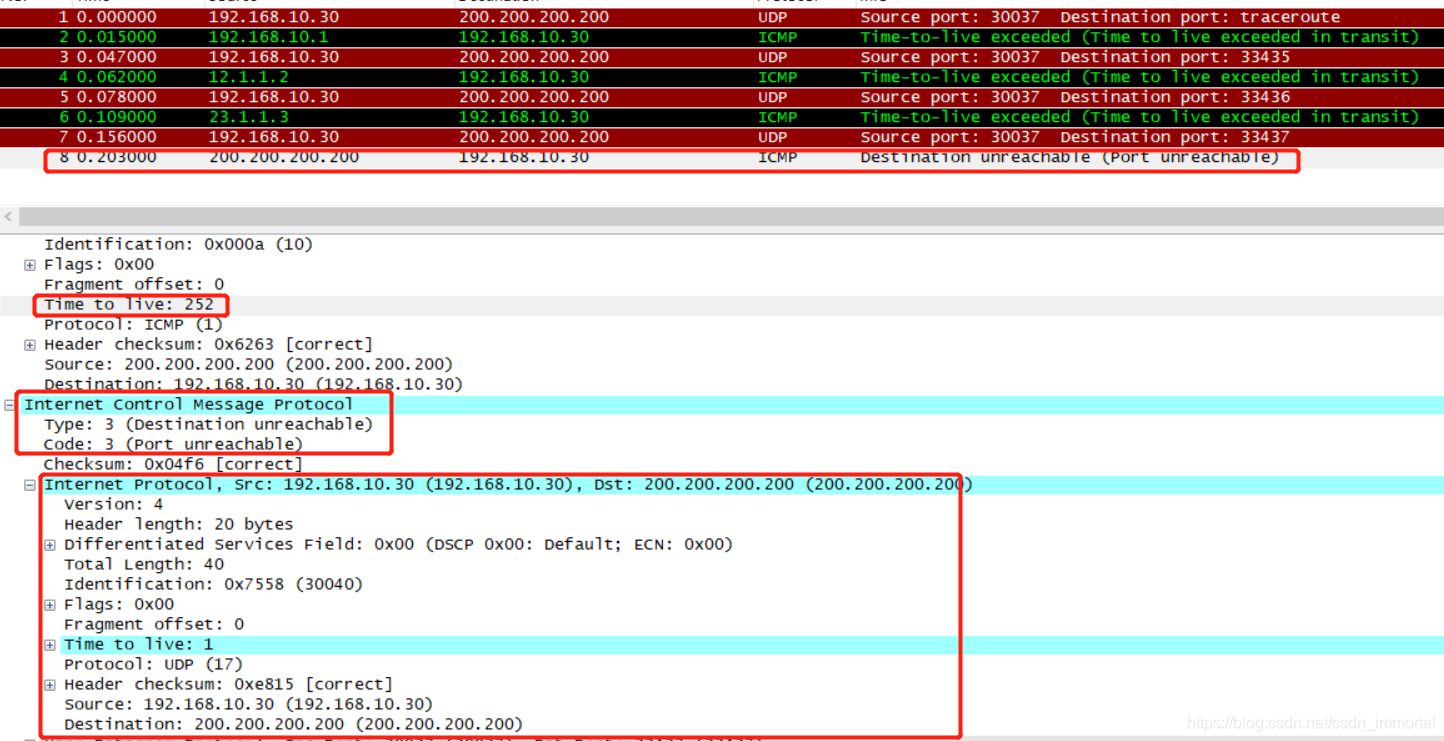
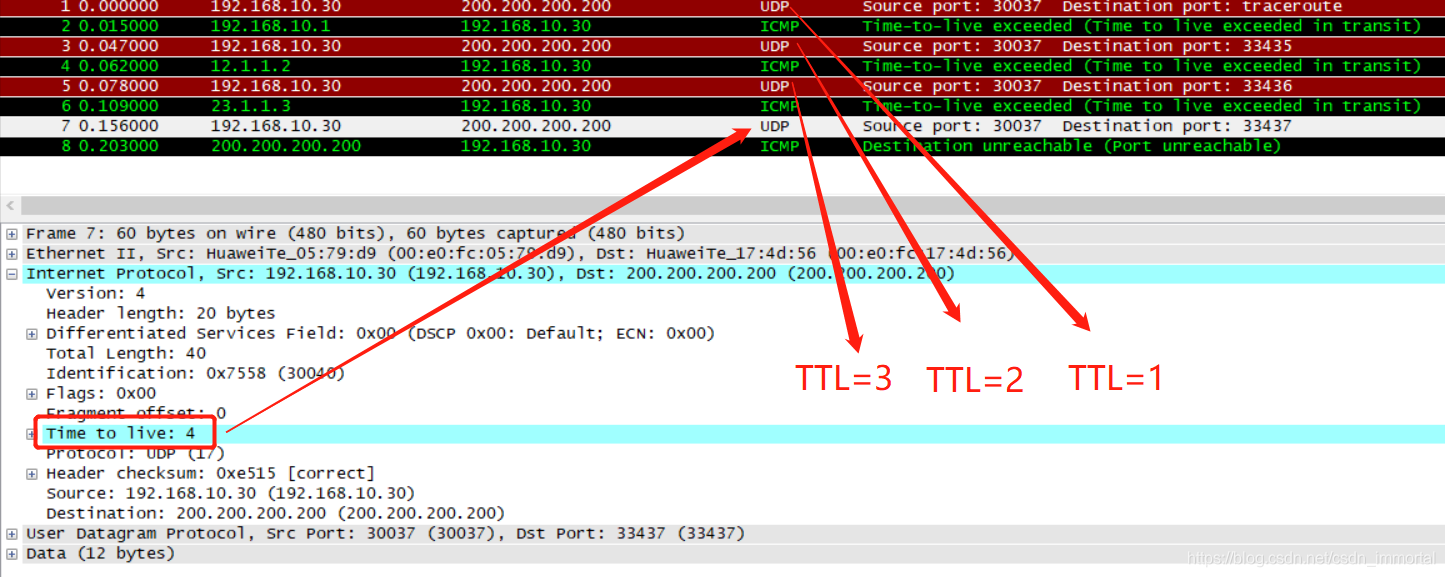
发送的是UDP报文 端口号33434 回应ICMP超时(11 0) 目的设备收到后,回应3 3 目的端口不可达的ICMP 报文
tracert是windows场景
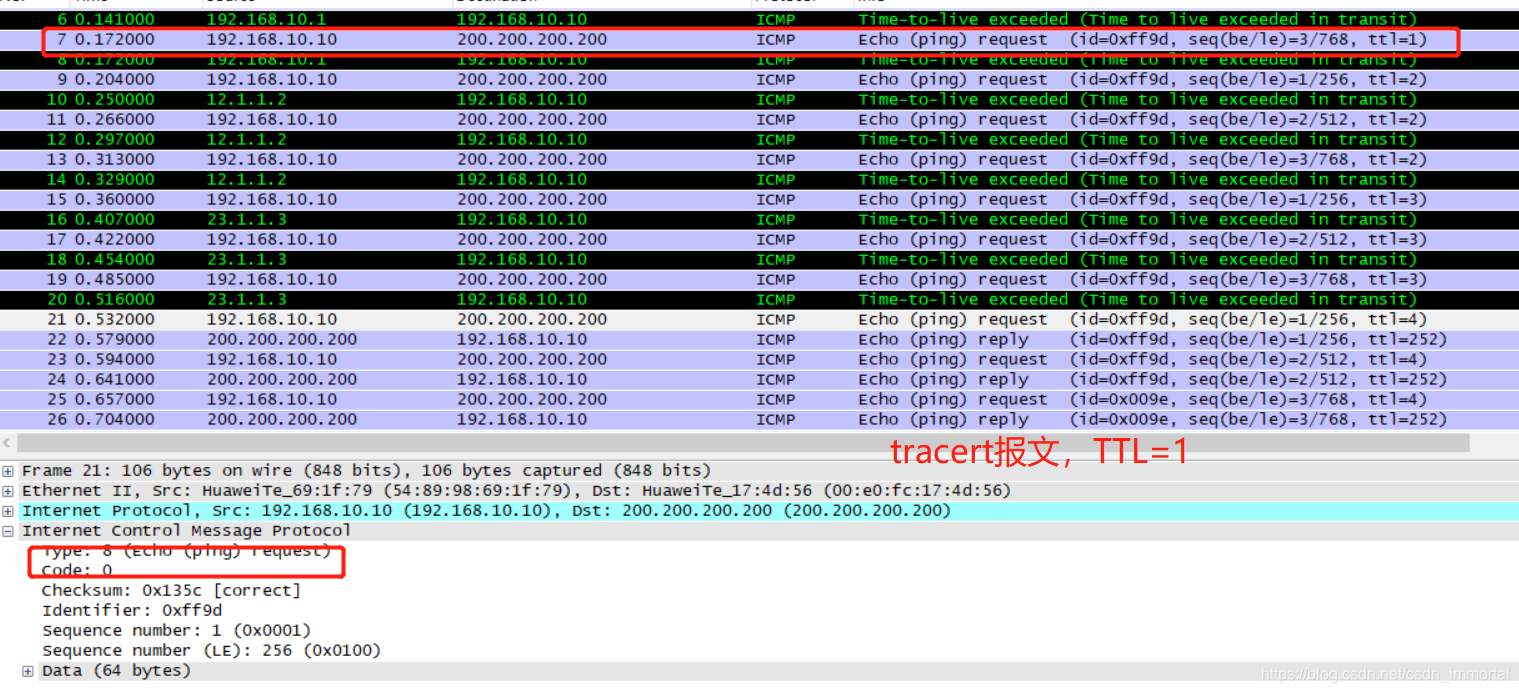
发送是ICMP request报文 (8 0) 回应ICMP 超时(11 0) 目的设备收到后,回应icmp reply报文 (0 0)回显应答(ping应答)
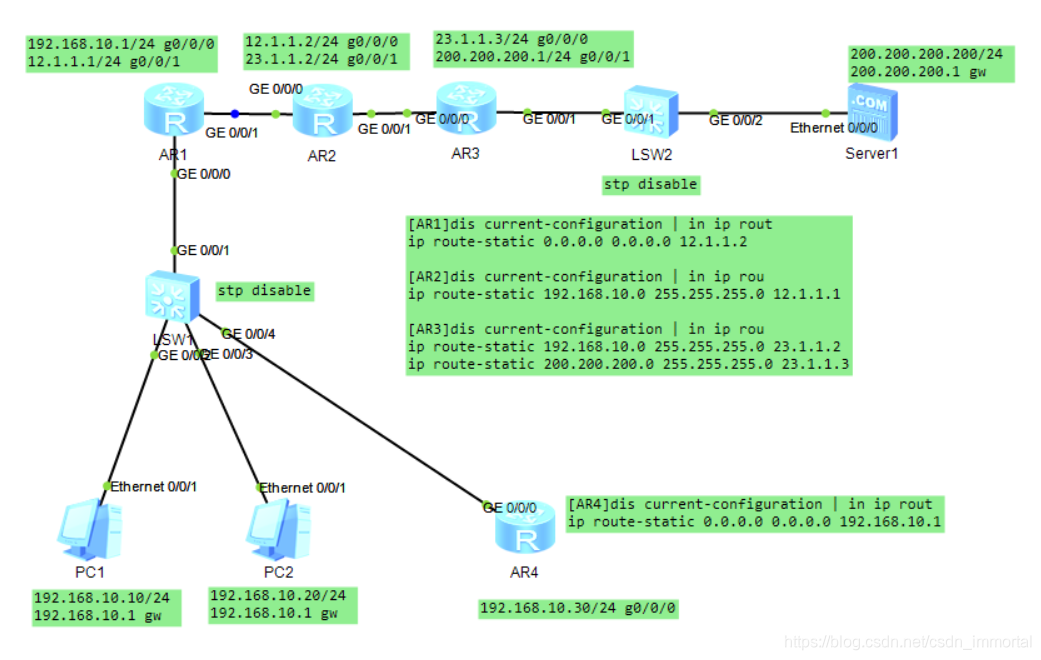
#traceroute的Linux场景
<AR4>tracert ?STRING<1-255>  IP address or hostname of a remote system-a             Set source IP address, the default is the IP address of the    output interface-f             First time to live, the default is 1-m             Max time to live, the default is 30-name          Display the host name of the router on each hop-p             Destination UDP port number, the default is 33434-q             Number of probe packet, the default is 3-s             -v             Display the MPLS label information carried in the ICMP Time    Exceed message. By default, it is only to display the path     information carried in the ICMP Time Exceed message and ICMP   Port Unreachable message without MPLS label information-vpn-instance  Specify VPN-Instance of MPLS VPN-w             Timeout in milliseconds to wait for each reply, the default is 5000msipv6           IPv6 Protocollsp            LSP traceroutevc             PWE3 traceroute<AR4>tracert -q 1 200.200.200.200traceroute to  200.200.200.200(200.200.200.2
00), max hops: 30 ,packet length: 40,press CTRL_C to break 1 192.168.10.1 50 ms 2 12.1.1.2 50 ms 3 23.1.1.3 60 ms 4 200.200.200.200 80 ms
#tracert的windows场景
PC1>tracert 200.200.200.200traceroute to 200.200.200.200, 8 hops max
(ICMP), press Ctrl+C to stop1  192.168.10.1   78 ms  47 ms  47 ms2  12.1.1.2   62 ms  47 ms  47 ms3  23.1.1.3   63 ms  62 ms  47 ms4  200.200.200.200   63 ms  62 ms  78 ms
本文来自互联网用户投稿,文章观点仅代表作者本人,不代表本站立场,不承担相关法律责任。如若转载,请注明出处。 如若内容造成侵权/违法违规/事实不符,请点击【内容举报】进行投诉反馈!