NIPT样本分析题目
我自己的电脑是win10系统1803版本,如果是其他版本系统运行的话有可能会出现系统库缺失等问题,所以最好自己运行一遍。
题目1:
step1: 安装R程序:
下载地址:https://cloud.r-project.org/bin/windows/base/R-3.5.1-win.exe
记住安装位置,默认安装位置C:\Program Files\R\R-3.5.1
step2:打开终端,
win+R键,输入cmd,确定,进入终端
step3:打开R程序(下面是默认安装位置的进入方法)
在终端输入
cd C:\Program Files\R\R-3.5.1
cd bin
R.exe
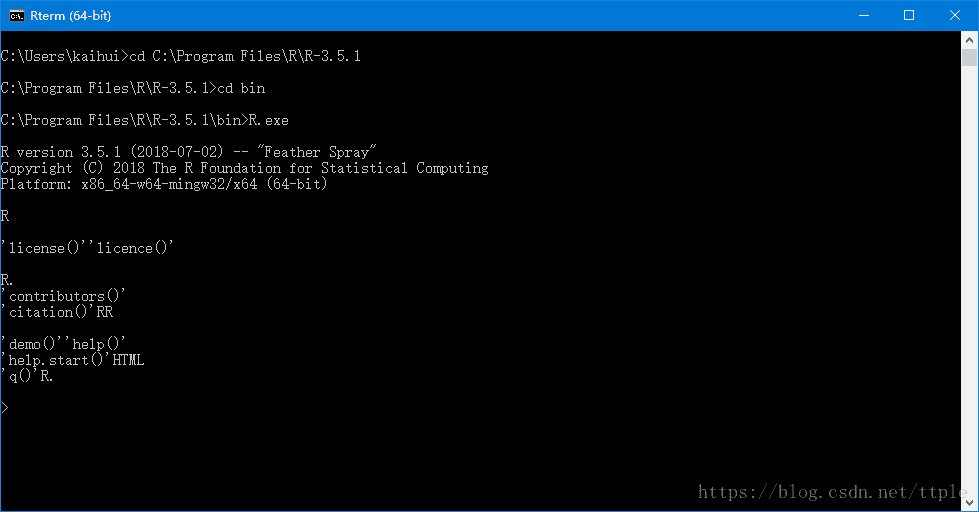
step4:运行算法脚本
把NIPT算法压缩包解压到c盘根目录下
在终端输入
setwd(“c:/”)
source(“test.R”)
等一会,程序运行完,就会在c盘根目录生成三个文件,就是所求的结果
example.bf.txt
example.zscore.txt
example.hh.txt
题目2:
step1: 使用管理员模式打开R程序(默认位置是C:\Program Files\R\R-3.5.1\bin\R.exe 右键点击R.exe,以管理员模式运行)
step2:在C盘根目录新建一个txt文件,改名为test2.R,用记事本打开,写入以下内容并保存。
library(reshape2);
library(ggplot2);
#数据读入
data <- read.table("example.bf.txt", sep=";", header=T, row.names=1, quote="");
data<-as.matrix(data);
data<-as.data.frame(data);
#is.matrix(data);# 增加行的名字
rownames(data)<- c("chr1","chr2","chr3","chr4","chr5","chr6","chr7","chr8","chr9","chr10","chr11","chr12","chr13","chr14","chr15","chr16","chr17","chr18","chr19","chr20","chr21","chr22")# 增加列的名字
colnames(data) <- paste("ID1","ID2","ID3","ID4","ID5","ID6","ID7","ID8","ID9","ID10","ID11","ID12","ID13","ID14","ID15","ID16","ID17","ID18","ID19","ID20")#增加一列ID列,保存行名字
data$ID <- rownames(data)# melt:把正常矩阵转换为长表格模式的函数。工作原理是把全部的非id列的数值列转为1列,命名为value;所有字符列转为variable列。
# id.vars 列用于指定哪些列为id列;这些列不会被merge,会保留为完整一列。
data_m <- melt(data, id.vars=c("ID"))
head(data_m)p <- ggplot(data_m, aes(x=variable,y=ID)) + xlab("samples") + theme_bw() + theme(panel.grid.major = element_blank()) + theme(legend.key=element_blank())  + theme(axis.text.x=element_text(angle=45,hjust=1, vjust=1)) + theme(legend.position="top") +  geom_tile(aes(fill=value)) + scale_fill_gradient(low = "white", high = "red")# 可以跟输出文件不同的后缀,以获得不同的输出格式
# colormode支持srgb (屏幕)和cmyk (打印,部分杂志需要,看上去有点褪色的感觉)格式
ggsave(p, filename="heatmap.pdf", width=10, height=15, units=c("cm"),colormodel="srgb")
step3: 在打开R.exe后的终端上输入以下内容:
setwd("c:/")
source("test2.R")
等程序运行完成后就可以在c盘根目录下看到输出的图片,就是所求bf的结果
step4:
将第二步骤中代码段第四行的
data <- read.table("example.bf.txt", sep=";", header=T, row.names=1, quote="");中的example.bf.txt分别改成
example.zscore.txt
example.hh.txt
,重复step2,step3就可以得到zscore,hh的结果
题目3:
#include参考链接:https://www.cnblogs.com/freescience/p/7421056.html
本文来自互联网用户投稿,文章观点仅代表作者本人,不代表本站立场,不承担相关法律责任。如若转载,请注明出处。 如若内容造成侵权/违法违规/事实不符,请点击【内容举报】进行投诉反馈!