JavaFX Connect4(四子棋)
Connect 4
四子棋的棋盘共有6行7列,棋盘是垂直摆放,每名玩者有21只圆形棋子,以不同颜色辨别。两名玩者轮流每次把一只棋子放进棋盘任何未全满的一行中,棋子会占据一行中最底未被占据的位置。两名玩者任何一方先以四只棋子在横,竖或斜方向联成一条直线,便可获胜,游戏亦结束。假如棋盘已完全被棋子填满,但仍未有任何一方成功把四只棋子成一直线,则成为和局。

实体
Core类
- 四子棋实体(二维数组)
- 落子(每次落子都会判断胜负)
- 判断胜负
public class Core {public int[][] core;//值为0不可操作;值为-1可操作;值为1红;值为2黑public int player;public Core(int p){core= new int[6][7];//六行七列initCore();player=p;}public void initCore(){for(int col=0;col<7;col++){core[5][col]=-1;//最后一行置-1}}/***落子* @param col*/public int drop(int col){int result=0;for(int row=5;row>=0;row--){if(core[row][col]==-1){core[row][col]=player;result=checkVictory(row,col);core[row-1][col]=-1;//这一列的上一行置为-1if(player==1) player++;else player--;break;//drop好了就不用再继续了}}return result;}/***检查是否胜利* @param row* @param col* @return 胜利返回player,没有胜利返回0*/public int checkVictory(int row,int col){int vertical=0;//纵向判断for(int r=row-3;r<row+4;r++){if(r<0||r>=6) continue;if(core[r][col]==player) vertical++;else vertical=0;if(vertical==4) return player;}int horizonal=0;//横向判断for(int c=col-3;c<col+4;c++){if(c<0||c>=7) continue;if(core[row][c]==player)horizonal++;else horizonal=0;if(horizonal==4) return player;}int diagonal1=0;//左上到右下for(int r=row-3,c=col-3;r<row+4&&c<col+4;r++,c++){if(r<0||c<0||r>=6||c>=7) continue;if(core[r][c]==player) diagonal1++;else diagonal1=0;if(diagonal1==4) return player;}int diagonal2=0;//左下到右上for(int r=row+3,c=col-3;r>row-4&&c<col+4;r--,c++){if(r<0||c<0||r>=6||c>=7)continue;if(core[r][c]==player) diagonal2++;else diagonal2=0;if(diagonal2==4) return player;}return 0;}
}
视图
View类
- 继承自Pane类,包含四个布局:dropBox(HBox), board(Pane), vicText(VBox), toolBox(VBox)。
- 落子以后在board上画有颜色的disc
import javafx.event.ActionEvent;
import javafx.event.EventHandler;
import javafx.geometry.Insets;
import javafx.scene.control.Alert;
import javafx.scene.control.Button;
import javafx.scene.layout.Pane;
import javafx.scene.layout.HBox;
import javafx.scene.layout.VBox;
import javafx.scene.paint.Color;
import javafx.scene.shape.Circle;
import javafx.scene.text.Text;public class View extends Pane{private Core core;private Pane board=new Pane();private HBox dropBox= new HBox();private VBox vicText = new VBox();private VBox toolBox=new VBox();private int winner=0;public View(){core=new Core(1);board.setLayoutX(0);board.setLayoutY(30);dropBox.setLayoutX(0);dropBox.setLayoutY(0);dropBox.setSpacing(10);dropBox.setPadding(new Insets(10,10,10,10));vicText.setPadding(new Insets(10,10,10,10));vicText.setSpacing(5);vicText.setLayoutX(520);vicText.setLayoutY(30);toolBox.setSpacing(10);toolBox.setLayoutX(500);toolBox.setLayoutY(350);toolBox.setPadding(new Insets(10,10,10,10));drawPlainDisc();drawDropButton();drawToolButton();this.getChildren().addAll(board,dropBox,vicText,toolBox);}private void drawPlainDisc() {//画board上的圈圈for (int r = 0; r < 6; r++) {for (int c = 0; c < 7; c++) {Circle circle = new Circle();circle.setRadius(30);circle.setCenterY(10 * (r + 1) + 30 * (2 * r + 1));circle.setCenterX(10 * (c + 1) + 30 * (2 * c + 1));circle.setStroke(Color.BLACK);circle.setFill(Color.WHITE);board.getChildren().add(circle);}}}private void drawDropButton(){//画drop的buttonfor(int i=0;i<7;i++){Button btdrop=new Button("DROP");btdrop.setPrefSize(60,20);final int iCol=i;//当所在的方法的形参需要被内部类里面使用时,该形参必须为finalbtdrop.setOnAction(new EventHandler<ActionEvent>() {@Overridepublic void handle(ActionEvent event){for(int r=5;r>=0;r--){if(core.core[r][iCol]==-1) {drawDisc(r, iCol);winner=core.drop(iCol);break;}}//winner!=0的情况下,drawDisc(r,iCol)虽然调用了但是未显示。我不知道怎么回事QAQ;if(winner!=0){if(winner==1){Text redwins = new Text("Red Wins!");vicText.getChildren().add(redwins);}else if(winner==2){Text blackwins = new Text("Black Wins!");vicText.getChildren().add(blackwins);}board.getChildren().clear();drawPlainDisc();core=new Core(1);}}});dropBox.getChildren().add(btdrop);}}private void drawToolButton(){Button restart=new Button("RESTART");restart.setPrefSize(100,30);restart.setOnAction(new EventHandler<ActionEvent>() {@Overridepublic void handle(ActionEvent event) {board.getChildren().clear();drawPlainDisc();core=new Core(1);}});Button help=new Button("HELP");help.setPrefSize(100,30);help.setOnAction(new EventHandler<ActionEvent>() {@Overridepublic void handle(ActionEvent event) {Alert help = new Alert(Alert.AlertType.INFORMATION);help.setHeaderText("Rules and Cautions");help.setTitle("Help");help.setContentText("Connect 4 is a two-player connection game in which the players take turns dropping colored discs from the top into the board.\n" +"The discs fall straight down, occupying the lowest available space within the column. \n" +"The objective of the game is to be the first to form a horizontal, vertical, or diagonal line of four of one's own discs.\n\n"+"Code by TreepoBear.\n"+"You can connect me through VX:cynthia9375 if you want.");help.showAndWait();}});toolBox.getChildren().addAll(restart,help);}private void drawDisc(int row,int col) {Circle disc=new Circle();disc.setCenterY(10*(row+1)+30*(2*row+1));disc.setCenterX(10*(col+1)+30*(2*col+1));disc.setRadius(30);if(core.player==1)disc.setFill(Color.RED);else if(core.player==2)disc.setFill(Color.BLACK);board.getChildren().add(disc);}
}
窗口
Window类
- .Application是JavaFX程序的入口,任何javafx应用程序程序都要继承该类并重写start()方法。
- 通过main()执行Application的launch(String str)方法。launch(String str)方法会默认执行本类下的init()、start()、stop()方法。
import javafx.application.*;
import javafx.scene.Scene;
import javafx.stage.Stage;public class Window extends Application{@Overridepublic void start(Stage primaryStage) throws Exception {Scene scene = new Scene(new View(),630,460);primaryStage.setTitle("Connect 4");primaryStage.setScene(scene);primaryStage.show();}public static void main(String[] args){launch(args);}
}
实现截图
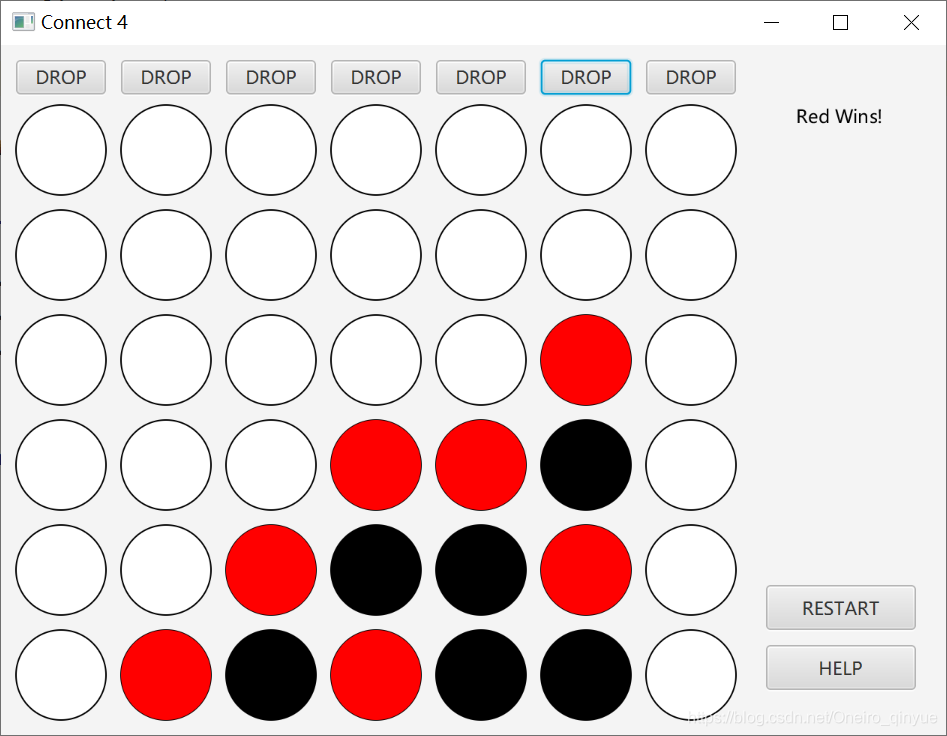
问题:drop判断到胜利的情况下,drawDisc(虽然)被调用了但是没有显示在Pane上。
本文来自互联网用户投稿,文章观点仅代表作者本人,不代表本站立场,不承担相关法律责任。如若转载,请注明出处。 如若内容造成侵权/违法违规/事实不符,请点击【内容举报】进行投诉反馈!