scrapy爬取天气存MySQL_Scrapy结合Mysql爬取天气预报入库
创建Scrapy工程:scrapy startproject weather2
定义Items(items.py):import scrapy
class Weather2Item(scrapy.Item):
# define the fields for your item here like:
# name = scrapy.Field()
weatherDate = scrapy.Field()
weatherDate2 = scrapy.Field()
weatherWea = scrapy.Field()
weatherTem1 = scrapy.Field()
weatherTem2 = scrapy.Field()
weatherWin = scrapy.Field()
编写Spider(spiders/weatherSpider.py):import scrapy
from weather2.items import Weather2Item
class CatchWeatherSpider(scrapy.Spider):
name = 'CatchWeather2'
allowed_domains = ['weather.com.cn']
start_urls = [
"http://www.weather.com.cn/weather/101280101.shtml"
]
def parse(self, response):
for sel in response.xpath('//*[@id="7d"]/ul/li'):
item = Weather2Item()
item['weatherDate'] = sel.xpath('h1/text()').extract()
item['weatherDate2'] = sel.xpath('h2/text()').extract()
item['weatherWea'] = sel.xpath('p[@class="wea"]/text()').extract()
item['weatherTem1'] = sel.xpath('p[@class="tem tem1"]/span/text()').extract() + sel.xpath('p[@class="tem tem1"]/i/text()').extract()
item['weatherTem2'] = sel.xpath('p[@class="tem tem2"]/span/text()').extract() + sel.xpath('p[@class="tem tem2"]/i/text()').extract()
item['weatherWin'] = sel.xpath('p[@class="win"]/i/text()').extract()
yield itemname:定义蜘蛛的名字。
allowed_domains: 包含构成许可域的基础URL,供蜘蛛去爬。
start_urls: 是一个URL列表,蜘蛛从这里开始爬。蜘蛛从start_urls中的URL下载数据,所有后续的URL将从这些数据中获取。
这里用到了xpath分析html,感觉好简单
测试运行:scrapy crawl CatchWeather2
结果片断:
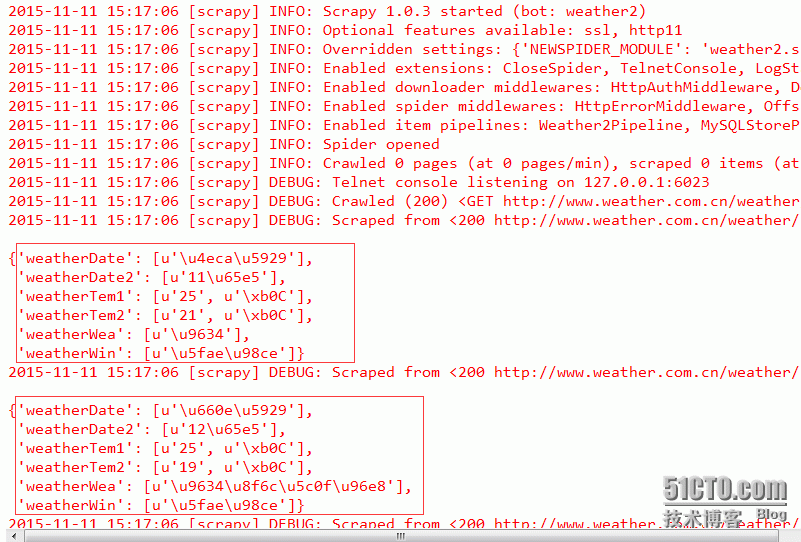
已经拿到我们想要的数据
创建数据库:CREATE TABLE `yunweiApp_weather` (
`id` int(11) NOT NULL AUTO_INCREMENT,
`weatherDate` varchar(10) DEFAULT NULL,
`weatherDate2` varchar(10) NOT NULL,
`weatherWea` varchar(10) NOT NULL,
`weatherTem1` varchar(10) NOT NULL,
`weatherTem2` varchar(10) NOT NULL,
`weatherWin` varchar(10) NOT NULL,
`updateTime` datetime NOT NULL,
PRIMARY KEY (`id`)
) ENGINE=InnoDB AUTO_INCREMENT=15 DEFAULT CHARSET=utf8;
创建PipeLines():import MySQLdb
import datetime
DEBUG = True
if DEBUG:
dbuser = 'lihuipeng'
dbpass = 'lihuipeng'
dbname = 'game_main'
dbhost = '192.168.1.100'
dbport = '3306'
else:
dbuser = 'root'
dbpass = 'lihuipeng'
dbname = 'game_main'
dbhost = '127.0.0.1'
dbport = '3306'
class MySQLStorePipeline(object):
def __init__(self):
self.conn = MySQLdb.connect(user=dbuser, passwd=dbpass, db=dbname, host=dbhost, charset="utf8", use_unicode=True)
self.cursor = self.conn.cursor()
#清空表:
self.cursor.execute("truncate table yunweiApp_weather;")
self.conn.commit()
def process_item(self, item, spider):
curTime = datetime.datetime.now()
try:
self.cursor.execute("""INSERT INTO yunweiApp_weather (weatherDate, weatherDate2, weatherWea, weatherTem1, weatherTem2, weatherWin, updateTime)
VALUES (%s, %s, %s, %s, %s, %s, %s)""",
(
item['weatherDate'][0].encode('utf-8'),
item['weatherDate2'][0].encode('utf-8'),
item['weatherWea'][0].encode('utf-8'),
item['weatherTem1'][0].encode('utf-8'),
item['weatherTem2'][0].encode('utf-8'),
item['weatherWin'][0].encode('utf-8'),
curTime,
)
)
self.conn.commit()
except MySQLdb.Error, e:
print "Error %d: %s" % (e.args[0], e.args[1])
return item
修改setting.py启用pipelines:ITEM_PIPELINES = {
#'weather2.pipelines.Weather2Pipeline': 300,
'weather2.pipelines.MySQLStorePipeline': 400,
}
后面的数字只是一个权重,范围在0-1000内即可
重新测试运行:scrapy crawl CatchWeather2
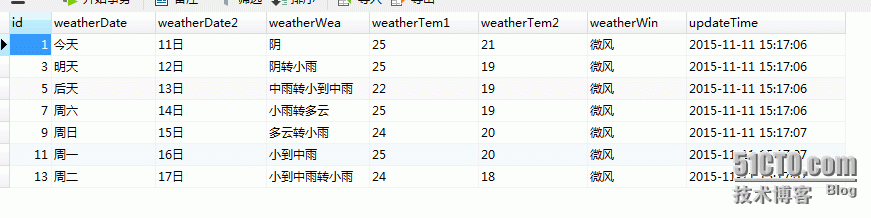
结果:
 结合运维后台随便展示一下:
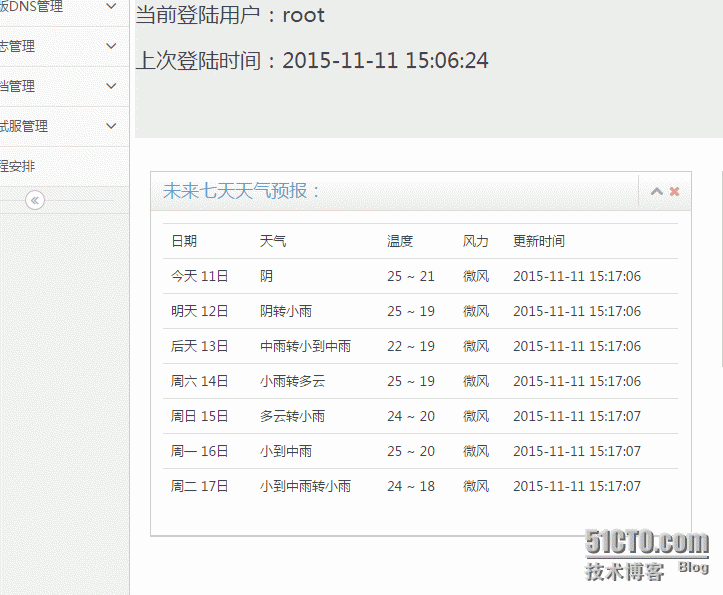
搞完收工~~
本文来自互联网用户投稿,文章观点仅代表作者本人,不代表本站立场,不承担相关法律责任。如若转载,请注明出处。 如若内容造成侵权/违法违规/事实不符,请点击【内容举报】进行投诉反馈!