OpenVINO 2022.3之八:OpenVINO Async API

OpenVINO 2022.3之八:OpenVINO Async API

OpenVINO Async API 是由 OpenVINO 工具包提供的编程接口,用于实现深度学习模型的异步推理。它允许开发人员并发执行多个推理请求,并优化硬件资源的利用率。

OpenVINO 推理请求的API提供了同步和异步执行。ov::InferRequest::infer() 本质上是同步的并且易于操作。异步将infer()“拆分”成ov::InferRequest::start_async() 和 ov::InferRequest::wait() (或回调函数)。虽然同步API可能更容易入手,但在生产代码中推荐使用异步API。因为异步API实现任意可能数量请求的流程控制。

c++示例代码:

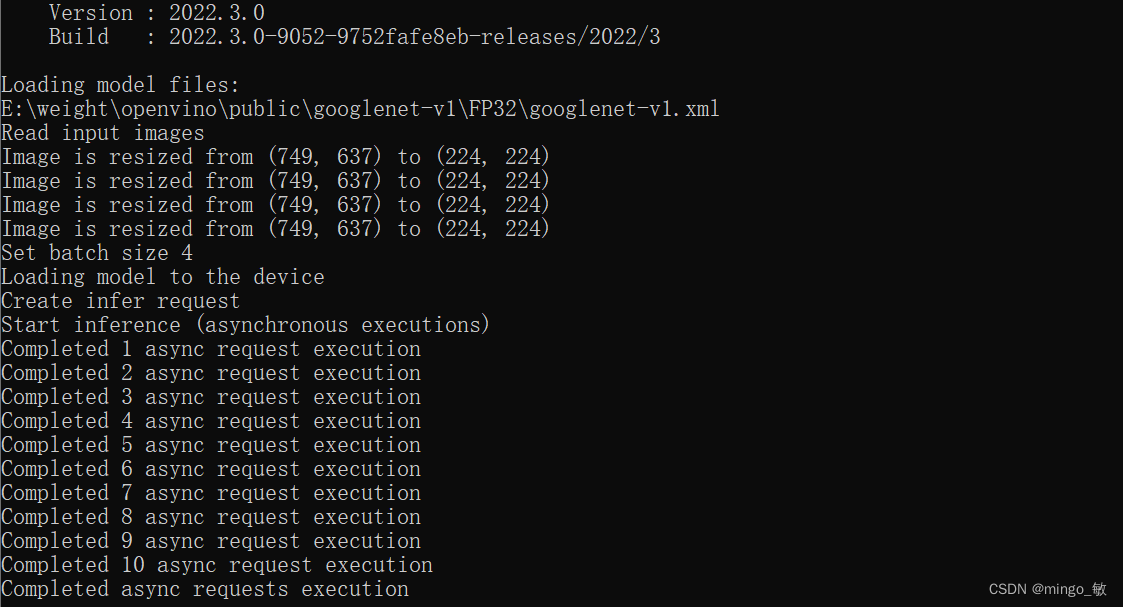
图像分类代码,代码来自openvino 示例

#include #include 
#include 
#include 
#include 
#include 
#include 
#include // clang-format off
#include "openvino/openvino.hpp"
#include "format_reader_ptr.h"#include 
#include 
#include constexpr auto N_TOP_RESULTS = 10;using namespace ov::preprocess;
using namespace std;int main() {try {// -------- Get OpenVINO Runtime version --------cout << ov::get_openvino_version() << endl;// -------- Read input --------std::string model_file("E:\\weight\\openvino\\public\\googlenet-v1\\FP32\\googlenet-v1.xml");std::string image_path("E:\\images");std::vector image_names;image_names.push_back("E:\\images\\car.bmp");image_names.push_back("E:\\images\\car.bmp");image_names.push_back("E:\\images\\car.bmp");image_names.push_back("E:\\images\\car.bmp");// -------- Step 1. Initialize OpenVINO Runtime Core --------ov::Core core;// -------- Step 2. Read a model --------cout << "Loading model files:" << endl << model_file << endl;std::shared_ptr model = core.read_model(model_file);// OPENVINO_ASSERT(model->inputs().size() == 1, "Sample supports models with 1 input only");// OPENVINO_ASSERT(model->outputs().size() == 1, "Sample supports models with 1 output only");// -------- Step 3. Configure preprocessing --------const ov::Layout tensor_layout{ "NHWC" };ov::preprocess::PrePostProcessor ppp(model);// 1) input() with no args assumes a model has a single inputov::preprocess::InputInfo& input_info = ppp.input();// 2) Set input tensor information:// - precision of tensor is supposed to be 'u8'// - layout of data is 'NHWC'input_info.tensor().set_element_type(ov::element::u8).set_layout(tensor_layout);// 3) Here we suppose model has 'NCHW' layout for inputinput_info.model().set_layout("NCHW");// 4) output() with no args assumes a model has a single result// - output() with no args assumes a model has a single result// - precision of tensor is supposed to be 'f32'ppp.output().tensor().set_element_type(ov::element::f32);// 5) Once the build() method is called, the pre(post)processing steps// for layout and precision conversions are inserted automaticallymodel = ppp.build();// -------- Step 4. read input images --------cout << "Read input images" << endl;ov::Shape input_shape = model->input().get_shape();const size_t width = input_shape[ov::layout::width_idx(tensor_layout)];const size_t height = input_shape[ov::layout::height_idx(tensor_layout)];std::vector> images_data;std::vector valid_image_names;for (const auto& i : image_names) {FormatReader::ReaderPtr reader(i.c_str());if (reader.get() == nullptr) {cout << "Image " + i + " cannot be read!" << endl;continue;}// Collect image datastd::shared_ptr data(reader->getData(width, height));if (data != nullptr) {images_data.push_back(data);valid_image_names.push_back(i);}}if (images_data.empty() || valid_image_names.empty())throw std::logic_error("Valid input images were not found!");// -------- Step 5. Loading model to the device --------// Setting batch size using image countconst size_t batchSize = images_data.size();cout << "Set batch size " << std::to_string(batchSize) << endl;ov::set_batch(model, batchSize);// -------- Step 6. Loading model to the device --------cout << "Loading model to the device " << endl;ov::CompiledModel compiled_model = core.compile_model(model, "CPU");// -------- Step 7. Create infer request --------cout << "Create infer request" << endl;ov::InferRequest infer_request = compiled_model.create_infer_request();// -------- Step 8. Combine multiple input images as batch --------ov::Tensor input_tensor = infer_request.get_input_tensor();for (size_t image_id = 0; image_id < images_data.size(); ++image_id) {const size_t image_size = shape_size(model->input().get_shape()) / batchSize;std::memcpy(input_tensor.data() + image_id * image_size, images_data[image_id].get(), image_size);}// -------- Step 9. Do asynchronous inference --------size_t num_iterations = 10;size_t cur_iteration = 0;std::condition_variable condVar;std::mutex mutex;std::exception_ptr exception_var;// -------- Step 10. Do asynchronous inference --------infer_request.set_callback([&](std::exception_ptr ex) {std::lock_guard l(mutex);if (ex) {exception_var = ex;condVar.notify_all();return;}cur_iteration++;cout << "Completed " << cur_iteration << " async request execution" << endl;if (cur_iteration < num_iterations) {// here a user can read output containing inference results and put new// input to repeat async request againinfer_request.start_async();}else {// continue sample execution after last Asynchronous inference request// executioncondVar.notify_one();}});// Start async request for the first timecout << "Start inference (asynchronous executions)" << endl;infer_request.start_async();// Wait all iterations of the async requeststd::unique_lock lock(mutex);condVar.wait(lock, [&] {if (exception_var) {std::rethrow_exception(exception_var);}return cur_iteration == num_iterations;});cout << "Completed async requests execution" << endl;// -------- Step 11. Process output --------ov::Tensor output = infer_request.get_output_tensor();}catch (const std::exception& ex) {cout << ex.what() << endl;return EXIT_FAILURE;}catch (...) {cout << "Unknown/internal exception happened." << endl;return EXIT_FAILURE;}return EXIT_SUCCESS;
}

在这里插入图片描述

python示例代码:

yolov5 目标检测,缺失权重文件或者代码请去ultralytics/yolov5

import cv2
import math
import numpy as np
import time
from typing import Tupleimport torchvision
import yaml
import torch
from openvino.runtime import Core, Tensor# Load COCO Label from yolov5/data/coco.yaml
with open('./data/coco.yaml', 'r', encoding='utf-8') as f:result = yaml.load(f.read(), Loader=yaml.FullLoader)
class_list = result['names']# Step1: Create OpenVINO Runtime Core
core = Core()
# Step2: Compile the Model for the dedicated device: CPU/GPU.0/GPU.1...
net = core.compile_model("./weights/yolov5s_openvino_model/yolov5s.xml", "CPU")# get input node and output node
input_node = net.inputs[0]
output_node = net.outputs[0]# Step 3. Create 1 Infer_request for current frame, 1 for next frame
infer_request_curr = net.create_infer_request()
infer_request_next = net.create_infer_request()# color palette
colors = [(255, 255, 0), (0, 255, 0), (0, 255, 255), (255, 0, 0)]
# import the letterbox for preprocess the frame
# from utils.augmentations import letterboximage_paths = ["./images/bus.jpg", "./images/zidane.jpg"]
# Get the current frame
frame_curr = cv2.imread(image_paths[0])
# Preprocess the frame
letterbox_img_curr, _, _ = letterbox(frame_curr, auto=False)
# Normalization + Swap RB + Layout from HWC to NCHW
blob = Tensor(cv2.dnn.blobFromImage(letterbox_img_curr, 1 / 255.0, swapRB=True))
# Transfer the blob into the model
infer_request_curr.set_tensor(input_node, blob)
# Start the current frame Async Inference
infer_request_curr.start_async()for idx in range(100):# Calculate the end-to-end process throughput.start = time.time()# Get the next frameframe_next = cv2.imread(image_paths[idx%len(image_paths)])# Preprocess the frameletterbox_img_next, _, _ = letterbox(frame_next, auto=False)# Normalization + Swap RB + Layout from HWC to NCHWblob = Tensor(cv2.dnn.blobFromImage(letterbox_img_next, 1 / 255.0, swapRB=True))# Transfer the blob into the modelinfer_request_next.set_tensor(input_node, blob)# Start the next frame Async Inferenceinfer_request_next.start_async()# wait for the current frame inference resultinfer_request_curr.wait()# Get the inference result from the output_nodeinfer_result = infer_request_curr.get_tensor(output_node)# Postprocess the inference resultdata = torch.tensor(infer_result.data)# Postprocess of YOLOv5:NMSdets = non_max_suppression(data)[0].numpy()bboxes, scores, class_ids = dets[:, :4], dets[:, 4], dets[:, 5]# rescale the coordinatesbboxes = scale_coords(letterbox_img_curr.shape[:-1], bboxes, frame_curr.shape[:-1]).astype(int)# show bbox of detectionsfor bbox, score, class_id in zip(bboxes, scores, class_ids):color = colors[int(class_id) % len(colors)]cv2.rectangle(frame_curr, (bbox[0], bbox[1]), (bbox[2], bbox[3]), color, 2)cv2.rectangle(frame_curr, (bbox[0], bbox[1] - 20), (bbox[2], bbox[1]), color, -1)cv2.putText(frame_curr, class_list[class_id], (bbox[0], bbox[1] - 10), cv2.FONT_HERSHEY_SIMPLEX, .5,(255, 255, 255))end = time.time()# show FPSfps = (1 / (end - start))fps_label = "Throughput: %.2f FPS" % fpscv2.putText(frame_curr, fps_label, (10, 25), cv2.FONT_HERSHEY_SIMPLEX, 1, (0, 0, 255), 2)print(fps_label + "; Detections: " + str(len(class_ids)))cv2.imshow("Async API demo", frame_curr)# Swap the infer requestinfer_request_curr, infer_request_next = infer_request_next, infer_request_currframe_curr = frame_nextletterbox_img_curr = letterbox_img_next# wait key for endingif cv2.waitKey(1) > -1:print("finished by user")cv2.destroyAllWindows()break
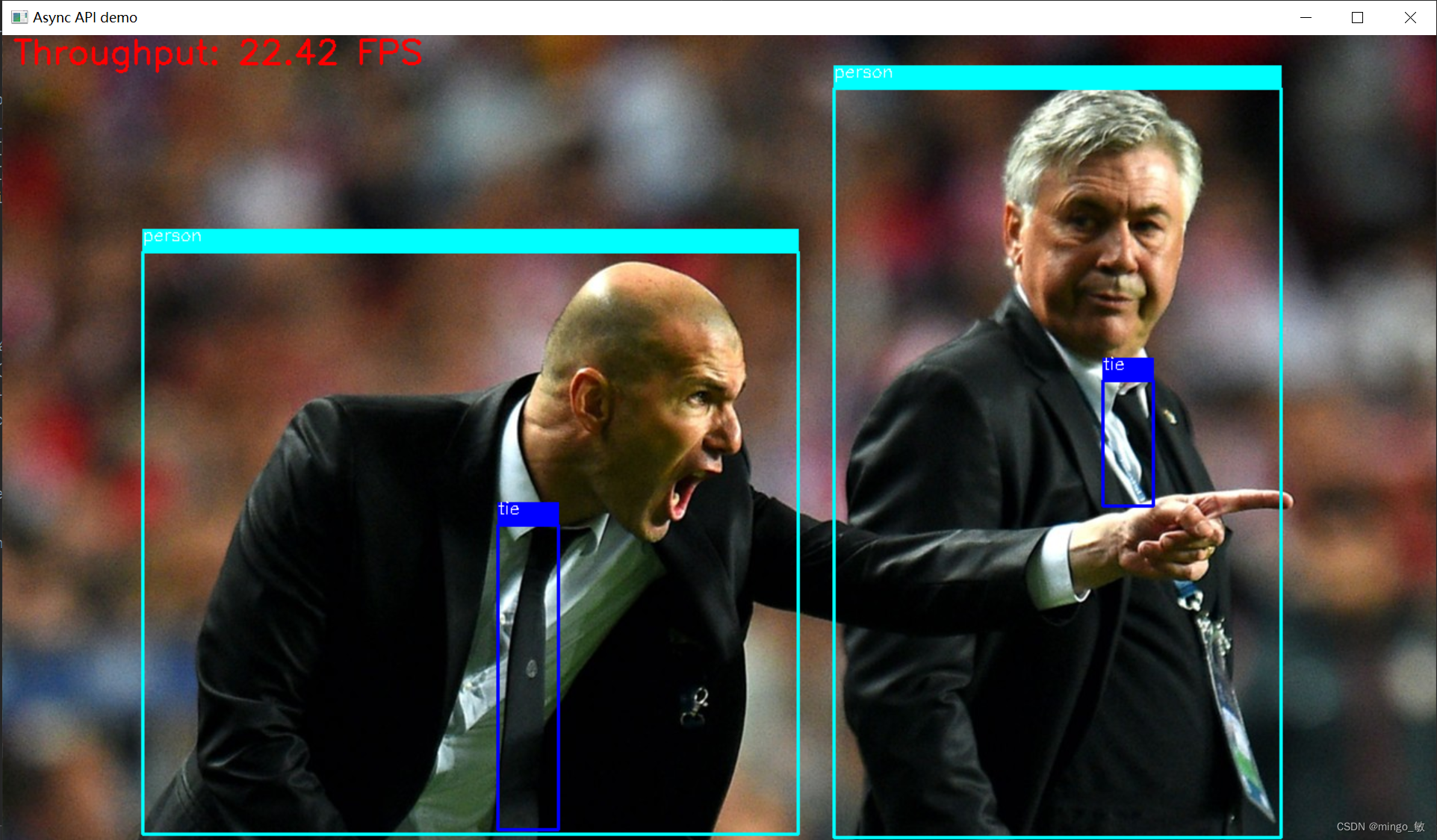
在这里插入图片描述


本文来自互联网用户投稿,文章观点仅代表作者本人,不代表本站立场,不承担相关法律责任。如若转载,请注明出处。 如若内容造成侵权/违法违规/事实不符,请点击【内容举报】进行投诉反馈!

相关文章

立即
投稿

微信公众账号

微信扫一扫加关注

返回
顶部