React 生命周期函数详解
文章目录
- 1. 介绍
- 2. 图解
- 3. 生命周期函数
- 3.1 constructor构造函数
- 3.2 static getDerivedStateFromProps(nextProps, prevState)方法
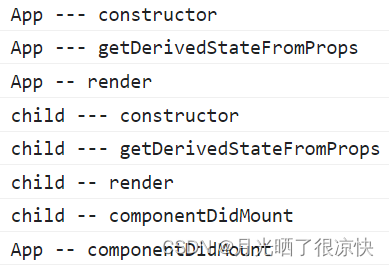
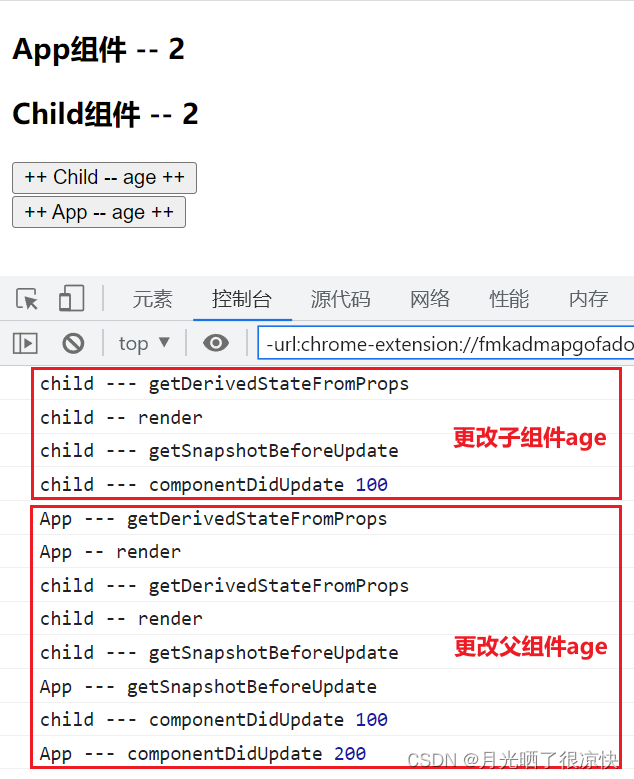
- 3.3 挂载时和更新时的生命周期函数执行顺序
- 3.4 componentWillUnmount函数的使用
- 3.5 shouldComponentUpdate优化渲染方案
1. 介绍
生命周期函数指在某一时刻组件会自动调用并执行的函数。React每个类组件都包含生命周期方法,以便于在运行过程中特定的阶段执行这些方法。、
注意:函数组件无生命周期,生命周期只有类组件才拥有。
2. 图解
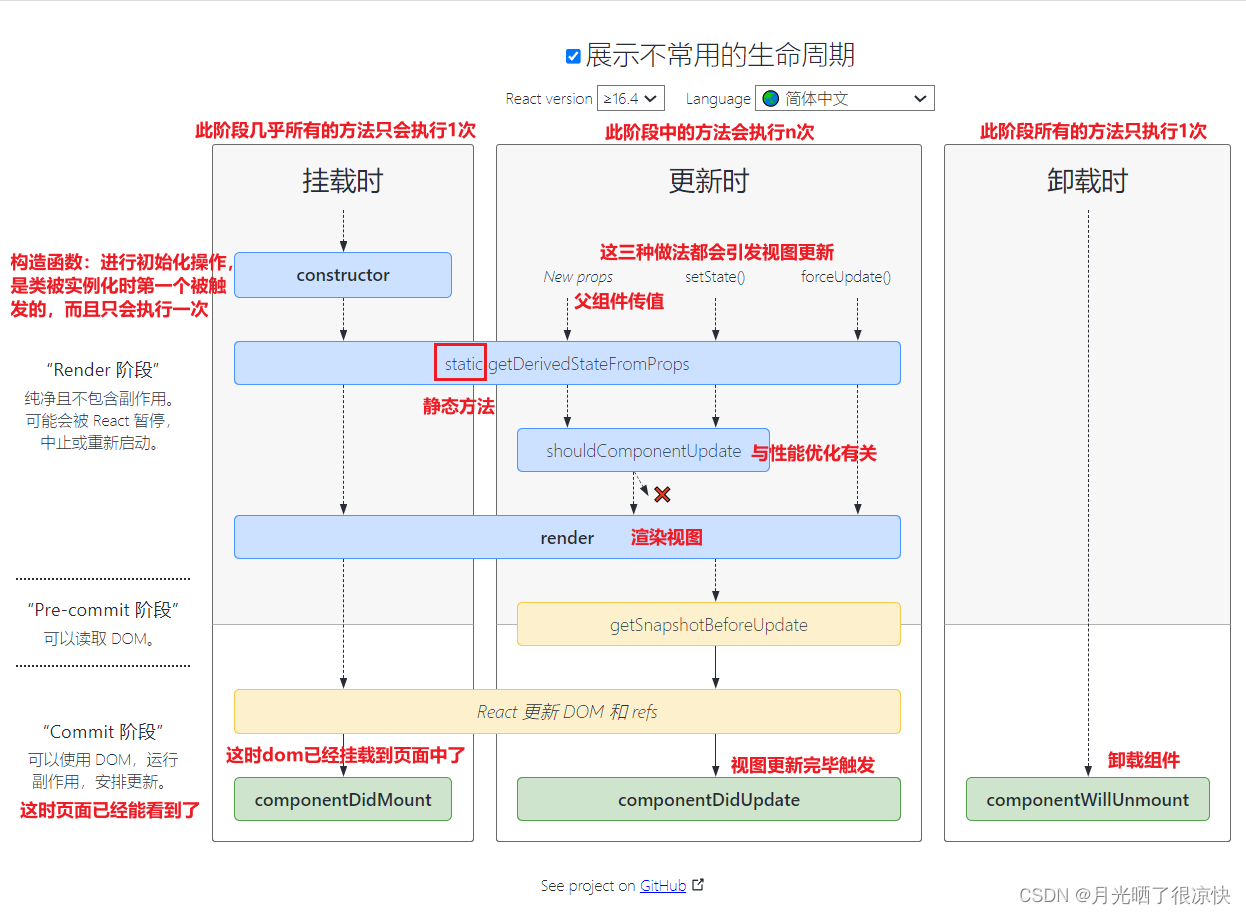
完整的生命周期主要为三个部分,分别为挂载时、更新时和卸载时,如下图所示:
3. 生命周期函数
3.1 constructor构造函数
描述:
React 组件的构造函数在挂载之前被调用。在实现 React.Component 构造函数时,需要先在添加其它内容前,调用 super(props),用来将父组件传来的 props 绑定到继承类中。
构造函数它只执行1次,可以进行数据初始化操作,因为它是所有的生命周期中第1个被执行的方法,但是不太建议在此方法中进行网络请求。
父组件的构造方法先执行,子组件的构造方法后执行。
语法:
constructor(props) {// 如果你在定义组件中有定义构造函数,则一定要调用super方法来调用父类的构造函数super(props)// todo …
}
3.2 static getDerivedStateFromProps(nextProps, prevState)方法
描述:
此方法在构造函数方法之后,Render 方法之前被调用,并且在初始挂载及后续更新时都会被调用。它应返回一个对象来更新 state,如果返回 null 则不更新任何内容。
此方法适用于罕见的用例,即当前组件的 state 的值在任何时候都取决于 props 传入。
语法:
state = {num: 0
};render() {return <div>当前的num是{this.state.num}</div>;
}
// 从props中获取数据,绑定到当前的这个组件中的state
// nextProps 父组件传递过来的整个props对象,即当前最新的props数据
// prevState 当前组件中的状态对象state,即当前最新的state数据,但暂时不包含返回值中要对state修改的值
static getDerivedStateFromProps(nextProps, prevState) { // 不需要更新当前statereturn null
}
注意:
- 此方法会执行 n 次
- 此方法它是一个静态方法,静态方法中不能使用 this
- 使用此方法一定要先定义好 state,否则报错
- 此方法必须要有返回值,
{}|null,如果返回为对象,则会对 state 中数据进行操作,返回的对象属性如果在 state 中没有则添加,有则修改;如果返回为 null,则不会对 state 进行任何操作
getDerivedStateFromProps 在父子组件中执行的先后顺序,及 nextProps, prevState 的使用:
import React, { Component } from 'react'class Child extends Component {constructor(props) {super(props)this.state = { num: 100 }console.log('child --- constructor')}// 快捷输入 gdsfpstatic getDerivedStateFromProps(nextProps, nextState) {console.log('child --- getDerivedStateFromProps')// nextState: 当前最新的state数据,暂时不包含你返回值中要对state修改的值console.log(nextProps, nextState)return { name: '张三' }}render() {return (<div><h3>Child组件</h3></div>)}
}class App extends Component {constructor(props) {super(props)this.state = { age: 1 }// 父组件先执行后子组件执行此方法  app -> childconsole.log('App --- constructor')}static getDerivedStateFromProps(nextProps, nextState) {console.log('App --- getDerivedStateFromProps')return null}render() {return (<div><Child name='李四' /></div>)}
}export default App

注意:由于这个方法会执行 n 次,所以不建议在这个方法中发送网络请求,容易造成死循环。如果想要在这个方法中发送网络请求,则一定要确保不要触发这个方法再次执行(即父组件不发送新的 props 或修改 props ,不修改 state ,不强制更新视图)
小案例:
描述:
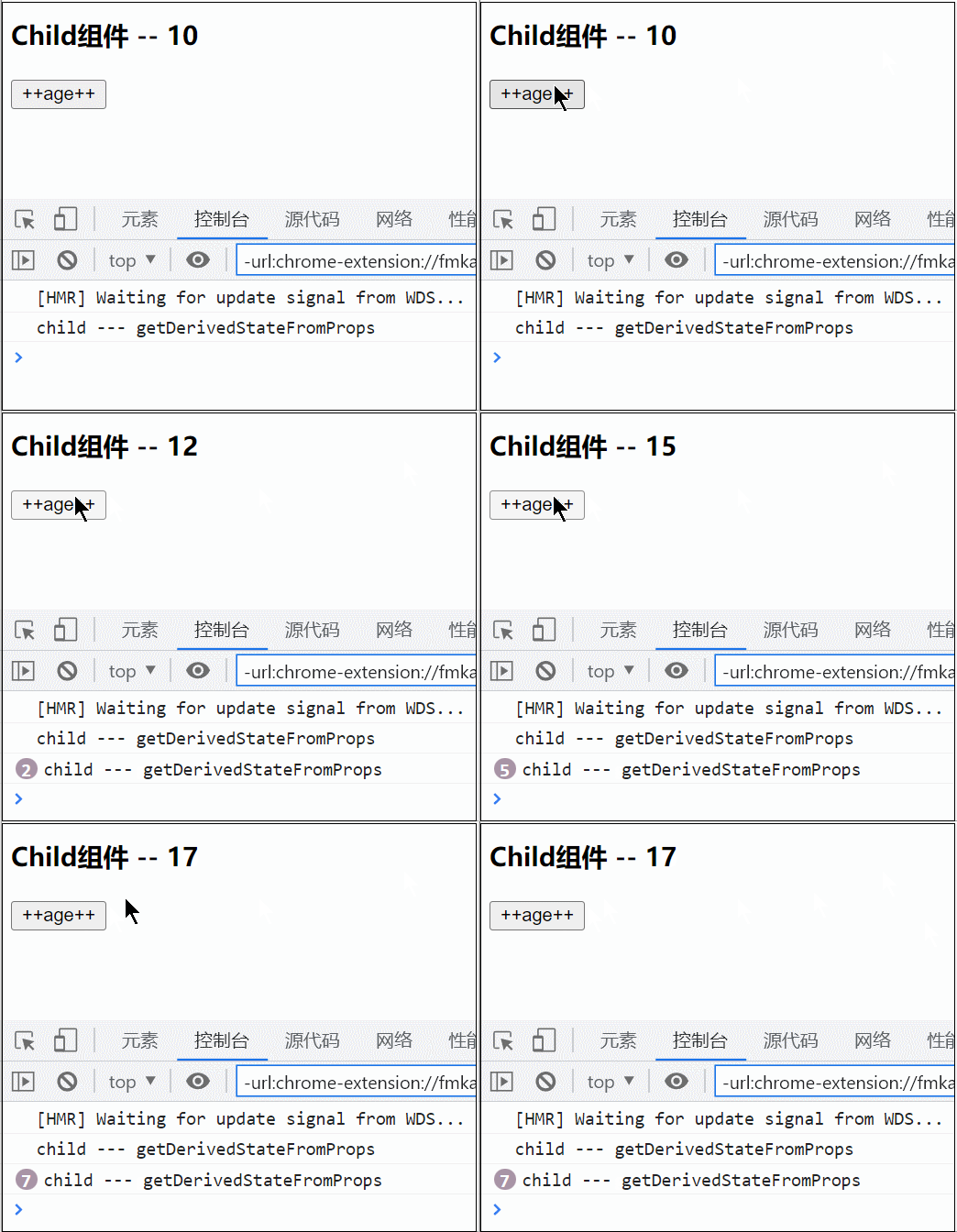
子组件将 state 中的数据修改为 nextProps 中的值,并且点击增加按钮能够触发后续对值的修改。
实现:
import React, { Component } from 'react'class Child extends Component {constructor(props) {super(props)this.state = { name: '张三' }}// 快捷输入 gdsfpstatic getDerivedStateFromProps(nextProps, nextState) {console.log('child --- getDerivedStateFromProps')// 如果你想用此方法,把props中的属性数据,追加到state中,后续能修改,则这样的操作,你要确保只执行1次// 这种方式只能接收到父组件第一次值过来的值(10),点击按钮子组件age并不会增加// 这是因为每次点击增加按钮都会触发当前函数,将state中的age修改为nextProps// return nextProps // 这种方式不会触发点击按钮增加age值if (nextState.flag != 1) {return { ...nextProps, flag: 1 }}return null}render() {let { age } = this.statereturn (<div><h3>Child组件 -- {age}</h3><buttononClick={() => {this.setState(state => ({ age: state.age + 1 }))}}>++age++</button></div>)}
}class App extends Component {constructor(props) {super(props)this.state = { age: 1 }}render() {return (<div><Child age={10} /></div>)}
}export default App
3.3 挂载时和更新时的生命周期函数执行顺序
挂载时生命周期函数介绍:
-
constructor(props)
React组件的构造函数在挂载之前被调用。在实现React.Component构造函数时,需要先在添加其它内容前,调用super(props),用来将父组件传来的props绑定到继承类中。只调用一次。
-
static getDerivedStateFromProps(nextProps, prevState)
此方法是react16.3之后新增,会在调用 render 方法之前调用,并且在初始挂载及后续更新时都会被调用。它应返回一个对象来更新 state,如果返回 null 则不更新任何内容。
此方法适用于罕见的用例,即当前组件的 state 的值在任何时候都取决于 props传入。
-
render()
render()方法是必需的,它主要负责组件的渲染,会被重复调用若干次
-
componentDidMount
它会在组件挂载后(插入 DOM 树中)立即调用。依赖于 DOM 节点的初始化应该放在这里。如需通过网络请求获取数据,此处是实例化请求的好地方。
-
shouldComponentUpdate(nextProps, nextState)
此函数将放在下文单独讲解。
-
getSnapshotBeforeUpdate(prevProps, prevState)
在最近一次渲染输出(提交到 DOM 节点)之前调用。它使得组件能在发生更改之前从 DOM 中捕获一些信息,此生命周期的任何返回值将作为参数传递给 componentDidUpdate()
-
componentDidUpdate(prevProps, prevState, snapshot)
会在数据更新后被立即调用。首次渲染不会执行此方法。
import React, { Component } from 'react'class Child extends Component {constructor(props) {super(props)this.state = { name: '张三' }console.log('child --- constructor')}// 快捷输入 gdsfpstatic getDerivedStateFromProps(nextProps, nextState) {console.log('child --- getDerivedStateFromProps')if (nextState.flag != 1) {return { ...nextProps, flag: 1 }}return null}// 它只执行1次// 虚拟dom挂载到真实的页面点中完成,在此进行dom操作// 在此可以进行网络请求componentDidMount() {console.log('child -- componentDidMount')}// ------------- 更新时// prevProps 修改之前的props数据// prevState 修改之前的state数据// 此方法要有一个返回值,且如果有此方法,则必须要有componentDidUpdate// 此方法的返回值,会在componentDidUpdate参数3中接受getSnapshotBeforeUpdate(prevProps, prevState) {console.log('child --- getSnapshotBeforeUpdate')return 100}// 数据更新完毕后执行componentDidUpdate(prevProps, prevState, snapshot) {console.log('child --- componentDidUpdate', snapshot)}render() {console.log('child -- render')let { age } = this.statereturn (<div><h3>Child组件 -- {age}</h3><buttononClick={() => {this.setState(state => ({ age: state.age + 1 }))}}>++ Child -- age ++</button></div>)}
}class App extends Component {constructor(props) {super(props)this.state = { age: 1 }console.log('App --- constructor')}static getDerivedStateFromProps(nextProps, nextState) {console.log('App --- getDerivedStateFromProps')return null}componentDidMount() {console.log('App -- componentDidMount')}getSnapshotBeforeUpdate(prevProps, prevState) {console.log('App --- getSnapshotBeforeUpdate')return 200}// 数据更新完毕后执行componentDidUpdate(prevProps, prevState, snapshot) {console.log('App --- componentDidUpdate', snapshot)}render() {let { age } = this.stateconsole.log('App -- render')return (<div><h3>App组件 -- {age}</h3><Child age={age} /><buttononClick={() => {this.setState(state => ({ age: state.age + 1 }))}}>++ App -- age ++</button></div>)}
}export default App
挂载时:
更新时:
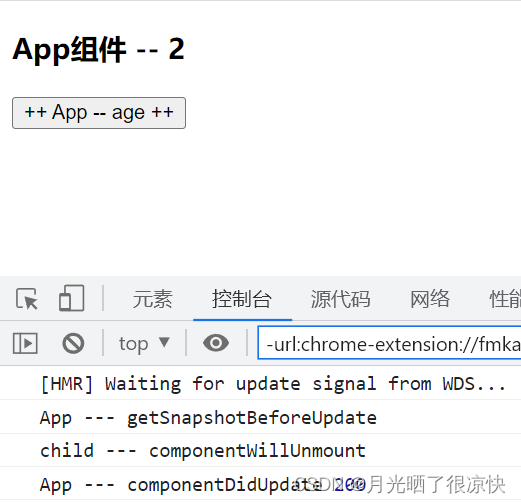
3.4 componentWillUnmount函数的使用
描述:
componentWillUnmount() 会在组件卸载及销毁之前直接调用。在此方法中执行必要的清理操作。
使用:
import React, { Component } from 'react'class Child extends Component {constructor(props) {super(props)this.state = { name: '张三' }}// 快捷输入 gdsfpstatic getDerivedStateFromProps(nextProps, nextState) {if (nextState.flag != 1) {return { ...nextProps, flag: 1 }}return null}// 销毁组件时执行componentWillUnmount() {console.log('child --- componentWillUnmount')}render() {let { age } = this.statereturn (<div><h3>Child组件 -- {age}</h3><buttononClick={() => {this.setState(state => ({ age: state.age + 1 }))}}>++ Child -- age ++</button></div>)}
}class App extends Component {constructor(props) {super(props)this.state = { age: 1 }}getSnapshotBeforeUpdate(prevProps, prevState) {console.log('App --- getSnapshotBeforeUpdate')return 200}// 数据更新完毕后执行componentDidUpdate(prevProps, prevState, snapshot) {console.log('App --- componentDidUpdate', snapshot)}render() {let { age } = this.statereturn (<div><h3>App组件 -- {age}</h3>{/* age大于1时销毁子组件 */}{age > 1 ? null : <Child age={age} />}<buttononClick={() => {this.setState(state => ({ age: state.age + 1 }))}}>++ App -- age ++</button></div>)}
}export default App
3.5 shouldComponentUpdate优化渲染方案
描述:
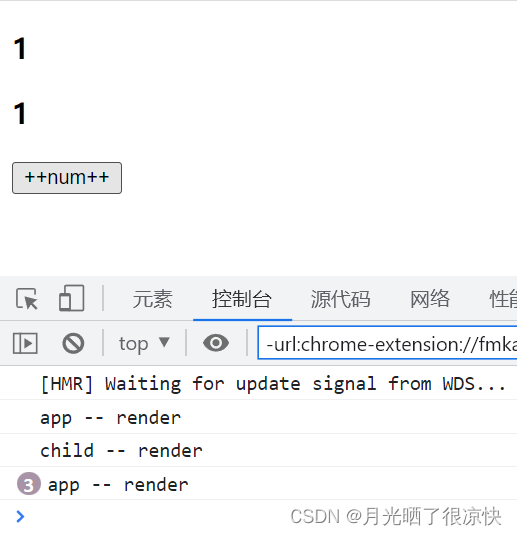
React 的更新机制导致,即使子组件未发生更新,只要父组件中的 state 改变,当前父组件及其所有子组件都会重新渲染,这样做虽然很高效,但会造成不少性能损耗,那么该如何避免呢?
当 props 或 state 发生变化时,shouldComponentUpdate() 会在渲染执行之前被调用。返回值默认为 true 则组件继续渲染,为 false 则当前组件不会渲染。首次渲染或使用 forceUpdate() 时不会调用该方法。此方法仅作为性能优化的方式而存在。你也可以考虑使用内置的 PureComponent 组件,而不是手动编写 shouldComponentUpdate()。
PureComponent 会对 props 和 state 进行浅层比较,并减少了跳过必要更新的可能性。 PureComponent 它可以对于组件无效渲染起到一定的优化,但是它只能针对于props中值为基本类型。
所以我们还可以使用生命周期中提供的优化方案,使用 shouldComponentUpdate 减少无效渲染次数。
语法:
shouldComponentUpdate(nextProps, nextState) {// 判断是否需要被渲染,如果需要则返回true,否则返回false if (nextProps.b === this.props.b) {return false;} else {return true;}
}// 简化方法:只需要将类组件的继承关系改成继承`PureComponent`即可,这样一来,框架会自动判断值是否有变化进一步决定组件是否需要被渲染。
import React, { PureComponent } from "react";
class Cmp extends PureComponent {render() {console.log("Cmp被渲染了");return <div>父亲传递过来的值b为:{this.props.b}</div>;}
}
export default Cmp
使用:
import React, { Component, PureComponent } from 'react'// PureComponent 它可以对于组件无效渲染起到一定的优化,但是它只能针对于props中值为基本类型
// 可以使用生命周期中提供的优化方案,提升无效渲染次数
// class Child extends PureComponent {
class Child extends Component {// 此方法,用于组件重复渲染的优化方法,它不是必须要用的// 此方法必须要有一个boolean返回值// 此方法只有在更新时才会触发// true 则继续向下渲染 render// false 表示当前不会继续渲染,从而减少无用渲染,提升性能// nextProps 最新的props数据 this.props 之前的props数据// nextState 最新的state数据 this.state 之前的state数据shouldComponentUpdate(nextProps, nextState) {// 针对于要比较的字段进行判断if (this.props.num.data === nextProps.num.data) {return false}return true}render() {console.log('child -- render')return (<div><h3>{this.props.num.data}</h3></div>)}
}class App extends Component {state = {num: { data: 1 },name: '张三'}render() {console.log('app -- render')return (<div><h3>{this.state.num.data}</h3><Child num={this.state.num} />{/* 这时子组件会更新 */}{/* */}<button onClick={() => this.setState({ num: { data: 1 } })}>++num++</button></div>)}
}export default App
扩展:使用lodash库减小无效渲染
import React, { Component, PureComponent } from 'react'
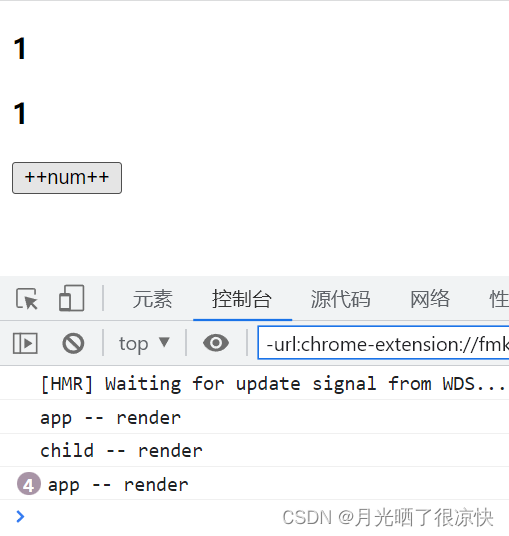
import _ from 'lodash'class Child extends Component {// 此方法,用于组件重复渲染的优化方法,它不是必须要用的// 此方法必须要有一个boolean返回值// 此方法只有在更新时才会触发// true 则继续向下渲染 render// false 表示当前不会继续渲染,从而减少无用渲染,提升性能shouldComponentUpdate(nextProps, nextState) {// 深层比对,它比对的是对象中属性的值,如果全局的值一样则为true,否则为falsereturn !_.isEqual(this.props, nextProps)}render() {console.log('child -- render')return (<div><h3>{this.props.num.data}</h3></div>)}
}class App extends Component {state = {num: { data: 1 },name: '张三'}render() {console.log('app -- render')return (<div><h3>{this.state.num.data}</h3><Child num={this.state.num} />{/* 这时子组件会更新 */}{/* */}<button onClick={() => this.setState({ num: { data: 1 } })}>++num++</button></div>)}
}export default App
本文来自互联网用户投稿,文章观点仅代表作者本人,不代表本站立场,不承担相关法律责任。如若转载,请注明出处。 如若内容造成侵权/违法违规/事实不符,请点击【内容举报】进行投诉反馈!