超详细.Vue源码解析之new Vue()初始化vue实例
触发原型上的_init函数
_init函数做了什么??
一、给vue实例一个递增的_uid(给一个标识没啥好说的)
二、配置处理及合并 mergeOptions
Ⅰ、 resolveConstructorOptions函数
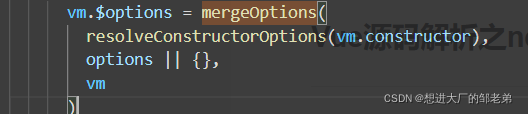
mergeOptions函数的两个参数分别为resolveConstructorOptions(vm.constructor)的返回值和options配置项所以我们先看看resolveConstructorOptions函数返回了什么以及它做了哪些事情
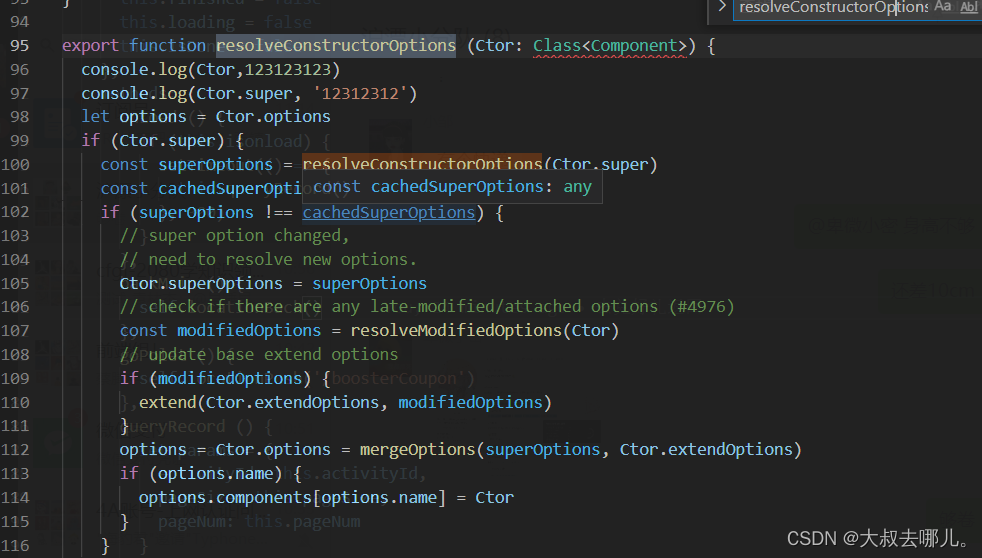
递归合并父类配置项其中也用到了mergeOptions mergeOptions函数作用是对配置项进行一些规则处理 下面将作介绍
Ⅱ、 mergeOptions函数
① 处理props normalizeProps()
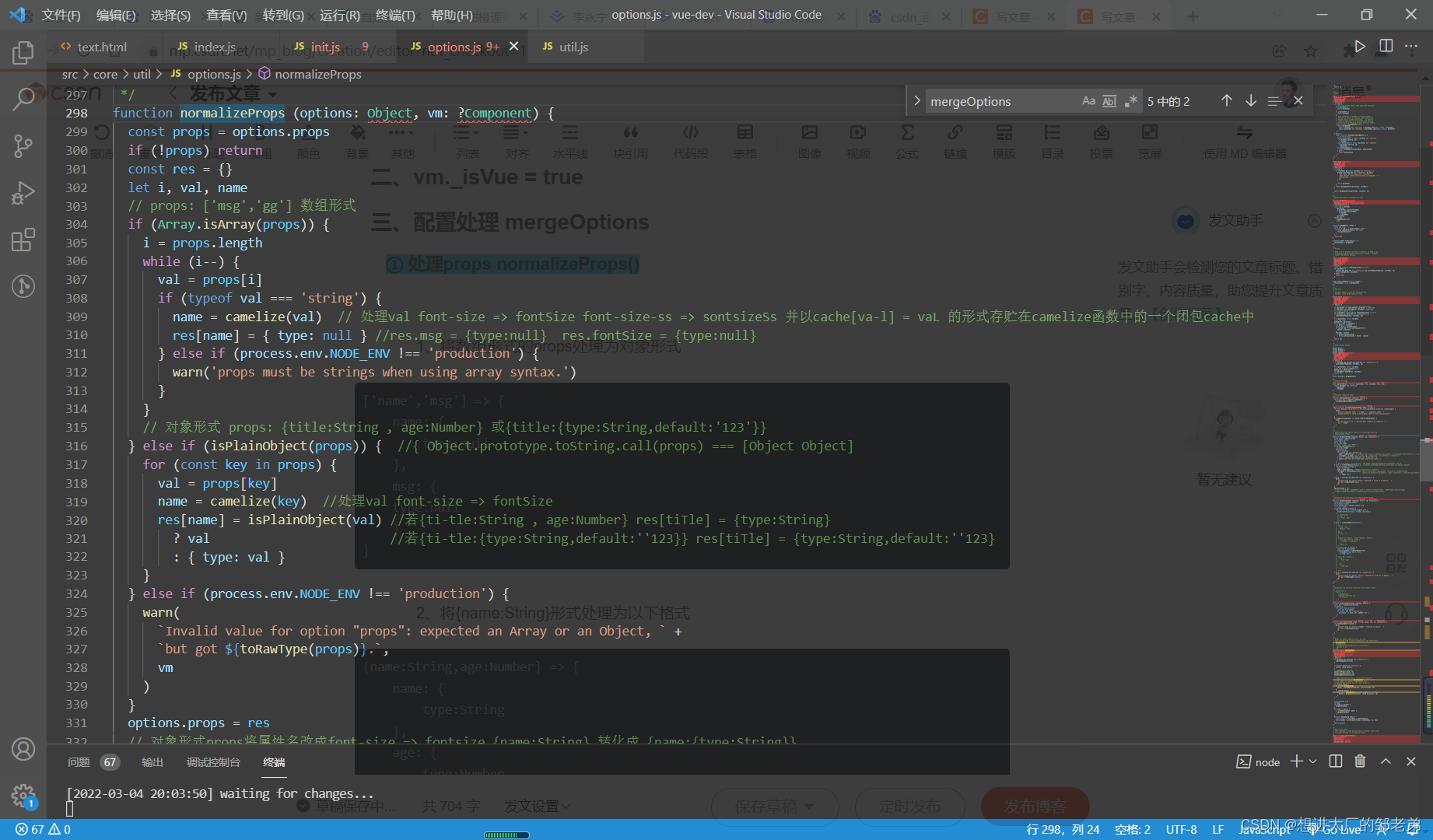
1、将数组形式的props处理为对象形式
['name','msg'] => {name: {type:null},msg: {type:null}
}
2、将{name:String}形式处理为以下格式
{name:String,age:Number} => {name: {type:String    },age: {type:Number    		             	            }
}
3、处理属性名称将转化为驼峰形式 例如: font-size => fontSize
② 处理Inject normalizeInject()
1、将数组形式的inject处理为对象形式
['msg'] => {msg : { // 当前组件取值标识from: 'msg' // provider取值标识}
}
2、将对象形式的inject处理为如下形式
{ foo: {from: 'bar',default: 'foo'},gg: {default: 'gg' }} => {foo: {from: 'bar',default: 'foo'},gg: {from: 'gg'default: 'gg' } }// from有值不变 无值加上from[key]③ 处理directiives normalizeDriectives
1、将函数形式的driectives处理为对象形式(将该函数挂在到bind和update钩子上)
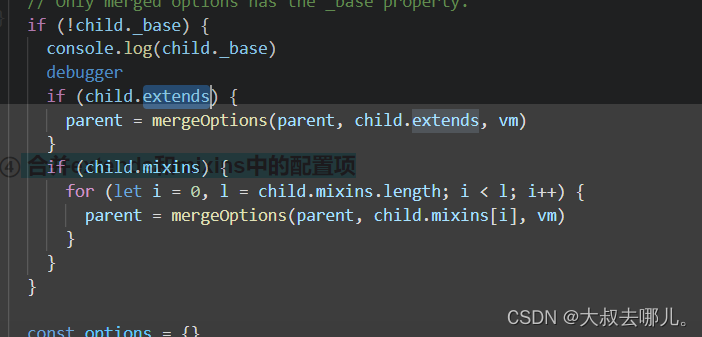
directives: {focus: ()=> {}} => {focus: {bind: ()=>{},update: ()=> {}}}④合并extends和mixins中的配置项
⑤ 最后将parent和child中的配置项合并
const options = {}let keyfor (key in parent) {mergeField(key)}for (key in child) {if (!hasOwn(parent, key)) {mergeField(key)}}function mergeField (key) {const strat = strats[key] || defaultStratoptions[key] = strat(parent[key], child[key], vm, key)}// const defaultStrat = function (parentVal: any, childVal: any): any {// return childVal === undefined// ? parentVal// : childVaparent和child共有的配置项 选择child中的 很好理解全局配置和new vue局部配置 优先使用局部的 后child中独有的配置项再合进options
三、初始化一些属性、事件
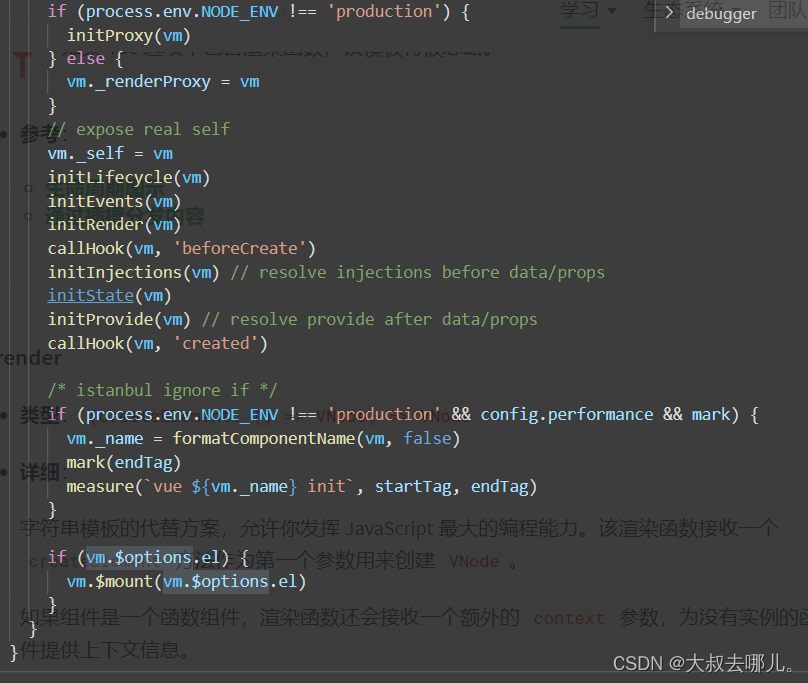
1、initProxy()
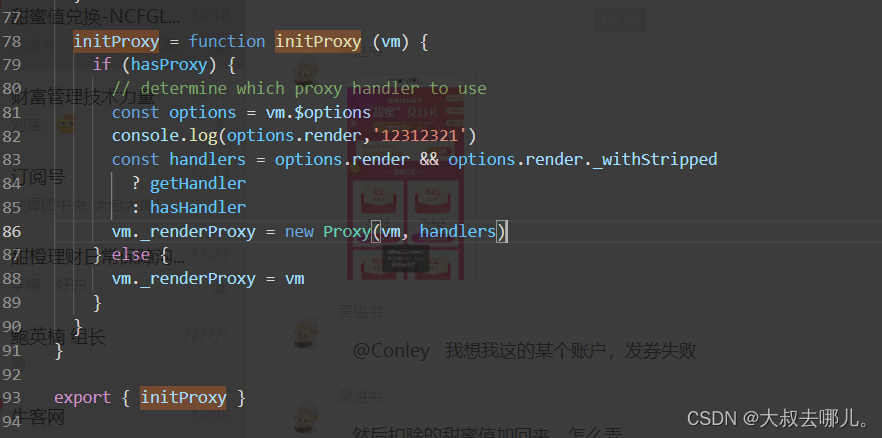
创建vm的proxy代理 主要用于检测错误的使用 调用warnNonPresent方法做出警示
2、initLifecycle() 处理组件父子关系 以及一些属性的初始化
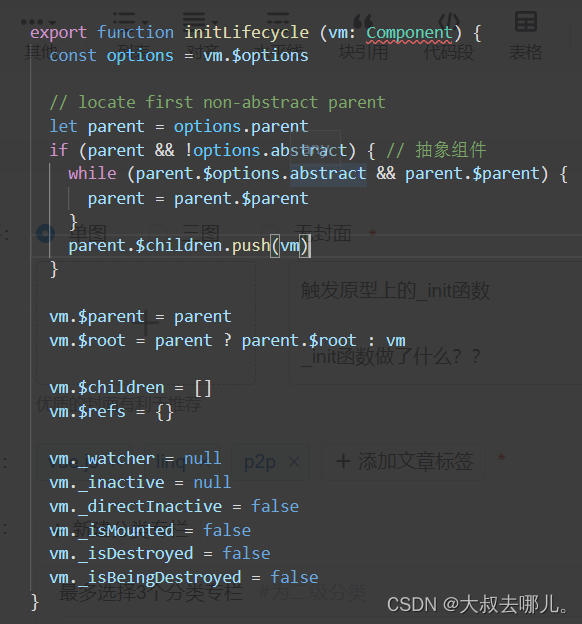
抽象组件不参与vue组件的父子关系组件创建后 要添加到父组件实例的$children中
3、initEvents()一些事件相关的初始化准备工作
hasHookEvent 该属性表示父组件是否通过"@hook:"把钩子函数绑定在当前组件上 默认值设为false
vm.$options. _parentListeners是模版编译的时候,检测到当前编译对象是子组建,那么会给当前对象的$options添加一个_parentListeners属性来存储当前组建所绑定的所有事件
一起看看updateComponentListeners函数做了哪些事
export function updateListeners (on: Object, // vm.$options._parentListenersoldOn: Object, // {}add: Function, remove: Function,createOnceHandler: Function, //vm: Component
) {let name, def, cur, old, eventfor (name in on) {def = cur = on[name]old = oldOn[name]event = normalizeEvent(name)/* istanbul ignore if */if (__WEEX__ && isPlainObject(def)) {cur = def.handlerevent.params = def.params}if (isUndef(cur)) {process.env.NODE_ENV !== 'production' && warn(`Invalid handler for event "${event.name}": got ` + String(cur),vm)} else if (isUndef(old)) {if (isUndef(cur.fns)) {cur = on[name] = createFnInvoker(cur, vm)}if (isTrue(event.once)) {cur = on[name] = createOnceHandler(event.name, cur, event.capture)}add(event.name, cur, event.capture, event.passive, event.params)} else if (cur !== old) {old.fns = curon[name] = old}}for (name in oldOn) {if (isUndef(on[name])) {event = normalizeEvent(name)remove(event.name, oldOn[name], event.capture)}}
}
updateComponentListeners函数主要目的就是更新事件列表加入新的移除旧的
首先遍历_parentListeners _parentListeners[name]存进def 然后是event = normalizeEvent(name)
normalizeEvent 根据_parentListeners的属性名name转换为一个对象赋值给event
const normalizeEvent = cached((name: string): {name: string,once: boolean,capture: boolean,passive: boolean,handler?: Function,params?: Array
} => {const passive = name.charAt(0) === '&'name = passive ? name.slice(1) : nameconst once = name.charAt(0) === '~' // Prefixed last, checked firstname = once ? name.slice(1) : nameconst capture = name.charAt(0) === '!'name = capture ? name.slice(1) : namereturn {name,once,capture,passive}
})export function cached (fn: F): F {const cache = Object.create(null)return (function cachedFn (str: string) {const hit = cache[str]return hit || (cache[str] = fn(str)) // cache.font-size = fontSize}: any)
}
这里cached就是利用闭包进行一个去重 normalizeEvent 是将字符串name(23232)转换为以下形式
{
capture: false
name: "23232"
once: true
passive: false
}
如果以! ~ &为首字符则删去第一个字符 capture once passive 分别代表name是否以! ~ &为首字符开头 就是处理一下vue事件的修饰符例如在模板解析的时候.once会变身为~跑到事件名的前面 后面就是正常的赋值 isUndef判断是否为undefined或null 如果vm.$options._parentListeners.xxx.handler.fns 不存在 cur = on[name] = createFnInvoker(cur, vm) jhcur 接下来 看一看createFnInvoker 函数做了什么事情
export function createFnInvoker (fns: Function | Array, vm: ?Component): Function {function invoker () {const fns = invoker.fnsif (Array.isArray(fns)) {const cloned = fns.slice()for (let i = 0; i < cloned.length; i++) {invokeWithErrorHandling(cloned[i], null, arguments, vm, `v-on handler`)}} else {// return handler return value for single handlersreturn invokeWithErrorHandling(fns, null, arguments, vm, `v-on handler`)}}invoker.fns = fnsreturn invoker
}
同一个组件上可能有多个事件此方法接受一个函数或函数组成的数组 此方法返回了一个invoker函数且给invoker函数添加一个属性fns该属性指向传入的函数也就是组件绑定的事件方法或方法组成的数组 那么我们接着看invoker函数,该函数调用时就是通过invokeWithErrorHandling函数返回的函数调用器执行传
export function invokeWithErrorHandling (handler: Function,context: any,args: null | any[],vm: any,info: string
) {let restry {res = args ? handler.apply(context, args) : handler.call(context)if (res && !res._isVue && isPromise(res) && !res._handled) {res.catch(e => handleError(e, vm, info + ` (Promise/async)`))// issue #9511// avoid catch triggering multiple times when nested callsres._handled = true}} catch (e) {handleError(e, vm, info)}return res
}
入的方法,该调用器还会做一些异常捕获处理。这样我们就发现了组件事件的调用是通过_parentListeners上每一项上的invoker去调用的。
接下来如果once存在 则去调用createOnceHandler
function createOnceHandler (event, fn) {const _target = targetreturn function onceHandler () {const res = fn.apply(null, arguments)if (res !== null) {_target.$off(event, onceHandler)}}
}
没什么好说的调用一次随后被remove($off)掉
我们再一起来看看$on $off 也就是add remove具体是怎么实现的
Vue.prototype.$on = function (event: string | Array
, fn: Function): Component { const vm: Component = this
if (Array.isArray(event)) {
for (let i = 0, l = event.length; i < l; i++) {
vm.$on(event[i], fn)
}
} else {
(vm._events[event] || (vm._events[event] = [])).push(fn)
// optimize hook:event cost by using a boolean flag marked at registration
// instead of a hash lookup
if (hookRE.test(event)) {
vm._hasHookEvent = true
}
}
return vm
}
$on 接收一个事件名或由事件名组成的数组和一个事件调用器 然后将调器一个个push进vm._events.event(vm._events[name])中 由于组件可复用 同一名称的方法 方法体不同vm._events.event为一个数组
Vue.prototype.$off = function (event?: string | Array, fn?: Function): Component {const vm: Component = this// allif (!arguments.length) {vm._events = Object.create(null)return vm}// array of eventsif (Array.isArray(event)) {for (let i = 0, l = event.length; i < l; i++) {vm.$off(event[i], fn)}return vm}// specific eventconst cbs = vm._events[event]if (!cbs) {return vm}if (!fn) {vm._events[event] = nullreturn vm}// specific handlerlet cblet i = cbs.lengthwhile (i--) {cb = cbs[i]if (cb === fn || cb.fn === fn) {cbs.splice(i, 1)break}}return vm} off函数移除如果没有传参则初始化vm._events 如果vm._events.event不存在什么都不做直接返回当前实例 如果没传调用器则清空vm._events.event 然后就是删除操作如果传入的调用器函数存在则从vm._events.event中删除该项 结合该方法我们可以去理解updateListeners 中的remove(event.name, oldOn[name], event.capture) 这句代码的含义为 如果oldListens中的某一项在Listens中不存在则从此时的vm.events.event中删除该项 实现vm.events.event的更新
  Vue.prototype.$emit = function (event: string): Component {const vm: Component = thisif (process.env.NODE_ENV !== 'production') {const lowerCaseEvent = event.toLowerCase()if (lowerCaseEvent !== event && vm._events[lowerCaseEvent]) {tip(`Event "${lowerCaseEvent}" is emitted in component ` +`${formatComponentName(vm)} but the handler is registered for "${event}". ` +`Note that HTML attributes are case-insensitive and you cannot use ` +`v-on to listen to camelCase events when using in-DOM templates. ` +`You should probably use "${hyphenate(event)}" instead of "${event}".`)}}let cbs = vm._events[event]if (cbs) {cbs = cbs.length > 1 ? toArray(cbs) : cbsconst args = toArray(arguments, 1)const info = `event handler for "${event}"`for (let i = 0, l = cbs.length; i < l; i++) {invokeWithErrorHandling(cbs[i], vm, args, vm, info)}}return vm}
}
调用vm._events.event中存放的一个个函数 $emit具体的放到后面讲
4、initRender 初始化 render 函数
export function initRender (vm: Component) {vm._vnode = null // the root of the child treevm._staticTrees = null // v-once cached treesconst options = vm.$optionsconsole.log(options, '++++++++++')const parentVnode = vm.$vnode = options._parentVnode // the placeholder node in parent treeconst renderContext = parentVnode && parentVnode.contextvm.$slots = resolveSlots(options._renderChildren, renderContext)vm.$scopedSlots = emptyObject// bind the createElement fn to this instance// so that we get proper render context inside it.// args order: tag, data, children, normalizationType, alwaysNormalize// internal version is used by render functions compiled from templatesvm._c = (a, b, c, d) => createElement(vm, a, b, c, d, false)// normalization is always applied for the public version, used in// user-written render functions.vm.$createElement = (a, b, c, d) => createElement(vm, a, b, c, d, true)// $attrs & $listeners are exposed for easier HOC creation.// they need to be reactive so that HOCs using them are always updatedconst parentData = parentVnode && parentVnode.data/* istanbul ignore else */if (process.env.NODE_ENV !== 'production') {defineReactive(vm, '$attrs', parentData && parentData.attrs || emptyObject, () => {!isUpdatingChildComponent && warn(`$attrs is readonly.`, vm)}, true)defineReactive(vm, '$listeners', options._parentListeners || emptyObject, () => {!isUpdatingChildComponent && warn(`$listeners is readonly.`, vm)}, true)} else {defineReactive(vm, '$attrs', parentData && parentData.attrs || emptyObject, null, true)defineReactive(vm, '$listeners', options._parentListeners || emptyObject, null, true)}
}
options._parentVnode 是模板解析时当前组件在父组件挂载的vNode组件节点 我们声明两个组件Layout Bay
{{title}}
{{msg}}
{{footer}}
我是你爸爸
默认header 默认main 默认header 打印options._parentVnode 结果如下图
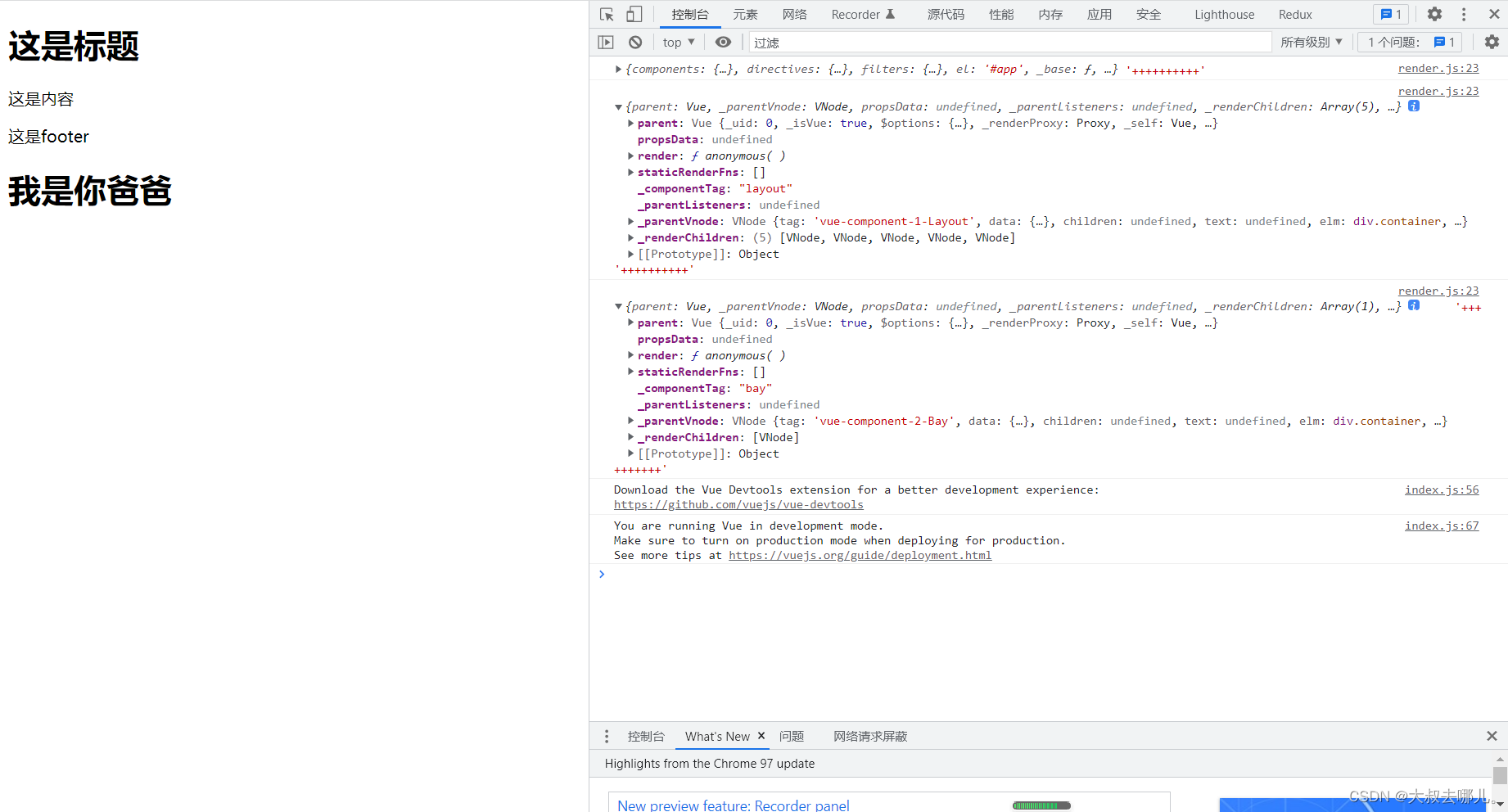
通过打印我们可以看到resolveSlots的两个参数分为 组件节点的context 和子节点也就是写在插槽中的内容 组件节点的context在这里为根节点 接下来我们来看看resolveSlots做了哪些事
export function resolveSlots (children: ?Array,context: ?Component
): { [key: string]: Array } {if (!children || !children.length) {return {}}// console.log(children,context,222222222222)const slots = {}for (let i = 0, l = children.length; i < l; i++) {const child = children[i]const data = child.data// remove slot attribute if the node is resolved as a Vue slot nodeif (data && data.attrs && data.attrs.slot) {delete data.attrs.slot}// named slots should only be respected if the vnode was rendered in the// same context.if ((child.context === context || child.fnContext === context) &&data && data.slot != null) {const name = data.slotconst slot = (slots[name] || (slots[name] = []))if (child.tag === 'template') {slot.push.apply(slot, child.children || [])} else {slot.push(child)}} else {(slots.default || (slots.default = [])).push(child)}}// ignore slots that contains only whitespacefor (const name in slots) {if (slots[name].every(isWhitespace)) {delete slots[name]}}return slots
}
根节点没有插槽的说法children自然不存在直接返回空对象 chiildren为5个vnode对象 分别为元素节点h1 文本节点换行 元素节点p 文本节点换行 元素节点p 如果元素节点含有slot属性则删除该节点对应vNode中的data.attrs.slot 如果当前节点的编译作用域与组件节点的相同且当前节点具有slot属性就将其push进slots[name] 没有slot的所有节点push进slots[defaults]中 最后生成一个如下所示的slots对象 retrun出去

在slots的操作中,vue主要做了以下几点操作:
- 若组件children子节点为空,则组件中this.$slots对象为{}空对象
- 若组件子节点存在,则先移除slot属性,接着匿名slot设置一个默认default作为key值,存储到this.$slots对象中,具名slot则按照定义的name进行存储
- 当定义slot的标签为template时,则获取它的子节点,进行渲染。
- 最后删除只包含空白字符(即不包含具体内容的slot)
接下来是讲createElement函数添加至vm.$createElement vm._c 其作用为解析用户写的模板html,从而成为浏览器可以识别的格式。此时只是赋值进行初始化工作就不再阐述
最后是defineReactive函数 vue响应式原理中非常重要的一个方法 这里对$attrs 和$listeners 做了处理 $attrs在祖孙传值的时候会用到 父组件通过v-bind $attrs 会将爷爷组件传给父组件且未在父组件props中接受值传递给子组件
$listeners作用类似就是将爷爷组件传给父组件的事件再在父组件通过v-on="$listeners" 传给子组件
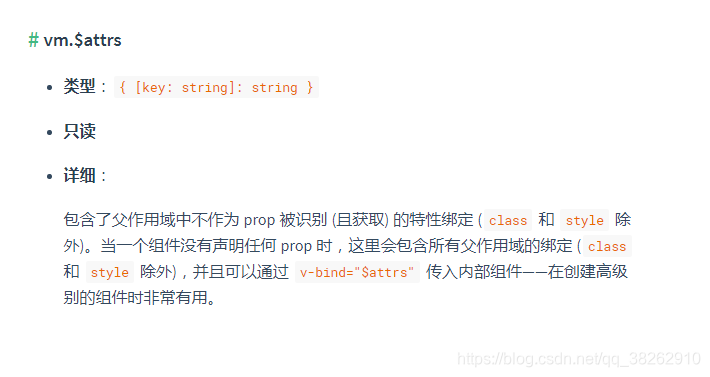
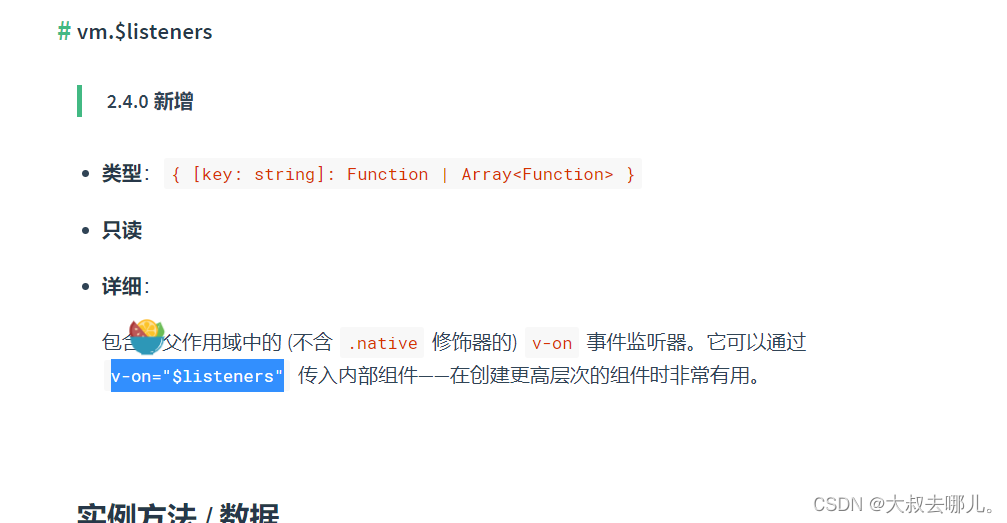
通过debugger打印可知 此时的$listeners $attrs 还是不存在的 之后通过Object.defineProperty给当前vm实例加上这两个属性 Object.defineProperty内部的实现 我们在响应式原理章节再去讨论
initRender做了四件事 处理vm.$slots 、vm.$createElement 、 响应式的vm.$listeners和vm.$attrs
5、callHook(vm, 'beforeCreate') vue生命周期函数beforeCreate
先来看看callHook内部怎么实现的
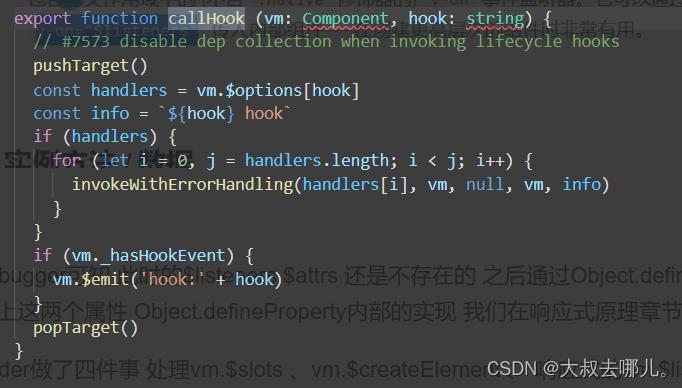
模板编译时钩子函数内的执行体会被放进vm.$options[hook]中 通过invokeWithErrorHandling调用该实例上的生命周期方法 由于mixin混入的存在这里为数组形式 循环执行多个如果是自定义hook事件@hook就直接emit触发
pushTarget popTarget和响应式有关一个targetStack模拟栈 在beforecreate这里传入undefined没有实际意义 就先不讨论
6、initInjections处理inject
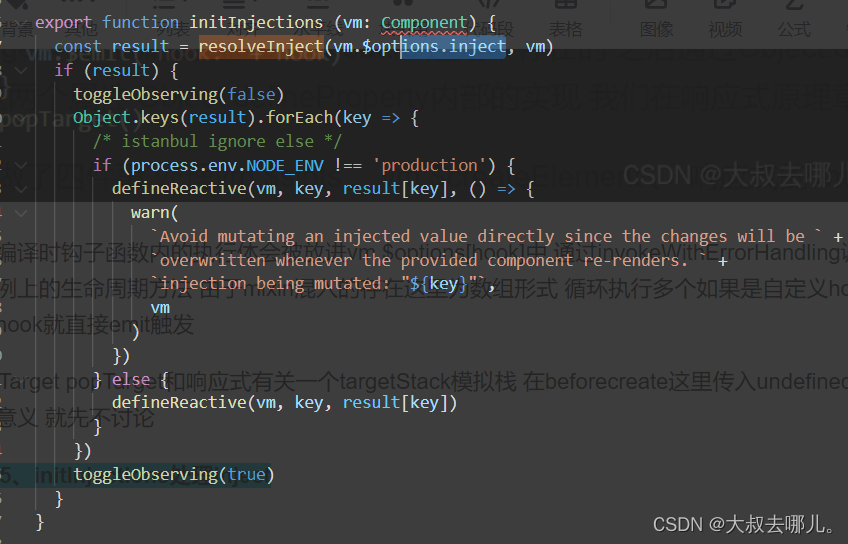
先来看看resolveInject做了哪些事
export function resolveInject (inject: any, vm: Component): ?Object {
if (inject) {
// inject is :any because flow is not smart enough to figure out cached
const result = Object.create(null)
const keys = hasSymbol
? Reflect.ownKeys(inject)
: Object.keys(inject)
for (let i = 0; i < keys.length; i++) {
const key = keys[i]
// #6574 in case the inject object is observed...
if (key === '__ob__') continue
const provideKey = inject[key].from //inject.foo.from
let source = vm
while (source) {
if (source._provided && hasOwn(source._provided, provideKey)) {
result[key] = source._provided[provideKey]
break
}
source = source.$parent
}
if (!source) {
if ('default' in inject[key]) {
const provideDefault = inject[key].default
result[key] = typeof provideDefault === 'function'
? provideDefault.call(vm)
: provideDefault
} else if (process.env.NODE_ENV !== 'production') {
warn(`Injection "${key}" not found`, vm)
}
}
}
return result
}
}
由于inject支持symbol 类型先根据使用方式提取属性 之后 遍历keys属性集合 向上查找如果当前查找的目标实例vm._provided 存在切自身含有静态属性from(这里的hasOwn就是hasOwnProperty) 就给result赋值 source._provided.from 然后break 由此可以看出inject从provide查找是就近原则 如果父组件提供了provide 就不会读取爷组件的provide了
if (!source)的意思是一直查到根组件都没有对应的from 这时再执行source = source.$parent 根组件没有$parent source为undefined 此时就会使用inject的defalut默认值
然后回到initInjections 接下来就是对inject的值进行响应式处理 响应式我们在后面去说
7、initState处理当前实例绑定的props methods data computed watch
- initProps
function initProps (vm: Component, propsOptions: Object) {const propsData = vm.$options.propsData || {}const props = vm._props = {}// cache prop keys so that future props updates can iterate using Array// instead of dynamic object key enumeration.const keys = vm.$options._propKeys = []const isRoot = !vm.$parent// root instance props should be convertedif (!isRoot) {toggleObserving(false)}for (const key in propsOptions) {keys.push(key)const value = validateProp(key, propsOptions, propsData, vm)/* istanbul ignore else */if (process.env.NODE_ENV !== 'production') {const hyphenatedKey = hyphenate(key)if (isReservedAttribute(hyphenatedKey) ||config.isReservedAttr(hyphenatedKey)) {warn(`"${hyphenatedKey}" is a reserved attribute and cannot be used as component prop.`,vm)}defineReactive(props, key, value, () => {if (!isRoot && !isUpdatingChildComponent) {warn(`Avoid mutating a prop directly since the value will be ` +`overwritten whenever the parent component re-renders. ` +`Instead, use a data or computed property based on the prop's ` +`value. Prop being mutated: "${key}"`,vm)}})} else {defineReactive(props, key, value)}// static props are already proxied on the component's prototype// during Vue.extend(). We only need to proxy props defined at// instantiation here.if (!(key in vm)) {proxy(vm, `_props`, key)}}toggleObserving(true)
}
开始const一些变量 vm.$options.propsData 是父向子传递的数据 vm._props就是当前组件props接收的数据 通过defineReactive将propsOptions(props配置) 响应式添加到 vm._props vm.$options._propKeys 就是暂存props属性 方便后面进行遍历
接下来看看循环内做了哪些事 首先是validateProp函数 这个函数用来确定props每一项的值
export function validateProp (key: string,propOptions: Object,propsData: Object,vm?: Component
): any {const prop = propOptions[key]const absent = !hasOwn(propsData, key)let value = propsData[key]// boolean castingconst booleanIndex = getTypeIndex(Boolean, prop.type)if (booleanIndex > -1) {if (absent && !hasOwn(prop, 'default')) {value = false} else if (value === '' || value === hyphenate(key)) {// only cast empty string / same name to boolean if// boolean has higher priorityconst stringIndex = getTypeIndex(String, prop.type)if (stringIndex < 0 || booleanIndex < stringIndex) {value = true}}}// check default valueif (value === undefined) {value = getPropDefaultValue(vm, prop, key)// since the default value is a fresh copy,// make sure to observe it.const prevShouldObserve = shouldObservetoggleObserving(true)observe(value)toggleObserving(prevShouldObserve)}if (process.env.NODE_ENV !== 'production' &&// skip validation for weex recycle-list child component props!(__WEEX__ && isObject(value) && ('@binding' in value))) {assertProp(prop, key, value, vm, absent)}return value
}
absent 代表没有propsData value就是父向子传递的值 没有就是undefined key代表props配置项中的每一个key
接下来我们来看看getTypeIndex函数
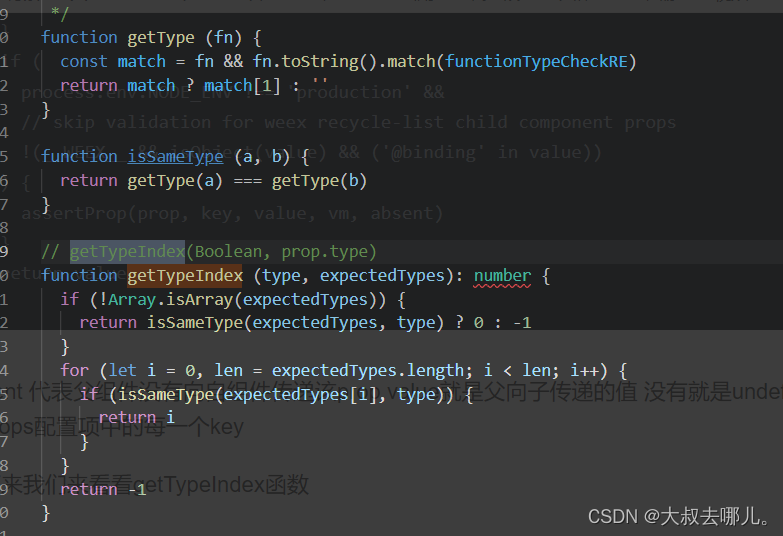
我们知道props的type属性是支持[String,Number,Boolean] 这样的数组形式的 所以函数里先判断 如果不是数组 且该type为Boolean 返回0否则返回-1 如果是数组则循环中的每一项 返回Boolean在数组的下标 如果没有Boolean则返回-1 我们就得到了booleanIndex 如果booleanIndex > -1则说明有Boolean类型的声明 如果propsData不存在该key也就是父组件没有向当前组件传值且当前组件该key的配置项没有设置默认值 则value = false 如果父向当前组件传了一个空字符串 key的-形式 然后获取String的下标 如果不存在或Boolean在String前 则value=true 如果父组件没有向当前组件传值且没有type声明为Boolean 则value等于默认值无default 则为undefined
然后就是响应式的处理
- initMethods
function initMethods (vm: Component, methods: Object) {const props = vm.$options.propsfor (const key in methods) {if (process.env.NODE_ENV !== 'production') {if (typeof methods[key] !== 'function') {warn(`Method "${key}" has type "${typeof methods[key]}" in the component definition. ` +`Did you reference the function correctly?`,vm)}if (props && hasOwn(props, key)) {warn(`Method "${key}" has already been defined as a prop.`,vm)}if ((key in vm) && isReserved(key)) {warn(`Method "${key}" conflicts with an existing Vue instance method. ` +`Avoid defining component methods that start with _ or $.`)}}vm[key] = typeof methods[key] !== 'function' ? noop : bind(methods[key], vm)}
}
没什么好说的直接一个个绑定到当前vm实例
-
initData
function initData (vm: Component) {let data = vm.$options.datadata = vm._data = typeof data === 'function'? getData(data, vm): data || {}if (!isPlainObject(data)) {data = {}process.env.NODE_ENV !== 'production' && warn('data functions should return an object:\n' +'https://vuejs.org/v2/guide/components.html#data-Must-Be-a-Function',vm)}// proxy data on instanceconst keys = Object.keys(data)const props = vm.$options.propsconst methods = vm.$options.methodslet i = keys.lengthwhile (i--) {const key = keys[i]if (process.env.NODE_ENV !== 'production') {if (methods && hasOwn(methods, key)) {warn(`Method "${key}" has already been defined as a data property.`,vm)}}if (props && hasOwn(props, key)) {process.env.NODE_ENV !== 'production' && warn(`The data property "${key}" is already declared as a prop. ` +`Use prop default value instead.`,vm)} else if (!isReserved(key)) {proxy(vm, `_data`, key)}}// observe dataobserve(data, true /* asRootData */)
}
如果data为函数调用getData获取data中的对象 data为对象报错 之后就是判断不可与props methods 名称重复然后监听data
-
initComputed
通过defineComputed循环创建computed
export function defineComputed (target: any,key: string,userDef: Object | Function
) {const shouldCache = !isServerRendering()if (typeof userDef === 'function') {sharedPropertyDefinition.get = shouldCache? createComputedGetter(key): createGetterInvoker(userDef)sharedPropertyDefinition.set = noop} else {sharedPropertyDefinition.get = userDef.get? shouldCache && userDef.cache !== false? createComputedGetter(key): createGetterInvoker(userDef.get): noopsharedPropertyDefinition.set = userDef.set || noop}if (process.env.NODE_ENV !== 'production' &&sharedPropertyDefinition.set === noop) {sharedPropertyDefinition.set = function () {warn(`Computed property "${key}" was assigned to but it has no setter.`,this)}}Object.defineProperty(target, key, sharedPropertyDefinition)
}
全局sharedPropertyDefinition对象就是Object.defineProerty的参数 noop是一个支持三个可选参数的空函数 isServerRendering判断是否为ssr环境 一般使用createComputedGetter构建getter
12
function createComputedGetter (key) {return function computedGetter () {const watcher = this._computedWatchers && this._computedWatchers[key]if (watcher) {if (watcher.dirty) {watcher.evaluate()}if (Dep.target) {watcher.depend()}return watcher.value}}
}
createComputedGetter基本是响应式的处理 computed监听的数据改变 dirty就会变成true 总之就是给getter一个监听函数
-
initWatch
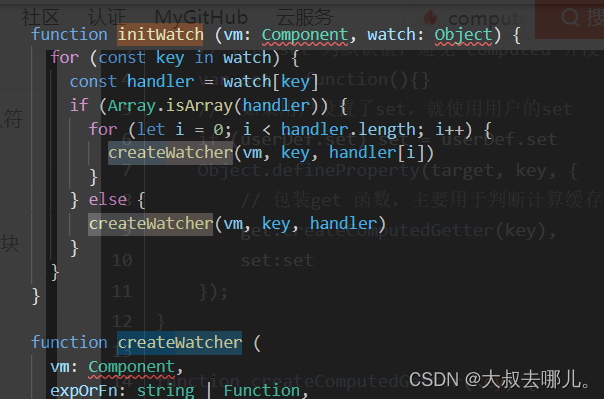
循环为每个fn创建watcher响应式都放在后面进行说明
8、initProvide处理provide
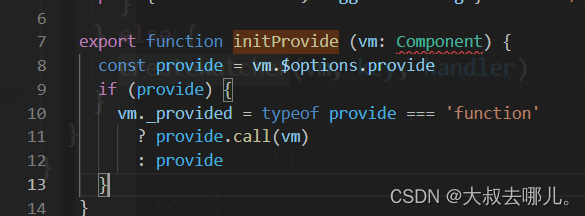
模板渲染时provide会挂在vm.$options.provide上 然后挂在vm._provided 很简单
9、callHook(vm, 'created')
和beforeCreate一样
9、vm.$mount(vm.$options.el)
挂载根节点
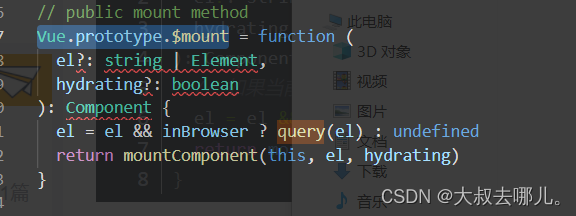
主要是query mountComponent 这两个函数
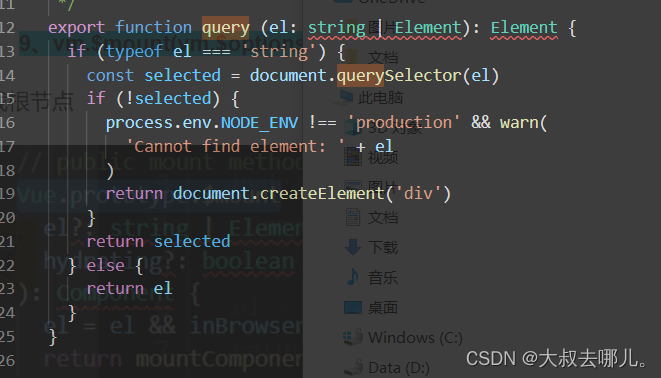
el dom不存在则返回一个div dom 存在则返回该el dom
export function mountComponent (vm: Component,el: ?Element,hydrating?: boolean
): Component {vm.$el = elif (!vm.$options.render) {vm.$options.render = createEmptyVNodeif (process.env.NODE_ENV !== 'production') {/* istanbul ignore if */if ((vm.$options.template && vm.$options.template.charAt(0) !== '#') ||vm.$options.el || el) {warn('You are using the runtime-only build of Vue where the template ' +'compiler is not available. Either pre-compile the templates into ' +'render functions, or use the compiler-included build.',vm)} else {warn('Failed to mount component: template or render function not defined.',vm)}}}callHook(vm, 'beforeMount')let updateComponent/* istanbul ignore if */if (process.env.NODE_ENV !== 'production' && config.performance && mark) {updateComponent = () => {const name = vm._nameconst id = vm._uidconst startTag = `vue-perf-start:${id}`const endTag = `vue-perf-end:${id}`mark(startTag)const vnode = vm._render()mark(endTag)measure(`vue ${name} render`, startTag, endTag)mark(startTag)vm._update(vnode, hydrating)mark(endTag)measure(`vue ${name} patch`, startTag, endTag)}} else {updateComponent = () => {vm._update(vm._render(), hydrating)}}// we set this to vm._watcher inside the watcher's constructor// since the watcher's initial patch may call $forceUpdate (e.g. inside child// component's mounted hook), which relies on vm._watcher being already definednew Watcher(vm, updateComponent, noop, {before () {if (vm._isMounted && !vm._isDestroyed) {callHook(vm, 'beforeUpdate')}}}, true /* isRenderWatcher */)hydrating = false// manually mounted instance, call mounted on self// mounted is called for render-created child components in its inserted hookif (vm.$vnode == null) {vm._isMounted = truecallHook(vm, 'mounted')}return vm
}
将真实dom赋值给当前实例的vm.$el 如果 vm.$options.render 不存在则赋值一个createEmptyVNode
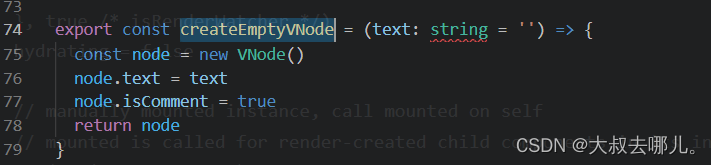
之后是一些异常处理 别告诉我你看不懂 然后调用beforemount 生产环境加上mark标识 再通过new Watcher去调用vm._update实现渲染 这个我们放在虚拟dom章节去说 最后执行mounted 钩子函数
=========================================================================
四、总结
1. 初始化大致流程:
处理options配置项 => 处理关于组件父子关系的一些属性 => 自定义事件添加调用器 => 初始化render处理vm.$slots 、vm.$createElement 、 响应式的vm.$listeners和vm.$attrs => 触发beforeCreate钩子 => 处理inject => 处理组件状态包括props methods data computed watch 其中computed watch 监听在此初始化 => 处理provide => 触发created钩子
2. new Vue初始化过程 触发了 beforeCreate created beforeMount mounted 四个生命周期函数
本文来自互联网用户投稿,文章观点仅代表作者本人,不代表本站立场,不承担相关法律责任。如若转载,请注明出处。 如若内容造成侵权/违法违规/事实不符,请点击【内容举报】进行投诉反馈!