iOS控件:navigationbar
一、导航条navigation bar
1、导航条navigationbar属于导航控制器,一个导航控制器只有一个导航条。
2、在一个导航控制器push新页面和pop页面时,导航条是同一个。
3、在一个视图控制器内改变了导航条的样式,其它控制器的导航条的样式也会改变,也说明了导航条属于导航控制器,而不是每个视图控制器都有一个导航条。
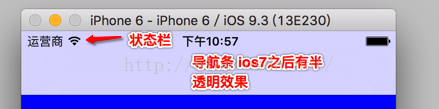
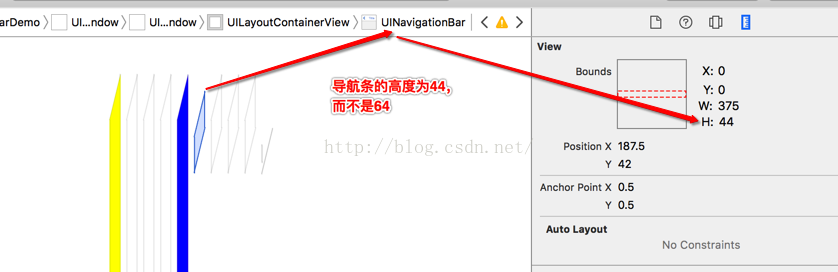
4、导航条的层级结构
navigationbar层级
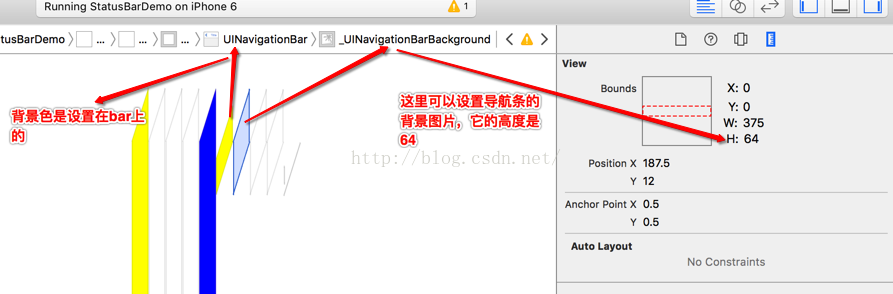
navigationBarBackground层级
二、设置导航条的属性
-(void)setNavigationBar{self.navigationController.navigationBarHidden = YES;//隐藏导航条self.navigationController.navigationBar.translucent = NO;//去除导航条的半透明效果self.navigationController.navigationBar.barStyle = UIBarStyleDefault;//导航条的样式,UIBarStyleBlackself.navigationController.navigationBar.backgroundColor = [UIColor yellowColor];//背景色,有叠加效果self.navigationController.navigationBar.barTintColor = [UIColor cyanColor];//背景色,纯色[self.navigationController.navigationBar setBackgroundImage:[UIImage imageNamed:@"nav-64"] forBarMetrics:UIBarMetricsDefault];//给导航条设置背景图片/*PS:UIBarMetricsDefault,//人像模式 竖屏UIBarMetricsCompact,//风景模式 横屏*/
}
三、navigationBar与navigationItem
1、navigationbar继承自UIView,通常是位于屏幕顶端的控件。
2、navigationbar是navigationitem的容器,以stack的形式管理UINavigationitem。需要说明的是UInavigationbar属于导航控制器,且只有一个,navigationitem是独立存在的不属于导航控制器也不属于导航条。它是试图控制器的属性。navigationbar提供了多种方法来管理单个和多个navitionItem。
3、UINavigationitem也是容器。包括titleView 、左侧N个按钮,右侧N个按钮这些控件,并提供了方法来管理这些控件。
示例代码1
#import "ViewController.h"
@interface ViewController ()@end
NSUInteger count;//navitionItem的个数
UINavigationBar * navigationBar;//导航条
@implementation ViewController- (void)viewDidLoad {[super viewDidLoad];self.view.backgroundColor = [UIColor blueColor];count = 1;//创建一个导航条navigationBar = [[UINavigationBar alloc] initWithFrame:CGRectMake(0, 20, [UIScreen mainScreen].bounds.size.width, 44)];//添加导航条[self.view addSubview:navigationBar];//push一个navigationItem[self push];
}//push一个navigationItem
-(void)push{[navigationBar pushNavigationItem:[self makeNavItem] animated:YES];count++;
}//pop一个navigationItem
-(void)pop{if (count>2) {count--;[navigationBar popNavigationItemAnimated:YES];}else{UIAlertView * alert = [[UIAlertView alloc] initWithTitle:@"提示" message:@"只剩下最后一个导航项,再出栈就没有了" delegate:nil cancelButtonTitle:@"ok" otherButtonTitles:nil, nil];[alert show];}
}//创建一个navigationItem
-(UINavigationItem*)makeNavItem{UINavigationItem * navigationItem = [[UINavigationItem alloc] initWithTitle:@""];UIBarButtonItem * leftBtn = [[UIBarButtonItem alloc] initWithBarButtonSystemItem:UIBarButtonSystemItemAdd target:self action:@selector(push)];UIBarButtonItem * rightBtn = [[UIBarButtonItem alloc] initWithBarButtonSystemItem:UIBarButtonSystemItemCancel target:self action:@selector(pop)];navigationItem.title = [NSString stringWithFormat:@"第【%ld】个导航项",count];[navigationItem setLeftBarButtonItem:leftBtn];[navigationItem setRightBarButtonItem:rightBtn];return navigationItem;
}@end
示例代码2
1、隐藏返回按钮
//隐藏导航条左侧返回按钮
self.navigationItem.hidesBackButton = YES;
//PS:可以看出navigationItem是试图控制器的属性。
2、中间titleView的一些设置
-(void)setMyTitleView{
#if 0//设置title的文本self.navigationItem.title = @"MyView";
#else//自定义titleViewUIView * myTitleView = [[UIView alloc] initWithFrame:CGRectMake(0, 0, 100, 40)];UILabel * label = [[UILabel alloc] initWithFrame:myTitleView.bounds];label.text = @"myTitleView";[myTitleView addSubview:label];myTitleView.backgroundColor = [UIColor orangeColor];self.navigationItem.titleView = myTitleView;
#endif
}
3、左侧按钮的相关设置
-(void)setLeftButtonItem{
#if 0//自定义左侧单个按钮UIBarButtonItem * leftItem = [[UIBarButtonItem alloc] initWithBarButtonSystemItem:UIBarButtonSystemItemCancel target:self action:@selector(back)];
#else//设置左侧单个按钮:UIButton * leftBtn = [UIButton buttonWithType:UIButtonTypeCustom];[leftBtn setTitle:@"返回" forState:UIControlStateNormal];[leftBtn addTarget:self action:@selector(back) forControlEvents:UIControlEventTouchUpInside];leftBtn.frame = CGRectMake(0, 0, 60, 20);leftBtn.titleLabel.font = [UIFont systemFontOfSize:12];//通过customView来设置barButtonUIBarButtonItem * leftItem = [[UIBarButtonItem alloc] initWithCustomView:leftBtn];
#endif//设置视图控制器的navigationitem。//导航条上的左侧单个按钮self.navigationItem.leftBarButtonItem = leftItem;
}
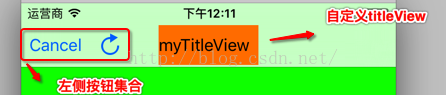
以上设置的截图如下:
1、

2、
参考文章:
1、http://www.jianshu.com/p/b7818eba288c
本文来自互联网用户投稿,文章观点仅代表作者本人,不代表本站立场,不承担相关法律责任。如若转载,请注明出处。 如若内容造成侵权/违法违规/事实不符,请点击【内容举报】进行投诉反馈!