Java中文件写入的7种方法
Java中文件写入的7种方法
话不多说,直接上代码,解释说明在代码下方
import java.io.*;
import java.nio.file.Files;
import java.nio.file.Paths;/*** @auther July* @create 2021-03-11* @desc ...*/
public class IOStreamDemo {public static void main(String[] args) {StringBuffer stringBuffer = new StringBuffer();for (int i = 0; i < 1000000; i++) {stringBuffer.append("abcdefghijklmnopqrstuvwxyz");}String str = stringBuffer.toString();String filePath1 = "F:\\test\\writer1.txt";String filePath2 = "F:\\test\\writer2.txt";String filePath3 = "F:\\test\\writer3.txt";String filePath4 = "F:\\test\\writer4.txt";String filePath5 = "F:\\test\\writer5.txt";String filePath6 = "F:\\test\\writer6.txt";String filePath7 = "F:\\test\\writer7.txt";long startTime1 = System.currentTimeMillis();testFileOutputStream(filePath1, str);long endTime1 = System.currentTimeMillis();System.out.println("FileOutputStream写入时间:" + (endTime1 - startTime1));System.out.println("==================================");long startTime2 = System.currentTimeMillis();testBufferedOutputStream(filePath2, str);long endTime2 = System.currentTimeMillis();System.out.println("BufferedOutputStream写入时间:" + (endTime2 - startTime2));System.out.println("==================================");long startTime3 = System.currentTimeMillis();testOutputStreamWriter(filePath3, str);long endTime3 = System.currentTimeMillis();System.out.println("OutputStreamWriter写入时间:" + (endTime3 - startTime3));System.out.println("==================================");long startTime4 = System.currentTimeMillis();testBufferedWriter(filePath4, str);long endTime4 = System.currentTimeMillis();System.out.println("BufferedWriter写入时间:" + (endTime4 - startTime4));System.out.println("==================================");long startTime5 = System.currentTimeMillis();testFileWriter(filePath5, str);long endTime5 = System.currentTimeMillis();System.out.println("FileWriter写入时间:" + (endTime5 - startTime5));System.out.println("==================================");long startTime6 = System.currentTimeMillis();testPrintWriter(filePath6, str);long endTime6 = System.currentTimeMillis();System.out.println("PrintWriter写入时间:" + (endTime6 - startTime6));System.out.println("==================================");long startTime7 = System.currentTimeMillis();testFiles(filePath7, str);long endTime7 = System.currentTimeMillis();System.out.println("Files写入时间:" + (endTime7 - startTime7));System.out.println("==================================");}//1.testFileOutputStreamprivate static void testFileOutputStream(String filePath, String content) {try(FileOutputStream fileOutputStream = new FileOutputStream(filePath)) {fileOutputStream.write(content.getBytes());} catch (Exception e) {}}//2.testBufferedOutputStreamprivate static void testBufferedOutputStream(String filePath, String content) {try(BufferedOutputStream buffered = new BufferedOutputStream(new FileOutputStream(filePath))) {buffered.write(content.getBytes());} catch (Exception e) {}}//3.testOutputStreamWriter,字符输出转换流private static void testOutputStreamWriter(String filePath, String content) {try(OutputStreamWriter outputStreamWriter = new OutputStreamWriter(new FileOutputStream(filePath))) {outputStreamWriter.write(content);} catch (Exception e) {}}//4.testBufferedWriterprivate static void testBufferedWriter(String filePath, String content) {try(BufferedWriter bufferedWriter = new BufferedWriter(new FileWriter(filePath))) {bufferedWriter.write(content);} catch (Exception e) {}}//5.testFileWriterprivate static void testFileWriter(String filePath, String content) {try(FileWriter fileWriter = new FileWriter(filePath)) {fileWriter.write(content);} catch (Exception e) {}}//6.testPrintWriterprivate static void testPrintWriter(String filePath, String content) {try(PrintWriter printWriter = new PrintWriter(new File(filePath))) {printWriter.write(content);} catch (Exception e) {}}//7.testFileprivate static void testFiles(String filePath, String content) {try {Files.write(Paths.get(filePath),content.getBytes());} catch (IOException e) {e.printStackTrace();}}
}
输出是:
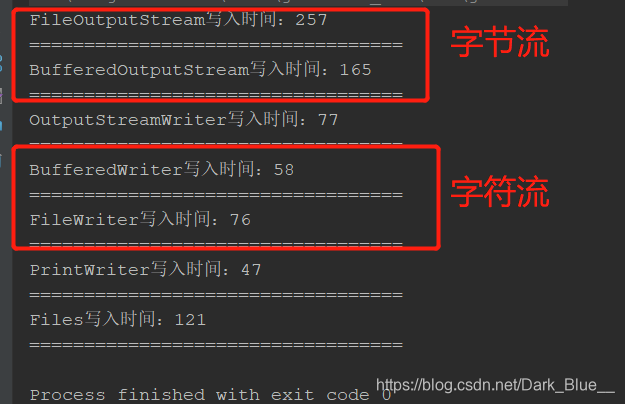
FileOutputStream写入时间:257
==================================
BufferedOutputStream写入时间:165
==================================
OutputStreamWriter写入时间:77
==================================
BufferedWriter写入时间:58
==================================
FileWriter写入时间:76
==================================
PrintWriter写入时间:47
==================================
Files写入时间:121
==================================Process finished with exit code 0
从流的分类上来看,字符输出流所用时间比字节输出流所用时间短
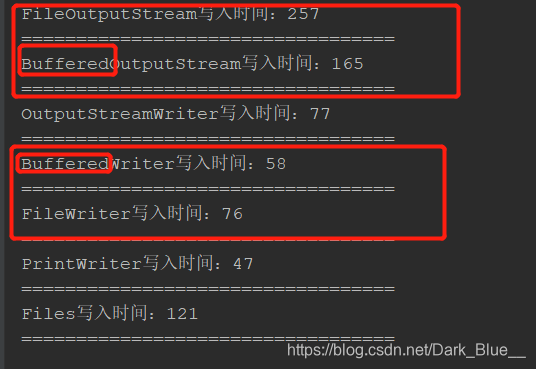
从是否带缓冲区来看,使用带缓冲区的所用时间更短
如果电脑性能比较好的话,这样对比可能不太明显,可以把for循环调大一点,对比结果就明显许多了。
下面解释一下这里为什么字符流比字节流要快:
这要从字节流和字符流的特性来看,字节流对于一些二进制文件的写入比较快,字符流对于一些字符串等文件的写入比较快,各有各的使用场景;在上面的性能测试中,由于要写入的是字符串,所以在用字节流操作的时候,是先把字符串转换为字节流,所以时间就耗费的比较多了。
下面解释一下为什么带缓冲区的用时比较快:
在文件写入的时候,CPU会和低速存储设备,比如所固态硬盘或者机械硬盘,固态硬盘性能比机械硬盘好一点,但是和CPU相比还是拖后腿,就像木桶效应一样,CPU写入的速度再快,也要等磁盘,但是如果加入缓存就不一样了(缓存是内存空间的一部分),CPU先把文件写到缓存中,这样就不用等磁盘一点一点写入了,这样CPU就可以去干其他事了;当缓存中写入的文件大小达到某个阈值的时候,再一次性写入磁盘,内存的写入速度可比磁盘的写入速度快多了。
拓展
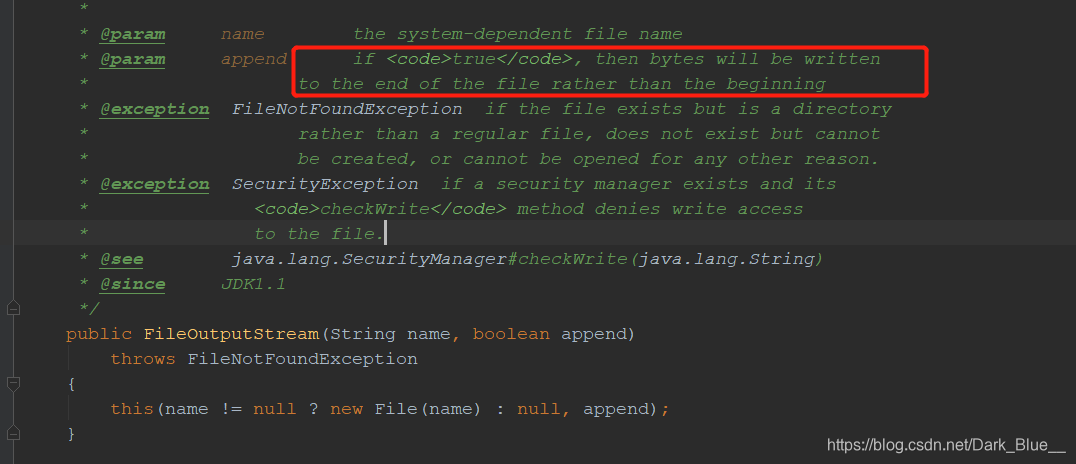
打开FileOutputStream的源码,就可以看到它的构造方法中有一个这个方法:

第二个参数的意思是是否在文件后面追加内容,如果设置为true,则在文件后面追加内容,而不是覆盖。
本文来自互联网用户投稿,文章观点仅代表作者本人,不代表本站立场,不承担相关法律责任。如若转载,请注明出处。 如若内容造成侵权/违法违规/事实不符,请点击【内容举报】进行投诉反馈!