Java 小项目
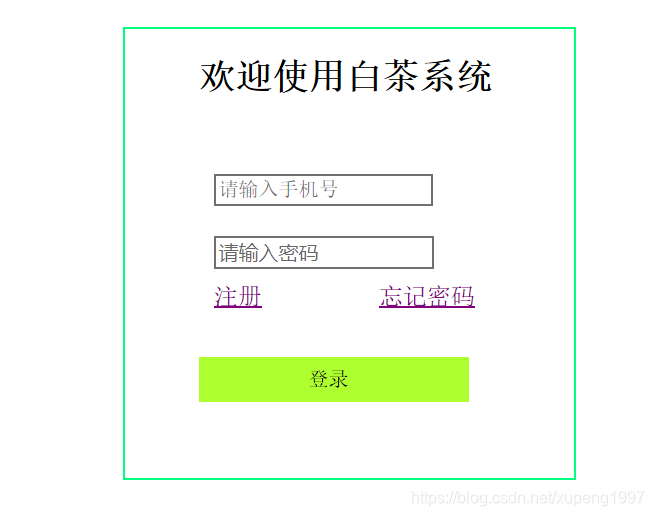
<html>
<head><style type="text/css">#center {height: 300px;width: 300px;margin: 0px auto;border: 1px solid springgreen;margin-top: 60px;}#username,#userpwd {position: relative;/*相对定位 top顶端*/left: 60px;margin-top: 30px;}#userpwd {position: relative;/*相对定位 top顶端*/left: 60px;margin-top: 20px;}h2 {position: relative;/*相对定位 top顶端*/left: 50px;}#p1 {position: relative;top: 10px;left: 60px;}#p2 {position: relative;top: 10px;left: 130px;/*text-decoration:none;去掉下滑线的*/}#p4 {position: relative;top: 40px;left: 50px;background-color: greenyellow;border: 1px;width: 60%;height: 30px;/*text-decoration:none;去掉下滑线的*/}#p3 {position: relative;top: 6px;left: 65px;background-color: greenyellow;border: none;/*text-decoration:none;去掉下滑线的*/}style>
head><body><div id="center"><div><h2>欢迎使用白茶系统h2><form name="form1" method="post" action="login.jsp"><br><br><a href="wu3.html" id="p1">注册a><a href="wu2.html" id="p2">忘记密码a><div id="p4">  <input type="submit" id="p3" value="登录">div>form>div><div>div><div>div>div>
body>
html>==================***jsp页面***========================
```jsp
<%@page import="QQ.Service.UserSevive"%>
<%@page import="QQ.Service.Usersaveimpl"%>
<%@page import="QQ.entry.User"%>
<%@ page language="java" contentType="text/html; charset=UTF-8"pageEncoding="UTF-8"%>

<html>
<head>
<meta charset="UTF-8">
<title>Insert title heretitle>
head>
<body>
<%
request.setCharacterEncoding("utf8");
String inpone = request.getParameter("name");
String pwd = request.getParameter("pwd");
User user = new User(inpone,pwd);
UserSevive userSevive = new Usersaveimpl();
userSevive.save(user);
%>
body>
html>
============密码重置===============

<html><head><style type="text/css">h2 {position: relative;/*相对定位 top顶端*/left: 90px;}#center1 {height: 300px;width: 300px;margin: 0px auto;border: 1px solid springgreen;margin-top: 60px;}#username{position: relative;left: 60px;margin-top: 5px;}#userpwd1{position: relative;left: 60px;margin-top: 15px;}#userpwd2{position: relative;left: 60px;margin-top: 15px;}#userpwd{position: relative;left: 60px;margin-top: 15px;}#p3 {position: relative;top: 3px;left: 65px;/*text-decoration:none;去掉下滑线的*/}#p4 {position: relative;top: 20px;left: 50px;background-color: greenyellow;border: 1px;width: 60%;height: 30px;/*text-decoration:none;去掉下滑线的*/}#p31 {position: relative;top: 3px;left: 65px;/*text-decoration:none;去掉下滑线的*/}#p41 {position: relative;top: 30px;left: 50px;background-color: greenyellow;border: 1px;width: 60%;height: 30px;/*text-decoration:none;去掉下滑线的*/}style>head><body><div id="center1"><div><h2>密码重置h2><br><br><br><br><div id="p4"><a href="wu4.HTML" id="p3">提交a>div><div id="p41"><a href="wu1.html" id="p31">返回a>div>div>div>body>
html>
==========***用户注册页面***=================

<html><head><style type="text/css">h2 {position: relative;/*相对定位 top顶端*/left: 90px;}#center1 {height: 300px;width: 300px;margin: 0px auto;border: 1px solid springgreen;margin-top: 60px;}#username{position: relative;left: 60px;margin-top: 5px;}#userpwd1{position: relative;left: 60px;margin-top: 15px;}#userpwd2{position: relative;left: 60px;margin-top: 15px;}#userpwd{position: relative;left: 60px;margin-top: 15px;}#p3 {position: relative;top: 3px;left: 65px;/*text-decoration:none;去掉下滑线的*/}#p31 {position: relative;top: 3px;left: 65px;/*text-decoration:none;去掉下滑线的*/}#p4 {position: relative;top: 40px;left: 50px;background-color: greenyellow;border: 1px;width: 60%;height: 30px;/*text-decoration:none;去掉下滑线的*/}#p41 {position: relative;top: 50px;left: 50px;background-color: greenyellow;border: 1px;width: 60%;height: 30px;/*text-decoration:none;去掉下滑线的*/}style>head><body><div id="center1"><div><h2>用户注册h2><br><br><br><div id="p4"><a href="" id="p3">提交a>div><div id="p41"><a href="wu1.html" id="p31">返回a>div>div>div>body>
html>
本文来自互联网用户投稿,文章观点仅代表作者本人,不代表本站立场,不承担相关法律责任。如若转载,请注明出处。 如若内容造成侵权/违法违规/事实不符,请点击【内容举报】进行投诉反馈!