linux普通用户没有ll命令
目录
- 1、解决办法
- 2、其他文件
1、解决办法
在当前用户的家目录添加 .bashrc 文件,没有家目录就切换到root用户新建,然后修改目录权限的命令: chown -R app:appgroup /home/app。
比如我的当前用户是 app ,就在 /home/app 目录下添加 .bashrc 文件,然后执行 source .bashrc 命令让文件生效。
.bashrc 文件内容如下
# .bashrc# Source global definitions
if [ -f /etc/bashrc ]; then. /etc/bashrc
fi# Uncomment the following line if you don't like systemctl's auto-paging feature:
# export SYSTEMD_PAGER=# User specific aliases and functions
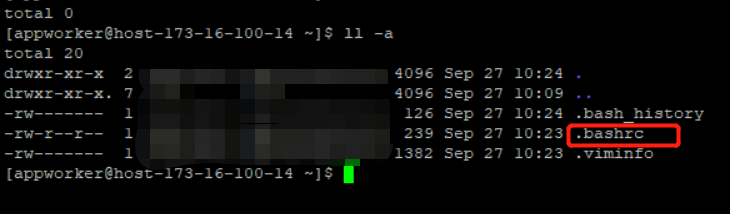
在当前 /home/app 目录就有一下文件了
2、其他文件
.bash_profile 文件
# .bash_profile# Get the aliases and functions
if [ -f ~/.bashrc ]; then. ~/.bashrc
fi# User specific environment and startup programsPATH=$PATH:$HOME/.local/bin:$HOME/binexport PATH
本文来自互联网用户投稿,文章观点仅代表作者本人,不代表本站立场,不承担相关法律责任。如若转载,请注明出处。 如若内容造成侵权/违法违规/事实不符,请点击【内容举报】进行投诉反馈!