Angular7 表单
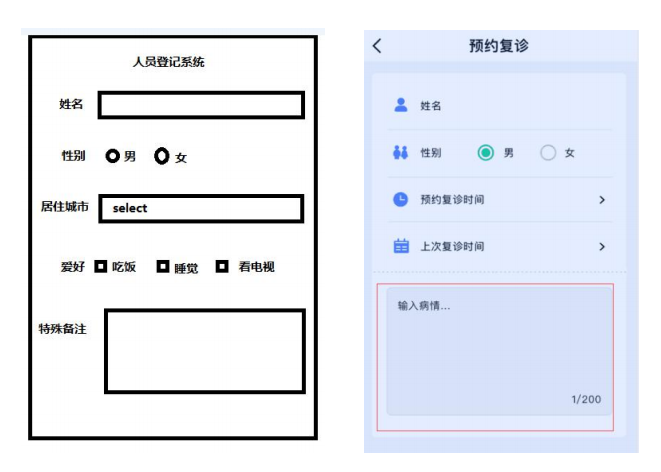
Angular 表单 input、checkbox、radio、 select、 textarea 实现在线预约功能
html 文件
<h2>人员登记系统h2><div class="people_list"><ul><li>姓 名:<input type="text" id="username" [(ngModel)]="peopleInfo.username" value="fonm_input" />li><li>性 别:<input type="radio" value="1" name="sex" id="sex1" [(ngModel)]="peopleInfo.sex"> <label for="sex1">男 label>   <input type="radio" value="2" name="sex"  id="sex2" [(ngModel)]="peopleInfo.sex"> <label for="sex2">女 label>li><li>城 市:<select name="city" id="city" [(ngModel)]="peopleInfo.city"><option [value]="item" *ngFor="let item of peopleInfo.cityList">{{item}}option>select>li><li>爱 好:<span *ngFor="let item of peopleInfo.hobby;let key=index;"><input type="checkbox"  [id]="'check'+key" [(ngModel)]="item.checked"/> <label [for]="'check'+key"> {{item.title}}label>  span>li><li>备 注:<textarea name="mark" id="mark" cols="30" rows="10" [(ngModel)]="peopleInfo.mark">textarea>li>ul><button (click)="doSubmit()" class="submit">获取表单的内容button><br><br><br><br><pre>{{peopleInfo | json}}pre>
div>
ts 文件
import { Component, OnInit } from '@angular/core';@Component({selector: 'app-form',templateUrl: './form.component.html',styleUrls: ['./form.component.scss']
})
export class FormComponent implements OnInit {public peopleInfo:any={username:'',sex:'2',cityList:['北京','上海','深圳'],city:'上海',hobby:[{title:'吃饭',checked:false},{title:'睡觉',checked:false},{title:'敲代码',checked:true}],mark:''}constructor() { }ngOnInit() {}doSubmit(){/*    jquery  dom操作let usernameDom:any=document.getElementById('username');console.log(usernameDom.value);    */console.log(this.peopleInfo);}}
css 文件
h2{text-align: center;
}.people_list{width: 400px;margin: 40px auto;padding:20px;border:1px solid #eee;li{height: 50px;line-height: 50px;.fonm_input{width: 300px;height: 28px;}}.submit{width: 100px;height: 30px;float: right;margin-right: 50px;margin-top:120px;}
}
转载于:https://www.cnblogs.com/wjw1014/p/10506961.html
本文来自互联网用户投稿,文章观点仅代表作者本人,不代表本站立场,不承担相关法律责任。如若转载,请注明出处。 如若内容造成侵权/违法违规/事实不符,请点击【内容举报】进行投诉反馈!