ROS(六):使用smartcar进行仿真
如果小伙伴们按照ROS(五)的博客走过一遍的话,使用smartcar进行仿真应该差不多.
按照之前的教程,下面两步可省略:
1.安装urdf_tutorial
sudo apt-get install ros-indigo-urdf-tutorial安装liburdfdom-tools,提供对urdf文件的检查
sudo apt-get install liburdfdom-tools我们可以从官方的文档中发现,ROS是有很多版本的,ROS对urdf的文件的支持可能不是很好,这时使用宏定义的.xacro文件兼容性更好,扩展性也更好. 所以可以把(五)中的一整个urdf文件重新整理成三个.xacro文件
3.机器人主题部分smartcar_body.urdf.xacro
<robot name="smartcar" xmlns:xacro="http://ros.org/wiki/xacro"> <xacro:property name="M_PI" value="3.14159"/> <xacro:include filename="$(find smartcar_description)/urdf/gazebo.urdf.xacro"/> <xacro:property name="base_x" value="0.33" /> <xacro:property name="base_y" value="0.33" /> <xacro:macro name="smartcar_body"> <link name="base_link"> <inertial> <origin xyz="0 0 0.055"/> <mass value="1.0" /> <inertia ixx="1.0" ixy="0.0" ixz="0.0" iyy="1.0" iyz="0.0" izz="1.0"/> inertial> <visual> <geometry> <box size="0.25 .16 .05"/> geometry> <origin rpy="0 0 0" xyz="0 0 0.055"/> <material name="blue"> <color rgba="0 0 .8 1"/> material> visual> <collision> <origin rpy="0 0 0" xyz="0 0 0.055"/> <geometry> <box size="0.25 .16 .05" /> geometry> collision> link> <link name="left_front_wheel"> <inertial> <origin xyz="0.08 0.08 0.025"/> <mass value="0.1" /> <inertia ixx="1.0" ixy="0.0" ixz="0.0" iyy="1.0" iyz="0.0" izz="1.0"/> inertial> <visual> <geometry> <cylinder length=".02" radius="0.025"/> geometry> <material name="black"> <color rgba="0 0 0 1"/> material> visual> <collision> <origin rpy="0 1.57075 1.57075" xyz="0.08 0.08 0.025"/> <geometry> <cylinder length=".02" radius="0.025"/> geometry> collision> link> <joint name="left_front_wheel_joint" type="continuous"> <axis xyz="0 0 1"/> <parent link="base_link"/> <child link="left_front_wheel"/> <origin rpy="0 1.57075 1.57075" xyz="0.08 0.08 0.025"/> <limit effort="100" velocity="100"/> <joint_properties damping="0.0" friction="0.0"/> joint> <link name="right_front_wheel"> <inertial> <origin xyz="0.08 -0.08 0.025"/> <mass value="0.1" /> <inertia ixx="1.0" ixy="0.0" ixz="0.0" iyy="1.0" iyz="0.0" izz="1.0"/> inertial> <visual> <geometry> <cylinder length=".02" radius="0.025"/> geometry> <material name="black"> <color rgba="0 0 0 1"/> material> visual> <collision> <origin rpy="0 1.57075 1.57075" xyz="0.08 -0.08 0.025"/> <geometry> <cylinder length=".02" radius="0.025"/> geometry> collision> link> <joint name="right_front_wheel_joint" type="continuous"> <axis xyz="0 0 1"/> <parent link="base_link"/> <child link="right_front_wheel"/> <origin rpy="0 1.57075 1.57075" xyz="0.08 -0.08 0.025"/> <limit effort="100" velocity="100"/> <joint_properties damping="0.0" friction="0.0"/> joint> <link name="left_back_wheel"> <inertial> <origin xyz="-0.08 0.08 0.025"/> <mass value="0.1" /> <inertia ixx="1.0" ixy="0.0" ixz="0.0" iyy="1.0" iyz="0.0" izz="1.0"/> inertial> <visual> <geometry> <cylinder length=".02" radius="0.025"/> geometry> <material name="black"> <color rgba="0 0 0 1"/> material> visual> <collision> <origin rpy="0 1.57075 1.57075" xyz="-0.08 0.08 0.025"/> <geometry> <cylinder length=".02" radius="0.025"/> geometry> collision> link> <joint name="left_back_wheel_joint" type="continuous"> <axis xyz="0 0 1"/> <parent link="base_link"/> <child link="left_back_wheel"/> <origin rpy="0 1.57075 1.57075" xyz="-0.08 0.08 0.025"/> <limit effort="100" velocity="100"/> <joint_properties damping="0.0" friction="0.0"/> joint> <link name="right_back_wheel"> <inertial> <origin xyz="-0.08 -0.08 0.025"/> <mass value="0.1" /> <inertia ixx="1.0" ixy="0.0" ixz="0.0" iyy="1.0" iyz="0.0" izz="1.0"/> inertial> <visual> <geometry> <cylinder length=".02" radius="0.025"/> geometry> <material name="black"> <color rgba="0 0 0 1"/> material> visual> <collision> <origin rpy="0 1.57075 1.57075" xyz="-0.08 -0.08 0.025"/> <geometry> <cylinder length=".02" radius="0.025"/> geometry> collision> link> <joint name="right_back_wheel_joint" type="continuous"> <axis xyz="0 0 1"/> <parent link="base_link"/> <child link="right_back_wheel"/> <origin rpy="0 1.57075 1.57075" xyz="-0.08 -0.08 0.025"/> <limit effort="100" velocity="100"/> <joint_properties damping="0.0" friction="0.0"/> joint> <link name="head"> <inertial> <origin xyz="0.08 0 0.08"/> <mass value="0.1" /> <inertia ixx="1.0" ixy="0.0" ixz="0.0" iyy="1.0" iyz="0.0" izz="1.0"/> inertial> <visual> <geometry> <box size=".02 .03 .03"/> geometry> <material name="white"> <color rgba="1 1 1 1"/> material> visual> <collision> <origin xyz="0.08 0 0.08"/> <geometry> <cylinder length=".02" radius="0.025"/> geometry> collision> link> <joint name="tobox" type="fixed"> <parent link="base_link"/> <child link="head"/> <origin xyz="0.08 0 0.08"/> joint> xacro:macro> robot>4.gazebo属性部分 gazebo.urdf.xacro
<robot xmlns:controller="http://playerstage.sourceforge.net/gazebo/xmlschema/#controller" xmlns:interface="http://playerstage.sourceforge.net/gazebo/xmlschema/#interface" xmlns:sensor="http://playerstage.sourceforge.net/gazebo/xmlschema/#sensor" xmlns:xacro="http://ros.org/wiki/xacro" name="smartcar_gazebo"> <xacro:macro name="smartcar_sim"> <gazebo reference="base_link"> <material>Gazebo/Bluematerial> gazebo> <gazebo reference="right_front_wheel"> <material>Gazebo/FlatBlackmaterial> gazebo> <gazebo reference="right_back_wheel"> <material>Gazebo/FlatBlackmaterial> gazebo> <gazebo reference="left_front_wheel"> <material>Gazebo/FlatBlackmaterial> gazebo> <gazebo reference="left_back_wheel"> <material>Gazebo/FlatBlackmaterial> gazebo> <gazebo reference="head"> <material>Gazebo/Whitematerial> gazebo> xacro:macro> robot>5.主文件 smartcar.urdf.xacro
<robot name="smartcar"    xmlns:xi="http://www.w3.org/2001/XInclude"  xmlns:gazebo="http://playerstage.sourceforge.net/gazebo/xmlschema/#gz"  xmlns:model="http://playerstage.sourceforge.net/gazebo/xmlschema/#model"  xmlns:sensor="http://playerstage.sourceforge.net/gazebo/xmlschema/#sensor"  xmlns:body="http://playerstage.sourceforge.net/gazebo/xmlschema/#body"  xmlns:geom="http://playerstage.sourceforge.net/gazebo/xmlschema/#geom"  xmlns:joint="http://playerstage.sourceforge.net/gazebo/xmlschema/#joint"  xmlns:controller="http://playerstage.sourceforge.net/gazebo/xmlschema/#controller"  xmlns:interface="http://playerstage.sourceforge.net/gazebo/xmlschema/#interface"  xmlns:rendering="http://playerstage.sourceforge.net/gazebo/xmlschema/#rendering"  xmlns:renderable="http://playerstage.sourceforge.net/gazebo/xmlschema/#renderable"  xmlns:physics="http://playerstage.sourceforge.net/gazebo/xmlschema/#physics"  xmlns:xacro="http://ros.org/wiki/xacro">  <xacro:include filename="$(find smartcar_description)/urdf/smartcar_body.urdf.xacro" />    <smartcar_body/>  <smartcar_sim/>
robot>
6.lanuch文件smartcar_display.rviz.launch
<launch> <param name="/use_sim_time" value="false" /> <arg name="urdf_file" default="$(find xacro)/xacro.py '$(find smartcar_description)/urdf/smartcar.urdf.xacro'" /> <arg name="gui" default="false" /> <param name="robot_description" command="$(arg urdf_file)" /> <param name="use_gui" value="$(arg gui)"/> <node name="arbotix" pkg="arbotix_python" type="arbotix_driver" output="screen"> <rosparam file="$(find smartcar_description)/config/smartcar_arbotix.yaml" command="load" /> <param name="sim" value="true"/> node> <node name="joint_state_publisher" pkg="joint_state_publisher" type="joint_state_publisher" > node> <node name="robot_state_publisher" pkg="robot_state_publisher" type="state_publisher"> <param name="publish_frequency" type="double" value="20.0" /> node> <node pkg="tf" type="static_transform_publisher" name="odom_left_wheel_broadcaster" args="0 0 0 0 0 0 /base_link /left_front_link 100" /> <node pkg="tf" type="static_transform_publisher" name="odom_right_wheel_broadcaster" args="0 0 0 0 0 0 /base_link /right_front_link 100" /> <node name="rviz" pkg="rviz" type="rviz" args="-d $(find smartcar_description)/urdf.rviz" /> launch>7.编译工作空间并运行
cd ~/catkin_ws/src/smartcar_description
//注意最后面的点
cp /opt/ros/indigo/share/urdf_tutorial/rviz/urdf.rviz  .
8.在indigo版本里,新增smartcar_description/config/smartcar_arbotix.yaml文件,内容为:
port: /dev/ttyUSB0
baud: 115200
rate: 20
sync_write: True
sync_read: True
read_rate: 20
write_rate: 20controllers: {#  Pololu motors: 1856 cpr = 0.3888105m travel = 4773 ticks per meter (empirical: 4100)base_controller: {type: diff_controller, base_frame_id: base_link, base_width: 0.26, ticks_meter: 4100, Kp: 12, Kd: 12, Ki: 0, Ko: 50, accel_limit: 1.0 }
}
9.编译完后进行仿真实验
roscore
//新终端
. devel/setup.bash
roslaunch smartcar_description smartcar_display.rviz.launch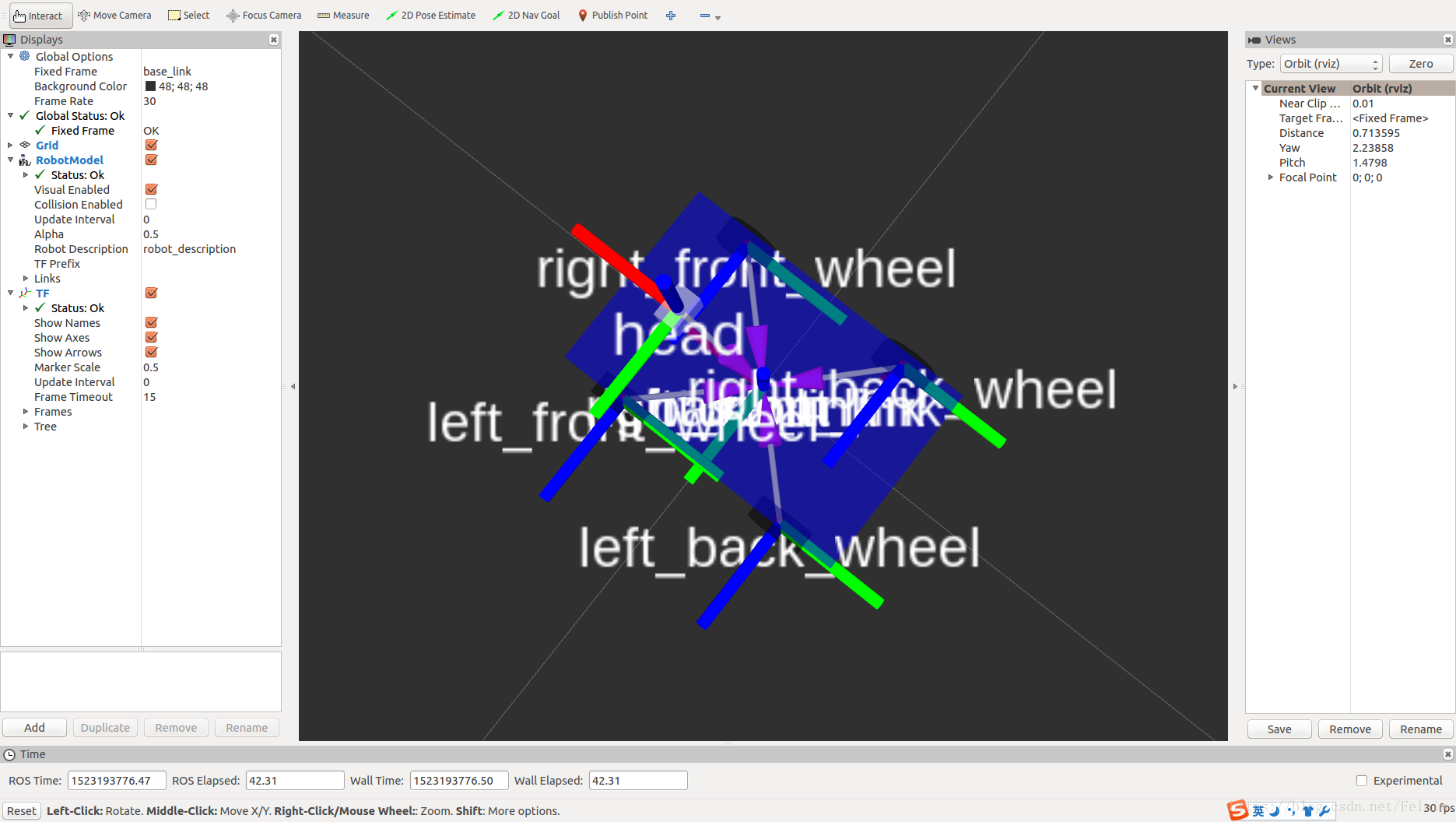
打开如上图所示,LZ为看美观,把名字都隐藏起来.然后发布一个message,让小车旋转起来:
rostopic pub -r 10 /cmd_vel geometry_msgs/Twist '{linear: {x: 0.5, y: 0, z: 0}, angular: {x: 0, y: 0, z: 0.5}}'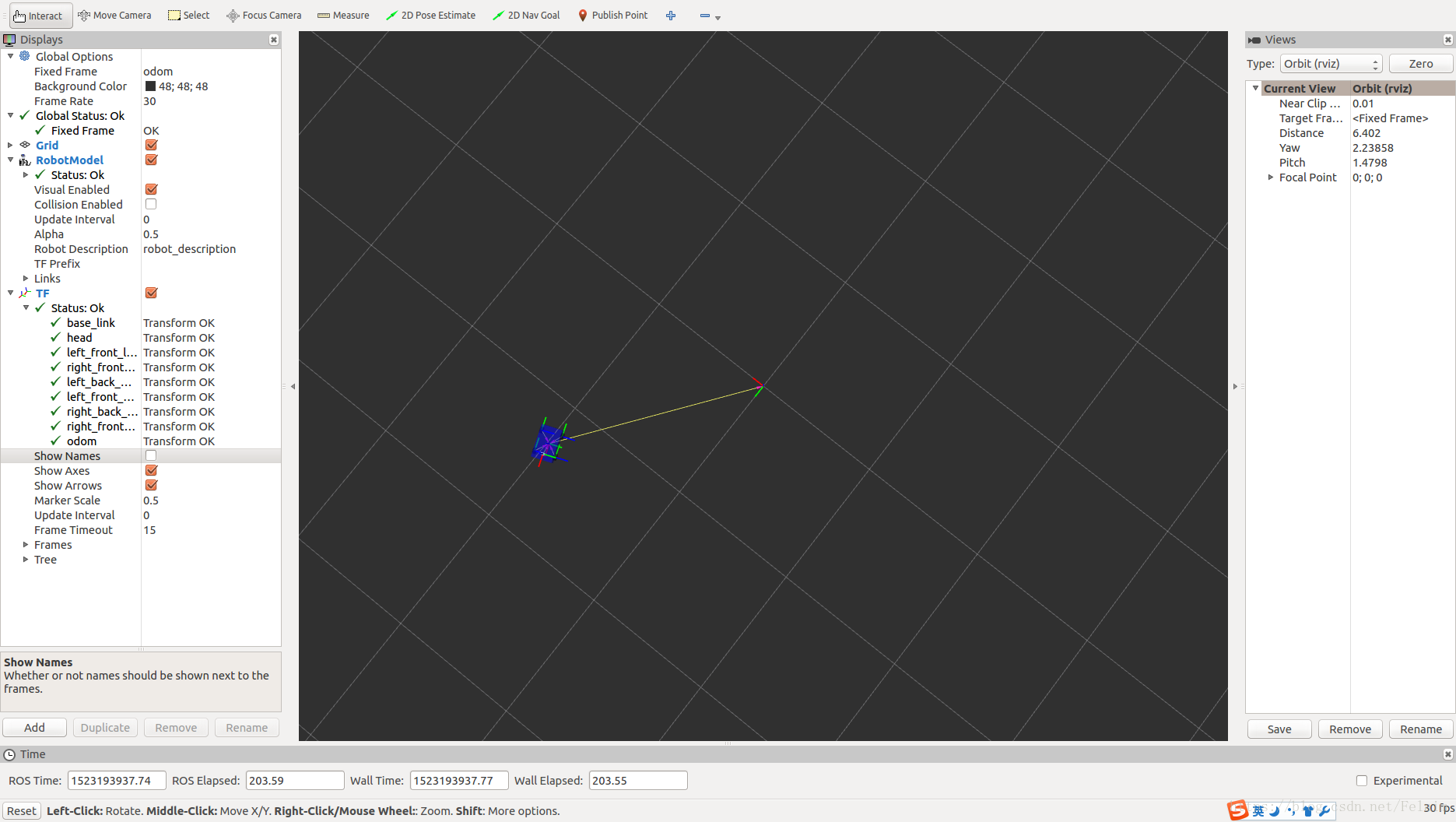
小车就能进行旋转了!
使用rqt_graph可以看到具体的节点关系
rqt_graph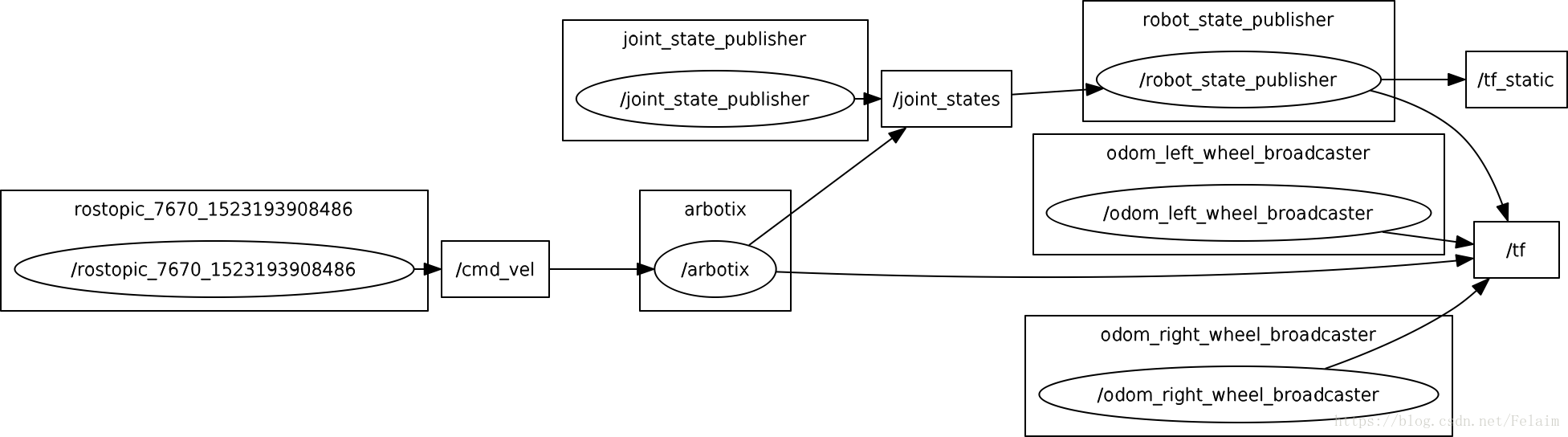
参考链接:
http://wiki.ros.org/xacro
https://www.ncnynl.com/archives/201609/843.html
本文来自互联网用户投稿,文章观点仅代表作者本人,不代表本站立场,不承担相关法律责任。如若转载,请注明出处。 如若内容造成侵权/违法违规/事实不符,请点击【内容举报】进行投诉反馈!