android自定义控件的最大高度MaxHeightView
代码地址:GitHub - Carbs0126/MaxHeightView: a ViewGroup which can limit the max height of its child view, used on android platform
android中部分控件具有maxHeight功能,如button等,但是对于ViewGroup类的控件,没有此属性,当我们需要限制某些view的高度时,(比如限制屏幕下方对话框的最大高度)那么,就需要一种可以限制其子view最大高度的ViewGroup。如何为自定义ViewGroup添加一个最大高度的属性呢?其实很简单,主要就是使用onMeasure()函数,在函数中控制高度即可。
先看下效果图:
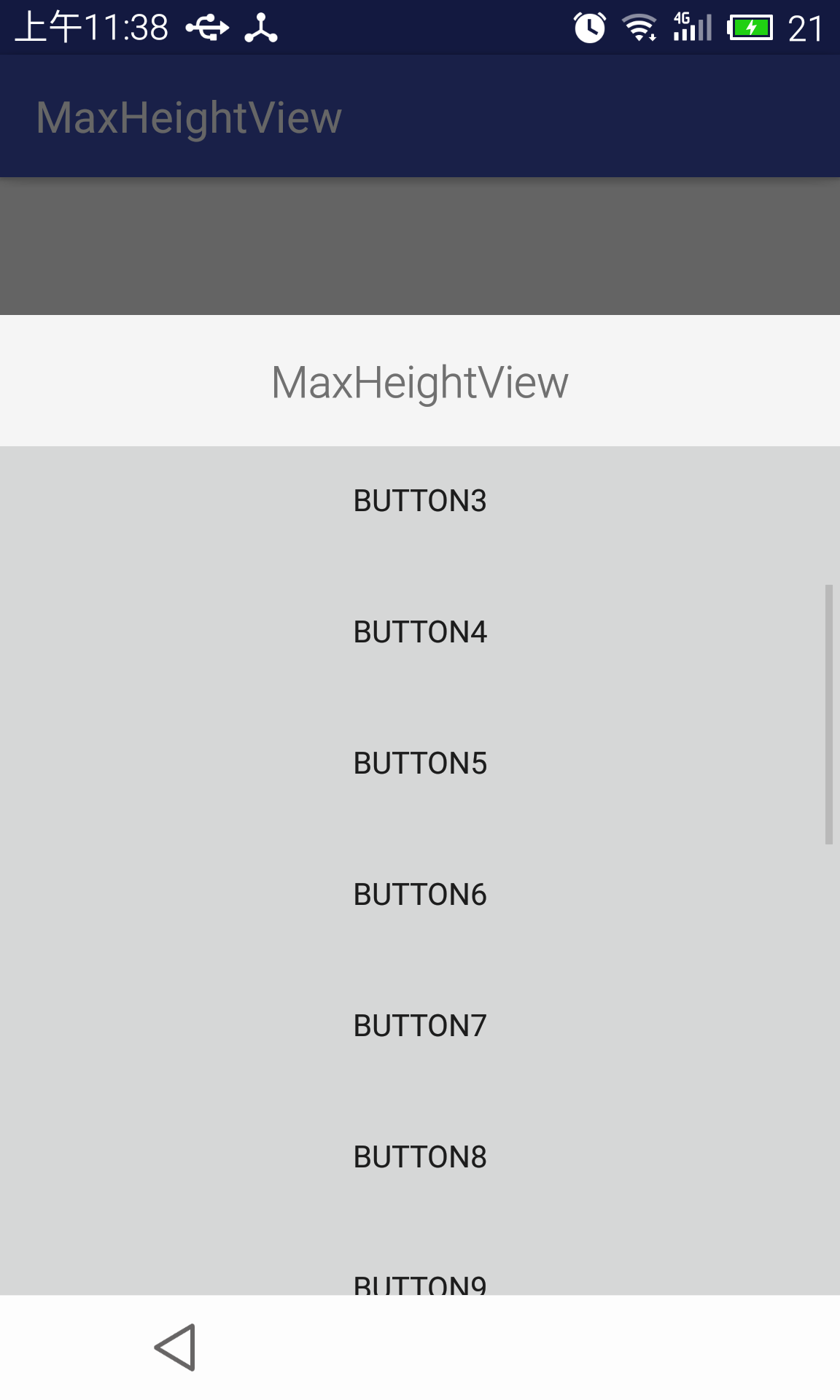
这是一个dialog,dialog中添加了共有20个button,如果不使用最大高度可控的viewgroup,则会充满整个屏幕。
java代码实现如下:
package cn.carbs.android.maxheightview.library;/**
* Created by carbs on 2016/5/12.
*/
import android.content.Context;
import android.content.res.TypedArray;
import android.util.AttributeSet;
import android.view.WindowManager;
import android.widget.FrameLayout;/**
* 先判断是否设定了mMaxHeight,如果设定了mMaxHeight,则直接使用mMaxHeight的值,
* 如果没有设定mMaxHeight,则判断是否设定了mMaxRatio,如果设定了mMaxRatio的值 则使用此值与屏幕高度的乘积作为最高高度
*
* @author Carbs
*/
public class MaxHeightView extends FrameLayout {private static final float DEFAULT_MAX_RATIO = 0.6f;
private static final float DEFAULT_MAX_HEIGHT = 0f;private float mMaxRatio = DEFAULT_MAX_RATIO;// 优先级高
private float mMaxHeight = DEFAULT_MAX_HEIGHT;// 优先级低public MaxHeightView(Context context) {super(context);init();
}public MaxHeightView(Context context, AttributeSet attrs) {super(context, attrs);initAttrs(context, attrs);init();
}public MaxHeightView(Context context, AttributeSet attrs, int defStyle) {super(context, attrs, defStyle);initAttrs(context, attrs);init();
}private void initAttrs(Context context, AttributeSet attrs) {TypedArray a = context.obtainStyledAttributes(attrs,R.styleable.MaxHeightView);final int count = a.getIndexCount();for (int i = 0; i < count; ++i) {int attr = a.getIndex(i);if(attr == R.styleable.MaxHeightView_mhv_HeightRatio){mMaxRatio = a.getFloat(attr, DEFAULT_MAX_RATIO);}else if(attr == R.styleable.MaxHeightView_mhv_HeightDimen){mMaxHeight = a.getDimension(attr, DEFAULT_MAX_HEIGHT);}}a.recycle();
}private void init(){if (mMaxHeight <= 0) {mMaxHeight = mMaxRatio * (float) getScreenHeight(getContext());} else {mMaxHeight = Math.min(mMaxHeight, mMaxRatio * (float)   getScreenHeight(getContext()));}
}@Override
protected void onMeasure(int widthMeasureSpec, int heightMeasureSpec) {int heightMode = MeasureSpec.getMode(heightMeasureSpec);int heightSize = MeasureSpec.getSize(heightMeasureSpec);if (heightMode == MeasureSpec.EXACTLY) {heightSize = heightSize <= mMaxHeight ? heightSize: (int) mMaxHeight;}if (heightMode == MeasureSpec.UNSPECIFIED) {heightSize = heightSize <= mMaxHeight ? heightSize: (int) mMaxHeight;}if (heightMode == MeasureSpec.AT_MOST) {heightSize = heightSize <= mMaxHeight ? heightSize: (int) mMaxHeight;}int maxHeightMeasureSpec = MeasureSpec.makeMeasureSpec(heightSize,heightMode);super.onMeasure(widthMeasureSpec, maxHeightMeasureSpec);
}/**
* 获取屏幕高度
*
* @param context
*/
private int getScreenHeight(Context context) {WindowManager wm = (WindowManager) context.getSystemService(Context.WINDOW_SERVICE);return wm.getDefaultDisplay().getHeight();
}}
属性文件如下:
使用方法:
在布局中使用如下代码:
..........
实现原理:
1.在构造方法中获取最大高度或者最大高度的比例;
2.在onMeasure()中通过获取heightMeasureSpec的size判断是否大于限定最大高度,如果大于,则将size设置为限定最大高度,并重新生成heightMeasureSpec,并调用super.onMeasure(widthMeasureSpec, maxHeightMeasureSpec);以完成onMeasure对控件大小的设定
注意事项:
- 此自定义view继承自FrameLayout,使用时最好嵌套一个ScrollView,以提高用户体验。
- 此view不完善的地方有,暂时不支持通过代码生成MaxHeightView,不过可以通过修改只有一个构造方法的public MaxHeightView(Context context)添加对应的mMaxHeight或者Ratio来限制大小。
代码项目地址:
GitHub - Carbs0126/MaxHeightView: a ViewGroup which can limit the max height of its child view, used on android platform
本文来自互联网用户投稿,文章观点仅代表作者本人,不代表本站立场,不承担相关法律责任。如若转载,请注明出处。 如若内容造成侵权/违法违规/事实不符,请点击【内容举报】进行投诉反馈!