弹幕效果实现
前言
昨天晚上11点了还没睡着,惆怅能力不足,但不知道怎么能快速的提升自己。呜呼哀哉,临睡前看了一个弹幕的效果实现的技术视频,听着很好的,自己在做电商这块也没写过弹幕。今天来到公司趁着闲暇按照人家说的思路写了一下,有用得上的可以看看。
demo地址
正文
先来看一下最终实现的效果:
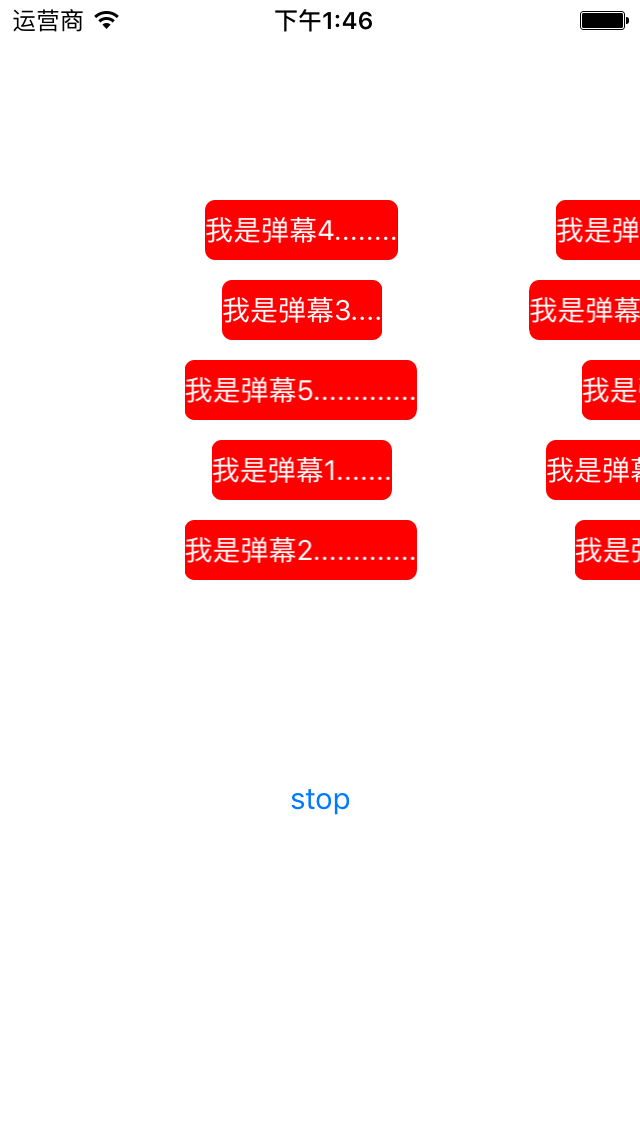
在这里,我只说一下重要的思想和代码块部分,关于其他的不再细说。代码很简单,基本上跑一下在瞅瞅就理解的差不多了。
思想
弹幕说白了就是移动的label.创建一个view里装着label用于做移动使用。view,label的宽度根据字体的多少去改变。然后开始移动,改变view的x值的大小。当view完全移除屏幕的时候这条弹幕完成,把view移除,开始下一条。
核心代码
装着label的view
首先构造方法不能少的
//创建
- (instancetype)initWithComment:(NSString *)comment{self = [super init];if (self) {//创建labelself.commentLabel.text = comment;NSDictionary *attr = @{NSFontAttributeName:[UIFont systemFontOfSize:14]};CGFloat width = [comment sizeWithAttributes:attr].width;//求出字体的宽度self.bounds = CGRectMake(0, 0, width + 2 * padding, 30);self.commentLabel.frame = CGRectMake(padding, 0, width, 30);}return self;
}
构造里面有label的frame确定,那我们内存空间一定要有label才可以,这里才用懒加载的方式创建label
//创建label
- (UILabel *)commentLabel{if (!_commentLabel) {_commentLabel = [[UILabel alloc]initWithFrame:self.bounds];_commentLabel.backgroundColor = [UIColor redColor];_commentLabel.textColor = [UIColor whiteColor];_commentLabel.font = [UIFont systemFontOfSize:14];_commentLabel.textAlignment = NSTextAlignmentCenter;_commentLabel.layer.cornerRadius = 5;_commentLabel.layer.masksToBounds = YES;[self addSubview:_commentLabel];}return _commentLabel;
}
然后开始弹幕动画的实现
#pragma mark -------开始结束方法
//开始方法
- (void)startAnimation{//给出uilabel的位置大小CGFloat screen = [UIScreen mainScreen].bounds.size.width;CGFloat duration = 3.0f;CGFloat wholeWidth = screen + CGRectGetWidth(self.bounds);//开始if (self.successShowComment) {self.successShowComment(syf_start);}//运行时间CGFloat speed = wholeWidth / 3.0f;CGFloat enterDurtion = CGRectGetWidth(self.bounds) / speed;[self performSelector:@selector(p_enterScreen) withObject:self afterDelay:enterDurtion];__block CGRect frame = self.frame;[UIView animateWithDuration:duration animations:^{frame.origin.x -= wholeWidth;self.frame = frame;} completion:^(BOOL finished) {[self removeFromSuperview];if (self.successShowComment) {self.successShowComment(syf_end);}}];
}
//结束
- (void)stopAnimation{[NSObject cancelPreviousPerformRequestsWithTarget:self];[self.layer removeAllAnimations];[self removeFromSuperview];
}#pragma mark -------私有方法
//view尾部也进入屏幕后调用
- (void)p_enterScreen{if (self.successShowComment) {self.successShowComment(syf_enter);}
}
为了逻辑清晰,以后代码好维护。我们才用了一个manager类区管理弹幕的方法实现,而不直接去vc里面写。
首先创建三个数组,分别去存弹幕view,原始数据,和数据处理数组
@property(nonatomic,strong)NSMutableArray *commentArray;//数据数组
@property(nonatomic,strong)NSMutableArray *barrageViews;//弹幕数组
@property(nonatomic,strong)NSMutableArray *barrageComment;//处理数组
@property(nonatomic,assign)BOOL stopAnimation;//判断开始还是停止状态
然后就是管理弹幕开始移动和停止的方法
#pragma mark -----开始停止方法
//开始
- (void)start{if (!self.stopAnimation) {return;}self.stopAnimation = NO;//数组数据全部移除[self.barrageComment removeAllObjects];[self.barrageComment addObjectsFromArray:self.commentArray];[self p_initBarrageComment];}
//停止
- (void)stop{if (self.stopAnimation) {return;}self.stopAnimation = YES;if (self.barrageViews.count > 0) {[self.barrageViews enumerateObjectsUsingBlock:^(id  _Nonnull obj, NSUInteger idx, BOOL * _Nonnull stop) {SYFBarrageView *view = obj;[view stopAnimation];view = nil;}];[self.barrageViews removeAllObjects];}}
底下的代码块是核心的操作代码:
基本思路就是看你需要创建几个同时移动的弹幕,我这里选择了5个,然后随机选择每个弹道去放弹幕,当一个弹幕的尾部也出现到屏幕时,就检查是否还有没有显示的弹幕内容,如果有,在这个弹道显示没有显示的弹幕内容。
#pragma mark ------私有方法
- (void)p_initBarrageComment{NSMutableArray *tempArray = [NSMutableArray arrayWithObjects:@(0),@(1),@(2),@(3),@(4), nil];for(int i = 0;i < 5;i ++){if (self.barrageComment.count > 0 ) {//随机数NSInteger index = arc4random() % tempArray.count;int temp = [[tempArray objectAtIndex:index] intValue];[tempArray removeObjectAtIndex:index];//从弹幕数组逐一取出数据NSString *comment = [self.barrageComment firstObject];[self.barrageComment removeObjectAtIndex:0];//创建view[self p_createViewBarrageView:comment temp:temp];}}
}
//创建弹幕
- (void)p_createViewBarrageView:(NSString *)comment temp:(int)tempIndex{if (self.stopAnimation) {return;}SYFBarrageView *barrageView = [[SYFBarrageView alloc]initWithComment:comment];barrageView.tempIndex = tempIndex;__block typeof(self)weakSelf =self;__block typeof(SYFBarrageView *)weakView = barrageView;//移除屏幕barrageView.successShowComment = ^(NSInteger status){if (weakSelf.stopAnimation) {//防止在停止时被调用return ;}switch (status) {case syf_start:{//弹幕进入[weakSelf.barrageViews addObject:weakView];}break;case syf_enter:{//是否还有其他内容有,在该轨迹创建一个NSString *nextComment = [weakSelf p_nextComment];if (nextComment) {[weakSelf p_createViewBarrageView:nextComment temp:tempIndex];}}break;case syf_end:{//弹幕飞出从数组删除if ([weakSelf.barrageViews containsObject:weakView]) {[weakView stopAnimation];[weakSelf.barrageViews removeObject:weakView];}if (weakSelf.barrageViews.count == 0) {//没有数据源了weakSelf.stopAnimation = YES;[weakSelf start];}}break;default:break;}};if (self.generateViewBlock) {self.generateViewBlock(barrageView);}[barrageView startAnimation];
}
//是否还有弹幕
- (NSString *)p_nextComment{if (self.barrageComment.count == 0) {return  nil;}NSString *comment = [self.barrageComment firstObject];if (comment) {[self.barrageComment removeObjectAtIndex:0];}return comment;
}
结语
好了,感觉还是看源码好理解,有问题的可以联系我。有能力的感觉对你有点用的就给个星星,谢了。
本文来自互联网用户投稿,文章观点仅代表作者本人,不代表本站立场,不承担相关法律责任。如若转载,请注明出处。 如若内容造成侵权/违法违规/事实不符,请点击【内容举报】进行投诉反馈!