msys + mintty
最近需要频繁的使用msys+mingw。下面是我从sourceforge上下载的“Personal Builds”:
Mingw64: mingw64-x86_64-4.9.2-release-win32-seh-rt_v4-rev3.7z
Msys: msys+7za+wget+svn+git+mercurial+cvs-rev13.7z
msys.bat 默认使用的 terminal 是sh.exe,功能有限,用久了还挺不方便的:
- line buffer 很小,看不到以前的cmdline history
- 不支持跨行复制,不支持鼠标右键复制黏贴
- vim使用TagList插件后,屏幕就全乱了
昨晚折腾了一下,换成 “msys.bat -mintty” ,瞬间舒服了很多。

为了分清mingw64还是mingw32, 本想将msys.bat里的 “$MSYSTEM” 换成 “MINGW64”
- if "x%MSYSTEM%" == "x" set MSYSTEM=MINGW32
- if "%1" == "MINGW32" set MSYSTEM=MINGW32
- if "%1" == "MSYS" set MSYSTEM=MSYS+ if "x%MSYSTEM%" == "x" set MSYSTEM=MINGW64
+ if "%1" == "MINGW32" set MSYSTEM=MINGW64
+ if "%1" == "MSYS" set MSYSTEM=MSYS
结果导致编译 ffmpeg 在 configure 时出错
$ ./configure
Unknown OS 'mingw64_nt-6.1'.If you think configure made a mistake, make sure you are using the latest
version from Git.  If the latest version fails, report the problem to the
ffmpeg-user@ffmpeg.org mailing list or IRC #ffmpeg on irc.freenode.net.
Include the log file "config.log" produced by configure as this will help
solve the problem.
看了一下 configure 的源码
exesuf() {case $1 inmingw32*|win32|win64|cygwin*|*-dos|freedos|opendos|os/2*|symbian) echo .exe ;;esac
}
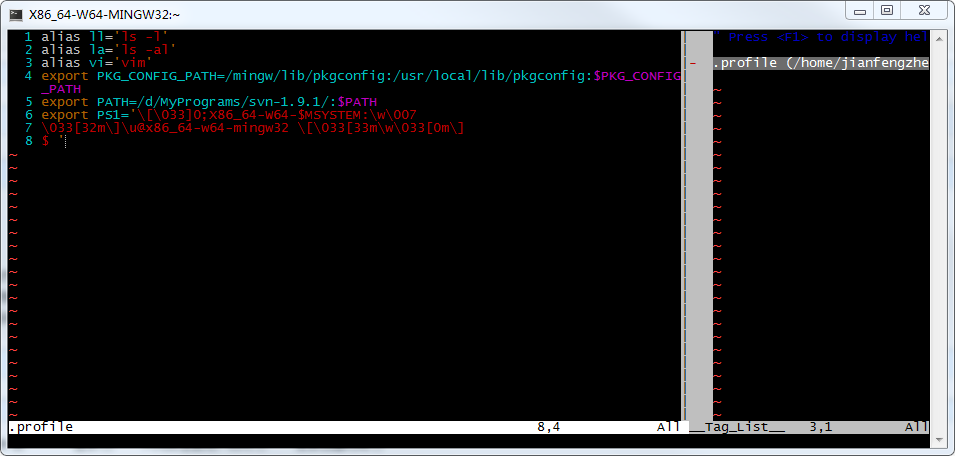
由于直接使用 “mingw32*” 而不是 “mingw*” 进行匹配,无法支持mingw64系统。为了避免麻烦,还是将 “$MSYSTEM” 改回 “MINGW32”。取而代之,通过修改 “$PS1” 来区分系统环境(msys/mingw32/mingw64)
转载于:https://www.cnblogs.com/jogh/p/4845671.html
本文来自互联网用户投稿,文章观点仅代表作者本人,不代表本站立场,不承担相关法律责任。如若转载,请注明出处。 如若内容造成侵权/违法违规/事实不符,请点击【内容举报】进行投诉反馈!