echarts圆形数据占比
项目要求给用户直观体验,完成echarts数据占比,在网上查了很久没找到想要的代码,
参考代码自己写了一个方法。实际效果图:
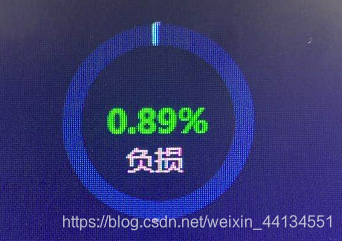
源码往这看。使用方法makeUpEcharts(‘echartsDom’,‘根据实际情况给出占比的val’)
//圆形echarts占比
function makeUpEcharts(el,makeUp_val){let color = ['#062551' ,'#5bffff'];let echartData = [{value: 100-makeUp_val},{value: makeUp_val}];let formatNumber = function(num) {let reg = /(?=(\B)(\d{3})+$)/g;return num.toString().replace(reg, ',');}let total = echartData.reduce((a, b) => {return b.value + '%'}, 0);var option = {color: color,title: [{text: '{val|' + formatNumber(total) + '}',top: 'center',left: 'center',textStyle: {rich: {// name: {//     fontSize: 14,//     fontWeight: 'normal',//     color: '#00ff00',//     padding: [10, 0]// },val: {fontSize: 16,fontWeight: 'bold',color: '#00ff00',}}}}],series: [{type: 'pie',radius: ['50%', '70%'], //控制圆环大小center: ['50%', '50%'],	//控制圆环位置data: echartData,hoverAnimation: false,itemStyle: {normal: {borderWidth: 2}},labelLine: {normal: {length: 0,length2: 0,lineStyle: {color: '#e6e6e6'}}}// ,// label: {//     normal: {//         formatter: params => {//             return (//                 '{icon|●}{name|' + params.name + '}{value|' +//                 formatNumber(params.value) + '}'//             );//         },//         padding: [0 , -100, 25, -100],//         rich: {//             icon: {//                 fontSize: 16//             },//             name: {//                 fontSize: 14,//                 padding: [0, 10, 0, 4],//                 color: '#666666'//             },//             value: {//                 fontSize: 18,//                 fontWeight: 'bold',//                 color: '#333333'//             }//         }//     }// },}]};let myChart = echarts.init(document.getElementById(el));myChart.setOption(option)
}
本文来自互联网用户投稿,文章观点仅代表作者本人,不代表本站立场,不承担相关法律责任。如若转载,请注明出处。 如若内容造成侵权/违法违规/事实不符,请点击【内容举报】进行投诉反馈!