vb.net倒计时器(3.0,版本优化,最原始的配置文件)
我现在还没有去学习xml文档、json、ini配置,只能使用老土的txt文件保存配置,按行读取配置(这也是我之前开发计时器时想到的,没想到一个晚上就把程序搞定了)
简单介绍新功能:
1、倒计时界面、主界面,可以随窗体的大小改变始终保持在窗体中央(核心是一行代码和一个panel控件)
2、使用鼠标滑动label来调整数值大小(核心是鼠标MouseDown,MouseUp事件的利益)
3、配置文件(核心是:不熟练的配置文件,不要取笑……)
好吧:上图
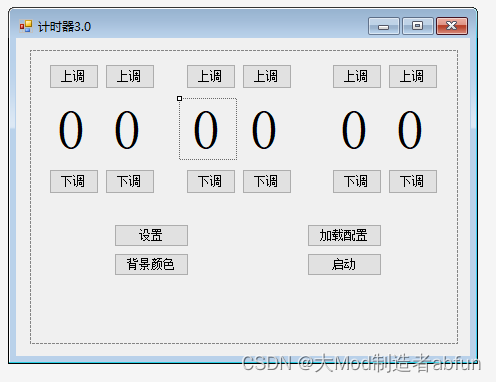
panel是这个虚线框(注意,本代码通俗易懂,部分变量不是原装变量名称,比如Label1=L1)
Imports System.IOPublic Class MainDim ms As StringPrivate Sub Button1_Click(sender As Object, e As EventArgs) Handles Button1.ClickL1.Text += 1End SubPrivate Sub Button2_Click(sender As Object, e As EventArgs) Handles Button2.ClickL2.Text += 1End SubPrivate Sub Button5_Click(sender As Object, e As EventArgs) Handles Button5.ClickL5.Text += 1End SubPrivate Sub Button4_Click(sender As Object, e As EventArgs) Handles Button4.ClickL4.Text += 1End SubPrivate Sub Button3_Click(sender As Object, e As EventArgs) Handles Button3.ClickL3.Text += 1End SubPrivate Sub Button6_Click(sender As Object, e As EventArgs) Handles Button6.ClickL6.Text += 1End SubPrivate Sub Button7_Click(sender As Object, e As EventArgs) Handles Button7.ClickL1.Text -= 1End SubPrivate Sub Button11_Click(sender As Object, e As EventArgs) Handles Button11.ClickL5.Text -= 1End SubPrivate Sub Button10_Click(sender As Object, e As EventArgs) Handles Button10.ClickL4.Text -= 1End SubPrivate Sub Button9_Click(sender As Object, e As EventArgs) Handles Button9.ClickL3.Text -= 1End SubPrivate Sub Button8_Click(sender As Object, e As EventArgs) Handles Button8.ClickL2.Text -= 1End SubPrivate Sub Button12_Click(sender As Object, e As EventArgs) Handles Button12.ClickL6.Text -= 1End SubPrivate Sub L1_TextChanged(sender As Object, e As EventArgs) Handles L1.TextChangeda(L1, 0, 2)If L1.Text = 2 ThenIf L2.Text > 3 ThenL2.Text = 3End IfEnd IfEnd SubPrivate Sub L2_TextChanged(sender As Object, e As EventArgs) Handles L2.TextChangeda(L2, 0, 9)If L1.Text = 2 ThenIf L2.Text > 3 ThenL2.Text = 3End IfEnd IfEnd SubPrivate Sub L3_TextChanged(sender As Object, e As EventArgs) Handles L3.TextChangeda(L3, 0, 5)End SubPrivate Sub L4_TextChanged(sender As Object, e As EventArgs) Handles L4.TextChangeda(L4, 0, 9)End SubPrivate Sub L5_TextChanged(sender As Object, e As EventArgs) Handles L5.TextChangeda(L5, 0, 5)End SubPrivate Sub L6_TextChanged(sender As Object, e As EventArgs) Handles L6.TextChangeda(L6, 0, 9)End SubPublic Sub a(l As Label, min As Integer, max As Integer)If l.Text < min Thenl.Text = maxElseIf l.Text > max Thenl.Text = minEnd IfEnd SubPublic Sub MoveMouseLabel(l As Label, p1 As Point, p2 As Point)Dim y1 As Integer = p1.YDim y2 As Integer = p2.YIf y1 < y2 Thenl.Text -= 1ElseIf y1 > y2 Thenl.Text += 1End IfEnd SubDim l1y As PointDim l2y As PointDim l3y As PointDim l4y As PointDim l5y As PointDim l6y As PointPrivate Sub L1_MouseDown(sender As Object, e As MouseEventArgs) Handles L1.MouseDownl1y = New Point(e.X, e.Y)End SubPrivate Sub L1_MouseUp(sender As Object, e As MouseEventArgs) Handles L1.MouseUpMoveMouseLabel(L1, l1y, New Point(e.X, e.Y))End SubPrivate Sub L2_MouseDown(sender As Object, e As MouseEventArgs) Handles L2.MouseDownl2y = New Point(e.X, e.Y)End SubPrivate Sub L2_MouseUp(sender As Object, e As MouseEventArgs) Handles L2.MouseUpMoveMouseLabel(L2, l2y, New Point(e.X, e.Y))End SubPrivate Sub L3_MouseDown(sender As Object, e As MouseEventArgs) Handles L3.MouseDownl3y = New Point(e.X, e.Y)End SubPrivate Sub L3_MouseUp(sender As Object, e As MouseEventArgs) Handles L3.MouseUpMoveMouseLabel(L3, l3y, New Point(e.X, e.Y))End SubPrivate Sub L4_MouseDown(sender As Object, e As MouseEventArgs) Handles L4.MouseDownl4y = New Point(e.X, e.Y)End SubPrivate Sub L4_MouseUp(sender As Object, e As MouseEventArgs) Handles L4.MouseUpMoveMouseLabel(L4, l4y, New Point(e.X, e.Y))End SubPrivate Sub L5_MouseDown(sender As Object, e As MouseEventArgs) Handles L5.MouseDownl5y = New Point(e.X, e.Y)End SubPrivate Sub L5_MouseUp(sender As Object, e As MouseEventArgs) Handles L5.MouseUpMoveMouseLabel(L5, l5y, New Point(e.X, e.Y))End SubPrivate Sub L6_MouseDown(sender As Object, e As MouseEventArgs) Handles L6.MouseDownl6y = New Point(e.X, e.Y)End SubPrivate Sub L6_MouseUp(sender As Object, e As MouseEventArgs) Handles L6.MouseUpMoveMouseLabel(L6, l6y, New Point(e.X, e.Y))End SubPrivate Sub Button15_Click(sender As Object, e As EventArgs) Handles Button15.ClickForm.Show()Config.TextBox1.Text = CUInt(L1.Text & L2.Text)Config.TextBox2.Text = CUInt(L3.Text & L4.Text)Config.TextBox3.Text = CUInt(L5.Text & L6.Text)Config.c = BackColorConfig.Close()Form.start(CUInt(L1.Text & L2.Text), CUInt(L3.Text & L4.Text), CUInt(L5.Text & L6.Text), Me.BackColor, ms)End SubPrivate Sub Button14_Click(sender As Object, e As EventArgs) Handles Button14.ClickIf IO.File.Exists(Application.StartupPath & "/me.config") = True ThenDim txt As New TextBoxtxt.Text = IO.File.ReadAllText(Application.StartupPath & "/me.config")Me.BackColor = Color.FromArgb(txt.Lines(0).ToString, txt.Lines(1).ToString, txt.Lines(2).ToString)If txt.Lines(3).ToString < 10 ThenL1.Text = 0L2.Text = txt.Lines(3).ToStringElseL1.Text = Mid(txt.Lines(3).ToString, 1, 1)L2.Text = Mid(txt.Lines(3).ToString, 2, 2)End IfIf txt.Lines(4).ToString < 10 ThenL3.Text = 0L4.Text = txt.Lines(4).ToStringElseL3.Text = Mid(txt.Lines(4).ToString, 1, 1)L4.Text = Mid(txt.Lines(4).ToString, 2, 2)End IfIf txt.Lines(5).ToString < 10 ThenL5.Text = 0L6.Text = txt.Lines(5).ToStringElseL5.Text = Mid(txt.Lines(5).ToString, 1, 1)L6.Text = Mid(txt.Lines(5).ToString, 2, 2)End Ifms = txt.Lines(6).ToStringEnd IfEnd SubPrivate Sub butconfig_Click(sender As Object, e As EventArgs) Handles butconfig.ClickConfig.ShowDialog()End SubPrivate Sub Main_Load(sender As Object, e As EventArgs) Handles MyBase.LoadIf IO.File.Exists(Application.StartupPath & "/me.config") = True ThenDim txt As New TextBoxtxt.Text = IO.File.ReadAllText(Application.StartupPath & "/me.config")Config.c = Color.FromArgb(txt.Lines(0).ToString, txt.Lines(1).ToString, txt.Lines(2).ToString)Config.Pic.BackColor = Color.FromArgb(txt.Lines(0).ToString, txt.Lines(1).ToString, txt.Lines(2).ToString)Config.H = txt.Lines(3).ToStringConfig.M = txt.Lines(4).ToStringConfig.S = txt.Lines(5).ToStringConfig.TextBox1.Text = txt.Lines(3).ToStringConfig.TextBox2.Text = txt.Lines(4).ToStringConfig.TextBox3.Text = txt.Lines(5).ToStringConfig.fn = txt.Lines(6).ToStringConfig.TextBox4.Text = txt.Lines(6).ToStringCall Button14_Click(Nothing, Nothing)End IfEnd SubPrivate Sub Button13_Click(sender As Object, e As EventArgs) Handles Button13.ClickDim col As New ColorDialogcol.ShowDialog()BackColor = col.ColorEnd SubDim MovBoll As BooleanDim CurrX As IntegerDim CurrY As IntegerDim MousX As IntegerDim MousY As IntegerPrivate Sub Main_MouseDown(sender As Object, e As MouseEventArgs) Handles Me.MouseDownMousX = e.XMousY = e.YMovBoll = TrueEnd SubPrivate Sub Main_MouseMove(sender As Object, e As MouseEventArgs) Handles Me.MouseMoveIf MovBoll = True ThenCurrX = Me.Left - MousX + e.XCurrY = Me.Top - MousY + e.YMe.Location = New Point(CurrX, CurrY)End IfEnd SubPrivate Sub Main_MouseUp(sender As Object, e As MouseEventArgs) Handles Me.MouseUpMovBoll = FalseEnd SubPrivate Sub Panel1_MouseDown(sender As Object, e As MouseEventArgs) Handles Panel1.MouseDownMousX = e.XMousY = e.YMovBoll = TrueEnd SubPrivate Sub Panel1_MouseMove(sender As Object, e As MouseEventArgs) Handles Panel1.MouseMoveIf MovBoll = True ThenCurrX = Me.Left - MousX + e.XCurrY = Me.Top - MousY + e.YMe.Location = New Point(CurrX, CurrY)End IfEnd SubPrivate Sub Panel1_MouseUp(sender As Object, e As MouseEventArgs) Handles Panel1.MouseUpMovBoll = FalseEnd SubPrivate Sub Main_Resize(sender As Object, e As EventArgs) Handles Me.ResizePanel1.Location = New Point(Width / 2 - Panel1.Width / 2, Height / 2 - Panel1.Height / 2)End Sub
End Class
这已经是优化过的第三次代码了,比我之前写的好太多了。
倒计时:

较为基本的几样,添油加醋随你便
代码:
Imports System.Windows.Shell
Public Class FormPublic H, M, S As IntegerDim ms As StringDim pros As IntegerDim taskpor As TaskbarItemProgressStatePrivate Sub Timer1_Tick(sender As Object, e As EventArgs) Handles Timer1.TickL3.Text -= 1Pro.Value += 1End SubPrivate Sub Form_Resize(sender As Object, e As EventArgs) Handles Me.ResizePanel1.Location = New Point(Width / 2 - Panel1.Width / 2, Height / 2 - Panel1.Height / 2)End SubPublic Sub start(H As Integer, M As Integer, S As Integer, backcolor As Color, ms As String)L1.Text = HL2.Text = ML3.Text = SMe.H = HMe.M = MMe.S = Spros = S + M * 60 + H * 3600 + 1Pro.Minimum = 0Pro.Maximum = prosTimer1.Interval = 1000Timer1.Enabled = TrueMe.BackColor = backcolorMe.ms = msEnd SubPrivate Sub L1_TextChanged(sender As Object, e As EventArgs) Handles L1.TextChangedIf L1.Text < 0 ThenTimer1.Enabled = FalseL1.Text = 0L2.Text = 0L3.Text = 0Pro.Value = 0My.Computer.Audio.Play(ms)End IfEnd SubPrivate Sub Button2_Click(sender As Object, e As EventArgs) Handles Button2.ClickTimer1.Enabled = FalseEnd SubPrivate Sub Button3_Click(sender As Object, e As EventArgs) Handles Button3.ClickTimer1.Enabled = TrueEnd SubPrivate Sub Button1_Click(sender As Object, e As EventArgs) Handles Button1.ClickIf MsgBox("确定要重置计时器?", vbYesNo) = vbYes ThenTimer1.Enabled = FalseL1.Text = HL2.Text = ML3.Text = SPro.Value = 0End IfEnd SubPrivate Sub Button4_Click(sender As Object, e As EventArgs) Handles Button4.ClickIf MsgBox("确定要结束计时器?", vbYesNo) = vbYes ThenTimer1.Enabled = FalseL1.Text = 0L2.Text = 0L3.Text = 0Pro.Value = 0End IfEnd SubPrivate Sub L2_TextChanged(sender As Object, e As EventArgs) Handles L2.TextChangedIf L2.Text < 0 ThenL1.Text -= 1L2.Text = 59If Timer1.Enabled = False ThenL2.Text = 0End IfEnd IfEnd SubPrivate Sub L3_TextChanged(sender As Object, e As EventArgs) Handles L3.TextChangedIf L3.Text < 0 ThenL2.Text -= 1L3.Text = 59If Timer1.Enabled = False ThenL3.Text = 0End IfEnd IfEnd Sub
End Class
二次优化,比之前写的关于vb.net初学者,倒计时器的开发
真的是好太多了
配置: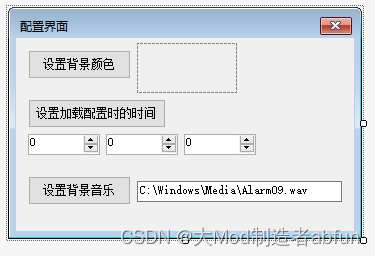
代码:
Public Class ConfigPublic c As ColorPublic fn As StringPublic H, M, S As IntegerDim str As StringPrivate Sub Button2_Click(sender As Object, e As EventArgs) Handles Button2.ClickH = TextBox1.TextM = TextBox2.TextS = TextBox3.TextEnd SubPrivate Sub Button3_Click(sender As Object, e As EventArgs) Handles Button3.ClickDim open As New OpenFileDialogopen.Filter = "wav files|*.wav"open.Title = "选择音频(*.wav)"open.InitialDirectory = "C:/Windows/Media"open.ShowDialog()If IO.File.Exists(open.FileName) = True ThenTextBox4.Text = open.FileNamefn = open.FileNameEnd IfEnd SubPrivate Sub Config_Load(sender As Object, e As EventArgs) Handles MyBase.LoadMe.BackColor = Main.BackColorEnd SubPrivate Sub Button1_Click(sender As Object, e As EventArgs) Handles Button1.ClickDim col As New ColorDialogcol.ShowDialog()Pic.BackColor = col.Colorc = col.ColorEnd SubPrivate Sub Config_Closed(sender As Object, e As EventArgs) Handles Me.ClosedIf c = Nothing Thenc = Color.LightBlueEnd IfCall Button2_Click(Nothing, Nothing)str &= c.R & vbCrLfstr &= c.G & vbCrLfstr &= c.B & vbCrLfstr &= H & vbCrLfstr &= M & vbCrLfstr &= S & vbCrLfstr &= TextBox4.Text & vbCrLfIO.File.WriteAllText(Application.StartupPath & "/me.config", str)str = ""End Sub
End Class
额。它不配使用.config的后缀,你们可以自己随便改
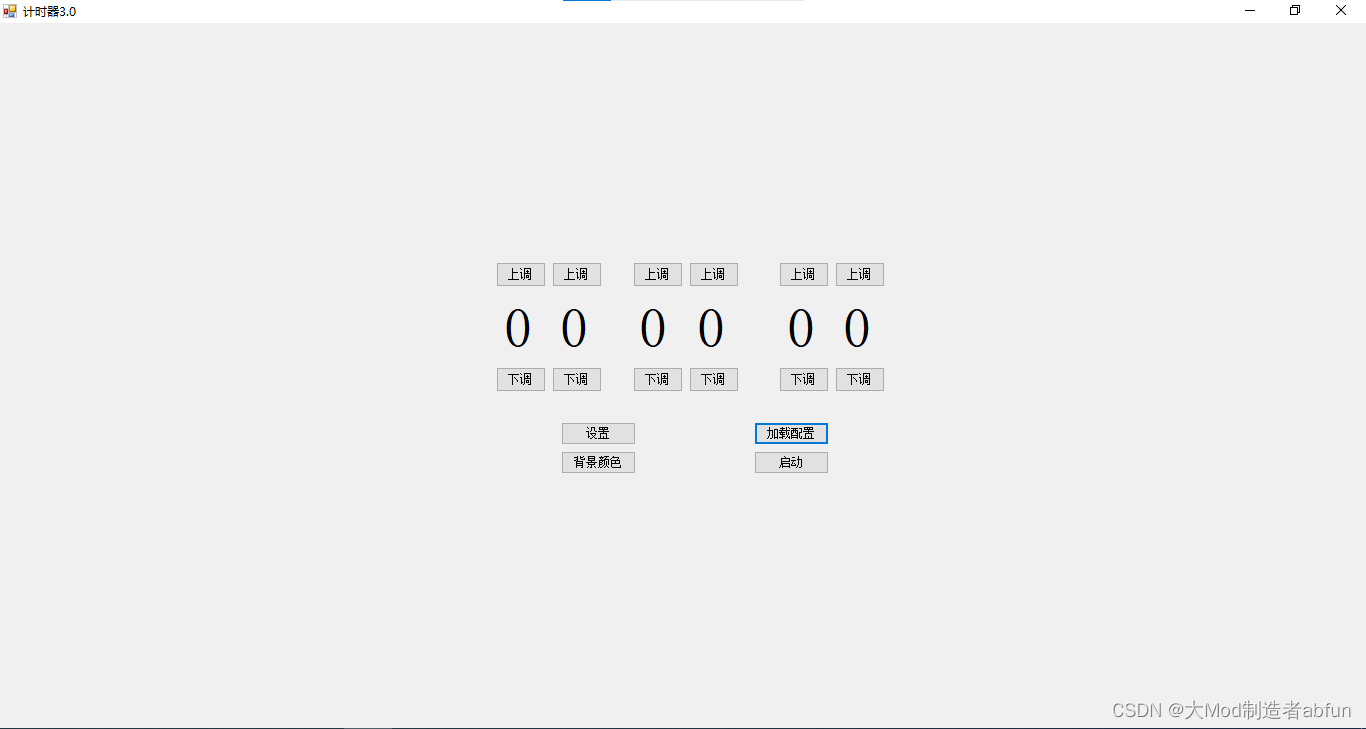
最后,把使用方法介绍一下,这是初始界面,没有配置

这是扩大的:
配置:
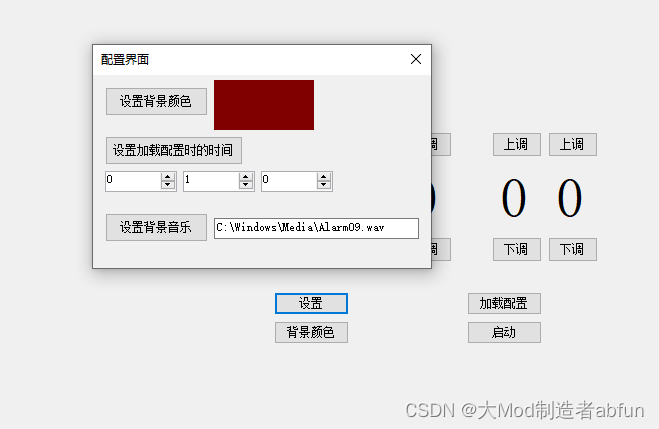
点击关闭直接就保存配置,点击加载配置:

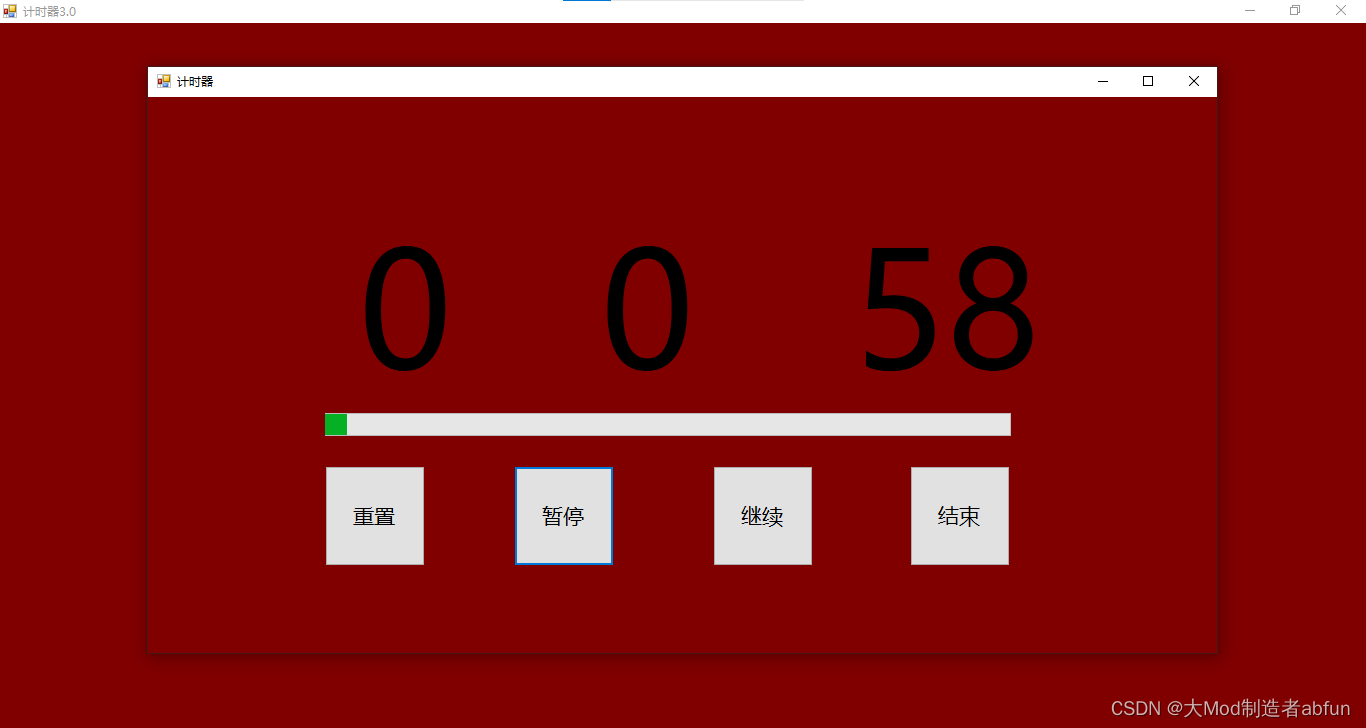
这,似乎有的恐怖!!!
关闭所有,重新启动:
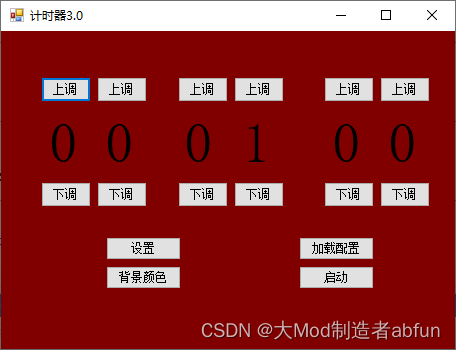
完成了!
本文来自互联网用户投稿,文章观点仅代表作者本人,不代表本站立场,不承担相关法律责任。如若转载,请注明出处。 如若内容造成侵权/违法违规/事实不符,请点击【内容举报】进行投诉反馈!