JS---- mouseenter和mouseover的区别以及动画函数的封装
mouseenter 和mouseover的区别
- 当鼠标移动到元素上时就会触发mouseenter 事件
- 类似 mouseover,它们两者之间的差别是
- mouseover 鼠标经过自身盒子会触发,经过子盒子还会触发。mouseenter 只会经过自身盒子触发
- 之所以这样,就是因为mouseenter不会冒泡
- 跟mouseenter搭配鼠标离开 mouseleave 同样不会冒泡
Mouseover mouseout和mouseenter mouseleave
代码示例:
mouseover:
father.addEventListener('mouseover', function(e) {console.log('鼠标移入了父盒子');})son.addEventListener('mouseover', function(e) {console.log('鼠标移入了子盒子');})

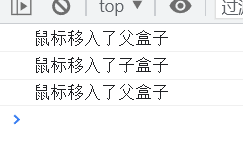
鼠标移入子盒子还是会触发移入父盒子的函数
mouseenter:
father.addEventListener('mouseenter', function(e) {console.log('鼠标移入了父盒子');})son.addEventListener('mouseenter', function(e) {console.log('鼠标移入了子盒子');})

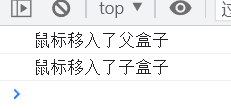
没有事件冒泡
动画函数封装
动画实现原理:
通过定时器 setInterval() 不断移动盒子位置。
-
获得盒子当前位置
-
让盒子在当前位置加上1个移动距离
-
利用定时器不断重复这个操作
-
加一个结束定时器的条件
-
注意此元素需要添加定位,才能使用element.style.left
代码示例:
DOCTYPE html>
<html lang="en"><head><meta charset="UTF-8"><meta name="viewport" content="width=device-width, initial-scale=1.0"><title>Documenttitle><style>.father {position: absolute;width: 300px;height: 300px;background-color: blueviolet;}.son {width: 150px;height: 150px;background-color: brown;}style>
head><body><div class="father"><div class="son">div>div><script>let father = document.querySelector('.father');function animate(obj, target) {// 封装一个动画函数  参数1 为元素对象 (操作哪个元素)  参数2 为停止动画的条件// 避免定时器的bug  使用之前先清除clearInterval(obj.timer);// 设置定时器obj.timer = setInterval(function() {// 如果满足了停止动画的条件就清除定时器  本质就是停止定时器if (obj.offsetLeft >= target) {clearInterval(obj.timer);}// 没30毫秒  元素的left加1像素obj.style.left = obj.offsetLeft + 1 + 'px';}, 30)}// 执行函数 传入元素和停止动画的条件animate(father, 500);script>
body>html>
本文来自互联网用户投稿,文章观点仅代表作者本人,不代表本站立场,不承担相关法律责任。如若转载,请注明出处。 如若内容造成侵权/违法违规/事实不符,请点击【内容举报】进行投诉反馈!