“百词斩”应用程序设计
实训内容:模仿“百词斩”手机App,设计并用Java语言实现一个“百词斩”图形界面程序(根据自己的能力,可以适当地增加或删除部分功能)。
参考程序界面:
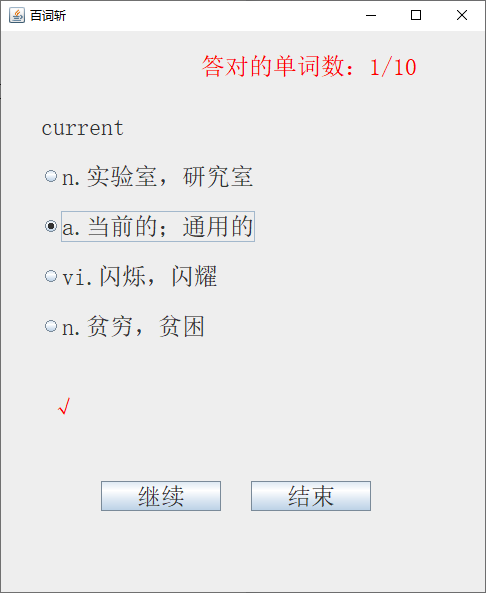
设计思路:
(1)事先将一定数量的英语单词存入一个文本文件中(一个单词的信息占一行,单词和中文解释之间用空格分隔)。附件words.txt是四级单词表。
(2)从文件中取出所有单词的信息,存入总单词表中(ArrayList类型)。
(3)从总单词表中,随机取出N单词(为了测试方便,N值可以取小一点,比如N=10)存入测试的单词表中(ArrayList类型)。每次从总单词表中取出一个单词后,从总单词表中删除已取出的单词。
(4)从测试的单词表中,随机取一个单词。将英语单词和中文解释分开。如: ability n.能力;能耐,本领
将“ability”作为要测试的单词,“n.能力;能耐,本领”作为答案。
随机产生选项的序号(0、1、2、3),在该选项的后面放入正确答案。
(5)从总单词表中随机取出3个不同的单词。分离出三个单词的中文解释部分,并作为其它三个错误选项(四个选项不能有重复,如果有重复,再取一个单词)。
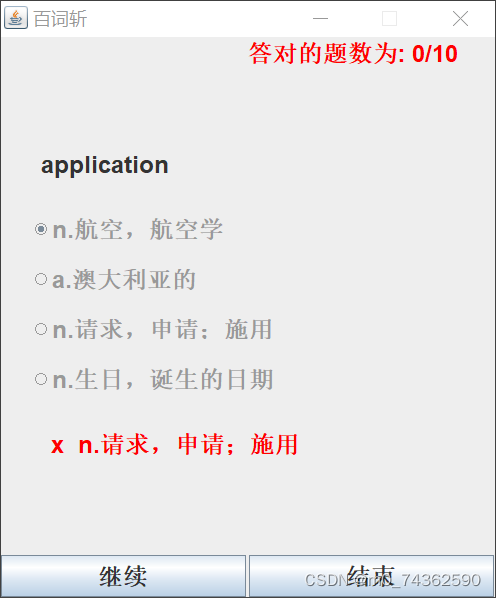
(6)在四个单选按钮中添加动作监听。如果答对了,更新答对单词的数量,并从测试的单词表中,删除答对的单词。如果答错了,显示正确答案。不管是答对还是答错,一旦选了,就不能更改(不能再选)。
(7)所有的单词都答对了,即测试单词表是空的,“继续”按钮变成不可用。
最低要求:
答对的单词,以后不会出现。
基本扩展:
(1)一次答对的单词,以后不会再出现。
(2)答错一次,要把这个单词加到测试的单词表中。例如,某个单词答错3次,在测试单词表中,这个单词应该出现4次。也就是说,一个单词答错一次,以后出现的几率会增加一倍。
(3)一个单词答错后,单词表中会有多个备份。以后再答对一次,只能删除一个备份。某个单词所有的备份都删除了,说明这个单词已经掌握了,这时才能计入答对的单词数量。
import javax.swing.*;
import java.awt.*;
import java.awt.event.ActionEvent;
import java.awt.event.ActionListener;
import java.io.BufferedReader;
import java.io.FileNotFoundException;
import java.io.FileReader;
import java.io.IOException;
import java.util.ArrayList;
public class Bczh extends JFrame implements ActionListener {// 所有的单词ArrayList totalWords = new ArrayList();// 用来测试的单词ArrayList testWords = new ArrayList();JPanel JPanel_center=new JPanel();JPanel JPanel_north=new JPanel();JPanel JPanel_south=new JPanel();JLabel scoreLabel = new JLabel(); // 答对单词数JLabel wordLabel = new JLabel(); // 正在测试的单词JLabel blankLabel = new JLabel(); //设置空的标签ButtonGroup group = new ButtonGroup();// 单选按钮组JRadioButton rb1 = new JRadioButton();// 选项一单选按钮JRadioButton rb2 = new JRadioButton();// 选项二单选按钮JRadioButton rb3 = new JRadioButton();// 选项三单选按钮JRadioButton rb4 = new JRadioButton();// 选项四单选按钮JLabel answerLabel = new JLabel(); // 显示正确答案标签JButton continueButton = new JButton("继续");JButton endButton = new JButton("结束");// 英语单词和正确答案String Englishword;String answer;String item[] = new String[4];//存储四个选项存储int right=0;//答对单词的个数int whole=0;//测试总单词的个数(对的错的都算)int totalNum=10;// 测试的单词总数(错的不算)int okNum = 0; // 答对的单词数int m=0;//记录答案位置String wrong="";//记录答错的单词Bczh() throws IOException {this.setTitle("百词斩");this.setSize(500, 600);this.setLayout(new BorderLayout());JPanel_south.setLayout(new GridLayout(1,2,3,3));JPanel_center.setLayout(null);JPanel_north.setLayout(new GridLayout(1,2));// 设置答对的单词数Font font = new Font("粗体",Font.BOLD,24);scoreLabel.setText("答对的题数为: "+okNum+"/"+totalNum);scoreLabel.setForeground(Color.red);// 设置颜色scoreLabel.setFont(font); // 设置字体JPanel_north.add(blankLabel);JPanel_north.add(scoreLabel);//将标签对齐在右边//设置按钮字体continueButton.setFont(font);endButton.setFont(font);// 设置正在测试的英语单词的字体wordLabel.setFont(font);rb1.setFont(font);// 设置选项一的字体字号rb2.setFont(font);// 设置选项二的字体字号rb3.setFont(font);// 设置选项三的字体字号rb4.setFont(font);// 设置选项四的字体字号wordLabel.setBounds(40, 80, 200, 30);rb1.setBounds(30, 120, 400, 80);rb2.setBounds(30, 170, 400, 80);rb3.setBounds(30, 220, 400, 80);rb4.setBounds(30, 270, 400, 80);// 添加动作命令标识rb1.setActionCommand("1");rb2.setActionCommand("2");rb3.setActionCommand("3");rb4.setActionCommand("4");// 将各个单选按钮加入到按钮组,确保多选一(一个按钮组内只能选一项)group.add(rb1);group.add(rb2);group.add(rb3);group.add(rb4);// 四个选项按钮添加监听rb1.addActionListener(this);rb2.addActionListener(this);rb3.addActionListener(this);rb4.addActionListener(this);// 设置答案标签answerLabel.setBounds(50, 350, 350, 50);answerLabel.setFont(font);answerLabel.setForeground(Color.red);// 设置答案的文字颜色// 设置继续按钮continueButton.setFont(font);continueButton.setBounds(100, 450, 120, 30);continueButton.setActionCommand("continue");// 添加动作命令标识continueButton.addActionListener(this);// 添加监听// 设置结束按钮endButton.setFont(font);endButton.setBounds(250, 450, 120, 30);endButton.setActionCommand("end");endButton.addActionListener(this); // 添加监听// 将个组件添加到窗口中this.add(JPanel_center,BorderLayout.CENTER);this.add(JPanel_south,BorderLayout.SOUTH);this.add(JPanel_north,BorderLayout.NORTH);JPanel_center.add(wordLabel);JPanel_center.add(rb1);JPanel_center.add(rb2);JPanel_center.add(rb3);JPanel_center.add(rb4);JPanel_center.add(answerLabel);JPanel_south.add(continueButton);JPanel_south.add(endButton);//设置界面参数this.setResizable(false);this.setVisible(true); // 设置窗口可见this.setLocationRelativeTo(null);// 设置窗口位置this.setDefaultCloseOperation(JFrame.EXIT_ON_CLOSE);//对标签进行加文本操作add();addtestWords();add1();}//将文件中的全部单词内容放入Arraylist列表中void add() throws IOException{BufferedReader br=new BufferedReader(new FileReader("C:\\Users\\岚铃\\Desktop\\words.txt"));String[] content=new String[600];String str;int all=0;while((str=br.readLine())!=null){content[all]=str;totalWords.add(content[all]);all++;}}//从totalWords列表中取出totalNum数量放入testWords中void addtestWords(){for(int i=0;i=50)great.setText("YOU ARE GREAT!(太棒了吧!)");elsegreat.setText("TRY AGAIN!(再接再厉!)");//设置字体的大小和颜色和文本Font f=new Font("粗体",Font.BOLD,25);summary.setFont(f);accuracy.setFont(f);great.setForeground(Color.MAGENTA);great.setFont(f);goon.setFont(f);end.setFont(f);//设置组件JP_center.setLayout(new GridLayout(6,1));JP_south.setLayout(new GridLayout(1,2,5,5));JP_center.add(summary);JP_center.add(accuracy);JP_center.add(great);JP_south.add(goon);JP_south.add(end);this.add(JP_center,BorderLayout.CENTER);this.add(JP_south,BorderLayout.SOUTH);//设置监听事件goon.addActionListener(this);end.addActionListener(this);}public void actionPerformed(ActionEvent e) {String click=e.getActionCommand();if(click.equals("再来一次")){try {new Bczh();} catch (IOException ex) {throw new RuntimeException(ex);}this.dispose();//关闭当前窗口}if(click.equals("结束")){this.dispose();//关闭当前窗口}}
}
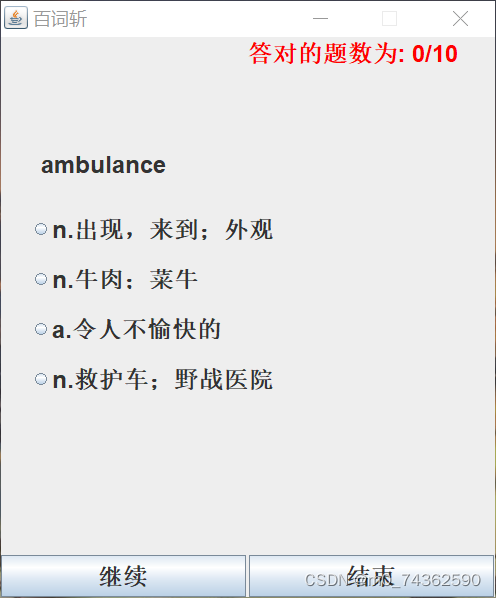
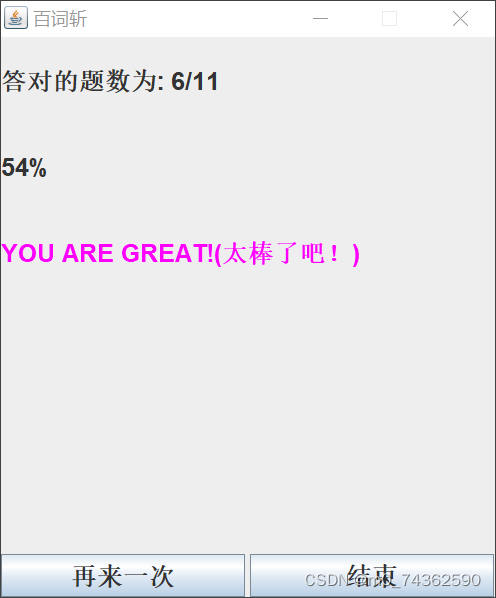
运行结果
本文来自互联网用户投稿,文章观点仅代表作者本人,不代表本站立场,不承担相关法律责任。如若转载,请注明出处。 如若内容造成侵权/违法违规/事实不符,请点击【内容举报】进行投诉反馈!