ObjectARX+QT实现获取Auto CAD的实体的DXF数据
ObjectARX为Auto CAD的二次开发工具。
对于ObjectARX+QT与Auto CAD的交互实现详情请看此篇内容https://blog.csdn.net/sunshinecandy/article/details/128573946
准备工作:
1) Visual studio2017
2) QT4.12.2
3) Auto CAD2020
4) ObjectArx 2020 SDK
5) ObjectArx Wizard 2020向导
以上是需要用到的软件和环境,本文对环境搭建不做阐述,重在记录实现功能。
实现的功能介绍:
Auto CAD命令行中有自带获取实体数据的命令"LIST"。使用Ctrl+F2打开CAD文本窗口,输入LIST命令,选中实体获取数据。
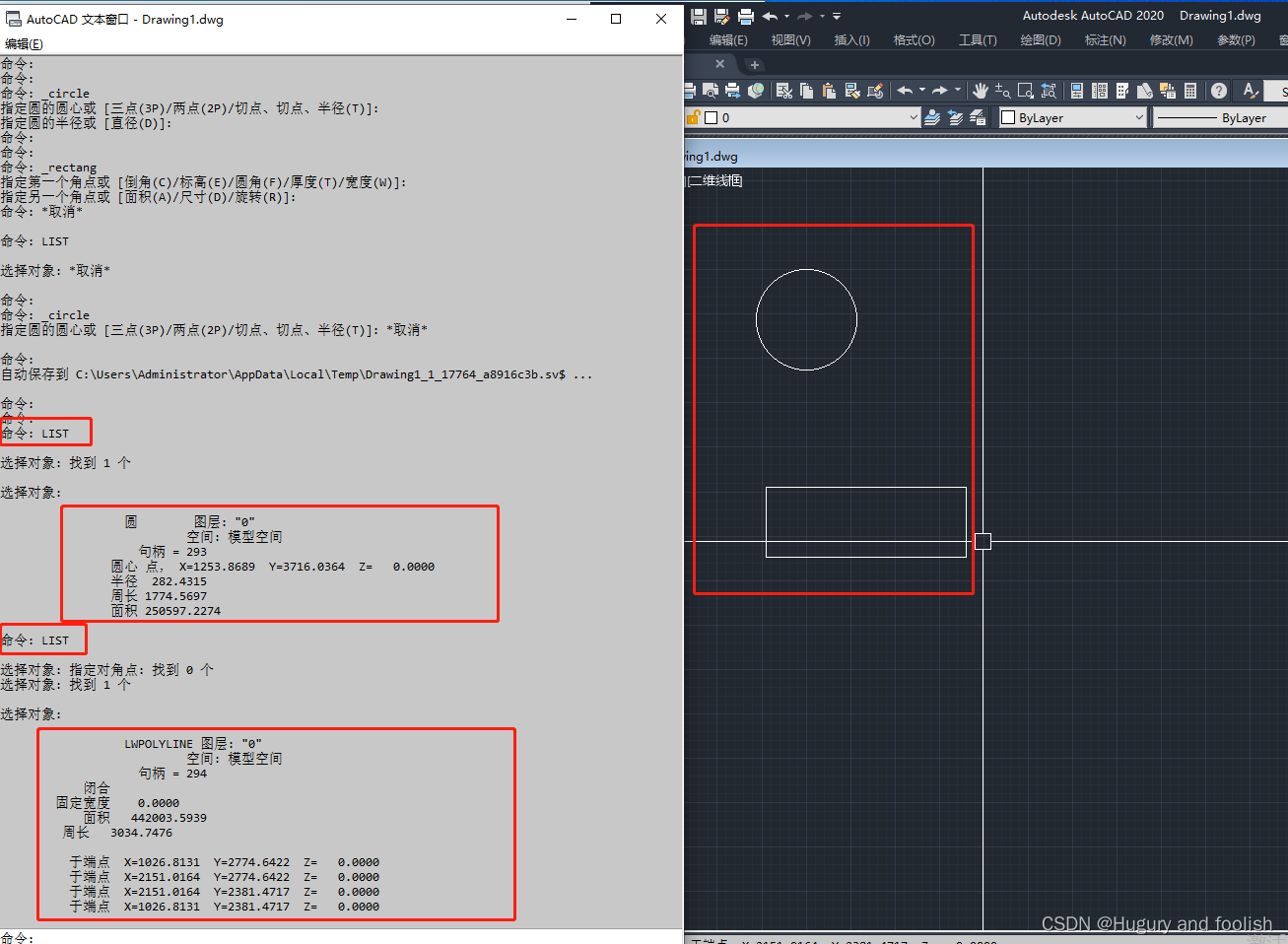
但是这样获取到的数据只能呈现在Auto CAD软件中,如若我们要将数据传输到QT或QML中,然后使用这些数据在QT或QML中画出相应图像或者用这些数据做其它事情,我们应该如何实现呢?
整体框架一览:
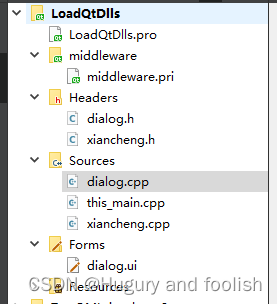
前提:必须已完成本文章开头实现ObjectARX+QT与CAD交互功能 !!!
First:代码展示
Second:代码解释
Third:运行结果展示(图片)。
Fourth:总结
代码展示:所有代码展示完的下方有对于代码的解释。
dialog.cpp代码:
#include "dialog.h"
#include "ui_dialog.h"
#includeDialog::Dialog(QWidget *parent) :QDialog(parent),ui(new Ui::Dialog)
{ui->setupUi(this);th1 = new xiancheng();connect(th1,SIGNAL(sendData(int)),this,SLOT(recvData(int)));connect(this,SIGNAL(sendAllData(std::string)), th1,SLOT(recvAllData(std::string)));
}Dialog::~Dialog()
{delete ui;
}int nCount = 0;std::string g_sAllData = "";
/*获得实体数据 实际为非扩展数据*/
void Dialog::on_pushButton_4_clicked(){dataSize_T data;data.str = "56789";data.nSize = data.str.length();ads_name ename;if(acedSSGet(NULL,NULL,NULL,NULL,ename) ==RTNORM ){int nLenth;acedSSLength(ename,&nLenth);acutPrintf(TEXT("\n select sets count is :%d"),nLenth);ui->textEdit_3->setText("\n aha The Following Content is Total Data:");for(int y=0; yrbnext) {if (pBuf->restype < 0)rt = pBuf->restype;else if (pBuf->restype < 10)rt = RTSTR;else if (pBuf->restype < 38)rt = RT3DPOINT;else if (pBuf->restype < 60)rt = RTREAL;else if (pBuf->restype < 80)rt = RTSHORT;else if (pBuf->restype < 100)rt = RTLONG;else if (pBuf->restype < 106)rt = RTSTR;else if (pBuf->restype < 148)rt = RTREAL;else if (pBuf->restype < 290)rt = RTSHORT;else if (pBuf->restype < 330)rt = RTSTR;else if (pBuf->restype < 370)rt = RTENAME;else if (pBuf->restype < 999)rt = RT3DPOINT;elsert = pBuf->restype;switch (rt) {case RTSHORT:if (pBuf->restype == RTSHORT){acutPrintf(TEXT("RTSHORT : %d\n"),pBuf->resval.rint);ui->textEdit_3->append(QStringLiteral("\n RTSHORT:")+ ',' +(QString::number(pBuf->resval.rint)));g_sAllData += QString::number(pBuf->resval.rint).toStdString() + '\n';}else{acutPrintf(TEXT("(%d . %d)\n"), pBuf->restype,pBuf->resval.rint);ui->textEdit_3->append(QStringLiteral("\n RTSHORT:") + ',' + (QString::number(pBuf->restype)) + ',' + (QString::number(pBuf->resval.rint)));g_sAllData += QString::number(pBuf->restype).toStdString() + '\n';g_sAllData += QString::number(pBuf->resval.rint).toStdString() + '\n';}break;case RTREAL:if (pBuf->restype == RTREAL){acutPrintf(TEXT("RTREAL : %0.3f\n"),pBuf->resval.rreal);ui->textEdit_3->append(QStringLiteral("\n RTREAL:") + ',' + QString::number(pBuf->resval.rreal,'f',2));g_sAllData += QString::number(pBuf->resval.rreal).toStdString() + '\n';}else{acutPrintf(TEXT("(%d . %0.3f)\n"), pBuf->restype,pBuf->resval.rreal);ui->textEdit_3->append(QStringLiteral("\n RTREAL:") + ',' + QString::number(pBuf->restype) + ',' + QString::number(pBuf->resval.rreal,'f',2));g_sAllData += QString::number(pBuf->restype).toStdString()  + '\n';g_sAllData += QString::number(pBuf->resval.rreal).toStdString() + '\n';}break;case RTSTR:if (pBuf->restype == RTSTR){acutPrintf(TEXT("RTSTR : %s\n"),pBuf->resval.rstring);ui->textEdit_3->append(QStringLiteral("\n RTSTR:") + ',' + QString::fromWCharArray(pBuf->resval.rstring));g_sAllData +=  QString::fromWCharArray(pBuf->resval.rstring).toStdString() + '\n';}else{acutPrintf(TEXT("(%d . \"%s\")\n"), pBuf->restype,pBuf->resval.rstring);ui->textEdit_3->append(QStringLiteral("\n RTREAL:") + ',' + QString::number(pBuf->restype) + ',' + QString::fromWCharArray(pBuf->resval.rstring));g_sAllData += QString::number(pBuf->restype).toStdString() + '\n';g_sAllData += QString::fromWCharArray(pBuf->resval.rstring).toStdString() + '\n';}break;case RT3DPOINT:if (pBuf->restype == RT3DPOINT){acutPrintf(TEXT("RT3DPOINT : %0.3f, %0.3f, %0.3f\n"),pBuf->resval.rpoint[X],pBuf->resval.rpoint[Y],pBuf->resval.rpoint[Z]);QString pop = QString::number( pBuf->resval.rpoint[X],'f',2);ui->textEdit_3->append(QStringLiteral("\n RT3DPOINT:") + ',' + QString::number(pBuf->resval.rpoint[X],'f',2) + ',' + QString::number(pBuf->resval.rpoint[Y],'f',2) + ',' + QString::number(pBuf->resval.rpoint[Z],'f',2));g_sAllData += QString::number(pBuf->resval.rpoint[X]).toStdString() + '\n';g_sAllData += QString::number(pBuf->resval.rpoint[Y]).toStdString() + '\n';g_sAllData += QString::number(pBuf->resval.rpoint[Z]).toStdString() + '\n';}else{acutPrintf(TEXT("(%d %0.3f %0.3f %0.3f)\n"),pBuf->restype,pBuf->resval.rpoint[X],pBuf->resval.rpoint[Y],pBuf->resval.rpoint[Z]);ui->textEdit_3->append(QStringLiteral("\n RT3DPOINTTwo:") + ',' + QString::number(pBuf->restype,'f',2) + ',' + QString::number(pBuf->resval.rpoint[X],'f',2) + ',' + QString::number(pBuf->resval.rpoint[Y],'f',2) + ',' + QString::number(pBuf->resval.rpoint[Z],'f',2));g_sAllData += QString::number(pBuf->restype).toStdString() + '\n';g_sAllData += QString::number(pBuf->resval.rpoint[X]).toStdString() + '\n';g_sAllData += QString::number(pBuf->resval.rpoint[Y]).toStdString() + '\n';g_sAllData += QString::number(pBuf->resval.rpoint[Z]).toStdString() + '\n';}break;case RTLONG:acutPrintf(TEXT("RTLONG : %d\n"),pBuf->resval.rlong);ui->textEdit_3->append(QStringLiteral("\n RTLONG:") + QString::number(pBuf->resval.rlong));g_sAllData += QString::number(pBuf->resval.rlong).toStdString() + '\n';break;case -1:case RTENAME:acutPrintf(TEXT("(%d)\n"),pBuf->restype, pBuf->resval.rlname[0]);ui->textEdit_3->append(QStringLiteral("\n :") + ',' + QString::number(pBuf->resval.rlname[0],16));g_sAllData +=  QString::number(pBuf->resval.rlname[0]).toStdString() + '\n';break;case -3:acutPrintf(TEXT("(-3)\n"));ui->textEdit_3->append("(-3)");g_sAllData += "(-3)" + '\n';}if ((i == 23) && (pBuf->rbnext != NULL)) {i = 0;acedGetString(0,TEXT("Press  to continue..."), buf);}}}}emit sendAllData(g_sAllData);g_sAllData = "";return;}/*连接服务器*/
void Dialog::on_pushButton_clicked(){th1->start();acutPrintf(TEXT("i am Client"));
}void Dialog::recvData(int data){nCount = data;}void Dialog::on_pushButton_2_clicked(){acutPrintf(TEXT("\n nCount:%d"),nCount);
}void Dialog::on_pushButton_3_clicked(){//emit sendAllData(g_sAllData);
}
dialog.h代码:
#ifndef DIALOG_H
#define DIALOG_H#include
#include
#include
#include #include "xiancheng.h"namespace Ui {
class Dialog;
}class Dialog : public QDialog
{Q_OBJECTpublic:explicit Dialog(QWidget *parent = nullptr);~Dialog();signals:void sendAllData(std::string data);private slots:void recvData(int data);void on_pushButton_4_clicked();void on_pushButton_clicked();void on_pushButton_2_clicked();void on_pushButton_3_clicked();private:Ui::Dialog *ui;xiancheng* th1;};#endif // DIALOG_H
this_main.cpp代码:
#pragma warning( push)
#pragma warning (disable: 4189 4100 )
//#define _AFXDLL
//#define _AFXDLL
#include
#include
#include "Dialog.h"
#pragma warning( pop)
#include
#include
#include
#include
#include
#include
#include
#include
#include
#include
#include
//#include //#include using namespace std::string_literals;#include
#include
#include struct resbuf* pBuf;
int flag = 0;
int i = 0;
double dCount[10];
namespace {
namespace _cpp_private {
const std::string qtApplicationPath = "123";/*!!!*/
//#if _OBJECT_ARX_VERSION_X64_ == 2018
//            u8R"(D:\Program Files\AutoCAD 2018\acad.exe)"s;
//#else
//            u8R"(D:\Program Files\AutoCAD 2022\AutoCAD 2022\acad.exe)";
//#endif
inline int & getArgc() {static int ans;ans = 1;return ans;
}
inline char** getArgv() {static char acadpath[] =u8R"(E:\AutoDesk CAD\AutoCAD 2020\acad.exe)";static char *argv[] = { nullptr };std::copy(qtApplicationPath.begin(), qtApplicationPath.end(),static_cast(acadpath));argv[0] = static_cast(acadpath);return argv;
}
}
}/*namespace*/inline void ShowQtWindow() {Dialog *p = new Dialog;p->setAttribute(Qt::WA_DeleteOnClose);// 应用控件时自动释放p->show();}extern "C" AcRx::AppRetCode
acrxEntryPoint(AcRx::AppMsgCode msg, void* pkt) {switch (msg) {case AcRx::kInitAppMsg: {acrxDynamicLinker->unlockApplication(pkt);acrxRegisterAppMDIAware(pkt);/*****************************************/{if (qApp == nullptr) {/*create the qt applicaton and never destory it*/auto varQtApplication =new QApplication(_cpp_private::getArgc(), _cpp_private::getArgv());(void)varQtApplication;}{/*force to load images plugins*/QImage varImage{ QString(":/png/this.png") };varImage.width();varImage.height();}}/*****************************************/acedRegCmds->addCommand(L"SSTD_GLOBAL_CMD_GROUP",L"ShowQtWindow",L"ShowQtWindow",ACRX_CMD_MODAL,&ShowQtWindow);}break;case AcRx::kUnloadAppMsg: {}break;default:break;}return AcRx::kRetOK;
}/********************************/
xiancheng.cpp代码:
#include "xiancheng.h"
xiancheng::xiancheng()
{}
int nRnt = 99;
std::string g_sDxfData = "";char cBuff[50];void xiancheng::run(){char cPop[100];char sBuff[20]={'0','1','2','3','4','5','6','7','8','9'};std::string str = "123456789";char sBuffLenth[5];std::string sSum = "";int nClientSock = socket(AF_INET, SOCK_STREAM, 0);struct sockaddr_in serverAddr;memset(&serverAddr, 0, sizeof (serverAddr));serverAddr.sin_family = AF_INET;serverAddr.sin_port = htons(写端口);serverAddr.sin_addr.s_addr = inet_addr("写IP地址");int nRet = ::connect(nClientSock, (struct sockaddr*)&serverAddr, sizeof(serverAddr));if(nRet < 0){}itoa(g_sDxfData.length(),cPop,10);int nLenths = send(nClientSock, cPop, sizeof(cPop), 0);if(nLenths > 0){}nRnt = send(nClientSock, g_sDxfData.c_str(), g_sDxfData.length(), 0);acutPrintf(TEXT("Socket send data to Service"));emit sendData( g_sDxfData.length());g_sDxfData = "";if(nRnt < 0){}else{}}void xiancheng::recvAllData(std::string data){g_sDxfData = data;acutPrintf(TEXT("CAD recv all DXF data"));//memcpy(cBuff,&data,sizeof(data));
}
xiancheng.h代码:
#ifndef XIANCHENG_H
#define XIANCHENG_H#include
#include #include
#include
#include
#include
#include
#include typedef struct data_T{int nSize;std::string str;
}dataSize_T;class xiancheng:public QThread
{Q_OBJECT
public:xiancheng();void run();
signals:void sendData(int data);private slots:void recvAllData(std::string data);
};#endif // XIANCHENG_H
代码解析:
dialog.cpp:
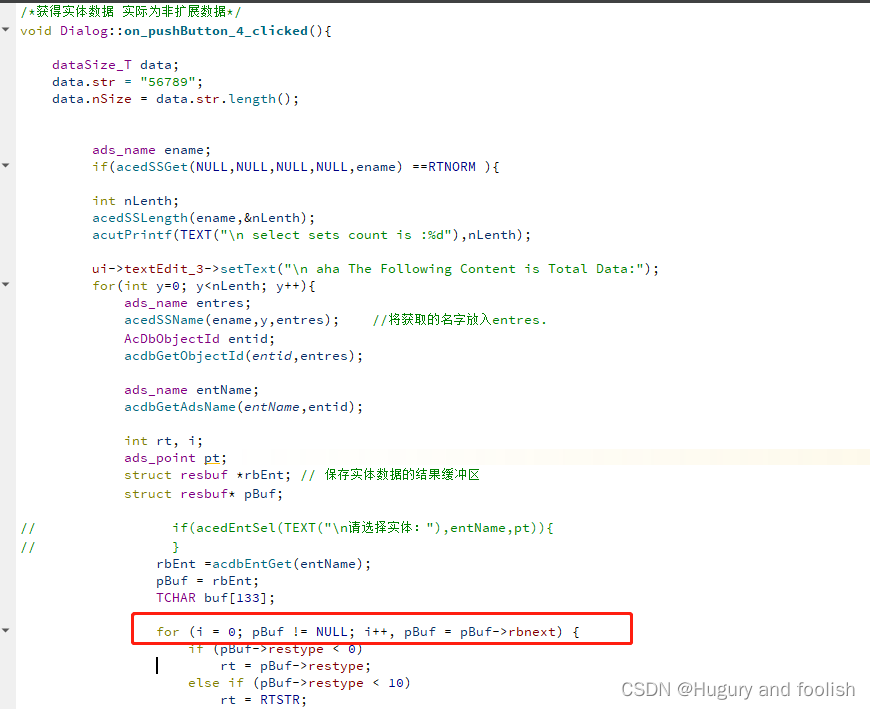
此代码最主要部分为on_pushButton4_clicked()函数部分,第二个for循环上方部分为选择实体,可以选择单个实体或者多个实体。第二个for循环下方里面为获取实体的所有数据。
this_main.cpp:
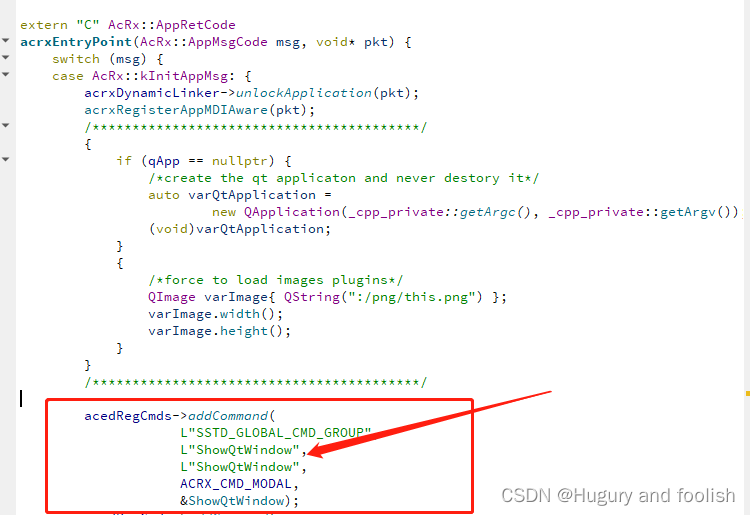
ShowQtWindow()函数为展示QT的UI界面。将此函数通过命令形式在CAD中打开用到的是下图的方式。在CAD中输入"ShowQtWindow"语句后可以在CAD中打开QT的界面
xiancheng.cpp:
此代码编写的是一个Socket的客户端用于将dialog.cpp代码中获取到的CAD实体数据传输给服务端。
运行结果:
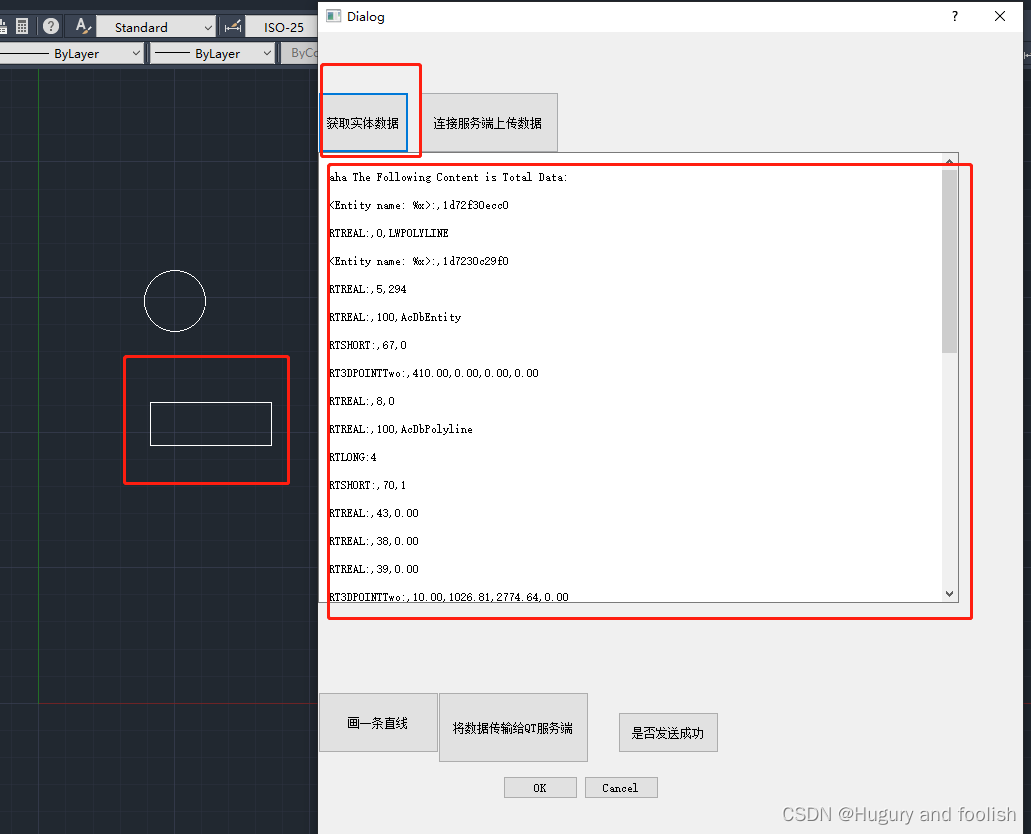
1)在Auto CAD的命令行中输入ShowQtWindow(命令可以随意命名,在this_main.cpp中修改)打开QT界面获取实体数据。
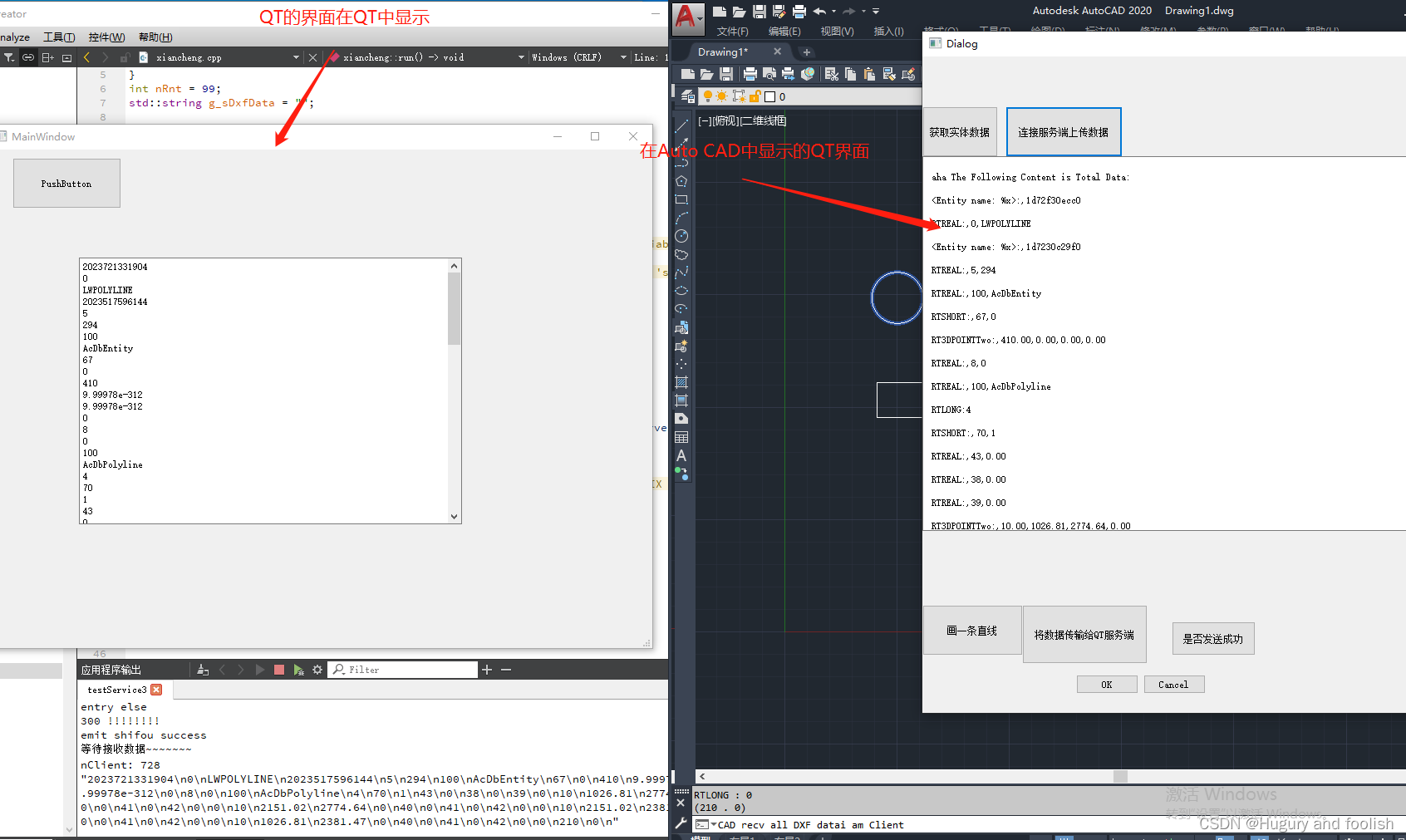
2)将获取到的实体数据通过Socket传输到另外一个QT项目中。
总结:
1) 实现的功能是,通过手动选择的方式获取到Auto CAD中实体的数据并将其传输到QT中。
2)本文章未展示Socket服务端方面的代码(因为在另外一个QT项目工程里非此项目工程)。不过服务端项目工程也只是接收本文章客户端方面发来的数据,仅此而已。
3)ObjectARX对于Auto CAD的二次开发过程中会有很多问题,需要耐心解决和细心研究。
4)本文章代码编写方法以及代码编写规范等其它方面还有很多不足之处,请各位见谅。如若各位看官有独到见解还望不吝赐教。
本文来自互联网用户投稿,文章观点仅代表作者本人,不代表本站立场,不承担相关法律责任。如若转载,请注明出处。 如若内容造成侵权/违法违规/事实不符,请点击【内容举报】进行投诉反馈!