antDesign menu 自定义修改选中样式,一级和多级菜单
antDesign menu 自定义修改选中样式,一级和多级菜单
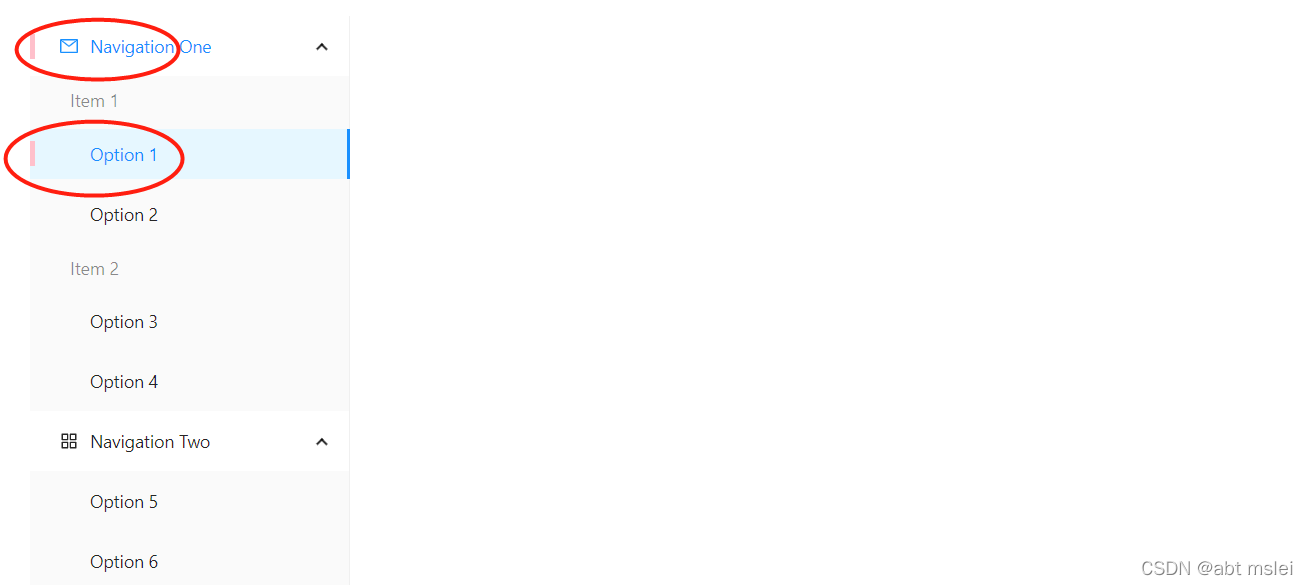
项目里一级菜单和二级菜单都存在的情况下,需要对选中的父级菜单做高亮选中状态
问题描述
二级和一级菜单互不影响选中(我这都选中了)
.ant-menu-submenu-selected > .ant-menu-submenu-title {position: relative;
}
.ant-menu-submenu-selected > .ant-menu-submenu-title:before {width: 4px;height: 20px;position: absolute;content: "";left: 0;background: pink;
}
解决方案:
当有子菜单时,不希望子菜单选中,通过观察,将兄弟级下的选中子菜单排除掉
.ant-menu-item-selected {position: relative;
}
.ant-menu-item-selected:before {width: 4px;height: 20px;position: absolute;content: "";left: 0;background: pink;
}.ant-menu-submenu-selected > .ant-menu-submenu-title {position: relative;
}
.ant-menu-submenu-selected > .ant-menu-submenu-title:before {width: 4px;height: 20px;position: absolute;content: "";left: 0;background: pink;
}
.ant-menu-submenu-selected.ant-menu-submenu-title+ ul.ant-menu-item-selected:before {display: none;
}
这样就可以了!!
本文来自互联网用户投稿,文章观点仅代表作者本人,不代表本站立场,不承担相关法律责任。如若转载,请注明出处。 如若内容造成侵权/违法违规/事实不符,请点击【内容举报】进行投诉反馈!