【微信小程序——计算器】
文章目录
- 前言
- 1、计算器的效果图
- 2、index.wxml
- 3、index.js
- 3、index.json
- 5、index.wxss
- 总结
前言
微信小程序是一种不需要下载安装即可使用的应用,它实现了应用“触手可及”的梦想,用户扫一扫或者搜一下即可打开应用。也体现了“用完即走”的理念,用户不用关心是否安装太多应用的问题。应用将无处不在,随时可用,但又无需安装卸载。对于开发者而言,微信小程序开发门槛相对较低,难度不及APP,能够满足简单的基础应用,适合生活服务类线下商铺以及非刚需低频应用的转换。微信小程序能够实现消息通知、线下扫码、公众号关联等七大功能。其中,通过公众号关联,用户可以实现公众号与微信小程序之间相互跳转。
提示:以上内容源于百度百科,仅供参考
1、计算器的效果图
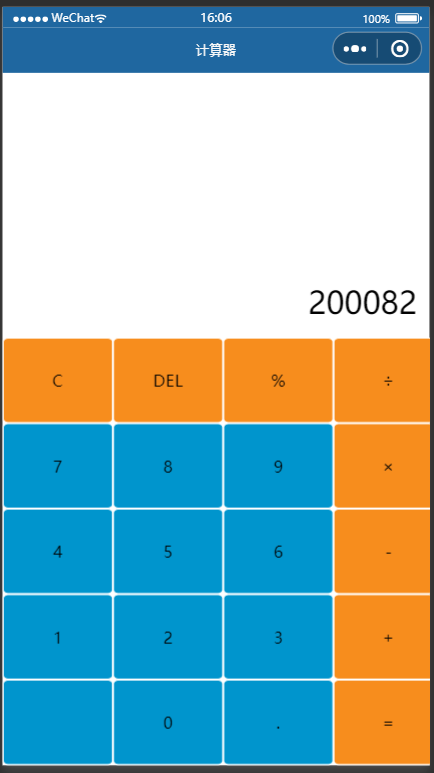
2、index.wxml
<!-- index.wxml -->
<view class='screen'>{{result}}</view><view class='test-bg'><view class='btnGroup'><view class='item orange' bindtap='clickButton' id="{{C}}">C</view><view class='item orange' bindtap='clickButton' id="{{back}}">DEL</view><view class='item orange' bindtap='clickButton' id="{{addSub}}">%</view><view class='item orange' bindtap='clickButton' id="{{div}}">÷</view></view><view class='btnGroup'><view class='item blue' bindtap='clickButton' id="{{id7}}">7</view><view class='item blue' bindtap='clickButton' id="{{id8}}">8</view><view class='item blue' bindtap='clickButton' id="{{id9}}">9</view><view class='item orange' bindtap='clickButton' id="{{mut}}">×</view></view><view class='btnGroup'><view class='item blue' bindtap='clickButton' id="{{id4}}">4</view><view class='item blue' bindtap='clickButton' id="{{id5}}">5</view><view class='item blue' bindtap='clickButton' id="{{id6}}">6</view><view class='item orange' bindtap='clickButton' id="{{sub}}">-</view></view><view class='btnGroup'><view class='item blue' bindtap='clickButton' id="{{id1}}">1</view><view class='item blue' bindtap='clickButton' id="{{id2}}">2</view><view class='item blue' bindtap='clickButton' id="{{id3}}">3</view><view class='item orange' bindtap='clickButton' id="{{add}}">+</view></view><view class='btnGroup'><view class='item blue' bindtap='clickButton' id="{{percent}}"></view><view class='item blue' bindtap='clickButton' id="{{id0}}">0</view><view class='item blue' bindtap='clickButton' id="{{dot}}">.</view><view class='item orange' bindtap='clickButton' id="{{equ}}">=</view></view></view>
3、index.js
// index.js
// 获取应用实例
const app = getApp()// Page({
//   data: {
//     motto: 'Hello World',
//     userInfo: {},
//     hasUserInfo: false,
//     canIUse: wx.canIUse('button.open-type.getUserInfo'),
//     canIUseGetUserProfile: false,
//     canIUseOpenData: wx.canIUse('open-data.type.userAvatarUrl') && wx.canIUse('open-data.type.userNickName') // 如需尝试获取用户信息可改为false
//   },
//   // 事件处理函数
//   bindViewTap() {
//     wx.navigateTo({
//       url: '../logs/logs'
//     })
//   },
//   onLoad() {
//     if (wx.getUserProfile) {
//       this.setData({
//         canIUseGetUserProfile: true
//       })
//     }
//   },
//   getUserProfile(e) {
//     // 推荐使用wx.getUserProfile获取用户信息,开发者每次通过该接口获取用户个人信息均需用户确认,开发者妥善保管用户快速填写的头像昵称,避免重复弹窗
//     wx.getUserProfile({
//       desc: '展示用户信息', // 声明获取用户个人信息后的用途,后续会展示在弹窗中,请谨慎填写
//       success: (res) => {
//         console.log(res)
//         this.setData({
//           userInfo: res.userInfo,
//           hasUserInfo: true
//         })
//       }
//     })
//   },
//   getUserInfo(e) {
//     // 不推荐使用getUserInfo获取用户信息,预计自2021年4月13日起,getUserInfo将不再弹出弹窗,并直接返回匿名的用户个人信息
//     console.log(e)
//     this.setData({
//       userInfo: e.detail.userInfo,
//       hasUserInfo: true
//     })
//   }
// })
Page({data: {back: 'back',C: 'C',addSub: 'addSub',add: '+',sub: '-',mut: '×',div: '÷',equ: '=',percent: '%',dot: '.',id0: '0',id1: '1',id2: '2',id3: '3',id4: '4',id5: '5',id6: '6',id7: '7',id8: '8',id9: '9',result: '0',valiBackOfArray: ['+', '-', '×', '÷', '.'],completeCalculate: false},// 计算结果calculate: function (str) {// 判断是不是有负数var isNagativeNum = false;if (str.charAt(0) == '-') {str = str.replace('-', '').replace('(', '').replace(')', '');isNagativeNum = true;}// 对字符串解析并运算var addArray = str.split('+');var sum = 0.0;for (var i = 0; i < addArray.length; i++) {if (addArray[i].indexOf('-') == -1) {if (addArray[i].indexOf('×') != -1 || addArray[i].indexOf('÷') != -1)sum += this.calculateMutDiv(addArray[i]);else sum += Number(addArray[i]);}else {var subArray = addArray[i].split('-');var subSum = 0;if (subArray[0].indexOf('×') != -1 || subArray[0].indexOf('÷') != -1) subSum = this.calculateMutDiv(subArray[0]);else subSum = Number(subArray[0]);for (var j = 1; j < subArray.length; j++) {if (subArray[i].indexOf('×') != -1 || subArray[i].indexOf('÷') != -1)subSum -= this.calculateMutDiv(subArray[j]);else subSum -= Number(subArray[j]);}sum += subSum;}}if (isNagativeNum) return (-sum).toString();else return sum.toString();},// 分块乘除运算calculateMutDiv: function (str) {var addArray = str.split('×');var sum = 1.0;for (var i = 0; i < addArray.length; i++) {if (addArray[i].indexOf('÷') == -1) {sum *= Number(addArray[i]);}else {var subArray = addArray[i].split('÷');var subSum = Number(subArray[0]);for (var j = 1; j < subArray.length; j++) {subSum /= Number(subArray[j]);}sum *= subSum;}}return sum;},// 是否以运算符结尾isOperatorEnd: function (str) {for (var i = 0; i < this.data.valiBackOfArray.length; i++) {if (str.charAt(str.length - 1) == this.data.valiBackOfArray[i]) return true;}return false;},clickButton: function (event) {if (this.data.result == 0) {if (event.target.id == 'back' || event.target.id == 'C' || event.target.id == 'addSub' || event.target.id == '%' || event.target.id == '+' || event.target.id == '-' || event.target.id == '×' || event.target.id == '÷' || event.target.id == '=') return;this.setData({result: event.target.id});}else if (event.target.id == 'back') {this.setData({result: this.data.result.length == 1 ? '0' : this.data.result.substring(0, this.data.result.length - 1)});}else if (event.target.id == 'C') {this.setData({result: '0'});}else if (event.target.id == 'addSub') {var r = this.data.result;if (this.isOperatorEnd(r)) return;if (r.charAt(0) == '-') this.setData({ result: r.replace('-', '').replace('(', '').replace(')', '') });else this.setData({result: '-(' + r + ')'});}else if (event.target.id == '%') {}else if (event.target.id == '=') {if (this.isOperatorEnd(this.data.result)) return;this.setData({result: this.calculate(this.data.result)});this.setData({completeCalculate: true});}else {if (this.isOperatorEnd(this.data.result) && this.isOperatorEnd(event.target.id)) return;// 如果计算结果有小数点,直到输入运算符前不能再输入小数点if (this.data.completeCalculate && this.data.result.indexOf('.') != -1 && event.target.id == '.') return;for (var i = 0; i < this.data.valiBackOfArray.length - 1; i++) {if (this.data.valiBackOfArray[i] == event.target.id) {this.setData({completeCalculate: false});break;}}this.setData({result: this.data.result + event.target.id});}}
})
3、index.json
{"usingComponents": {},"navigationBarTitleText":"计算器","navigationBarBackgroundColor":"#1f67a0","navigationBarTextStyle":"white"
}
5、index.wxss
/**index.wxss**/
/* .userinfo {display: flex;flex-direction: column;align-items: center;color: #aaa;
}.userinfo-avatar {overflow: hidden;width: 128rpx;height: 128rpx;margin: 20rpx;border-radius: 50%;
}.usermotto {margin-top: 200px;
} */
page {width: 100%;height: 100%;
}.test-bg {position: fixed;bottom: 0;
}.screen {position: fixed;color: #000000;font-size: 30px;bottom: 780rpx;text-align: right;width: 730rpx;word-wrap: break-word;
}.btnGroup {display: flex;/*弹性显示结构*/flex-direction: row;/*横向显示*/
}.item {width: 192rpx;line-height: 148rpx;border-radius: 5%;text-align: center;
}.orange {/* 前景色 */color: #000000;border: solid 1rpx #ffffff;/* 背景色 */background: #f78d1d;
}.blue {/* 前景色 */color: #000000;border: solid 1rpx #ffffff;/* 背景色 */background: #0095cd;
}
总结
该小程序还有待完善的地方,还请各位大佬多多指教。
本文来自互联网用户投稿,文章观点仅代表作者本人,不代表本站立场,不承担相关法律责任。如若转载,请注明出处。 如若内容造成侵权/违法违规/事实不符,请点击【内容举报】进行投诉反馈!