Spring boot集成freemarker导出excel
使用Spring boot集成freemarker可以将一些复杂的excel表格导出
下面直接开始使用步骤:
1. 集成freemarker
在pom.xml文件中导入springfreemarker的依赖
org.springframework.boot spring-boot-starter-freemarker 2.1.4.RELEASE junit junit 4.13.2 test 2. 创建实体类与excel文档模板
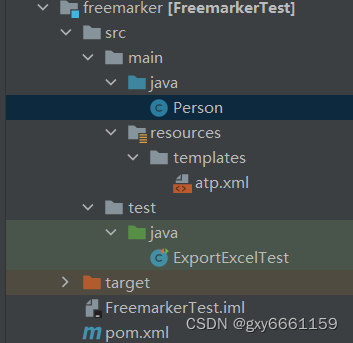
将atp.xsl文件另存为xml格式,得到一个atp.xml文件
3. 创建一个测试类,用于测试导出文件
import freemarker.template.Configuration;
import freemarker.template.Template;
import org.junit.Test;import java.io.BufferedWriter;
import java.io.File;
import java.io.FileOutputStream;
import java.io.OutputStreamWriter;
import java.util.ArrayList;
import java.util.HashMap;
import java.util.List;
import java.util.Map;public class ExportExcelTest {@Testpublic void run() throws Exception{Configuration configuration = new Configuration(Configuration.VERSION_2_3_26);configuration.setDefaultEncoding("utf-8");configuration.setClassForTemplateLoading(ExportExcelTest.class,"/templates/");Template template = configuration.getTemplate("atp.xml");Person person1 = new Person();Person person2 = new Person();Person person3 = new Person();person1.setId("1");person1.setName("pan");person2.setId("2");person2.setName("boot");person3.setId("3");person3.setName("pan66");Map map = new HashMap<>();List list = new ArrayList<>();list.add(person1);list.add(person2);list.add(person3);//带有实体类的list集合map.put("list",list);List> mapList = new ArrayList<>();for (int i = 0; i <2; i++) {Map map1 = new HashMap<>();map1.put("total","123456"+i);map1.put("success","80"+i);mapList.add(map1);}//带有map集合的list集合map.put("mapList",mapList);File file = new File("src/main/resources/templates/marti.xls");BufferedWriter bw = new BufferedWriter(new OutputStreamWriter(new FileOutputStream(file)));template.process(map,bw);bw.flush();bw.close();System.out.println("导出成功");}
}
4. 对atp.xml文件进行修改,添加替换符
Pan Pan 2016-12-02T08:54:00Z 2022-08-22T08:06:13Z 2052-11.1.0.12302 470D5A143AE34423B1D07CFE37DD2552 12215 7835 False False | 测试1 | 测试2 |
<#list mapList as map><#if (map_index < 5 )>| ${map["total"]} | ${map["success"]} |
| 测试1 | 测试2 |
<#list list as list>| ${list.id} | ${list.name} |
0 0 100 3 6 1 R7C2 False False
0 0 100 False False
0 0 100 False False 目前自己用到的就是这些,主要是对list集合进行分析
本文来自互联网用户投稿,文章观点仅代表作者本人,不代表本站立场,不承担相关法律责任。如若转载,请注明出处。 如若内容造成侵权/违法违规/事实不符,请点击【内容举报】进行投诉反馈!