SpringBoot_web开发-thymeleaf语法
我们看一下Thymeleaf的自动配置规则,我们得按照规则用起来,这里有一个自动配置,这里专门有一个thymeleaf,Thymeleaf的自动配置,ThymeleafAutoConfiguration,自动配置不用看了,无非就是给里面添加一些组件,他有好多Thymeleaf2的,但是判断不生效,视图解析器添加组件,我们主要看默认规则,默认规则都在ThymeleafProperties里面,来看什么默认规则呢,@ConfigurationProperties(prefix = "spring.thymeleaf")
public class ThymeleafProperties {private static final Charset DEFAULT_ENCODING = Charset.forName("UTF-8");private static final MimeType DEFAULT_CONTENT_TYPE = MimeType.valueOf("text/html");public static final String DEFAULT_PREFIX = "classpath:/templates/";public static final String DEFAULT_SUFFIX = ".html";照着他就直接用起来了,首先默认规则有一个默认的前缀,"classpath:/templates/",还有默认的后缀,前后缀就是我们视图解析的代名词,然后也是通过它我们就知道,只要我们把html页面,放在类路径下的templates里面,然后thymeleaf就能够帮我们自动渲染了,那我们就直接来看一下,比如我来写一个请求,如果我们以前写success,现在我们引入了thymeleaf模板引擎,我们要去success页面,thymeleaf默认在这拼,相当于在类路径下的templates里面,给你找到success,还得拼一个后缀htmlclasspath:/templates/success.html为了能达到目的地,我们就在这写一个success.html我们来发送这个success请求,看我们的模板引擎是不是来到success页面localhost:8080/success
package com.learn.controller;import org.springframework.stereotype.Controller;
import org.springframework.web.bind.annotation.RequestMapping;
import org.springframework.web.bind.annotation.ResponseBody;@Controller
public class HelloController {@ResponseBody@RequestMapping("/hello")public String hello1() {return "hello controller";}@RequestMapping("/success")public String success() {// classpath:/templates/success.htmlreturn "success";}}
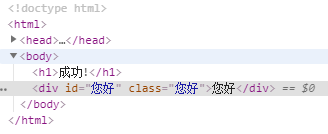
thymeleaf我们来参照他的文档https://www.thymeleaf.org/他这里有3.0.9版本和2.1.6版本,同时使用,这里也有对thymeleaf的简单介绍,它是现代的JAVA服务端的引擎hymeleaf is a modern server-side Java template engine for both web and standalone environments.特点是自然的模板语言,写法就比较像html的语法格式,我们主要来看他的文档Thymeleaf 3.0https://www.thymeleaf.org/doc/tutorials/3.0/usingthymeleaf.pdf体会一下thymeleaf的使用,我们就以一个最常用的场景,比如我们要发success请求,来到这个页面,查出数据在页面展示,如果是我们的JSP页面就简单多了,这个数据会放在我们请求域中,我想去success页面取值怎么取啊https://www.thymeleaf.org/doc/tutorials/3.0/usingthymeleaf.html如果是以前JSP,就直接${hello}就完事,现在不是JSP,要按照thymeleaf的语法来,他语法是什么就得来说一下,首先我们要用thymeleaf,你得在html导入一个thymeleaf的名称空间,示例里面把这段复制xmlns:th="http://www.thymeleaf.org"当然你也可以不导,不导的话就没有语法提示了,导入的作用就是为了语法提示,我们使用的第一步,导入thymeleaf的名称空间,第二步我们就可以使用thymeleaf的语法了,怎么使用呢,假设我这里有一个div,我们想在这里取出hello的值,th:text,意思就是文本内容,${hello},来访问一下hello请求,看能不能取出来呢,我们来访问一下,发现也取出来了http://localhost:8080/success @RequestMapping("/success")public String success(Map map) {// classpath:/templates/success.htmlmap.put("hello", "您好");return "success";}
Insert title here

成功!
Insert title here
成功!
这是显示欢迎信息
Insert title here
成功!
这是显示欢迎信息
这些表达式语法我们来看一下,我们能写哪些表达式,${},*{},#{},@{},~{},这都是什么意思,表达式语法,第一个${},我们之前是用来获取变量值的,每一个怎么用呢,每一个我们来参照文档来看一下,标准表达式语法,Variables变量,${}是用来获取值,底层就是OGNL表达式,既然是OGNLWe already mentioned that ${...} expressions are in fact OGNL (Object-Graph Navigation Language) expressions executed on the map of variables contained in the context.各种高大上的往下看,能怎么用呢,下面有各种例子,比如我们可以调用对象的属性,https://www.thymeleaf.org/doc/tutorials/3.0/usingthymeleaf.html#variables/** Access to properties using the point (.). Equivalent to calling property getters.*/
${person.father.name}包括调属性的时候可以这样来使用/** Access to properties can also be made by using brackets ([]) and writing * the name of the property as a variable or between single quotes.*/
${person['father']['name']}/** If the object is a map, both dot and bracket syntax will be equivalent to * executing a call on its get(...) method.*/
${countriesByCode.ES}
${personsByName['Stephen Zucchini'].age}如果map中的key有空格,我们也可以这么来写,/** Indexed access to arrays or collections is also performed with brackets, * writing the index without quotes.*/
${personsArray[0].name}数组中来取,/** Methods can be called, even with arguments.*/
${person.createCompleteName()}
${person.createCompleteNameWithSeparator('-')}包括我们进行方法调用,包括方法我们还能给她传一个参数,这个就是我们OGNL表达式,不仅能调属性,获取对象的属性,这是最基本的功能,然后他还能调用方法,接下来他还有一些功能,下面还有一个Expression Basic Objects,我们表达式里边还能写"#.",#是内置的一些基本对象,使用内置的基本对象,内置的对象都是什么呢,#ctx: the context object.
#vars: the context variables.
#locale: the context locale.
#request: (only in Web Contexts) the HttpServletRequest object.
#response: (only in Web Contexts) the HttpServletResponse object.
#session: (only in Web Contexts) the HttpSession object.
#servletContext: (only in Web Contexts) the ServletContext object.一个叫ctx,当前上下文对象,当前上下文的变量值,包括locale代表区域信息的,如果是WEB环境,有我们的request,response,session,servletContext,它能够使用这几个内置对象,他还能用什么呢,包括内置对象怎么用,这一块也有文档,可以点进去,Established locale country: US.如果我们要用我们国家的区域信息,哪个国家,区域代号,他的使用附录都在这,You can read the full reference of these objects in Appendix A.https://www.thymeleaf.org/doc/tutorials/3.0/usingthymeleaf.html#appendix-a-expression-basic-objects比如我们获取请求参数的这个值,/** ============================================================================* See javadoc API for class org.thymeleaf.context.WebRequestParamsVariablesMap* ============================================================================*/${param.foo} // Retrieves a String[] with the values of request parameter 'foo'
${param.size()}
${param.isEmpty()}
${param.containsKey('foo')}
...通过size我们知道请求参数中有多少个参数,包括请求参数是不是为空一大堆,还有我们从session获取值,我来举一个例子,例子都在附录里面,除了基本对象外,还有工具对象,Expression Utility Objects,内置的一些工具对象,工具对象会增强一些功能,是哪个对象呢,Besides these basic objects, Thymeleaf will offer us a set of utility objects that will
help us perform common tasks in our expressions.#execInfo: information about the template being processed.
#messages: methods for obtaining externalized messages inside variables expressions,
in the same way as they would be obtained using #{…} syntax.
#uris: methods for escaping parts of URLs/URIs
#conversions: methods for executing the configured conversion service (if any).
#dates: methods for java.util.Date objects: formatting, component extraction, etc.
#calendars: analogous to #dates, but for java.util.Calendar objects.
#numbers: methods for formatting numeric objects.
#strings: methods for String objects: contains, startsWith, prepending/appending, etc.
#objects: methods for objects in general.
#bools: methods for boolean evaluation.
#arrays: methods for arrays.
#lists: methods for lists.
#sets: methods for sets.
#maps: methods for maps.
#aggregates: methods for creating aggregates on arrays or collections.
#ids: methods for dealing with id attributes that might be repeated
(for example, as a result of an iteration).我们就来结合文档的演示,这个就是我们内置的工具对象,有演示在附录里打开,You can check what functions are offered by each of these utility objects in the Appendix B.https://www.thymeleaf.org/doc/tutorials/3.0/usingthymeleaf.html#appendix-b-expression-utility-objects我们要使用numbers这个工具类,我们来做一些事情/* * Set minimum integer digits.* Also works with arrays, lists or sets*/
${#numbers.formatInteger(num,3)}
${#numbers.arrayFormatInteger(numArray,3)}
${#numbers.listFormatInteger(numList,3)}
${#numbers.setFormatInteger(numSet,3)}String工具类可以把他转成toString,/** Null-safe toString()*/
${#strings.toString(obj)} 下面也可以调用startWith方法,/** Check whether a String starts or ends with a fragment* Also works with arrays, lists or sets*/
${#strings.startsWith(name,'Don')} // also array*, list* and set*
${#strings.endsWith(name,endingFragment)} // also array*, list* and set*有非常多的用法,这都有示例,我们都可以来对照使用,这个就是我们${},用的最多也是最强大的表达式,接下来我们再来看第二个,叫*{},这个叫变量的选择表达式,这个东西是什么呢,4.3 Expressions on selections (asterisk syntax)*{}是什么呢,Not only can variable expressions be written as ${...}, but also as *{...}.不仅变量表达式可以写成${},还可以写成*{},他和${}在功能上是一样的,只是有一个补充功能,比如我们有一个tb:object,我们取出一个对象,session里面取出user对象,我们先把tb:object对象重写,以后我们要用user对象的值,我们就可以在当前的div里面,星号就代表我刚才的对象,然后我们直接获取对象里的属性就行了,这个就类似于写session.user.firstName
Name: Sebastian.
Surname: Pepper.
Nationality: Saturn.
Name: Sebastian.
Surname: Pepper.
Nationality: Saturn.
补充使用就是,就是配合th:object一起使用的,以后我们要获取里面的值呢,就可以直接这么来做了,这个都有文档片段,我们就参照这个文档,他都不难,我们就参照文档,我们来做就行了,我们再通过实验来深化使用,还有一个叫#{},这是干什么呢,一个叫Message,Message它是来取国际化内容的,包括@{},它是来帮我们定义url链接的,用它定义url有什么好处呢,我们可以在下面看到示例,比如这里就有一个示例,
view
view
view如果要传多个变量,If several parameters are needed, these will be separated by commas:@{/order/process(execId=${execId},execType='FAST')}包括我们来看下面,前面都不写了,我们直接写一个杠,片段引用的表达式,我们文档里面也有Fragments,我们要插入一个片段文档,我们要用~{},我们在实验里面再说,...这就是我们五种表达式,如果要用thymeleaf模板引擎,知道何时用哪种表达式就行了,接下来就是其他的一些用法了,你可以用字面量,比如普通的字符串,数字,包括多个数据用逗号隔开,文本操作,这里还有数学运算,他支持数学运算,表达式里边就会用这些数学运算,包括还有布尔运算,什么并且什么,什么或什么,包括还支持比较运算,比如有一些特殊字符,用后面这些来替代,条件运算,if-then,这个就是我们三元运算符,前面是一个条件跟遍历有关Iteration,这一块我们看下面的示例,他这里有一段代码https://www.thymeleaf.org/doc/tutorials/3.0/usingthymeleaf.html#iterationpublic void process(final HttpServletRequest request, final HttpServletResponse response,final ServletContext servletContext, final ITemplateEngine templateEngine)throws Exception {ProductService productService = new ProductService();List allProducts = productService.findAll(); WebContext ctx = new WebContext(request, response, servletContext, request.getLocale());ctx.setVariable("prods", allProducts);templateEngine.process("product/list", ctx, response.getWriter());}比如他用了一个Service查了一些数据,用prods保存起来,他用的是th:each标签,把我们要遍历的数据取出来${prods}Good Thymes Virtual Grocery Product list
NAME PRICE IN STOCK Onions 2.41 yes
每一个数据要用什么变量名,他在冒号里面用了变量名,冒号后面要遍历的是集合,以后就用变量名取出这个数据,那我们也来这么遍历,th:each每次遍历都会生成当前这个标签,我如果是这种遍历,12 Inlining行内写法,我们就可以用[[...]] or [(...)]的方式,这两个有啥区别呢,其实[[...]]就是th:text,[(...)]就是th:utext,Expressions between [[...]] or [(...)] are considered inlined expressions in Thymeleaf, and inside them we can use any kind of expression that would also be valid in a th:text or th:utext attribute.Note that, while [[...]] corresponds to th:text (i.e. result will be HTML-escaped), [(...)] corresponds to th:utext and will not perform any HTML-escaping. So with a variable such as msg = 'This is great!', given this fragment:localhost:8080/success package com.learn.controller;import java.util.Arrays;
import java.util.Map;import org.springframework.stereotype.Controller;
import org.springframework.web.bind.annotation.RequestMapping;
import org.springframework.web.bind.annotation.ResponseBody;@Controller
public class HelloController {@ResponseBody@RequestMapping("/hello")public String hello1() {return "hello controller";}@RequestMapping("/success")public String success(Map map) {// classpath:/templates/success.htmlmap.put("hello", "您好
");map.put("users", Arrays.asList("张三","李四","王五"));return "success";}}
Insert title here
成功!
这是显示欢迎信息
[[${user}]]
本文来自互联网用户投稿,文章观点仅代表作者本人,不代表本站立场,不承担相关法律责任。如若转载,请注明出处。 如若内容造成侵权/违法违规/事实不符,请点击【内容举报】进行投诉反馈!