JAVA之获取JavaSwing单选框JRadioButton选中的值(内容)
JAVA之获取JavaSwing单选框JRadioButton选中的值(内容)
package word;import java.awt.BorderLayout;
import java.awt.Component;
import java.awt.event.ActionEvent;
import java.awt.event.ActionListener;import javax.print.attribute.standard.Severity;
import javax.swing.ButtonGroup;
import javax.swing.JButton;
import javax.swing.JFrame;
import javax.swing.JLabel;
import javax.swing.JOptionPane;
import javax.swing.JPanel;
import javax.swing.JRadioButton;public class www extends JFrame{JButton btn;private static JPanel pane1 ;public www() {JFrame frame = new JFrame("单选框");   //顶层容器frame.setSize(200, 200);          //窗口大小pane1 = new JPanel();       //中间容器//单选框JRadioButton c1 = new JRadioButton("草莓",true);//创建单选框,true为默认选中,不需要可去掉JRadioButton c2 = new JRadioButton("柠檬");//创建单选框JRadioButton c3 = new JRadioButton("香蕉");//创建单选框ButtonGroup group = new ButtonGroup(); //创建单选框按钮组JLabel l1 = new JLabel("模式:");group.add(c1);//将单选框组件加入单选框按钮组,否则两个都可以选择group.add(c2);group.add(c3);pane1.add(l1);pane1.add(c1);//将单选框组件加入面板pane1.add(c2);pane1.add(c3);//按钮btn = new JButton("你选择的是:");pane1.add(btn);//将按钮加入面板frame.add(pane1);frame.setDefaultCloseOperation(JFrame.EXIT_ON_CLOSE);frame.setVisible(true);//显示btn.addActionListener(new ActionListener() {//按钮监听@Overridepublic void actionPerformed(ActionEvent e) {// TODO Auto-generated method stubString info ="";//通过面板属性名获取到该面板上的所有组件System.out.println(info);for(Component c:pane1.getComponents()){if(c instanceof JRadioButton){if(((JRadioButton) c).isSelected()){info += ((JRadioButton)c).getText();}}}System.out.println(info);//输出选择的单选框文本JOptionPane.showMessageDialog(null, "你选择了"+info);}});}public static void main(String[] args) {// TODO Auto-generated method stubnew www();}}
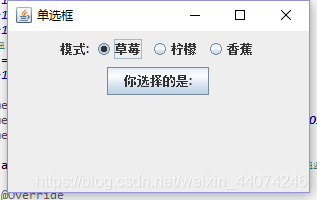
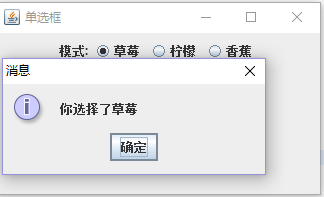
输出为:
本文来自互联网用户投稿,文章观点仅代表作者本人,不代表本站立场,不承担相关法律责任。如若转载,请注明出处。 如若内容造成侵权/违法违规/事实不符,请点击【内容举报】进行投诉反馈!