SpringBoot内部配置:“application.properties配置”和”使用XML配置”,读取属性文件中的内容,日志配置,Profile配置(学习:SpringBoot实战)
1 SpringBoot内部配置
1.1、修改端口和应用上下文
server.port=9090
server.context-path=/helloboot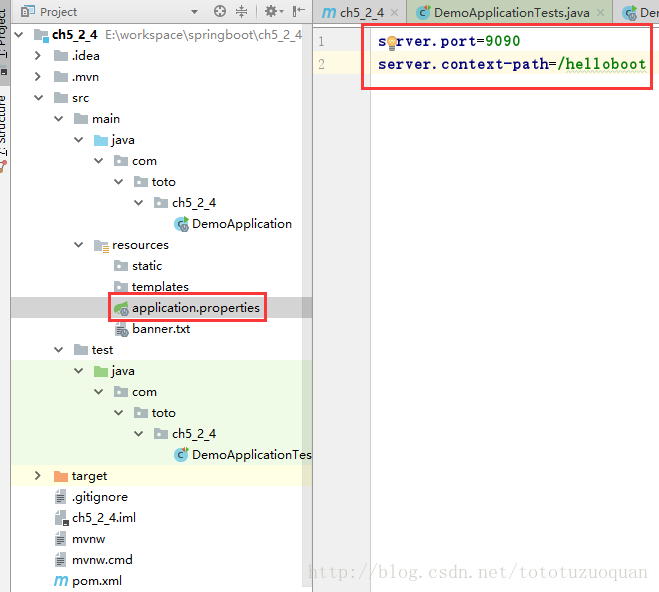
Spring Boot也可以使用yml进行配置,application.yml配置方式:
server:port:9090contextPath:/helloboot1.2、使用XML配置
SpringBoot提倡零配置,即无xml配置,但是在实际项目中,可能有一些特殊要求你必须使用XML配置,这时我们可以通过Spring提供的@ImportResource来加载xml配置。例如:
@ImportResource({"classpath:some-context.xml","classpath:another-context.xml"})2、SpringBoot外部配置
Spring Boot允许使用properties文件,yaml文件或者命令行参数作为外部配置
2.1 命令行参数配置
Spring Boot可以是基于jar包运行的,打成jar包的程序可以直接通过下面的命令运行:
java -jar xx.jar可以通过以下命令修改Tomcat端口号:
java -jar xx.jar --server.port=90902.2 常规属性配置
在2.2节我们讲述了在常规Spring环境下,注入properties文件里的值的方式,通过@PropertySource指明properties文件的位置,然后通过@Value注入值。在Spring Boot里,我们只需要在application.properties定义属性,直接使用@Value注入即可。例如:
@Configuration
@PropertySource({  "classpath:config.properties",  "classpath:db.properties" //如果是相同的key,则最后一个起作用
})
public class AppConfig {  @Autowired  Environment env;
}
2.3完整案例
2.3.1 目录结构
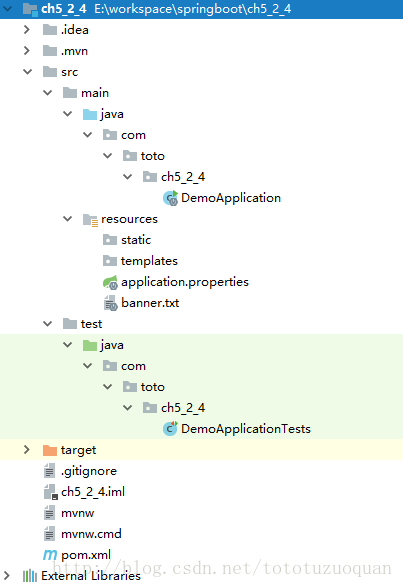
2.3.2 编写pom.xml文件
<project xmlns="http://maven.apache.org/POM/4.0.0" xmlns:xsi="http://www.w3.org/2001/XMLSchema-instance"xsi:schemaLocation="http://maven.apache.org/POM/4.0.0 http://maven.apache.org/xsd/maven-4.0.0.xsd"><modelVersion>4.0.0modelVersion><groupId>com.totogroupId><artifactId>ch5_2_4artifactId><version>0.0.1-SNAPSHOTversion><packaging>jarpackaging><name>demoname><description>Demo project for Spring Bootdescription><parent><groupId>org.springframework.bootgroupId><artifactId>spring-boot-starter-parentartifactId><version>1.5.7.RELEASEversion><relativePath/> parent><properties><project.build.sourceEncoding>UTF-8project.build.sourceEncoding><project.reporting.outputEncoding>UTF-8project.reporting.outputEncoding><java.version>1.8java.version>properties><dependencies><dependency><groupId>org.springframework.bootgroupId><artifactId>spring-boot-starter-webartifactId>dependency><dependency><groupId>org.springframework.bootgroupId><artifactId>spring-boot-starter-testartifactId><scope>testscope>dependency>dependencies><build><plugins><plugin><groupId>org.springframework.bootgroupId><artifactId>spring-boot-maven-pluginartifactId>plugin>plugins>build>project>2.3.3 application.properties文件的内容
server.port=9090
server.context-path=/demobook.author=wangyunfei
book.name=spring boot
2.3.4 banner.txt参考博文
http://blog.csdn.net/tototuzuoquan/article/details/78168952
2.3.5 DemoApplication.java内容如下
package com.toto.ch5_2_4;import org.springframework.beans.factory.annotation.Value;
import org.springframework.boot.SpringApplication;
import org.springframework.boot.autoconfigure.SpringBootApplication;
import org.springframework.boot.builder.SpringApplicationBuilder;
import org.springframework.web.bind.annotation.RequestMapping;
import org.springframework.web.bind.annotation.RestController;/*** @RestController 等价@ResponseBody 和 @Controller*/
@RestController
@SpringBootApplication
public class DemoApplication {@Value("${book.author}")private String bookAuthor;@Value("${book.name}")private String bookName;@RequestMapping("/")String index() {return "book name is:" + bookName + " and book author is:" + bookAuthor;}public static void main(String[] args) {SpringApplication.run(DemoApplication.class, args);}
}
2.3.6 DemoApplicationTests.java的内容如下:
package com.toto.ch5_2_4;import org.junit.Test;
import org.junit.runner.RunWith;
import org.springframework.boot.test.context.SpringBootTest;
import org.springframework.test.context.junit4.SpringRunner;@RunWith(SpringRunner.class)
@SpringBootTest
public class DemoApplicationTests {@Testpublic void contextLoads() {}}
2.3.7 浏览器访问
http://localhost:9090/demo/

2.4 类型安全配置
Spring Boot还提供了基于类型安全的配置方式,通过@ConfigurationProperties将properties属性和一个Bean及其属性关联,从而实现类型安全的配置
2.4.1 项目目录结构
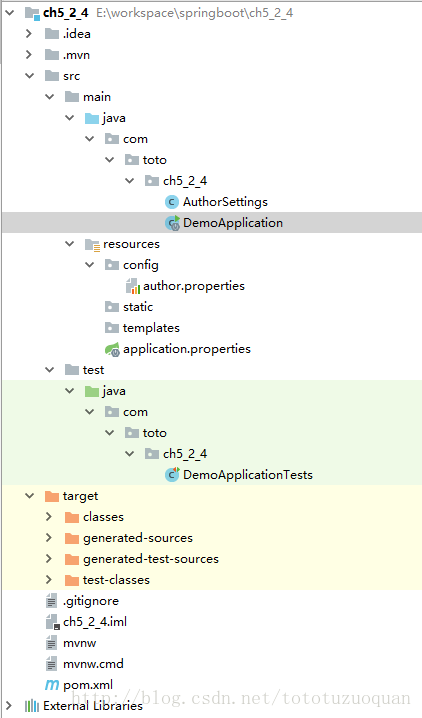
2.4.2 pom.xml文件的内容和上面的案例的内容一样,这里省略不做介绍
2.4.3 author.properties 的内容如下
author.name=toto
author.age=27
2.4.4 AuthorSettings的内容如下
package com.toto.ch5_2_4;import org.springframework.boot.context.properties.ConfigurationProperties;
import org.springframework.context.annotation.Configuration;
import org.springframework.context.annotation.PropertySource;
import org.springframework.stereotype.Component;@Component
/**注意在1.5以上的SpringBoot版本中已经将location去掉了,这里使用PropertySource作为替代方案**/
@ConfigurationProperties(prefix = "author")
@PropertySource("classpath:config/author.properties")
public class AuthorSettings {private String name;private String age;public String getName() {return name;}public String getAge() {return age;}public void setName(String name) {this.name = name;}public void setAge(String age) {this.age = age;}
}
2.4.5 DemoApplication.java的内容如下:
package com.toto.ch5_2_4;import org.springframework.beans.factory.annotation.Autowired;
import org.springframework.beans.factory.annotation.Value;
import org.springframework.boot.SpringApplication;
import org.springframework.boot.autoconfigure.SpringBootApplication;
import org.springframework.boot.builder.SpringApplicationBuilder;
import org.springframework.web.bind.annotation.RequestMapping;
import org.springframework.web.bind.annotation.RestController;/*** @RestController 等价@ResponseBody 和 @Controller*/
@RestController
@SpringBootApplication
public class DemoApplication {@Autowiredprivate AuthorSettings authorSettings;@RequestMapping("/")String index() {return "author name is:" + authorSettings.getName() + " and author age is:" + authorSettings.getAge();}public static void main(String[] args) {SpringApplication.run(DemoApplication.class, args);}
}
2.4.6 运行查看结果

3、日志配置
Spring Boot支持Java Util Logging、Log4J、Log4J2和logback作为日志框架,无论使用哪种日志框架,Spring Boot已为当前使用日志框架的控制台输出及文件输出做好了配置。
默认情况下,Spring Boot使用Logback作为日志框架。
配置日志级别和最终的输出路径:
logging.file=E:/workspace/log.log配置日志文件,格式为logging.level.包名=级别
logging.level.org.springframework.web = DEBUG
4、Profile配置
profile是Spring用来针对把不同的环境对不同的配置提供支持的,全局Profile使用application-{profile}.properties如(application-prod.properties)
也就是说:Spring可以针对不同的环境使用不同的配置文件做配置
通过在application.properties中设置spring.profiles.active=prod来指定使用配置文件application-prod.properties中的配置
下面我们分别为生产(prod)和开发(dev)环境使用不同的配置文件,生产环境下端口号为80,开发环境下端口为8888
4.1 项目目录结构
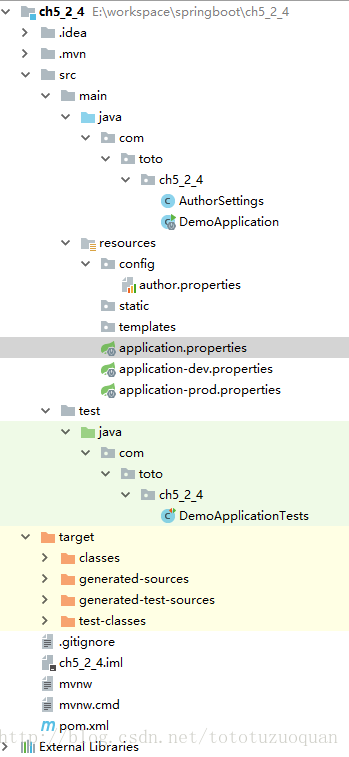
4.2 编写配置文件
生产环境的配置文件application-prod.properties的内容如下:
server.port=80
server.context-path=/prod
开发环境的配置文件application-dev.properties的内容如下:
server.port=8080
server.context-path=/dev
当前的application.properties的配置文件内容为:
## 可以到E:/workspace/log.log中查看日志内容
logging.file=E:/workspace/log.log
logging.level.org.springframework.web = DEBUGspring.profiles.active=dev
4.3 运行
浏览器中输入:http://localhost:8080/dev/,看到的结果如下:
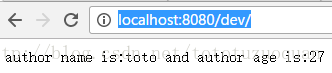
修改application.properties中的spring.profiles.active的值为prod,即:
logging.file=E:/workspace/log.log
logging.level.org.springframework.web = DEBUGspring.profiles.active=prod
然后再运行,在浏览器上输入:
http://localhost/prod/,运行后的结果如下:
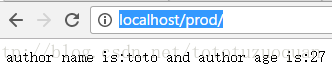
经过查看两次结果,发现最后两次的运行结果一致。
本文来自互联网用户投稿,文章观点仅代表作者本人,不代表本站立场,不承担相关法律责任。如若转载,请注明出处。 如若内容造成侵权/违法违规/事实不符,请点击【内容举报】进行投诉反馈!