Linux基础命令----echo 颜色输出 (Bash技巧: 颜色和格式)
描述
-
在ANSI/VT100 终端和终端仿真器不只是能够显示黑色和白色文本;由于转义序列,它们可以显示颜色和格式化的文本。 这些序列由转义字符 (通常由
^[或FormatCode组成。[FormatCodem -
在 Bash,
\e\033\x1B
-
实例:
| 代码(Bash) | 预览 |
|---|---|
echo -e “ \ e [31mHello World \ e [0m” |  |
echo -e “ \ 033 [31mHello \ e [0m World” |  |
- 注意:
- 该命令的
-e选项echo启用对转义序列的解析。 \e[0m序列删除所有属性(格式和颜色)。在每个彩色文本的末尾都最好添加它。
- 该命令的
- 说明:
\e转义起始符,定义一个转义序列, 可以使用\033或者\x1B代替[表示开始定义颜色m转义终止符,表示颜色定义完毕- 再次使用
\e[,表示再次开启颜色定义,0表示使用默认的颜色,m表示颜色定义结束,所以\e[0m的作用是恢复之前的配色方案
格式化(Formatting)
描述:
这是最常用的用于格式化文本的控制序列。它们的支持取决于所使用的终端(请参阅兼容性列表)。
集合(SET)
| 编码 | 描述 | 实例 | 预览 |
|---|---|---|---|
| 1 | 粗体/明亮(Bold/Bright) | echo -e "Normal \e[1mBold" |  |
| 2 | 暗淡(Dim) | echo -e "Normal \e[2mDim" |  |
| 4 | 下划线(Underlined) | echo -e "Normal \e[4mUnderlined"" |  |
| 5 | 闪烁(Blink)1 | echo -e "Normal \e[5mBlink" | 不闪烁 |
| 7 | 反转(反转前景色和背景色) | echo -e "Normal \e[7minverted" |  |
| 8 | 隐藏(对密码有用) | echo -e "Normal \e[8mHidden" |  |
重置(Reset)
| 编码 | 描述 | 实例 | 预览 |
|---|---|---|---|
| 0 | 重置所有属性 | echo -e "\e[0mNormal Text" |  |
| 21 | 重设粗体/明亮 | echo -e "Normal \e[1mBold \e[21mNormal" |  |
| 22 | 重设暗淡 | echo -e "Normal \e[2mDim \e[22mNormal" |  |
| 24 | 重设下划线 | echo -e "Normal \e[4mUnderlined \e[24mNormal" |  |
| 25 | 重设闪烁 | echo -e "Normal \e[5mBlink \e[25mNormal" | 这里不能显示动图 |
| 27 | 重设反转 | echo -e "Normal \e[7minverted \e[27mNormal" |  |
| 28 | 重设隐藏 | echo -e "Normal \e[8mHidden \e[28mNormal" |  |
8/16 色
前景色(文字)
| 编码 | 描述 | 实例 | 预览 |
|---|---|---|---|
| 39 | 默认前景色 | echo -e "Default \e[39mDefault" |  |
| 30 | 黑色 | echo -e "Default \e[30mBlack" |  |
| 31 | 红色 | echo -e "Default \e[31mRed" |  |
| 32 | 绿色 | echo -e "Default \e[32mGreen" |  |
| 33 | 黄色 | echo -e "Default \e[33mYellow" |  |
| 34 | 蓝色 | echo -e "Default \e[34mBlue" |  |
| 35 | 品红 | echo -e "Default \e[35mMagenta" |  |
| 36 | 青色 | echo -e "Default \e[36mCyan" |  |
| 37 | 浅灰 | echo -e "Default \e[37mLight gray" |  |
| 90 | 深灰色 | echo -e "Default \e[90mDark gray" |  |
| 91 | 淡红色 | echo -e "Default \e[91mLight red" |  |
| 92 | 浅绿色 | echo -e "Default \e[92mLight green" |  |
| 93 | 浅黄色 | echo -e "Default \e[93mLight yellow" |  |
| 94 | 淡蓝色 | echo -e "Default \e[94mLight blue" |  |
| 95 | 淡品红 | echo -e "Default \e[95mLight magenta" |  |
| 96 | 浅青绿 | echo -e "Default \e[96mLight cyan" |  |
| 97 | 白色 | echo -e "Default \e[97mWhite" |  |
背景(Background)
| 编码 | 描述 | 实例 | 预览 |
|---|---|---|---|
| 49 | 默认背景色 | echo -e "Default \e[49mDefault" |  |
| 40 | 黑色 | echo -e "Default \e[40mBlack" |  |
| 41 | 红色 | echo -e "Default \e[41mRed" |  |
| 42 | 绿色 | echo -e "Default \e[42mGreen" |  |
| 43 | 黄色 | echo -e "Default \e[43mYellow" |  |
| 44 | 蓝色 | echo -e "Default \e[44mBlue" |  |
| 45 | 品红 | echo -e "Default \e[45mMagenta" |  |
| 46 | 青色 | echo -e "Default \e[46mCyan" |  |
| 47 | 浅灰 | echo -e "Default \e[47mLight gray" |  |
| 100 | 深灰色 | echo -e "Default \e[100mDark gray" |  |
| 101 | 浅红色 | echo -e "Default \e[101mLight red" |  |
| 102 | 浅绿色 | echo -e "Default \e[102mLight green" |  |
| 103 | 浅黄色 | echo -e "Default \e[103mLight yellow" |  |
| 104 | 浅蓝 | echo -e "Default \e[104mLight blue" |  |
| 105 | 浅洋红色 | echo -e "Default \e[105mLight magenta" |  |
| 106 | 浅青色 | echo -e "Default \e[106mLight cyan" |  |
| 107 | 白色 | echo -e "Default \e[107mWhite" |  |
88/256色
说明:
- 某些终端(请参阅兼容性列表)可以支持88或256种颜色。这是允许您使用它们的控制序列。
- 颜色数字256仅受vte支持(GNOME终端,XFCE4终端,Nautilus终端,终结器等)
- 88色终端(如rxvt)与256色终端的色图不同。要显示88色终端的颜色图,请在88色终端中运行
256-colors.sh脚本。
前景色(文字)
要使用前景上的256种颜色(文本颜色)中的一种,控制顺序为
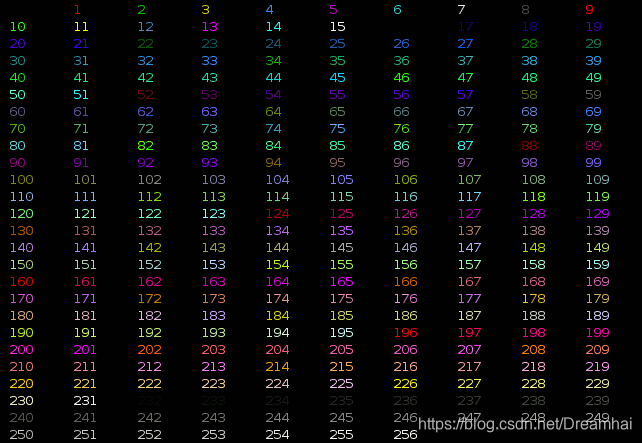
实例:
| 代码 | 预览 |
|---|---|
echo -e “ \ e [38; 5; 82mHello \ e [38; 5; 198mWorld” |  |
for i in {16..21} {21..16} ; do echo -en "\e[38;5;${i}m#\e[0m" ; done ; echo |  |
背景色
要在背景上使用256种颜色之一,控制顺序为
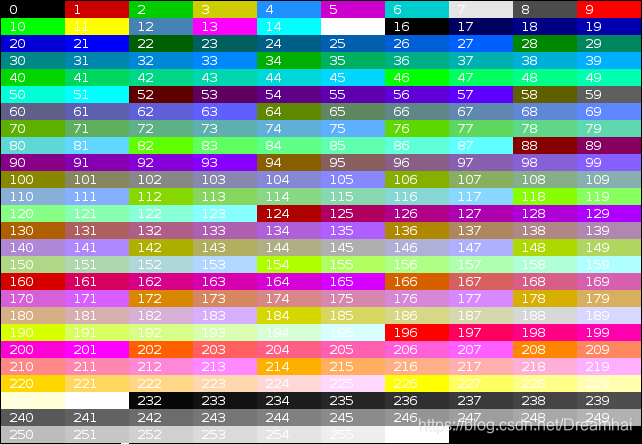
实例:
| 代码 | 预览 |
|---|---|
echo -e "\e[40;38;5;82m Hello \e[30;48;5;82m World \e[0m" |  |
for i in {16..21} {21..16} ; do echo -en "\e[48;5;${i}m \e[0m" ; done ; echo |  |
属性组合
终端允许属性组合。属性必须用分号(“ ;”)分隔。
实例:
| 描述 | 代码 | 预览 |
|---|---|---|
| 加粗加下划线 | echo -e "\e[1;4mBold and Underlined" |  |
| 粗体+红色前景+绿色背景 | echo -e "\e[1;31;42m Yes it is awful \e[0m" |  |
demo程序(Demonstration programs)
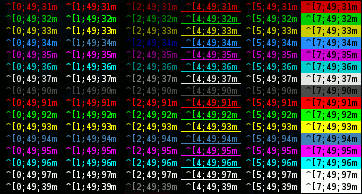
颜色和格式(16种颜色)
以下Shell脚本显示了许多可能的属性组合(但不是全部,因为它一次只使用一个格式属性)。
点击下载: colors_and_formatting.sh
#!/bin/bash# This program is free software. It comes without any warranty, to
# the extent permitted by applicable law. You can redistribute it
# and/or modify it under the terms of the Do What The Fuck You Want
# To Public License, Version 2, as published by Sam Hocevar. See
# http://sam.zoy.org/wtfpl/COPYING for more details.#Background
for clbg in {40..47} {100..107} 49 ; do#Foregroundfor clfg in {30..37} {90..97} 39 ; do#Formattingfor attr in 0 1 2 4 5 7 ; do#Print the resultecho -en "\e[${attr};${clbg};${clfg}m ^[${attr};${clbg};${clfg}m \e[0m"doneecho #Newlinedone
doneexit 0
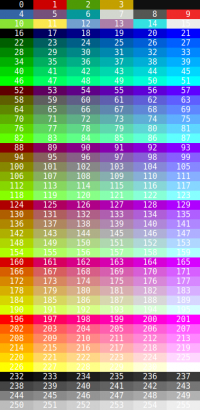
256 色
以下脚本显示了某些终端和终端仿真器(例如XTerm和GNOME Terminal)上可用的256种颜色。
点击下载:256-colors.sh
#!/bin/bash# This program is free software. It comes without any warranty, to
# the extent permitted by applicable law. You can redistribute it
# and/or modify it under the terms of the Do What The Fuck You Want
# To Public License, Version 2, as published by Sam Hocevar. See
# http://sam.zoy.org/wtfpl/COPYING for more details.for fgbg in 38 48 ; do # Foreground / Backgroundfor color in {0..255} ; do # Colors# Display the colorprintf "\e[${fgbg};5;%sm  %3s  \e[0m" $color $color# Display 6 colors per linesif [ $((($color + 1) % 6)) == 4 ] ; thenecho # New linefidoneecho # New line
doneexit 0
不适用于大多数的终端仿真器,可在tty和Term中使用 ↩︎
本文来自互联网用户投稿,文章观点仅代表作者本人,不代表本站立场,不承担相关法律责任。如若转载,请注明出处。 如若内容造成侵权/违法违规/事实不符,请点击【内容举报】进行投诉反馈!