2.springboot操作hdfs (未完待续)
记录springboot操作hdfs过程中遇到的一些问题。
一、pom文件引入依赖:
org.apache.hadoop hadoop-hdfs 3.3.6
org.apache.hadoop hadoop-client 3.3.6
二、编写applicaton.yml、config、service、controller。
demo代码主要参考地址:https://kgithub.com/WinterChenS/springboot-learning-experience/blob/master/spring-boot-hadoop
hdfs:hdfsPath: hdfs://192.xxx.xxx.xx:8888hdfsName: xxxpackage com.guo.self.dubai.hadoop;import lombok.extern.slf4j.Slf4j;
import org.apache.hadoop.fs.FileSystem;
import org.springframework.beans.factory.annotation.Value;
import org.springframework.context.annotation.Bean;
import org.springframework.context.annotation.Configuration;import java.io.IOException;
import java.net.URI;
import java.net.URISyntaxException;/*** @author:guoq* @date:2023/7/28* @descripion:*/
@Slf4j
@Configuration
public class HadoopConfig {@Value("${hdfs.hdfsPath}")private String hdfsPath;@Value("${hdfs.hdfsName}")private String hdfsName;@Beanpublic org.apache.hadoop.conf.Configuration getConfiguration(){org.apache.hadoop.conf.Configuration config = new org.apache.hadoop.conf.Configuration();config.set("fs.defaultFS",hdfsPath);return config;}@Beanpublic FileSystem getFileSystem(){FileSystem fileSystem=null;try {fileSystem= FileSystem.get(new URI(hdfsPath), getConfiguration(), hdfsName);} catch (IOException e) {e.printStackTrace();} catch (InterruptedException e) {e.printStackTrace();} catch (URISyntaxException e) {e.printStackTrace();}return fileSystem;}
}
package com.guo.self.dubai.hadoop;import java.util.List;
import java.util.Map;/*** @author:guoq* @date:2023/7/31* @descripion:*/
public interface HDFSService {//文件是否存在boolean existFile(String path);//目录List> readCatalog(String path);}
package com.guo.self.dubai.hadoop;import lombok.extern.slf4j.Slf4j;
import org.apache.hadoop.fs.FileStatus;
import org.apache.hadoop.fs.FileSystem;
import org.apache.hadoop.fs.Path;
import org.springframework.beans.factory.annotation.Autowired;
import org.springframework.stereotype.Service;
import org.springframework.util.StringUtils;import java.io.IOException;
import java.util.*;/*** @author:guoq* @date:2023/7/31* @descripion:*/
@Service
@Slf4j
public class HDFSServiceImpl  implements  HDFSService{@Autowiredprivate FileSystem fileSystem;@Overridepublic boolean existFile(String path) {if (StringUtils.isEmpty(path)){return false;}Path src = new Path(path);try {return fileSystem.exists(src);} catch (IOException e) {log.error(e.getMessage());}return false;}@Overridepublic List> readCatalog(String path) {if (StringUtils.isEmpty(path)){return Collections.emptyList();}if (!existFile(path)){log.error("catalog is not exist!!");return Collections.emptyList();}Path src = new Path(path);FileStatus[] fileStatuses = null;try {fileStatuses = fileSystem.listStatus(src);} catch (IOException e) {log.error(e.getMessage());}List> result = new ArrayList<>(fileStatuses.length);if (null != fileStatuses && 0 < fileStatuses.length) {for (FileStatus fileStatus : fileStatuses) {Map cataLogMap = new HashMap<>();cataLogMap.put("filePath", fileStatus.getPath());cataLogMap.put("fileStatus", fileStatus);result.add(cataLogMap);}}return result;}
}
package com.guo.self.dubai.hadoop;import com.guo.self.dubai.common.CommonResult;
import com.guo.self.dubai.entity.RoleEntity;
import io.swagger.annotations.Api;
import io.swagger.annotations.ApiOperation;
import lombok.extern.slf4j.Slf4j;
import org.springframework.beans.factory.annotation.Autowired;
import org.springframework.web.bind.annotation.GetMapping;
import org.springframework.web.bind.annotation.RequestMapping;
import org.springframework.web.bind.annotation.RestController;import javax.validation.Valid;
import java.util.List;
import java.util.Map;/*** @author:guoq* @date:2023/7/31* @descripion:*/
@RestController
@RequestMapping(value="/hdfs")
@Api(tags = "HDFS应用")
@Slf4j
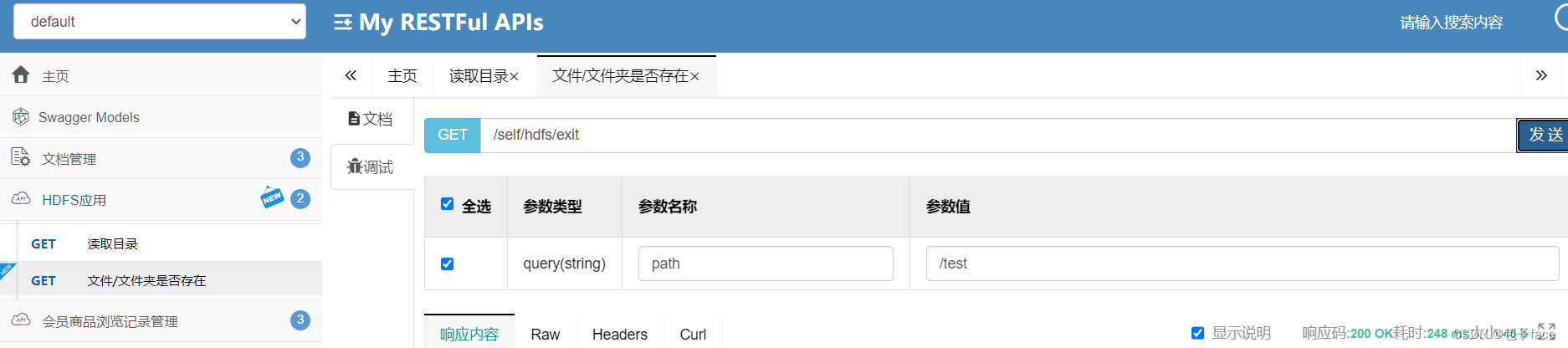
public class HDFSController {@Autowiredprivate HDFSService hdfsService;@GetMapping("/exit")@ApiOperation(value = "文件/文件夹是否存在")public CommonResult exit(String path){boolean b = hdfsService.existFile(path);return  CommonResult.success(b);}@GetMapping("/catalog")@ApiOperation(value = "读取目录")public CommonResult readCatalog(String path){List> maps = hdfsService.readCatalog(path);final String[] str = {""};maps.stream().forEach(item->{str[0] +=item.toString();});return  CommonResult.success(str[0]);}
}
三、启动报错:java.io.FileNotFoundException: java.io.FileNotFoundException: HADOOP_HOME and hadoop.home.dir are unset
参考文章:windows搭建hadoop环境(解决HADOOP_HOME and hadoop.home.dir are unset)_hadoop_home and hadoop.home.dir are unset._ppandpp的博客-CSDN博客
- 把centos7上安装的hadoop.xxx.tar.gz解压到windows本地
- 下载对应版本的winutils.exe和hadoop.dll,(下载地址:文件 · master · mirrors / cdarlint / winutils · GitCode),并复制到第一步步骤解压的bin目录下
- 配置本地环境变量
- 找到第一步解压的文件,找到hadoop.xxxx/ 与bin目录同级的etc文件,进入里层文件夹,编辑hadoop-env.cmd,找到set JAVA_HOME=%JAVA_HOME%,替换成你本地的jdk环境,提示如果本地配置文件夹中有空格,会不生效,可以新建一个链接文件,链接到目标文件,把链接文件夹设置到环境变量,命令:mklink/J D:\ProgramFiles "D:\Program Files",
- 执行hadoop version即可
四、启动报错:java.io.IOException: Could not locate executable null\bin\winutils.exe in the Hadoop binaries.
参考文章:解决Hadoop在本地(windows)操作报错:Could not locate executable null\bin\winutils.exe in the Hadoop binaries._hadoop windows 解压失败_D奋斗的小菜鸟!的博客-CSDN博客,配置了CLASSPATH即可
五:正常编写代码:(未完待续)
六:效果,能成功调用
本文来自互联网用户投稿,文章观点仅代表作者本人,不代表本站立场,不承担相关法律责任。如若转载,请注明出处。 如若内容造成侵权/违法违规/事实不符,请点击【内容举报】进行投诉反馈!