记录某网站登录js逆向解密过程
某网站登录对密码进行加密,对js一窍不通之下硬着头皮找代码,开始想着直接调用js文件,自写html等,由于学艺不精不会搞,为此求助论坛大佬,最后发现加密秘钥就在眼前,只因对加密规则等不熟悉,所以才相见不相识,特此记录
1.追踪发现js文件登录密码进行加密,追到te方法
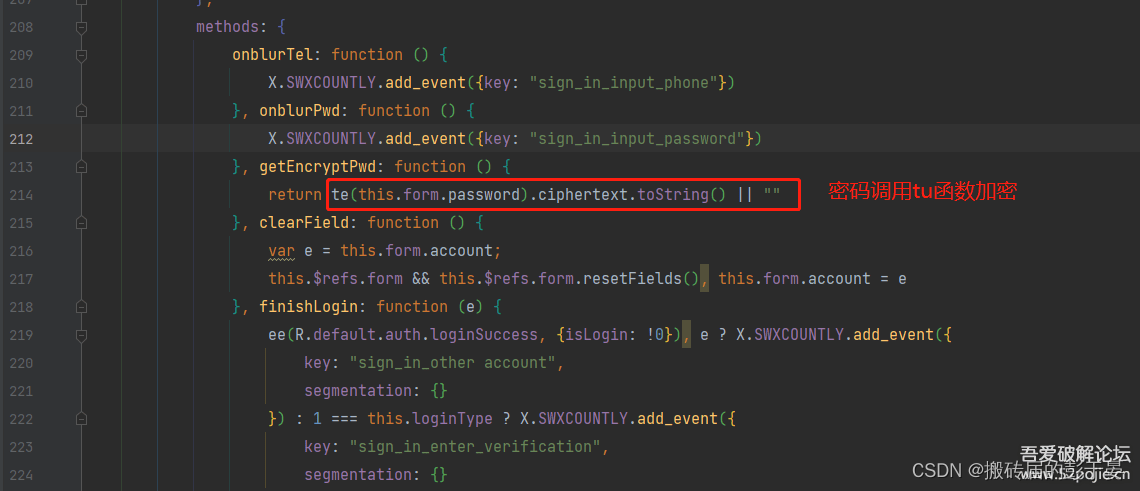
2.到这里已经开始懵了

3.这里其实已经说明了大部分的加密方式,如iv,padding等,都是用的AES的CBC模式(当时对AES的参数等不熟知,只知道publicKey,privateKey)

- 代码就在眼前,但是缺不认识它

- 这里比较折磨我的是这个秘钥先进行Base64的解析,然后才拿解析后的密码去做aes加密,其实我是看得懂那段代码的,但是由于逆向经验不足,所以在在线加密解密工具处找了老半天
5.最后的最后,我已经把te(‘123456’).toString()已经成功获取,但是由于不知道ciphertext是什么,或者是什么加密规则,卡在了最后一步,机缘巧合(百度)之后发现这是base64和hex的互转,这里十分感谢那篇博客的前端代码给了我灵感,aes加密后可以得到base64或者hex,所以这里还需要在做一次转换(无逆向经验,大佬勿喷),此处贴上网址,也可以自己编码实现.https://base64.guru/converter/decode/hex
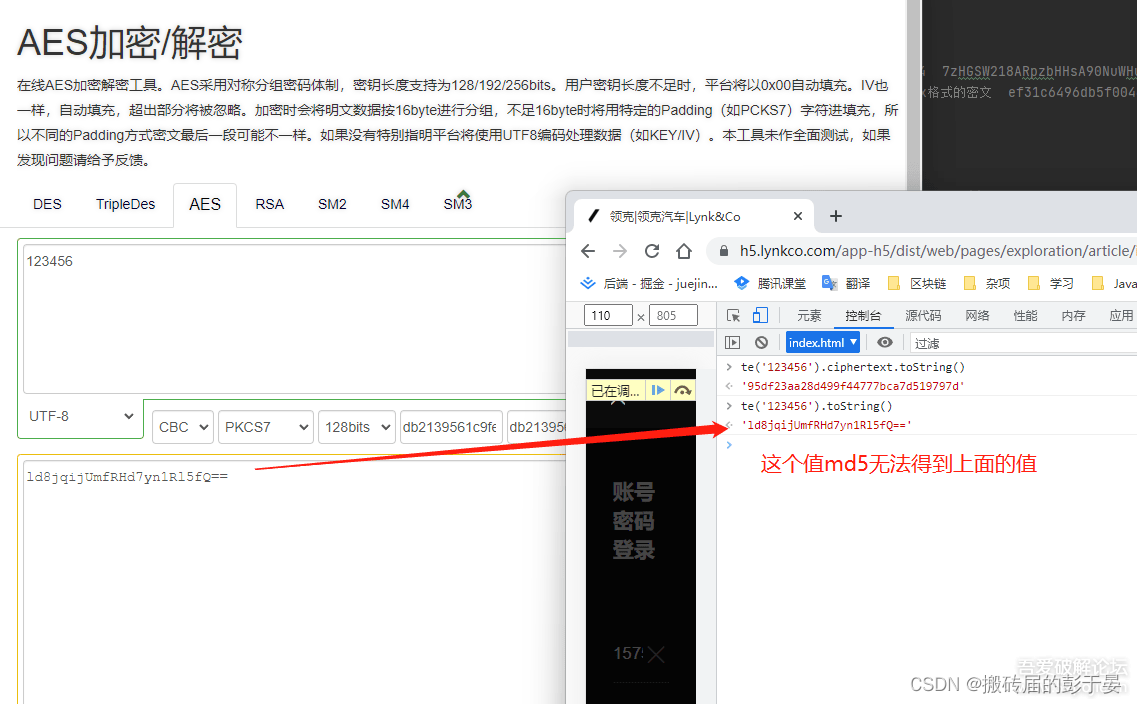
最后解密成功后当然是上我熟悉的java代码…
package cn.fly.code.util;import org.apache.commons.codec.DecoderException;
import org.apache.commons.codec.binary.Hex;
import org.apache.tomcat.util.codec.binary.Base64;
import org.bouncycastle.jce.provider.BouncyCastleProvider;
import javax.crypto.Cipher;
import javax.crypto.NoSuchPaddingException;
import javax.crypto.spec.IvParameterSpec;
import javax.crypto.spec.SecretKeySpec;
import java.io.UnsupportedEncodingException;
import java.security.Key;
import java.security.NoSuchAlgorithmException;
import java.security.NoSuchProviderException;
import java.security.Security;
import java.util.Arrays;/*** @Description:* @author: zhouyou* @date: 2022/07/22 09:12**/
public class AesUtils {// 算法名称final static String KEY_ALGORITHM = "AES";// 加解密算法/模式/填充方式final static String algorithmStr = "AES/CBC/PKCS7Padding";private static Key key;private static Cipher cipher;static boolean isInited = false;static byte[] iv = "db2139561c9fe068".getBytes();public static void init(byte[] keyBytes) {// 如果密钥不足16位,那么就补足.  这个if 中的内容很重要int base = 16;if (keyBytes.length % base != 0) {int groups = keyBytes.length / base + (keyBytes.length % base != 0 ? 1 : 0);byte[] temp = new byte[groups * base];Arrays.fill(temp, (byte) 0);System.arraycopy(keyBytes, 0, temp, 0, keyBytes.length);keyBytes = temp;}// 初始化Security.addProvider(new BouncyCastleProvider());// 转化成JAVA的密钥格式key = new SecretKeySpec(keyBytes, KEY_ALGORITHM);try {// 初始化ciphercipher = Cipher.getInstance(algorithmStr, "BC");} catch (NoSuchAlgorithmException e) {// TODO Auto-generated catch blocke.printStackTrace();} catch (NoSuchPaddingException e) {// TODO Auto-generated catch blocke.printStackTrace();} catch (NoSuchProviderException e) {// TODO Auto-generated catch blocke.printStackTrace();}}/*** 加密方法** @param content  要加密的字符串* @param keyBytes 加密密钥* @return*/public static byte[] encrypt(byte[] content, byte[] keyBytes) {byte[] encryptedText = null;init(keyBytes);try {cipher.init(Cipher.ENCRYPT_MODE, key, new IvParameterSpec(iv));encryptedText = cipher.doFinal(content);} catch (Exception e) {// TODO Auto-generated catch blocke.printStackTrace();}return encryptedText;}/*** 解密方法** @param encryptedData 要解密的字符串* @param keyBytes      解密密钥* @return*/public byte[] decrypt(byte[] encryptedData, byte[] keyBytes) {byte[] encryptedText = null;init(keyBytes);try {cipher.init(Cipher.DECRYPT_MODE, key, new IvParameterSpec(iv));encryptedText = cipher.doFinal(encryptedData);} catch (Exception e) {// TODO Auto-generated catch blocke.printStackTrace();}return encryptedText;}public static void main(String[] args) throws UnsupportedEncodingException, DecoderException {String password = "db2139561c9fe068";AesUtils aes = new AesUtils();// 加解密密钥String content = "123456";// 加密字符串System.out.println("加密前的:" + content);System.out.println("加密密钥:" + new String(password.getBytes()));// 加密方法byte[] enc = encrypt(content.getBytes(), password.getBytes());Hex hex = new Hex();System.out.println("加密后的内容:" + new String(hex.encode(enc)));// 解密方法byte[] dec = aes.decrypt(enc, password.getBytes());System.out.println("解密后的内容:" + new String(dec));String hexString = Hex.encodeHexString(enc);System.out.println("解密后的内容:" + hexString);//System.out.println(Base642Hex("ld8jqijUmfRHd7yn1Rl5fQ=="));}/*** base642Hex* @param guid* @return*/public static String Base642Hex(String guid){byte[] decoded = Base64.decodeBase64(guid);String hexString = Hex.encodeHexString(decoded);return hexString;}}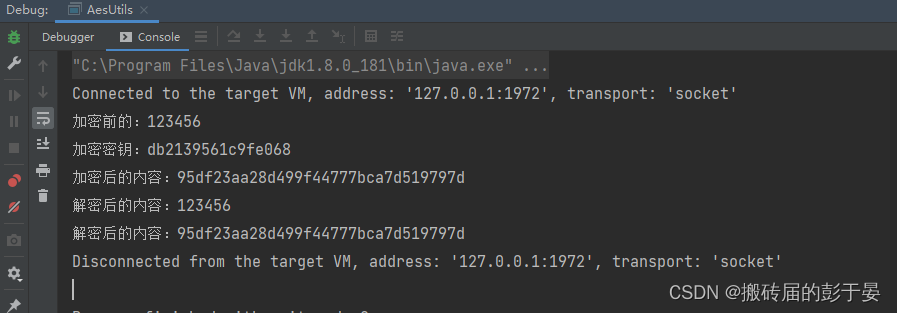
--------------END-----------------
本文来自互联网用户投稿,文章观点仅代表作者本人,不代表本站立场,不承担相关法律责任。如若转载,请注明出处。 如若内容造成侵权/违法违规/事实不符,请点击【内容举报】进行投诉反馈!