GCC遇到的一些问题
GCC编译器遇到的一些问题
- 一./cstdlib:75:15: 致命错误: stdlib.h:没有那个文件或目录
- 二.导出头文件路劲和库路劲
- linux在执行生成的Makefile的make指令的时候出现==cannot find -l***==找不到库的时候
- 三.执行./configure出现一些无法解决的错误,莫米奇妙的错误
- 四.执行configure出现checking for C compiler default output file name... configure: error: C compiler cannot create executables
- 五.执行configure出现库找不到和头文件找不到错误
- 六.configure添加头文件和库查找路劲
- 七.Makefile一些常用命令
- 1.打印数据
- 2.make install的时候指定安装路径
- 八.添加运行时库路劲
- 九.make时有动态库却提示找不到动态库
- 十 cannot find /lib/libc.so.6等编译自己的库自己找不着系列
- 十一:'dlsym@@GLIBC_2.17'
- 十三 给LIBS添加-l**的时候主要事项
一./cstdlib:75:15: 致命错误: stdlib.h:没有那个文件或目录
/cstdlib:75:15: 致命错误: stdlib.h:没有那个文件或目录没有那个文件或目录 #include_next
原因:
这是由于gcc7已经吧stdlib.h纳入了libstdc++以进行更好的优化,C Library的头文件stdlib.h使用 Include_next,而include_next对gcc系统头文件路径很敏感。
解决方法参考链接
编译Qt的时候出现的
方法一:
在Qt的.pro文件中去除如下一行:
INCLUDEPATH +=/usr/include
方法二:
在Qt的.pro文件中添加如下一行:
QMAKE_CFLAGS_ISYSTEM = -I
以上两种解决方法比较不方便,项目很多的时候需要一个个改pro文件
实用的解决方法:
打开报错的配置编译器文件
将原来的#include_next <stdlib.h>改为#include<stdlib.h>即可
二.导出头文件路劲和库路劲
export CPLUS_INCLUDE_PATH=$PWD/qtbase/src/3rdparty/angle/include:$CPLUS_INCLUDE_PATH
linux在执行生成的Makefile的make指令的时候出现==cannot find -l***==找不到库的时候
没库需要先找到库(根据具体情况找)
有库的时候直接在库所在的路径导出到环境变量
这里是将/home/mywork/VNC/libXau-1.0.7/target_bin/lib路径添加到系统查看的库路劲,这样系统就可以根据这个路径找到该目录下的库
$ export LD_LIBRARY_PATH=/home/mywork/VNC/libXau-1.0.7/target_bin/lib:$LD_LIBRARY_PATH
如果添加了还提示cannot find -l***,则需要检查下平台是否对应,比如编译器用的是64位的 而库却是32位的 或者位数一样,平台不一样,比如编译器是Arm的,但是库是X86或者X86_64的,这种情况就需要重新编译库了
三.执行./configure出现一些无法解决的错误,莫米奇妙的错误
举例子:在编译libXfont2-2.0.3,执行以下脚本的时候出现错误
执行脚本
RCLIB_PATH=/home/mywork/VNC
export PKG_CONFIG_PATH=$PKG_CONFIG_PATH:$SRCLIB_PATH/freetype-2.10.0/target_bin/lib/pkgconfig
export PKG_CONFIG_PATH=$PKG_CONFIG_PATH:$SRCLIB_PATH/libfontenc-1.1.4/target_bin/lib/pkgconfig
export LDFLAGS="-L/opt/mylib -lz"
./configure \--prefix=$(pwd)/target_bin\--with-freetype-config=/usr/local/freetype/bin/freetype-config \--with-zlib=/home/mywork/x11Vnc/zlib-1.2.11.dfsg/target_bin \--host=arm-linux
出现的错误,明明指定export PKG_CONFIG_PATH=$PKG_CONFIG_PATH:
$SRCLIB_PATH/libfontenc-1.1.4/target_bin/lib/pkgconfig而且目录确定存在却提示No package ‘fontenc’ found,其实从最上面的红色箭头就知道路劲找错了
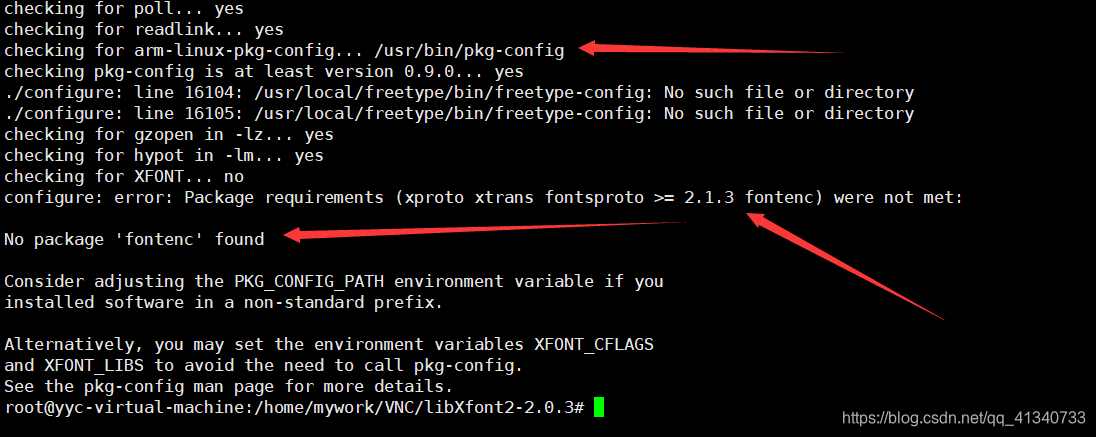
排除错误:先打开config.log文件,然后查看问题出在第几行,查看日志发现问题出在16464行 16478行 16494行
configure:15832: checking for arm-linux-pkg-config
configure:15862: result: /usr/bin/pkg-config
configure:15930: checking pkg-config is at least version 0.9.0
configure:15933: result: yes
configure:16131: checking for gzopen in -lz
configure:16156: arm-linux-gcc -o conftest -g -O2  -L/opt/mylib -lz conftest.c -lz   >&5
configure:16156: $? = 0
configure:16165: result: yes
configure:16391: checking for hypot in -lm
configure:16416: arm-linux-gcc -o conftest -g -O2  -L/opt/mylib -lz conftest.c -lm   >&5
conftest.c:51:6: warning: conflicting types for built-in function 'hypot'char hypot ();^
configure:16416: $? = 0
configure:16425: result: yes
configure:16437: checking for XFONT
configure:16444: $PKG_CONFIG --exists --print-errors "xproto xtrans fontsproto >= 2.1.3 fontenc"
Package fontenc was not found in the pkg-config search path.
Perhaps you should add the directory containing `fontenc.pc'
to the PKG_CONFIG_PATH environment variable
No package 'fontenc' found
configure:16447: $? = 1
configure:16461: $PKG_CONFIG --exists --print-errors "xproto xtrans fontsproto >= 2.1.3 fontenc"
Package fontenc was not found in the pkg-config search path.
Perhaps you should add the directory containing `fontenc.pc'
to the PKG_CONFIG_PATH environment variable
No package 'fontenc' found
configure:16464: $? = 1
configure:16478: result: no
No package 'fontenc' found
configure:16494: error: Package requirements (xproto xtrans fontsproto >= 2.1.3 fontenc) were not met:No package 'fontenc' foundConsider adjusting the PKG_CONFIG_PATH environment variable if you
installed software in a non-standard prefix.Alternatively, you may set the environment variables XFONT_CFLAGS
and XFONT_LIBS to avoid the need to call pkg-config.
See the pkg-config man page for more details.
打开configure文件,在configure文件中添加下面语句打印行号来确定出错位置
echo "++++++++++++++++++++++++++++++++LINENO: $LINENO++++++++++++PKG_CONFIG: $PKG_CONFIG"
通过打印定位出出错位置在19713行处,
pkg_failed=no
#下面这个打印语句是自己添加的
echo "++++++++++++++++++++++++++++++++LINENO: $LINENO++++++++++++PKG_CONFIG: $PKG_CONFIG"
{ $as_echo "$as_me:${as_lineno-$LINENO}: checking for XFONT" >&5
$as_echo_n "checking for XFONT... " >&6; }if test -n "$XFONT_CFLAGS"; thenpkg_cv_XFONT_CFLAGS="$XFONT_CFLAGS"elif test -n "$PKG_CONFIG"; thenif test -n "$PKG_CONFIG" && \{ { $as_echo "$as_me:${as_lineno-$LINENO}: \$PKG_CONFIG --exists --print-errors \"xproto xtrans fontsproto >= 2.1.3 fontenc\""; } >&5($PKG_CONFIG --exists --print-errors "xproto xtrans fontsproto >= 2.1.3 fontenc") 2>&5ac_status=$?$as_echo "$as_me:${as_lineno-$LINENO}: \$? = $ac_status" >&5test $ac_status = 0; }; thenpkg_cv_XFONT_CFLAGS=`$PKG_CONFIG --cflags "xproto xtrans fontsproto >= 2.1.3 fontenc" 2>/dev/null`test "x$?" != "x0" && pkg_failed=yes
elsepkg_failed=yes
fielsepkg_failed=untried
fi
if test -n "$XFONT_LIBS"; thenpkg_cv_XFONT_LIBS="$XFONT_LIBS"elif test -n "$PKG_CONFIG"; thenif test -n "$PKG_CONFIG" && \{ { $as_echo "$as_me:${as_lineno-$LINENO}: \$PKG_CONFIG --exists --print-errors \"xproto xtrans fontsproto >= 2.1.3 fontenc\""; } >&5($PKG_CONFIG --exists --print-errors "xproto xtrans fontsproto >= 2.1.3 fontenc") 2>&5ac_status=$?$as_echo "$as_me:${as_lineno-$LINENO}: \$? = $ac_status" >&5test $ac_status = 0; }; thenpkg_cv_XFONT_LIBS=`$PKG_CONFIG --libs "xproto xtrans fontsproto >= 2.1.3 fontenc" 2>/dev/null`test "x$?" != "x0" && pkg_failed=yes
elsepkg_failed=yes
fielsepkg_failed=untried
fi
添加打印函数执行configure结果显示下面结果,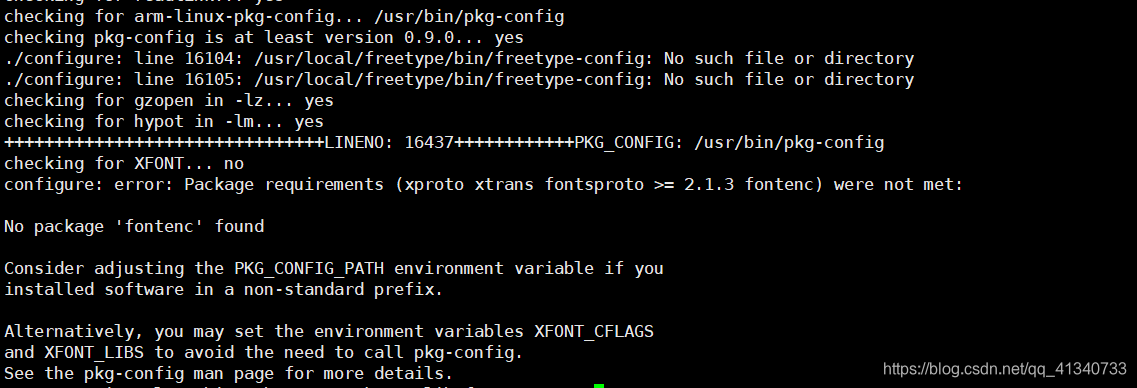
根据$PKG_CONFIG值打印结果(/usr/bin/pkg-config)来看是程序的寻找的路径不对,因此将configure脚本修改为,然后执行执行configure脚本
pkg_failed=no
#给PKG_CONFIG重新赋值正确的路径
PKG_CONFIG=/home/mywork/VNC/libfontenc-1.1.4/target_bin/lib/pkgconfig
echo "++++++++++++++++++++++++++++++++LINENO: $LINENO++++++++++++PKG_CONFIG: $PKG_CONFIG"
{ $as_echo "$as_me:${as_lineno-$LINENO}: checking for XFONT" >&5
$as_echo_n "checking for XFONT... " >&6; }if test -n "$XFONT_CFLAGS"; thenpkg_cv_XFONT_CFLAGS="$XFONT_CFLAGS"elif test -n "$PKG_CONFIG"; thenif test -n "$PKG_CONFIG" && \{ { $as_echo "$as_me:${as_lineno-$LINENO}: \$PKG_CONFIG --exists --print-errors \"xproto xtrans fontsproto >= 2.1.3 fontenc\""; } >&5($PKG_CONFIG --exists --print-errors "xproto xtrans fontsproto >= 2.1.3 fontenc") 2>&5ac_status=$?$as_echo "$as_me:${as_lineno-$LINENO}: \$? = $ac_status" >&5test $ac_status = 0; }; thenpkg_cv_XFONT_CFLAGS=`$PKG_CONFIG --cflags "xproto xtrans fontsproto >= 2.1.3 fontenc" 2>/dev/null`test "x$?" != "x0" && pkg_failed=yes
else
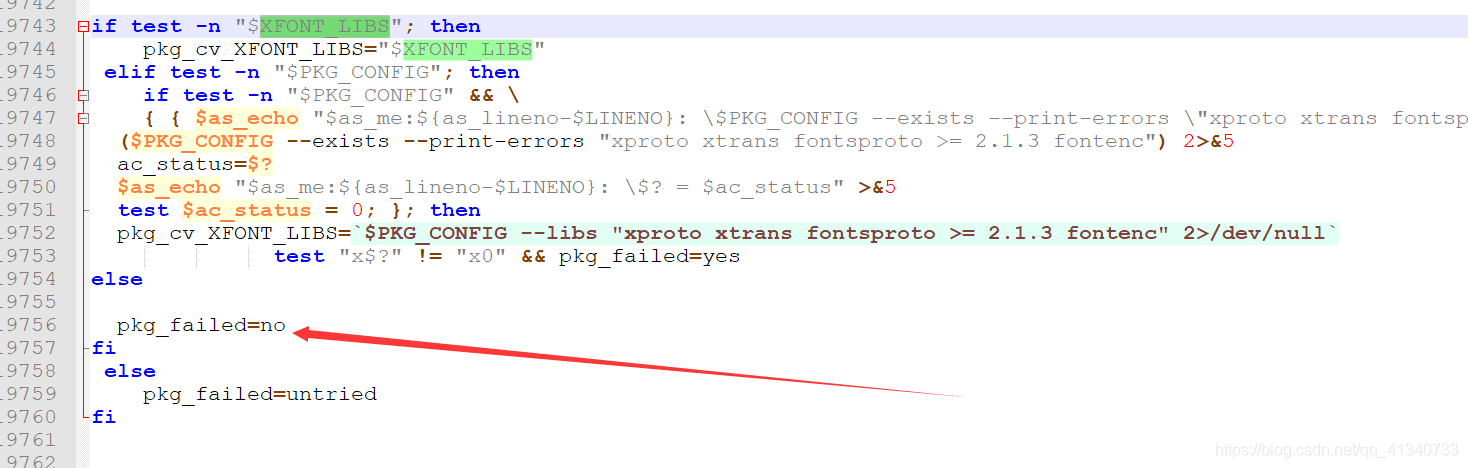
然后傻逼玩意还是过不了 直接修改条件骗过,以上只提供一个排错方法,把条件修改下面样子,将yes改为no就配置通过了
四.执行configure出现checking for C compiler default output file name… configure: error: C compiler cannot create executables
错误
checking for C compiler default output file name... configure: error: C compiler cannot create executables
See `config.log' for more details.
出现原因是在configure最前面加了动态链接的时候出现的,路径-lXrandr并没有这个库,去掉就好了
LIBS="-L /opt/libX11target/lib -lX11 -lxcb -lXau -lXext -lXtst -lXi -lcrypto -lssl -lXrandr"
五.执行configure出现库找不到和头文件找不到错误
库文件找不到错误案例
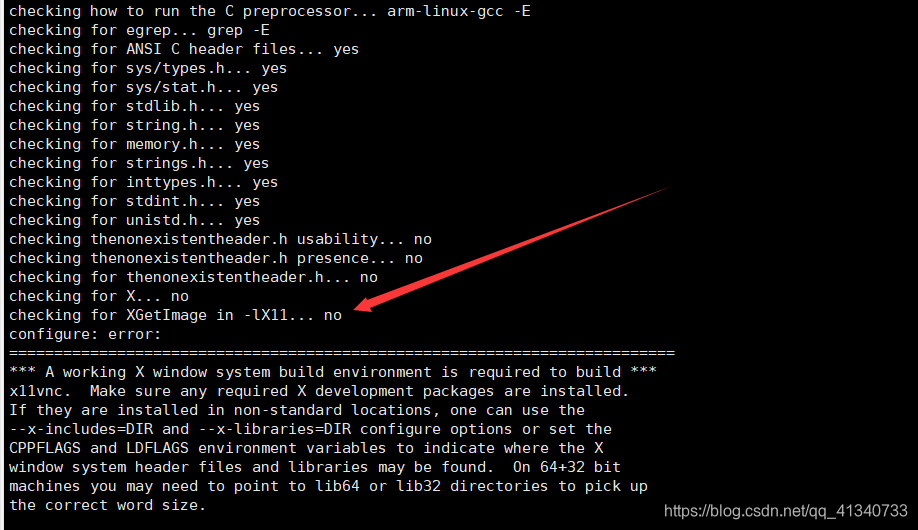
直接在打开configure在最前面加动态库链接,如下面
LIBS="-L /opt/libX11target/lib -lX11 -lxcb -lXau -lXext -lXtst -lXi -lcrypto -lssl"
或者在configure执行前给LIBS赋值,如下面
export PKG_CONFIG_PATH=$PKG_CONFIG_PATH:/opt/libX11target/lib/pkgconfig
export LIBS="-L /opt/libX11target/lib -lX11 -lxcb -lXau -lXext -lXtst -lXi -lcrypto -lssl"
export  CFLAGS="-I/opt/libX11target/include"
./configure \--prefix=$(pwd)target_bin \--host=arm-linux \--with-x \--with-system-libvncserver \--with-x11vnc \
头文件找不到案例,跟库文件一样
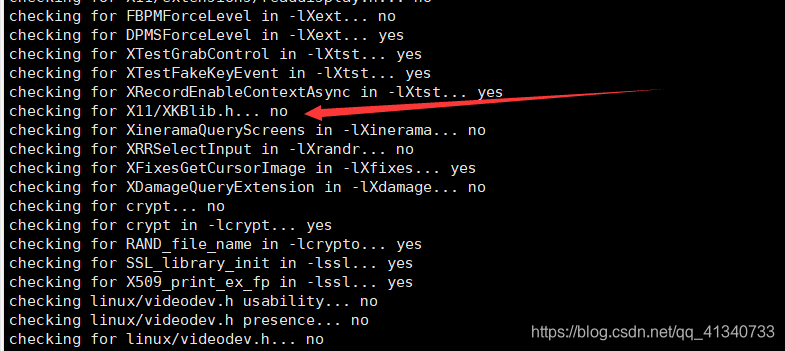
直接在打开configure在最前面加动态库链接,如下面
CFLAGS="-I/opt/libX11target/include"
或者在configure执行前给CFLAGS赋值,如下面
export PKG_CONFIG_PATH=$PKG_CONFIG_PATH:/opt/libX11target/lib/pkgconfig
export LIBS="-L /opt/libX11target/lib -lX11 -lxcb -lXau -lXext -lXtst -lXi -lcrypto -lssl"
export  CFLAGS="-I/opt/libX11target/include"
./configure \--prefix=$(pwd)target_bin \--host=arm-linux \--with-x \--with-system-libvncserver \--with-x11vnc \
六.configure添加头文件和库查找路劲
export CFLAGS="-I/opt/libX11target/include"
export LDFLAGS="-L/opt/libX11target/lib"
或者指定多个目录
export LDFLAGS="-L/opt/libX11target/lib -I/usr/host/aarch64-buildroot-linux-gnu/sysroot/usr/lib"
export CFLAGS="-I/opt/libX11target/include -I/usr/host/aarch64-buildroot-linux-gnu/sysroot/usr/include"
七.Makefile一些常用命令
1.打印数据
输出打印并停止脚本:
$(warning xxxxx)//打印文本
$(error xxxxx)//打印变量
打印警告,不停止脚本:
$(warning  $(XXX))
2.make install的时候指定安装路径
make DESTDIR=$(pwd)/target install
八.添加运行时库路劲
来自linux下添加动态链接库路径的方法
应用程序在编译的时候需要链接动态库,运行时候也需要。
如下错误
./x11vnc: error while loading shared libraries: libssl.so.1.0.0: cannot open shared object file: No such file or directory
原因是Linux下的共享库路径配置不正确。默认的linux共享库搜索路径为/lib和/usr/lib两个目录(不包含子目录),若共享库不在这两个路径,不能自动连接到(最典型的就是/usr/local/lib)。
解决方法有五种:
1,连接时使用静态库(.a文件)。在g++命令上写入该.a文件的完整路径。
2,使用LD_LIBRARY_PATH环境变量。(临时有效,且有时候没有效果),把需要添加的路径加入到LD_LIBRARY_PATH中,注意如果多于一个要用冒号隔开。如:export LD_LIBRARY_PATH=/usr/local/lib/minigui:$LD_LIBRARY_PATH
3,将动态库文件复制到可以搜索到的路径(一般是系统默认的路径,如/lib、/usr/lib)里面,这样比较狠,但是可能导致一些后即问题。
4,编译的时候设定:在编译源码的时候可以用参数:-Wl, -rpath指定动态搜索的路径即可。
5,修改系统文件/etc/ld.so.conf,添加路径,运行ldconfig命令。
第五种方法的说明如下:
在/etc/ld.so.conf文件中指定了默认的动态链接库查找路径,我的/etc/ld.so.conf文件内容是这样的include /etc/ld.so.conf.d/*.conf。也就是说它间接的指定了定义路径的文件,我们只需要把需要的路径加到/etc/ld.so.conf.d目录下的任何一个文件中,再运行ldconfig就可以了,但为了容易理解,最好是找一个相关的文件,或者重新建立一个文件,把需要添加的路径写入然后运行ldconfig
ldconfig几个需要注意的地方
- 往/lib和/usr/lib里面加东西,是不用修改/etc/ld.so.conf的,但是完了之后要调一下ldconfig,不然这个library会找不到
- 想往上面两个目录以外加东西的时候,一定要修改/etc/ld.so.conf,然后再调用ldconfig,不然也会找不到
九.make时有动态库却提示找不到动态库
错误出现
/opt/gcc-linaro-5.3.1-2016.05-x86_64_aarch64-linux-gnu/bin/../lib/gcc/aarch64-linux-gnu/5.3.1/../../../../aarch64-linux-gnu/bin/ld: warning: libxcb.so.1, needed by /opt/libX11target/lib/libX11.so, not found (try using -rpath or -rpath-link)
/opt/libX11target/lib/libX11.so: undefined reference to `xcb_get_file_descriptor'
/opt/libX11target/lib/libX11.so: undefined reference to `xcb_connect'
/opt/libX11target/lib/libX11.so: undefined reference to `xcb_generate_id'
/opt/libX11target/lib/libX11.so: undefined reference to `xcb_connect_to_display_with_auth_info'
/opt/libX11target/lib/libX11.so: undefined reference to `xcb_writev'
/opt/libX11target/lib/libX11.so: undefined reference to `xcb_poll_for_reply64'
/opt/libX11target/lib/libX11.so: undefined reference to `xcb_poll_for_queued_event'
/opt/libX11target/lib/libX11.so: undefined reference to `xcb_wait_for_reply64'
/opt/libX11target/lib/libX11.so: undefined reference to `xcb_poll_for_event'
/opt/libX11target/lib/libX11.so: undefined reference to `xcb_get_maximum_request_length'
/opt/libX11target/lib/libX11.so: undefined reference to `xcb_take_socket'
/opt/libX11target/lib/libX11.so: undefined reference to `xcb_wait_for_event'
/opt/libX11target/lib/libX11.so: undefined reference to `xcb_disconnect'
/opt/libX11target/lib/libX11.so: undefined reference to `xcb_connection_has_error'
/opt/libX11target/lib/libX11.so: undefined reference to `xcb_get_setup'
/opt/libX11target/lib/libX11.so: undefined reference to `xcb_parse_display'
打开Makefile库路劲是有指定的,库也存在
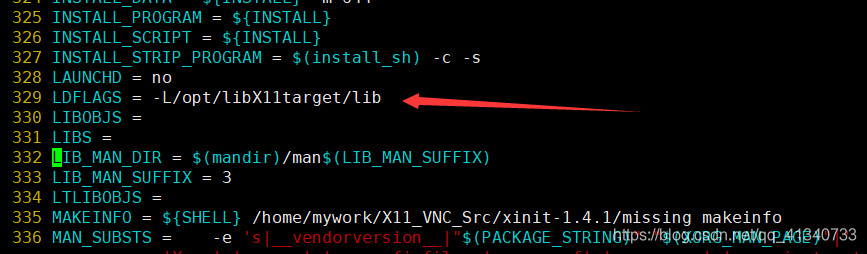
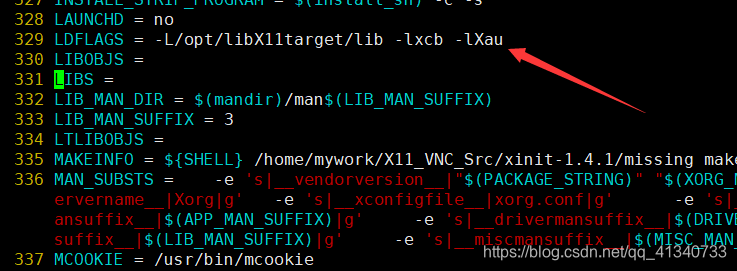
把Makefile改成
十 cannot find /lib/libc.so.6等编译自己的库自己找不着系列
错误提示,这几个库文件编译里面都有带,但不从自己的路劲找,哎,就是玩,将编译中的库链接到它去找的库就行了
***/aarch64-linux-gnu/bin/ld: cannot find /lib/libc.so.6
***/aarch64-linux-gnu/bin/ld: cannot find /usr/lib/libc_nonshared.a
***/aarch64-linux-gnu/bin/ld: cannot find /lib/ld-linux-aarch64.so.1
链接到实际查找的路劲
root@ubuntu:/lib# ln -s /opt/gcc-linaro-5.3.1-2016.05-x86_64_aarch64-linux-gnu/aarch64-linux-gnu/libc/lib/libc.so.6 libc.so.6
root@ubuntu:/usr/lib# ln -s /opt/gcc-linaro-5.3.1-2016.05-x86_64_aarch64-linux-gnu/aarch64-linux-gnu/libc/usr/lib/libc_nonshared.a libc_nonshared.a
root@ubuntu:/lib# ln -s /opt/gcc-linaro-5.3.1-2016.05-x86_64_aarch64-linux-gnu/aarch64-linux-gnu/libc/lib/ld-linux-aarch64.so.1 ld-linux-aarch64.so.1
十一:‘dlsym@@GLIBC_2.17’
错误
bin/ld: options.o: undefined reference to symbol 'dlsym@@GLIBC_2.17'
解决方法
make的时候指定参数,如果configure时候有指定参数 就不要再make的时候再指定,加上-ldl,而且必须放在最后面
make CC=arm-linux-gcc OPENSSL_INCLUDE_DIR=/usr/aarch64-buildroot-linux-gnu/sysroot/usr/include \LIBS="-L/usr/aarch64-buildroot-linux-gnu/sysroot/usr/lib -lcrypt -lutil -lssl -lcrypto -ldl"
十三 给LIBS添加-l**的时候主要事项
必须注意-l**添加顺序,不然可能会出现意外错误,最好根据编译顺序添加
本文来自互联网用户投稿,文章观点仅代表作者本人,不代表本站立场,不承担相关法律责任。如若转载,请注明出处。 如若内容造成侵权/违法违规/事实不符,请点击【内容举报】进行投诉反馈!